
Amit CDD531AM-U02 Manuel utilisateur

1
CDD531AM-U02
WiFi ADSL2/2+ Router
User Manual

2
Copyright
The contents of this publication may not be reproduced in any part or as a whole, stored,
transcribed in an information retrieval system, translated into any language, or transmitted
in any form or by any means, mechanical, magnetic, electronic, optical, photocopying,
manual, or otherwise, without the prior written permission.
Trademarks
All products, company, brand names are trademarks or registered trademarks of their
respective companies. They are used for identification purpose only. Specifications are
subject to be changed without prior notice.
FCC Interference Statement
This equipment has been tested and found to comply with the limits for a Class B digital
device pursuant to Part 15 of the FCC Rules. These limits are designed to provide
reasonable protection against radio interference in a commercial environment. This
equipment can generate, use and radiate radio frequency energy and, if not installed and
used in accordance with the instructions in this manual, may cause harmful interference to
radio communications. Operation of this equipment in a residential area is likely to cause
interference, in which case the user, at his own expense, will be required to take whatever
measures are necessary to correct the interference.
CE Declaration of Conformity
This equipment complies with the requirements relating to electromagnetic compatibility,
EN 55022/A1 Class B.

3
TABLE OF CONTENTS
COPYRIGHT.................................................................................................................................. 2
FCC INTERFERENCE STATEMENT......................................................................................... 2
CHAPTER 1 . INTRODUCTION........................................................................................... 5
1.1PACKAGE LIST......................................................................................................................... 5
1.2 HARDWARE INSTALLATION..................................................................................................... 6
1.2.1 Hardware configuration............................................................................................. 6
1.2.2 LED indicators............................................................................................................ 7
CHAPTER 2 . GETTING STARTED ....................................................................................10
2.1 EASY SETUP BY WINDOWS UTILITY ............................................................................10
2.3 EASY SETUP BY CONFIGURING WEB UI .............................................................................14
CHAPTER 3 . MAKING CONFIGURATION......................................................................18
3.1 BASIC SETTING ............................................................................................................19
3.1.1 Network Setup .........................................................................................................20
3.1.1.2 LAN type .................................................................................................................. 20
3.1.1.2 Internet Setup......................................................................................................... 20
3.1.2 DHCP Server............................................................................................................28
3.1.3 Wireless Settings....................................................................................................30
3.1.4 Change Password...................................................................................................34
3.2. NAS CONFIGURATION .................................................................................................35
3.2.1. Disk Utility ..............................................................................................................35
3.2.2. File Sharing.............................................................................................................35
3.2.2.1. Basic Setting .............................................................................................................. 35
3.2.2.2. FTP Service................................................................................................................ 36
3.2.3. Access Control.........................................................................................................36
3.2.3.1. User Configuration..................................................................................................... 37
3.2.4. iTunes Server...........................................................................................................37
3.3. DOWNLOAD ASSISTANT ................................................................................................38
3.3.1. FTP..........................................................................................................................38
3.3.2. HTTP.......................................................................................................................38
3.3.3. BT (Bit Torrent) .......................................................................................................40
3.3.3.1. Start BT download ..................................................................................................... 40
3.3.3.2. BT download status.................................................................................................... 41
3.3.3.3. Stop, Resume and Remove seed................................................................................. 41
3.3.4. Download Status......................................................................................................42
3.3.5. How to access data on the NAS?.............................................................................42
3.3.5.1. Windows User............................................................................................................ 42
3.3.5.1.1. BY NETWORK PLACE............................................................................................42
3.3.5.1.2. BY WEB HDD.....................................................................................................43
3.3.5.2. Unix User................................................................................................................... 43
3.4. FORWARDING RULES ...................................................................................................43
3.4.1. Virtual Server.........................................................................................................44
3.4.2. Special AP .............................................................................................................45
3.4.3. Security Setting.....................................................................................................47
3.4.3.1. Packet Filters ........................................................................................................... 47
3.4.3.2. Domain Filters .......................................................................................................... 49
3.4.3.3. URL Blocking ........................................................................................................... 49
3.4.3.4. MAC Control............................................................................................................. 51
3.4.3.5. Miscellaneous .......................................................................................................... 52
3.4.4. Advanced Setting..................................................................................................53
3.4.4.1. System Log............................................................................................................... 53
3.4.4.2. Dynamic DNS........................................................................................................... 54
3.4.4.3. QoS............................................................................................................................ 55
3.4.4.4. SNMP ........................................................................................................................ 56

4
3.4.4.5. Routing...................................................................................................................... 57
3.4.4.6. System Time ............................................................................................................ 58
3.4.4.7. Scheduling................................................................................................................ 59
3.4.5. Tool Box.................................................................................................................60
3.4.5.1. System Info............................................................................................................... 60
3.4.5.2. Firmware Upgrade................................................................................................... 61
3.4.5.3. Backup Setting......................................................................................................... 62
3.4.5.4. Reset to Default ....................................................................................................... 62
3.4.5.5. Reboot....................................................................................................................... 63
3.4.5.6. Miscellaneous .......................................................................................................... 63
4 . TROUBLESHOOTING...........................................................................................................64
APPENDIX A. SPEC SUMMARY TABLE ................................................................................67
APPENDIX B. LICENSING INFORMATION............................................................................69

5
Chapter 1 . Introduction
Congratulations on your purchase of this outstanding product: CDD531AM-U02 WiFi
ADSL2/2+ Broadband Router. This product is specifically designed for those who need to
have the file sharing, P2P download and printer sharing services beyond his home and
office. It provides a complete solution for Internet surfing and broadband sharing.
Instructions for installing and configuring this product can be found in this manual. Before
you install and use this product, please read this manual carefully for fully exploiting the
functions of this product.
1.1Package List
Items Description Contents Quantity
1 WiFi Broadband Router
1
2 Power adapter
1
3 CD
1

6
1.2 Hardware Installation
1.2.1 Hardware configuration
LAN1~LAN4
LEDs
ADSL Connection
Status WPS / USB
OFF Button
Status LED Power SwitchWLAN LED
Wireless
On/Off Button
Reset: Press “Wireless on/off” and “WPS” button for 5 sec simultaneously.

7
1.2.2 LED indicators
LED Status Description
Green in flash power is on
Green in fast
flash Reset mode
Green USB storage attached
Green in flash Data access
Status (USB)
Green in flash
then stop
Press ‘USB off’ button till LED flashing, then
can remove USB storage when LED stop
flashing.
Green in flash xDSL connection is established
ADSL Green in fast
flash Data packet transferred via DSL Line
Green WiFi is on.
WLAN Green in flash Data access
Green RJ45 cable is plugged, and Ethernet
connection is established.
LAN
Green in flash Data access
Auto MDI/MDIX RJ-45 Ports
Automatically sense the types of WAN
and LAN when connecting to Ethernet
Receptor for
Power adapter
RJ-11 PortUSB Port

8
How to Operate
DO NOT connect WiFi Broadband Router to power before performing the
installation steps below.
Step 1.
Plug the RJ45 cable into LAN port 1~4 and
connect with your PC or NB.
Step 2.
Plug your RJ-11 into the DSL port and
connect with your xDSL modem.
Step 3.
Plug the power jack into it.
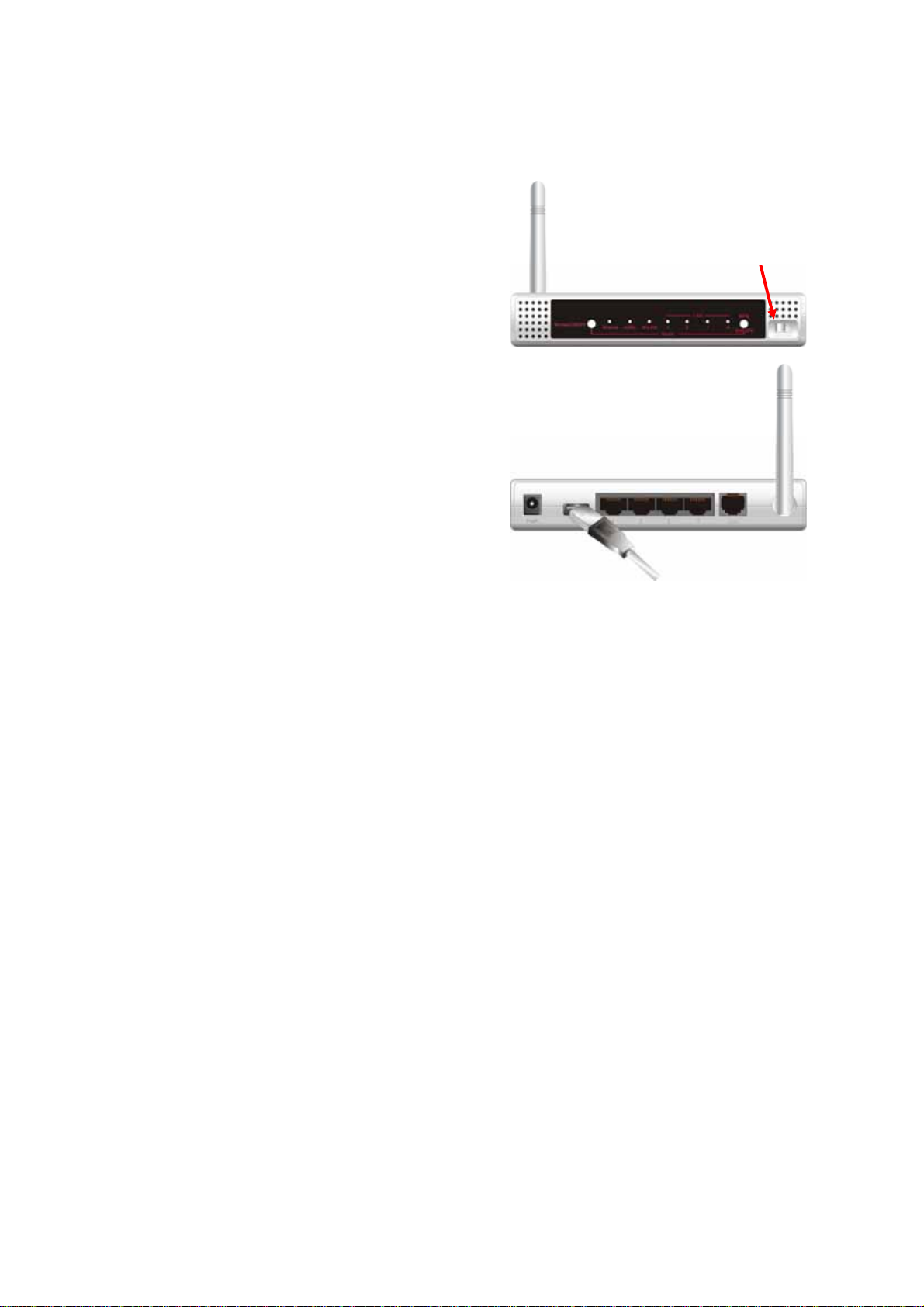
9
Step 4
Power ON.
Step 5
Prepare a USB Storage or Printer, and then
plug into the USB port.
10
Chapter 2 . Getting Started
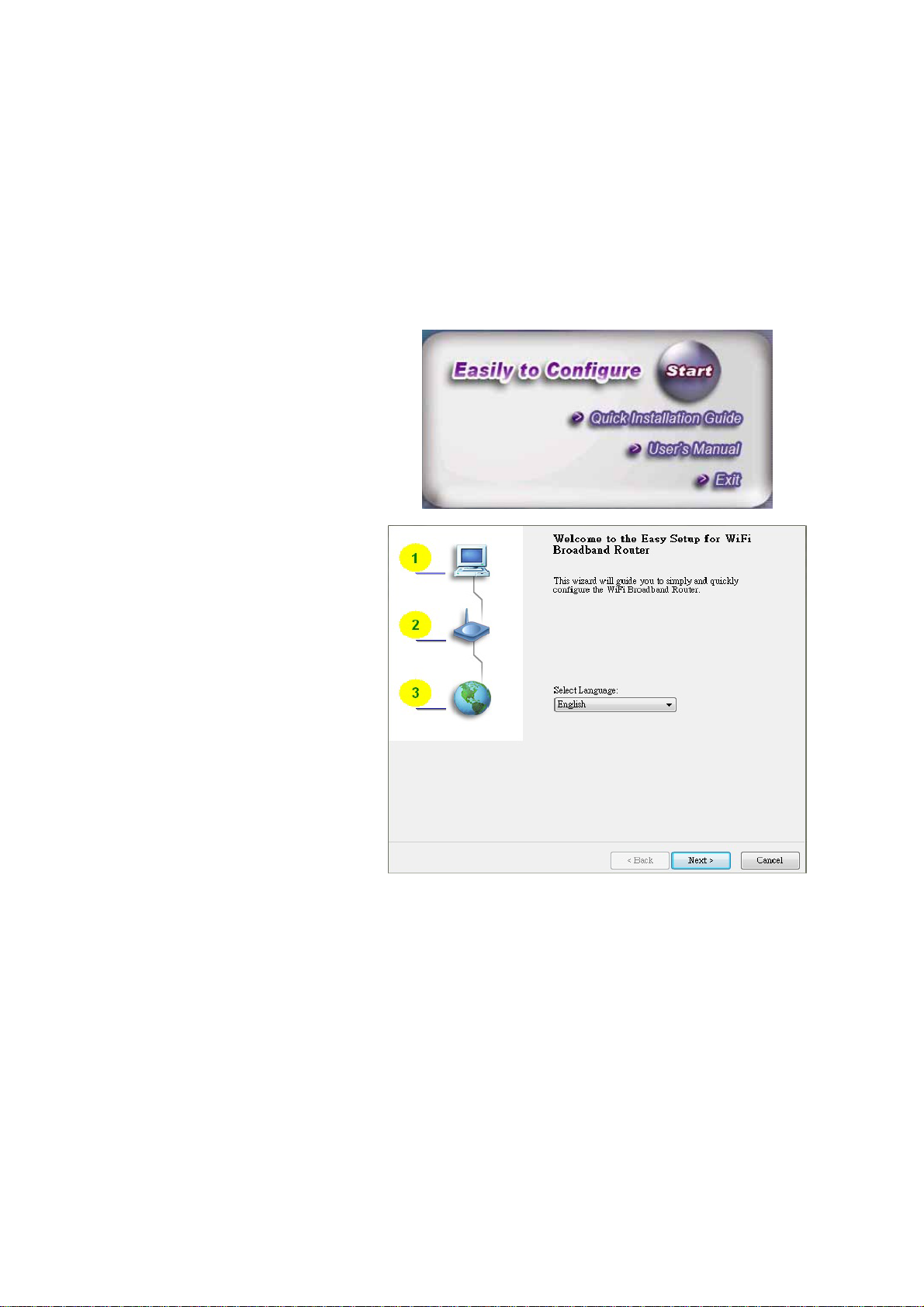
Please use windows EZ setup utility or Web UI wizard to enter the setup process.
2.1 Easy Setup by Windows Utility
Step 1.
Install the Easy Setup Utility
from the provided CD click the
“Start” then follow the steps to
configure the device.
Step 2.
Select Language then click
“Next” to continue.
Table des matières
Autres manuels Amit Routeur réseau

Amit
Amit CDE530AM-002 Manuel utilisateur

Amit
Amit RB-SW00A/NR1 Manuel utilisateur

Amit
Amit WIP181AM Manuel utilisateur

Amit
Amit WRTB1 Series Manuel utilisateur

Amit
Amit IWP87DAM-07151 Manuel utilisateur

Amit
Amit CDM530AM-002 Manuel utilisateur

Amit
Amit RB-RTE Series Manuel utilisateur

Amit
Amit AIPQB1215WA61/01 Manuel utilisateur

Amit
Amit Zcomax VHG760 Guide de configuration rapide
Manuels Routeur réseau populaires d'autres marques


NETGEAR
NETGEAR FS526T - Switch Manuel utilisateur

Korenix
Korenix JetNet 5710G Series Manuel utilisateur

Automated Logic
Automated Logic ZN551 Manuel du propriétaire

Cisco
Cisco ASR 1000 Series Manuel de l'opérateur

EnGenius
EnGenius ESR-9710 Manuel utilisateur

Cisco
Cisco 805 Series Instructions d'utilisation et de sécurité