
AmazonBasics B074KDHMKJ Instructions d'utilisation et de sécurité

created by: Impala Services Ltd.Page size: 139.7 x 107.95 mm
B074KGMWRQ, B074KDHMKJ, B074KHWNJZ
Fire Resistant Safe
Coffre-fort Résistant Au Feu
Feuerbeständiger Tresor
Cassaforte Resistente al Fuoco
Caja Fuerte a Prueba De Incendios
耐火金庫
防火保险箱
B074KGMWRQ, B074KDHMKJ, B074KHWNJZ-AmazonBasics-Fire proof safe-IM-V07 (EU).indb 1 11/1/17 12:38 PM

English ..................................... 3
Français ................................. 14
Deutsch.................................. 25
Italiano................................... 36
Español.................................. 47
日本語 ..................................... 58
中文 ........................................ 69
B074KGMWRQ, B074KDHMKJ, B074KHWNJZ-AmazonBasics-Fire proof safe-IM-V07 (EU).indb 2 11/1/17 12:38 PM
3
Welcome Guide •English
Fire Resistant Safe
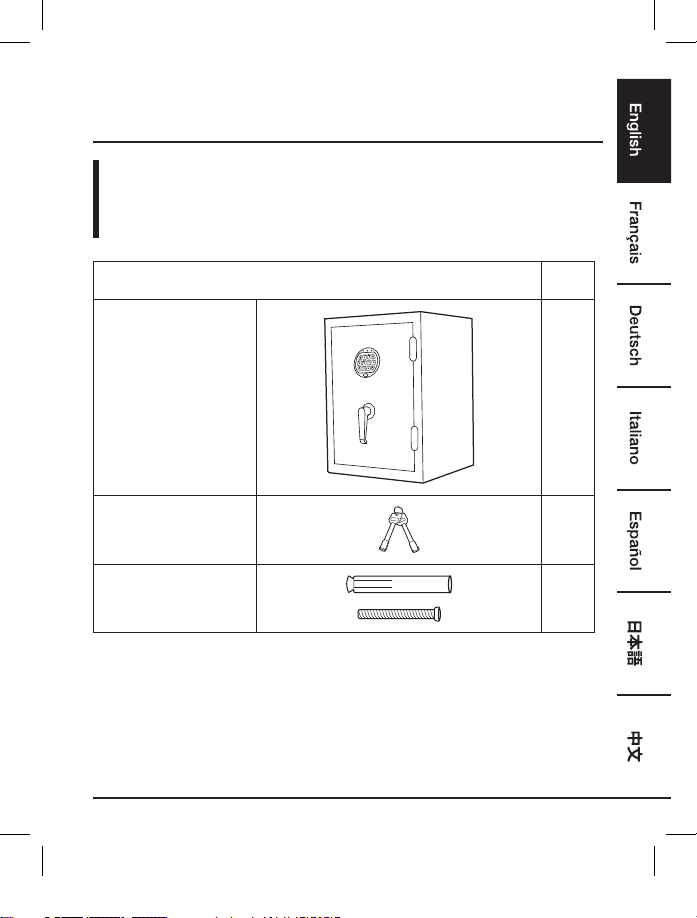
Contents:
Before getting started, ensure the package contains the following components:
Part Qty
Safe 1
Keys 2
Expansion bolt 1
B074KGMWRQ, B074KDHMKJ, B074KHWNJZ-AmazonBasics-Fire proof safe-IM-V07 (EU).indb 3 11/1/17 12:38 PM

4
Safety Measures
WARNING Tip Over Hazard
• A child or adult can tip the safe and be killed or seriously injured.
• Failure to secure the safe as shown in these instructions can result in
death or serious injury to children and adults.
• Children should not play with or around the safe at any time.
• Keep keys and combination in a secure place away from children.
• Do not store back up key, your combination or this document in the safe.
•
Warning: Keep your safe closed and locked at all times when not in use. Children could accidentally
be locked inside the safe.
• Do not move this safe using its handle. The handle should only be used for opening and closing
the door of the safe.
•
Do not store electronic media, computer disks, audio-visual media or photographic negatives
in this safe. This material will not survive the rated internal temperature of the safe. This material
may be damaged or destroyed.
B074KGMWRQ, B074KDHMKJ, B074KHWNJZ-AmazonBasics-Fire proof safe-IM-V07 (EU).indb 4 11/1/17 12:38 PM

5
FCC Warning
This device complies with Part 15 of the FCC Rules. Operation of this product is subject to the
following two conditions: (1) this device may not cause harmful interference, and (2) this device
must accept any interference received, including interference that may cause undesired operation.
Changes or modifications not expressly approved by the party responsible for compliance with the
FCC Rules could void the user’s authority to operate the equipment.
NOTE: This equipment has been tested and found to comply with the limits for a class B digital
device, pursuant to Part 15 of the FCC Rules. These limits are designed to provide reasonable
protection against harmful interference in a residential installation. This equipment generates,
uses and can radiate radio frequency energy and, if not installed and used in accordance with
the instructions, may cause harmful interference to radio communications. However, there is no
guarantee that interference will not occur in a particular installation. If this equipment does cause
harmful interference to radio or television reception, which can be determined by turning the
equipment off and on, the user is encouraged to try to correct the interference by one or more of
the following measures:
• Reorient or relocate the receiving antenna.
• Increase the separation between the equipment and receiver.
• Connect the equipment into an outlet on a circuit different from that to which the receiver is
connected.
• Consult the dealer or an experienced technician for help.
This device has been evaluated to meet general RF exposure requirement. The device can be used
in portable exposure condition without restriction.
B074KGMWRQ, B074KDHMKJ, B074KHWNJZ-AmazonBasics-Fire proof safe-IM-V07 (EU).indb 5 11/1/17 12:38 PM

6
Installing The Battery
• Turn the lock cover as shown in the illustration below. Connect a 9V alkaline battery (not
included) to the battery connecting cap. Place the lock cover back into its original position.
• Repeat above steps for battery replacement.
NOTE:
• When changing the battery, always hold the battery connecting cap while disconnecting or
attaching the battery. Do not pull on the wires. Doing this could cause the power supply to
become disconnected from the lock.
• When the battery runs out, the red light will flash when you press any button on the keypad.
Replace the batteries when the red light flashes.
12 3 4
5 6 7 8
9 0 #
B074KGMWRQ, B074KDHMKJ, B074KHWNJZ-AmazonBasics-Fire proof safe-IM-V07 (EU).indb 6 11/1/17 12:38 PM

7
Opening Safe For The First Time
• After installing the battery, to open an electronic lock the first time, press the following numbers/
symbols on the electronic keypad in this order: 1 - 5 - 9 - #. These numbers are preset.
• NOTE: You should change the entry code as soon as possible after opening the safe to insure
proper security.
• After you have entered the factory code, you will need to turn the handle clockwise to open the
door. You will have 5 seconds to turn the handle before the locking mechanism is reactivated.
Setting Your Own Code
• To enter your own security code you will need to follow the steps listed below:
1. After opening the electronic safe (with the preset factory code of 1, 5, 9, #) locate the small
red button on the inside of the door near the hinge.
2. Press the red button and then release it. You will hear two beeps. The yellow light on the
faceplate will be activated and will stay on for a period of time that should allow you to
enter your code. You can only enter your code while the yellow light is on.
• With the door open and the yellow light on, enter your own personal security code, which can
be 3 - 8 digits long, and confirm your new code by pressing the “ * “ symbol on the electronic
touch pad. Before you close the door, try the new security code to make sure the lock releases
the handle so you can turn it and retract the live action bolts.
• DO NOT SHUT THE DOOR UNTIL YOU HAVE CONFIRMED THAT YOUR NEW SECURITY
CODE HAS BEEN ENTERED CORRECTLY.
• If the code fails, go through steps 1 and 2 again. If you write down your combination, you
must keep this information in a secure place, away from children, not inside the safe. Then you
should close and lock the safe.
• When you open the safe in the future enter the security code you have set followed by the “#”
symbol.
• If the incorrect security code is entered 3 times, you will have an automatic lockout for 20
seconds before you can try your code again.
• If the incorrect security code is entered 3 additional times, there will be a 5-minute lockout
before the code can be tried again.
B074KGMWRQ, B074KDHMKJ, B074KHWNJZ-AmazonBasics-Fire proof safe-IM-V07 (EU).indb 7 11/1/17 12:38 PM

8
Locking The Safe
• To lock the safe, close the door and rotate the handle counter clockwise until it stops. If the
handle is not turned until it stops, the locking mechanism will not lock.
• NOTE ON LOCKING THE SAFE: Because the locking mechanism is deactivated for
approximately 3 to 6 seconds after the combination is entered, wait a minimum of 6 seconds
from the time the combination is entered to lock the safe.
Turning The Keypad Sound Off/On
• You can turn off the “Beep” sound of the keypad by entering the code * 6 3 3.
• To turn the “Beep” sound on, enter the code * 6 6.
Mounting The Safe
• The safe must be mounted to the floor. For optimal safety and security, the safe should
be installed adjacent to a side wall, in an isolated, dry and secure area.
• The safe should be flat against the wall and floor.
• CHILDREN SHOULD NOT PLAY WITH OR AROUND THE SAFE AT ANY TIME.
Securing The Safe
• This safe must be mounted to the floor. Failure to do so will compromise the safety and security
of the safe.
• To bolt down your safe, you will need:
Drill
Pencil
Hammer
B074KGMWRQ, B074KDHMKJ, B074KHWNJZ-AmazonBasics-Fire proof safe-IM-V07 (EU).indb 8 11/1/17 12:38 PM

9
1. Place the safe in the desired location and locate the mounting hole with cap covered in the
bottom of the safe.
2. Remove the cap, then use a pencil to mark the mounting hole in the floor.
3. Move the safe away, then use a 12 mm bit to drill mounting hole that are 2 in. (50 mm) deep.
4. Put the expansion bolt (included) into the mounting hole, then turn the clamping screw
counterclockwise to separate.
5. Align the safe over the hole, then secure the safe with the clamping screw and replace the cap.
B074KGMWRQ, B074KDHMKJ, B074KHWNJZ-AmazonBasics-Fire proof safe-IM-V07 (EU).indb 9 11/1/17 12:38 PM

10
Opening The Safe In Emergency
• A “Back Up Key” has been provided in case you have forgotten or lost your security code. To
open the safe using the back up key, follow the steps below:
1. Remove the cover by turning the cover counter clockwise as shown in the illustration. The
lock can hang by the connecting cable while unlocking the safe.
2. Insert the key in the key hole and turn counter-clockwise 1/4 turn (until stopped) in order to
unlock the safe. Rotate the handle and open the door.
3. Keep the door open until you have entered a new security code. Before entering your new
code, remove the key and screw the cover back in place.
4. Enter your new security code following the instructions.
12 3 4
5 6 7 8
9 0 #
Important
• Keep keys and records of your combination number in a secure place separate from your safe,
away from children.
B074KGMWRQ, B074KDHMKJ, B074KHWNJZ-AmazonBasics-Fire proof safe-IM-V07 (EU).indb 10 11/1/17 12:38 PM
Ce manuel convient aux modèles suivants
2
Table des matières
Langues :
Autres manuels AmazonBasics Sûr

AmazonBasics
AmazonBasics B00UG9HB1Q Manuel utilisateur

AmazonBasics
AmazonBasics B078HDDS9Y Manuel utilisateur

AmazonBasics
AmazonBasics B074KGMWRQ Manuel utilisateur

AmazonBasics
AmazonBasics B00UG9HB1Q Manuel utilisateur

AmazonBasics
AmazonBasics B01BGY010C Manuel utilisateur

AmazonBasics
AmazonBasics B077K3FJHC Manuel utilisateur
Manuels Sûr populaires d'autres marques


Honeywell
Honeywell 2077D - 1.21 Cubic Foot Anti-Theft Safe Manuel utilisateur

Hornady
Hornady SnapSafe Trunk Safe II Manuel utilisateur

SPORTS AFIELD
SPORTS AFIELD SA-HD5-BIO Manuel utilisateur

Honeywell
Honeywell 5912 Manuel utilisateur

Phoenix
Phoenix FS1280F Manuel utilisateur

Phoenix
Phoenix SS0992K Fiche d'information produit


