
AmazonBasics B073VS6WNZ Manuel utilisateur

created by: Impala Services Ltd.Page size: 139.7 x 107.95 mm
B073VS6WNZ
Mechanical Feel Gaming Keyboard
Teclado Para Juegos De Sensación Mecánica
Clavier De Jeu Au Toucher Mécanique
B073VS6WNZ-AmazonBasics-Mechanical Feel Gaming Keyboard-IM-V06 (US).indb 1 9/19/17 5:03 PM

English ..................................... 3
Español .................................. 17
Français ................................. 30
B073VS6WNZ-AmazonBasics-Mechanical Feel Gaming Keyboard-IM-V06 (US).indb 2 9/19/17 5:03 PM

3
Welcome Guide •English
Mechanical Feel Gaming Keyboard
Keyboard Buttons
Customizable G Keys
Customizable M Keys
Backlight Switch Key
LED lndicator
B073VS6WNZ-AmazonBasics-Mechanical Feel Gaming Keyboard-IM-V06 (US).indb 3 9/19/17 5:03 PM

4
Safety And Compliance
Read this instruction manual carefully before using the product. It contains important information
for your safety as well as operating and maintenance advice. Observe all safety instructions to
avoid damage through improper use! Follow all warnings on the product. Keep this instruction
manual for future use. Should this product be passed on to a third party, then this instruction
manual must be included.
• Never use this product if damaged! Disconnect the product from the outlet and contact your
retailer if it is damaged.
• To avoid damaging the cord, do not squeeze, bend or chafe it on sharp edges. Keep it away
from hot surfaces and open flames as well.
• Warning! During cleaning or operation do not immerse the electrical parts of the product in
water or other liquids. Never hold the product under running water.
• Do not open the product casing under any circumstances. Do not insert any foreign objects
into the inside of the casing.
• Do not place heavy objects on top of the product. Do not place objects with open flames (e.g.
candles) on top of or beside the product. Do not place objects filled with water (e.g. vases) on
or near the product.
• This product is not intended for use by persons (including children) with reduced physical,
sensory or mental capabilities, or lack of experience and knowledge, unless they have been
given supervision or instruction concerning use of the product by persons responsible for their
safety.
• Do not insert any objects into the inside of the product and do not let any foreign objects get
inside the product. This could result in electric shock, fire or damages to the product.
• Protect the product from extreme temperatures, direct sunlight, strong jolts, high humidity,
moisture, flammable gases, vapours and solvents.
• Repairs must be performed by the manufacturer or its service agent or a similarly qualified
person.
B073VS6WNZ-AmazonBasics-Mechanical Feel Gaming Keyboard-IM-V06 (US).indb 4 9/19/17 5:03 PM

5
FCC Warning
This device complies with Part 15 of the FCC Rules. Operation of this product is subject to the
following two conditions: (1) this device may not cause harmful interference, and (2) this device
must accept any interference received, including interference that may cause undesired operation.
Changes or modifications not expressly approved by the party responsible for compliance with the
FCC Rules could void the user’s authority to operate the equipment.
NOTE: This equipment has been tested and found to comply with the limits for a class B digital
device, pursuant to Part 15 of the FCC Rules. These limits are designed to provide reasonable
protection against harmful interference in a residential installation. This equipment generates,
uses and can radiate radio frequency energy and, if not installed and used in accordance with
the instructions, may cause harmful interference to radio communications. However, there is no
guarantee that interference will not occur in a particular installation. If this equipment does cause
harmful interference to radio or television reception, which can be determined by turning the
equipment off and on, the user is encouraged to try to correct the interference by one or more of
the following measures:
• Reorient or relocate the receiving antenna.
• Increase the separation between the equipment and receiver.
• Connect the equipment into an outlet on a circuit different from that to which the receiver is
connected.
• Consult the dealer or an experienced technician for help.
This device has been evaluated to meet general RF exposure requirement. The device can be used
in portable exposure condition without restriction.
IC Caution
This device complies with Industry Canada license-exempt RSS standard(s). Operation is subject
to the following two conditions: (1) this device may not cause interference, and (2) this device must
accept any interference, including interference that may cause undesired operation of the device.
This Class B digital apparatus complies with Canadian ICES-3(B)/NMB-3(B).
(French version)
B073VS6WNZ-AmazonBasics-Mechanical Feel Gaming Keyboard-IM-V06 (US).indb 5 9/19/17 5:03 PM

6
Intended use
This device is intended for writing and playing games on a computer. It has the macro feature,
which allows to customize keys and save particular key combinations etc. for gaming purposes. It
is intended for indoor use only.
Before First Use
• Carefully remove all packaging materials and retain for future use.
• Check for transport damages.
• Clean the product (Cleaning and Maintenance).
• Place the product on a stable, flat and heat-resistant surface.
System Requirements
• Windows®XP/7/8/8.1/10
• USB port
• CD-ROM driver
• 160 MB free hard disk space
Installation
• Plug the keyboard into a USB port in your computer.
• Windows®automatically detects the keyboard.
• Open the AmazonBasics gaming software and follow the on-screen instructions.
• Windows®will prompt you if installation should continue despite not passing Windows logo
testing; install the driver despite this.
NOTICE The driver will automatically uninstall older driver versions. For that
reason it may take a while until the driver is installed and ready to use.
• As soon as the installation process is completed click “OK”.
• Reboot your PC.
• The AmazonBasics gaming software icon will now appear in the right-hand side of the Taskbar.
Right click the AmazonBasics icon to access the keyboard configuration menu.
Setting the Keyboard Language
Click on the icon and choose the appropriate language from the list.
B073VS6WNZ-AmazonBasics-Mechanical Feel Gaming Keyboard-IM-V06 (US).indb 6 9/19/17 5:03 PM

7
Macro
The MACROS allow to create and save numerous series of keystrokes assigned to a particular key,
etc. for gaming purposes.
Macro Manager
The Macro manager allows you to create numerous series of keystrokes assigned to a particular
key.
B073VS6WNZ-AmazonBasics-Mechanical Feel Gaming Keyboard-IM-V06 (US).indb 7 9/19/17 5:03 PM

8
• Select an existing MACRO.
• Type in a MACRO name.
• Set the number of repetitions of a chosen MACRO.
•
• the delay will be reproduced according
to how keystrokes/presses are entered.
• the delay is predefined and fixed
(expressed in seconds).
• Ignore all the pauses in-between
keystrokes and button presses.
• Insert delay in the MACRO content.
• Delete the selected MACRO content.
• Delete the MACRO content.
• Set up a new MACRO.
• Delete a MACRO profile.
• Start recording the MACRO keystroke combination.
•
• Allows to add keystrokes to the
beginning of the MACRO.
• Allows to add keystrokes to the end of
the MACRO.
Setting up the G1-G5 keys
• Select one of the G keys in the software.
• To load an existing macro, select it from the field.
• To create a new macro, type in the macro name in the field and click .
• Click and type in the desired key combination. When finished, click and
then .
B073VS6WNZ-AmazonBasics-Mechanical Feel Gaming Keyboard-IM-V06 (US).indb 8 9/19/17 5:03 PM
9
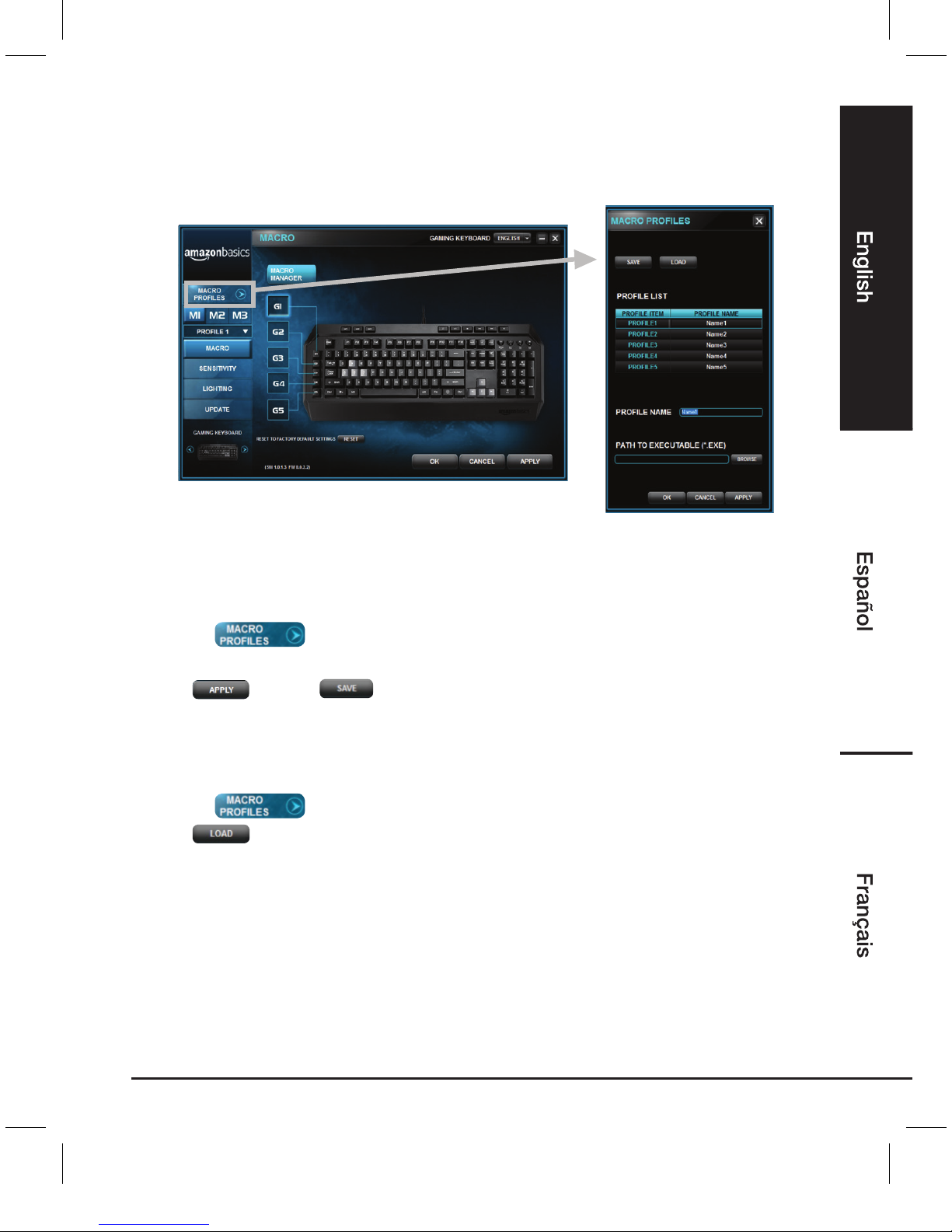
Macro Proles
Macro profiles let you organize all your custom settings. You can have up to five profiles saved.
Renaming a Macro profile
• Click on .
• Select a profile and type the new name in the text field next to PROFILE NAME.
• Click and then .
• Choose the file name and location and then click SAVE.
Loading an existing Macro profile
• Click on .
• Click .
• Choose an existing Macro profile.
• Click OK.
B073VS6WNZ-AmazonBasics-Mechanical Feel Gaming Keyboard-IM-V06 (US).indb 9 9/19/17 5:03 PM

10
M1-M3 Mode switch keys
The mode switch lets you customize your keyboard with 3 programmable M keys. Each mode
includes customizable key assignments, sensitivity adjustment, and lighting settings.
• The Macros allow you to create a series of precise keystrokes
and button presses.
• Set the sensitivity settings.
•
Customize the backlight and keycap by choosing from different
basic lighting effects or creating your own using the Chroma
configurator.
• Update the application.
Setting up the M1-M3 keys
• Press one of the M keys on the keyboard.
• Choose the settings you want to customize.
• When finished press and then .
B073VS6WNZ-AmazonBasics-Mechanical Feel Gaming Keyboard-IM-V06 (US).indb 10 9/19/17 5:03 PM
Table des matières
Langues :
Autres manuels AmazonBasics Clavier


