Alink WNAP4G Manuel utilisateur

User Manual
A-LINK WNAP4G
WLAN Gigabit Router
V2.0_20121122

A-LINK WNAP4G User Manual
2
TABLE OF CONTENTS
COPYRIGHT .....................................................................................................................4
FCC INTERFERENCE STATEMENT................................................................................4
CHAPTER 1 INTRODUCTION..........................................................................................5
1.1 PACKAGE LIST......................................................................................................5
1.2 HARDWARE INSTALLATION.................................................................................6
CHAPTER 2 GETTING STARTED WITH EASY SETUP UTILITY...................................9
2.1 EASY SETUP BY WINDOWS UTILITY ..................................................................9
2.2 EASY SETUP BY CONFIGURING WEB PAGES.................................................14
CHAPTER 3 CONFIGURATIONS- BASIC NETWORK..................................................19
3.1 LAN(WIFI) & WAN SETUP............................................................................20
3.1.1 NETWORK SETUP........................................................................................21
3.1.2 IPV6...............................................................................................................38
3.1.3 WIRELESS SETTINGS .................................................................................43
3.1.4 ADVANCED WIRELESS SETTINGS.............................................................49
3.2 NAT................................................................................................................50
3.2.1 VIRTUAL SERVER........................................................................................50
3.2.2 SPECIAL AP..................................................................................................52
3.2.3 LOOPBACK...................................................................................................53
3.2.4 DMZ...............................................................................................................53
3.3 ROUTING......................................................................................................54
3.3.1 STATIC ROUTING.........................................................................................54
3.3.2 DYNAMIC ROUTING.....................................................................................55
3.4 CLIENT/SERVER/PROXY.............................................................................55
3.4.1 DHCP SERVER.............................................................................................56
3.4.2 DYNAMIC DNS..............................................................................................58
CHAPTER 4 CONFIGURATIONS- ADVANCED NETWORK.........................................59
4.1 FIREWALL.....................................................................................................59
4.1.1 FIREWALL STATUS......................................................................................60
4.1.2 PACKET FILTERS.........................................................................................61
4.1.3 DOMAIN FILTERS.........................................................................................63
4.1.4 URL BLOCKING............................................................................................64
4.1.5 MAC CONTROL ............................................................................................65
4.1.6 OTHERS........................................................................................................66
4.2 QOS (QUALITY OF SERVICE)......................................................................67
4.2.1 SMART QOS .................................................................................................68
4.2.2 USER DEFINED RULE-BASED QOS ...........................................................70

A-LINK WNAP4G User Manual
3
4.3 VLAN .............................................................................................................75
4.4 GREEN..........................................................................................................76
4.5 MANAGEMENT.............................................................................................76
4.5.1 UPNP.............................................................................................................76
4.5.2 SNMP ............................................................................................................77
4.5.3 TR-069 REMOTE MANAGEMENT................................................................79
CHAPTER 5 CONFIGURATIONS - APPLICATIONS.....................................................80
5.1 USSD.............................................................................................................80
5.2 NAS ...............................................................................................................81
5.2.1 DISK UTILITY................................................................................................81
5.2.2 SAMBA SERVER ..........................................................................................82
5.2.3 FTP SERVER CONFIGURATION.................................................................82
5.2.4 ACCESS CONTROL......................................................................................83
5.2.5 ITUNE SERVER............................................................................................84
5.2.6 DOWNLOAD ASSISTANT .............................................................................85
5.2.7 DOWNLOAD STATUS...................................................................................89
5.2.8 WEB HDD......................................................................................................89
5.2.9 MISCELLANEOUS ........................................................................................90
CHAPTER 6 SYSTEM ....................................................................................................91
6.1 SYSTEM INFORMATION..............................................................................91
6.2 SYSTEM STATUS.........................................................................................92
6.2.1 WEB LOG......................................................................................................92
6.2.2 SYSTEM LOG ...............................................................................................92
6.2.3 EMAIL ALERT ...............................................................................................93
6.3 SYSTEM TOOLS...........................................................................................94
6.3.1 ACCOUNT & PASSWORD............................................................................94
6.3.2 FW UPGRADE ..............................................................................................94
6.3.3 SYSTEM TIME...............................................................................................95
6.3.4 OTHERS........................................................................................................96
6.4 SCHEDULING...............................................................................................98
6.5 MMI................................................................................................................99
CHAPTER 7 TROUBLESHOOTING.............................................................................100
APPENDIX A. SPEC SUMMARY TABLE.....................................................................105
APPENDIX B. LICENSING INFORMATION.................................................................107
* Please press the “Ctrl”key to use the bookmark for .doc file.
* Please click the bookmark icon on the left hand side to check bookmark list for .pdf file.

A-LINK WNAP4G User Manual
4
Copyright
The contents of this publication may not be reproduced in any part or as a whole, stored,
transcribed in an information retrieval system, translated into any language, or
transmitted in any form or by any means, mechanical, magnetic, electronic, optical,
photocopying, manual, or otherwise, without the prior written permission.
Trademarks
All products, company, brand names are trademarks or registered trademarks of their
respective companies. They are used for identification purpose only. Specifications are
subject to be changed without prior notice.
FCC Interference Statement
This equipment has been tested and found to comply with the limits for a Class B digital
device pursuant to Part 15 of the FCC Rules. These limits are designed to provide
reasonable protection against radio interference in a commercial environment. This
equipment can generate, use and radiate radio frequency energy and, if not installed and
used in accordance with the instructions in this manual, may cause harmful interference
to radio communications. Operation of this equipment in a residential area is likely to
cause interference, in which case the user, at his own expense, will be required to take
whatever measures are necessary to correct the interference.
CE Declaration of Conformity
This equipment complies with the requirements relating to electromagnetic compatibility,
EN 55022/A1 Class B.

A-LINK WNAP4G User Manual
5
Chapter 1 Introduction
The WNAP4G Router is a high-performance device that supports gigabit Ethernet,
wireless networking at home, work, or in a public place. The WNAP4G Router supports
3G/4G USB modems, either WCDMA or EVDO and even HSPA and LTE as well, and
supports wireless data transfers up to 300M bps, and wired data transfers up to
100Mbps. The WNAP4G Router is compatible with industry security features.
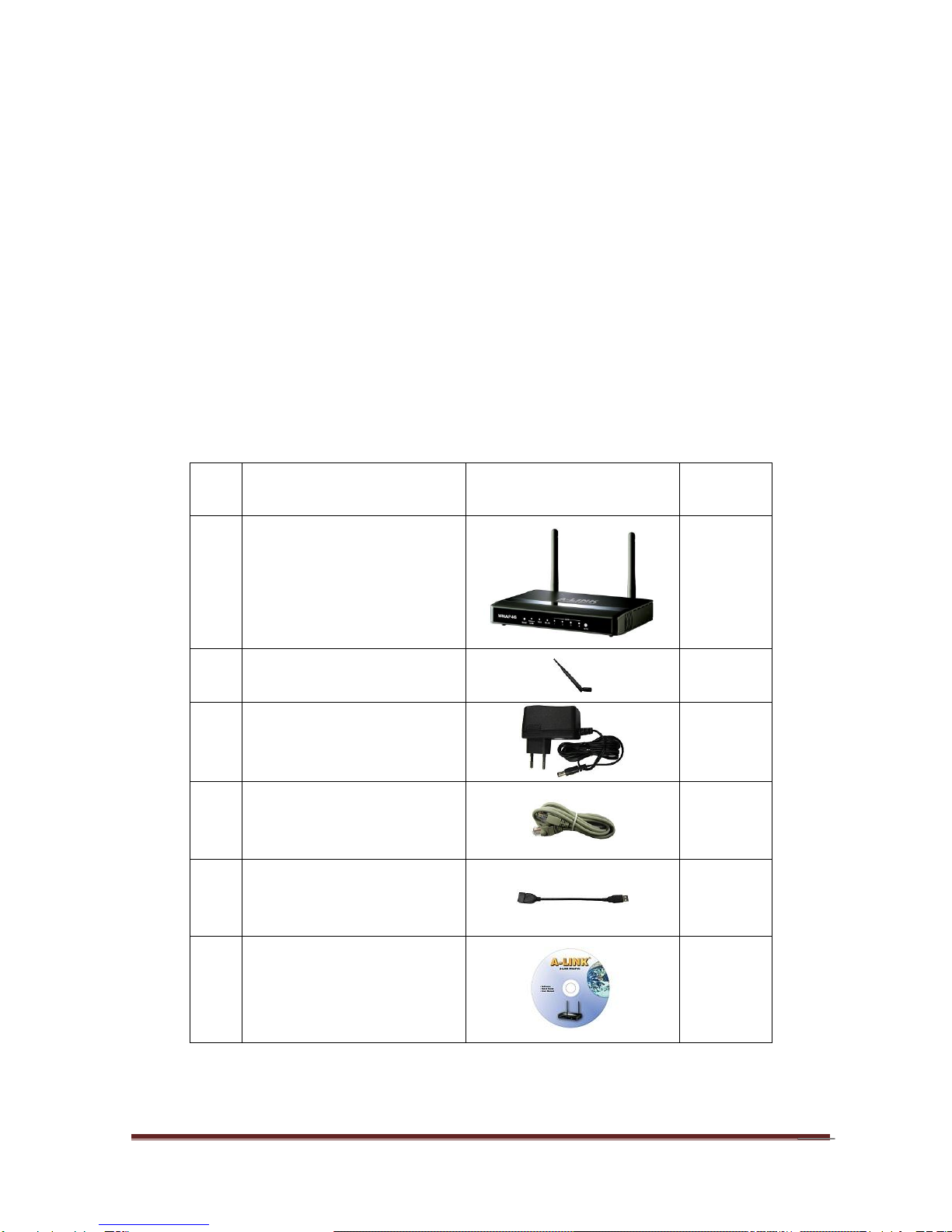
1.1 Package List
Item
s
Description
Contents
Quantity
1
WNAP4G Router
1
2
SMA antenna
2
3
Power adapter
1
4
RJ-45 cable
1
5
USB cable
1
6
CD
1

A-LINK WNAP4G User Manual
6
1.2 Hardware Installation
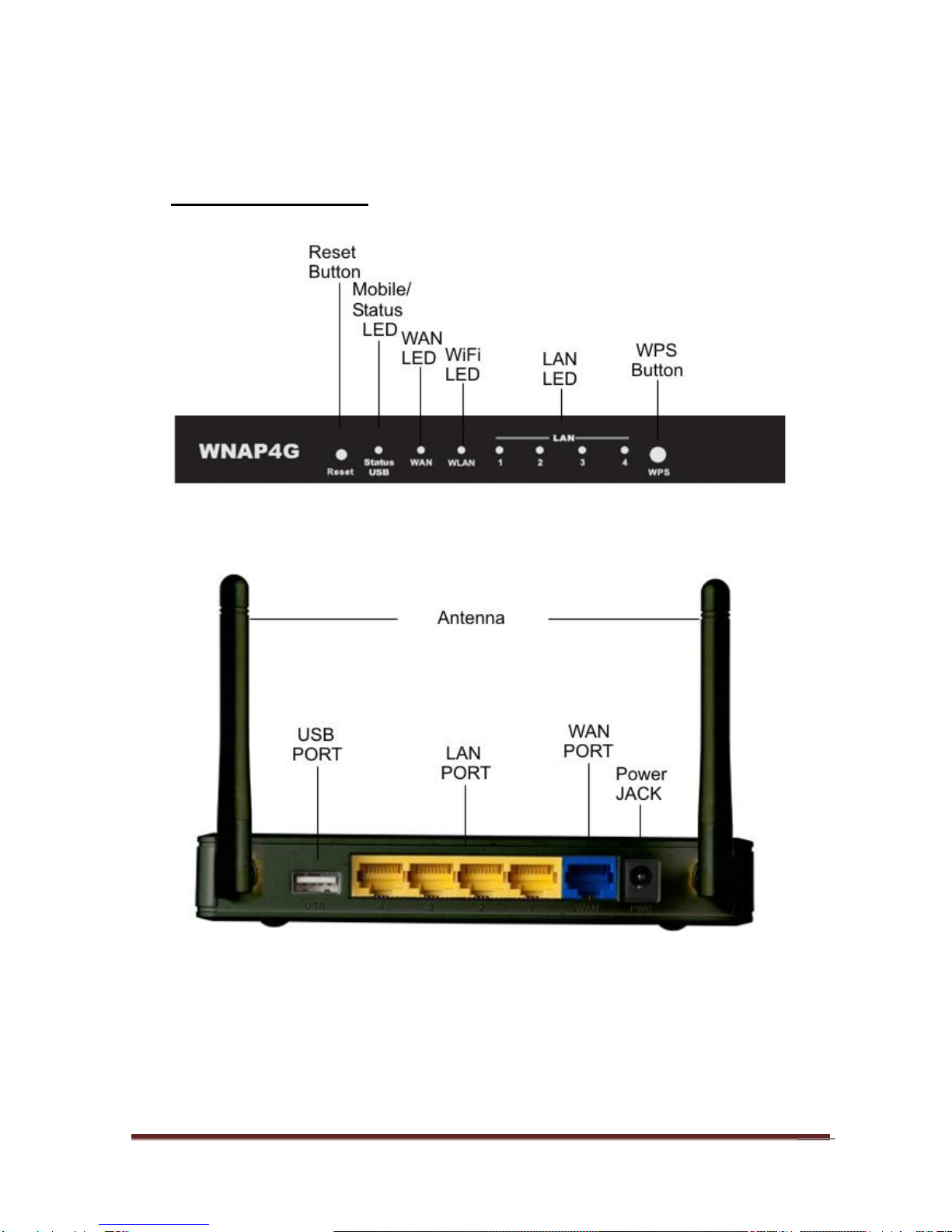
A. Hardware configuration
LED Indicators
Power LED

A-LINK WNAP4G User Manual
7
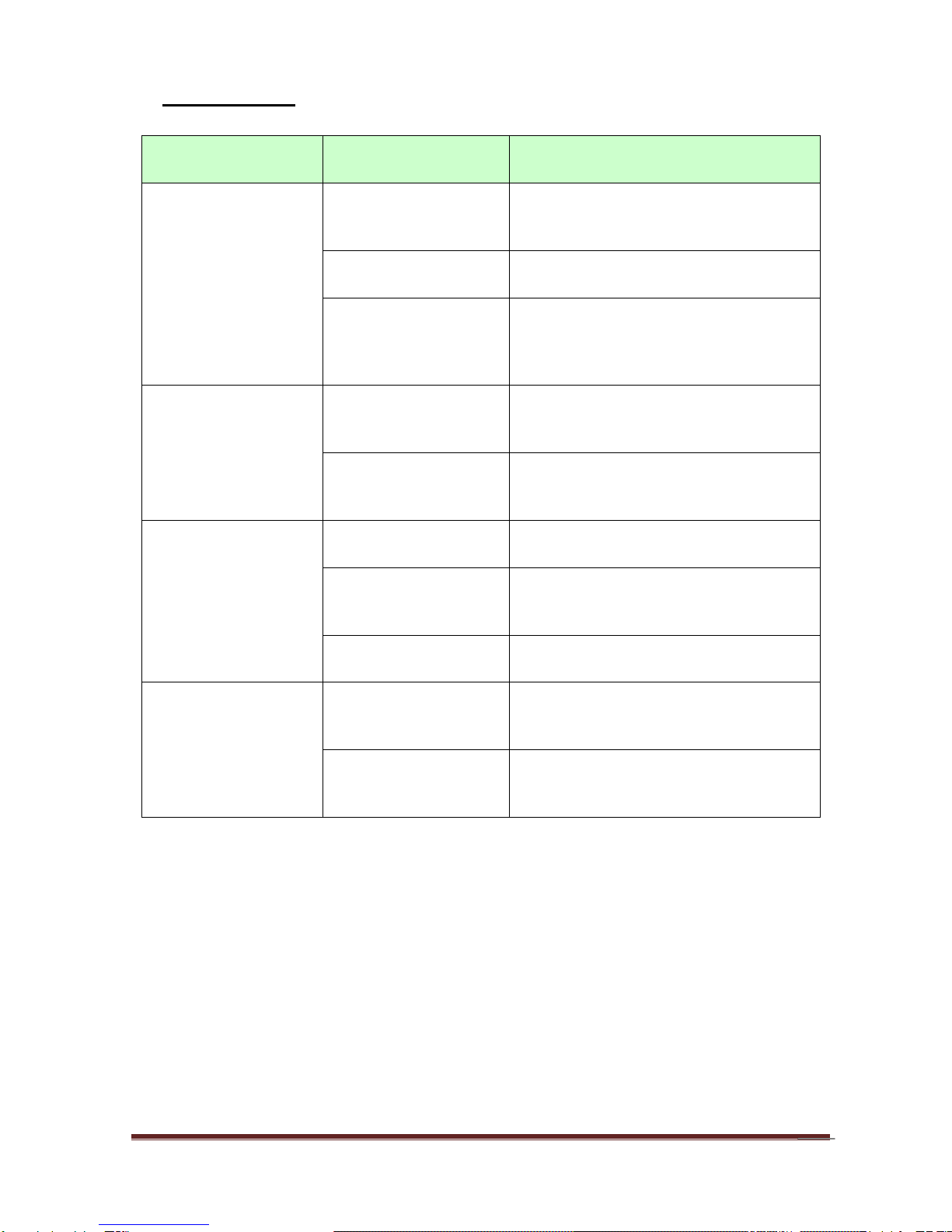
B. LED indicators
LED
Indicator
Description
Status/USB
Green and Blink once
per second
No external USB device is attached,
and this router is working.
Green and Steady On
An external USB device is attached
Green and Blinking
Data packet transferred via attached
USB device (e.g. USB drive, 3G/4G
dongle)
Ethernet WAN
Green and Steady On
Ethernet WAN connection is
established
Green and Blinking
Data packet transferred via Ethernet
WAN
WLAN
Green and Blinking
Data packet transferred via WiFi
Green and Fast
Blinking
In WPS PBC mode
OFF
WiFi radio is disabled
Ethernet LAN 1~4
Green and Steady On
Ethernet LAN connection is
established
Green and Blinking
Data packet transferred via Ethernet
LAN
LED Indicators
Power LED

A-LINK WNAP4G User Manual
8
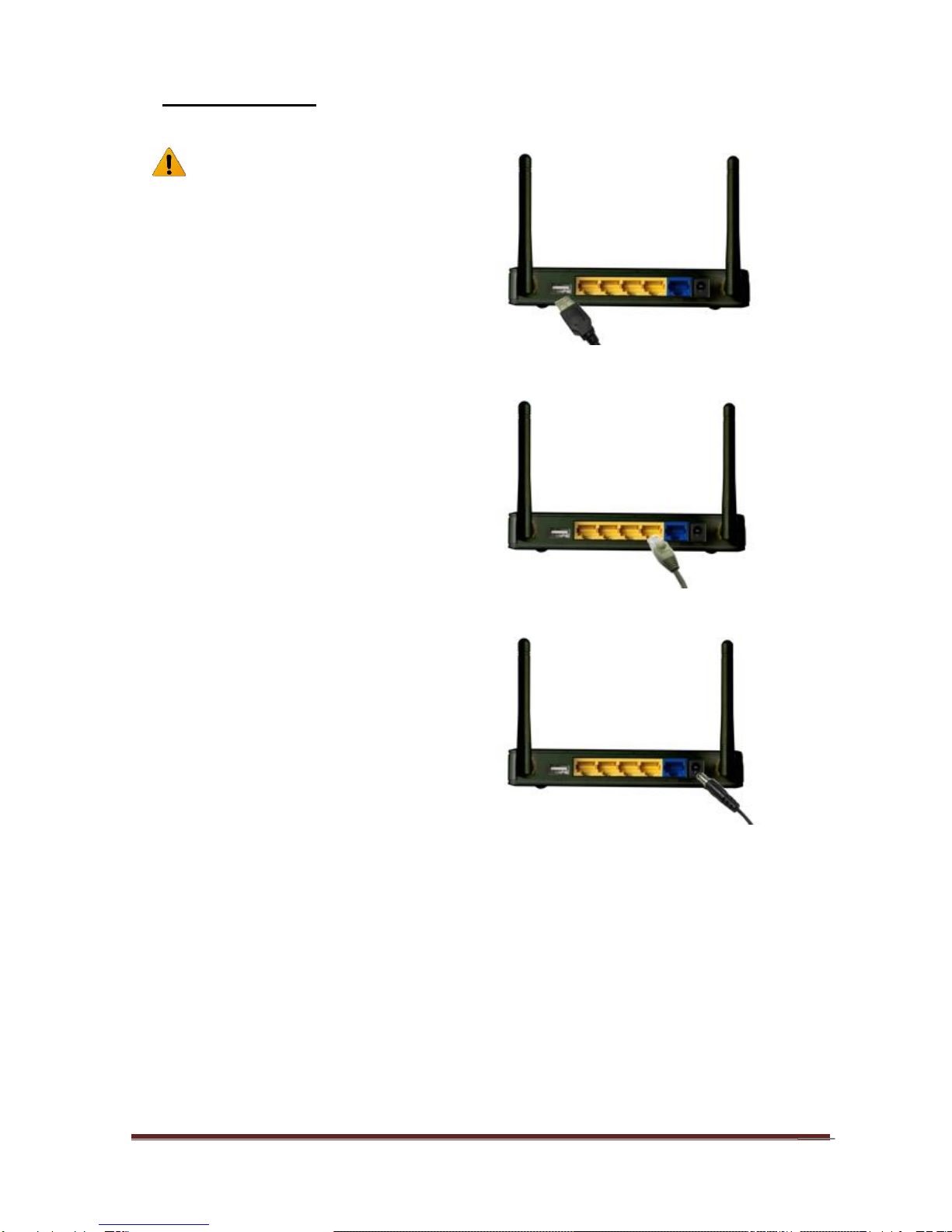
C. Installation Steps
Note: DO NOT connect the router
to power before performing the
installation steps below.
Step 1.
Plug a USB modem into USB port.
Step 2.
Insert RJ45 cable into LAN Port on the
back panel of the router. Then plug the
other end of into computer.
Step 3.
Plug the power jack into the receptor on
the back panel of the router. Then plug
the other end into a wall outlet or power
strip.

A-LINK WNAP4G User Manual
9
Chapter 2 Getting Started with Easy Setup Utility
There are two approaches for you to set up the WNAP4G Router quickly and easily. One
is through executing the provided Windows Easy Setup Utility on your PC, and the other
is through browsing the device web pages and configuration.
2.1 Easy Setup by Windows Utility
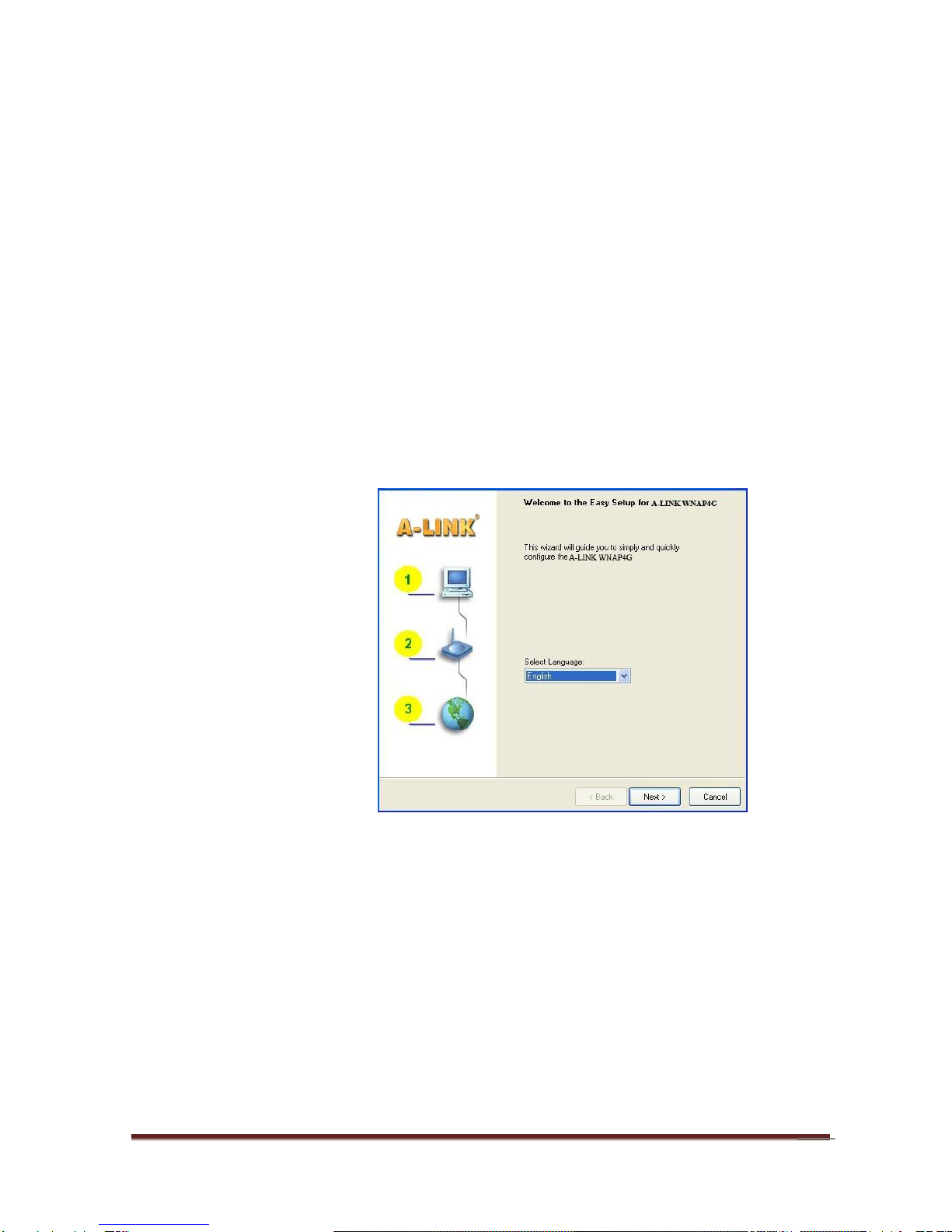
Step 1:
Install the Easy Setup
Utility from the provided
CD then follow the steps
to configure the device.
Step 2:
Select Language then
click “Next” to continue.

A-LINK WNAP4G User Manual
10
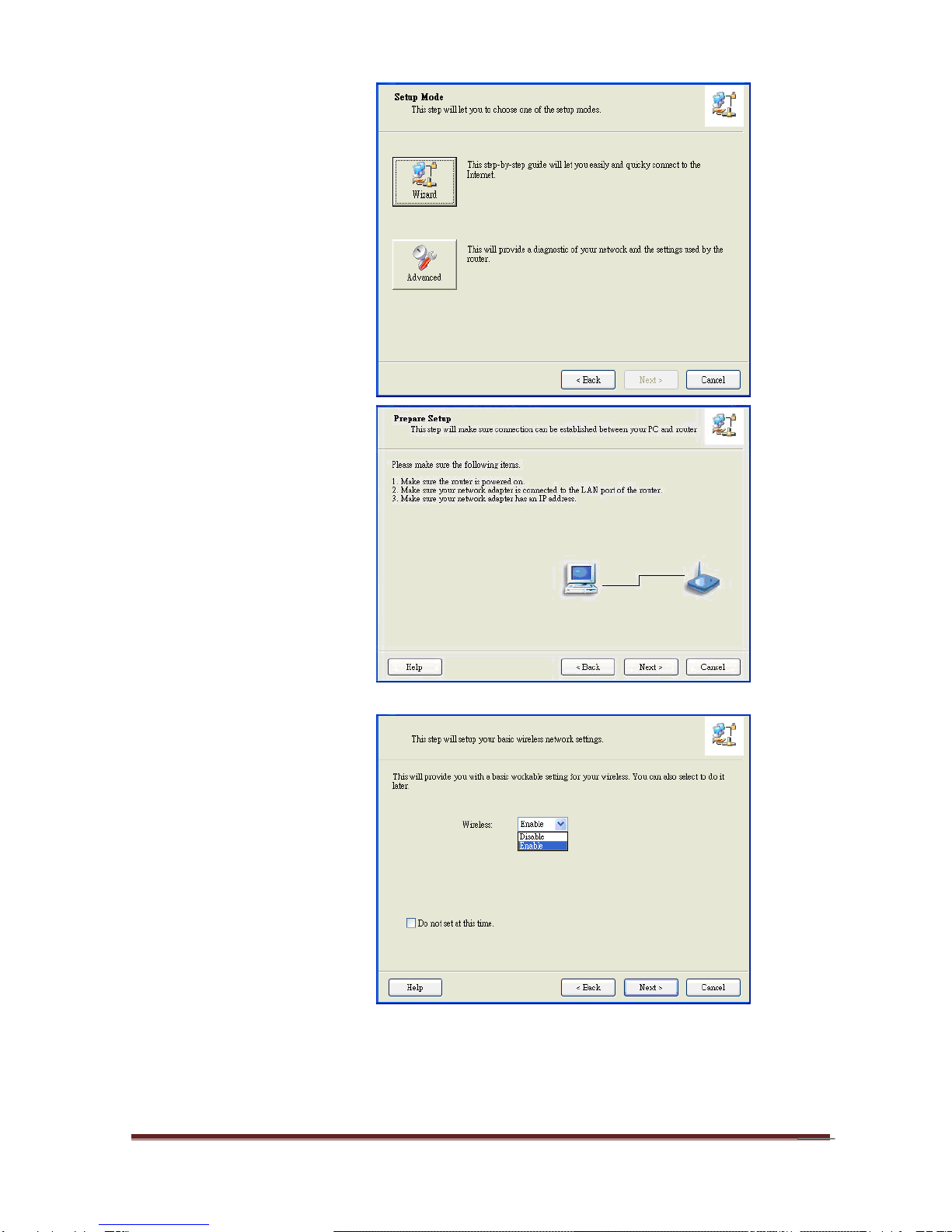
Step 3:
Then click the “Wizard”
to continue.
Step 4:
Click “Next” to continue.
Step 5:
Select Wireless Enable,
and then click “Next” to
continue.
Autres manuels pour WNAP4G
2
Table des matières
Autres manuels Alink Routeur sans fil