ALCON ALCON-7 Manuel utilisateur

OPERATION GUIDE
STATlON TO STATION STATION TO MOBILE
MIDDLE
RANGE RF
TELECOM
SYSTEM

TABLE OF CONTENTS
ALCON-7 FEATURES .....................................................................................................................3
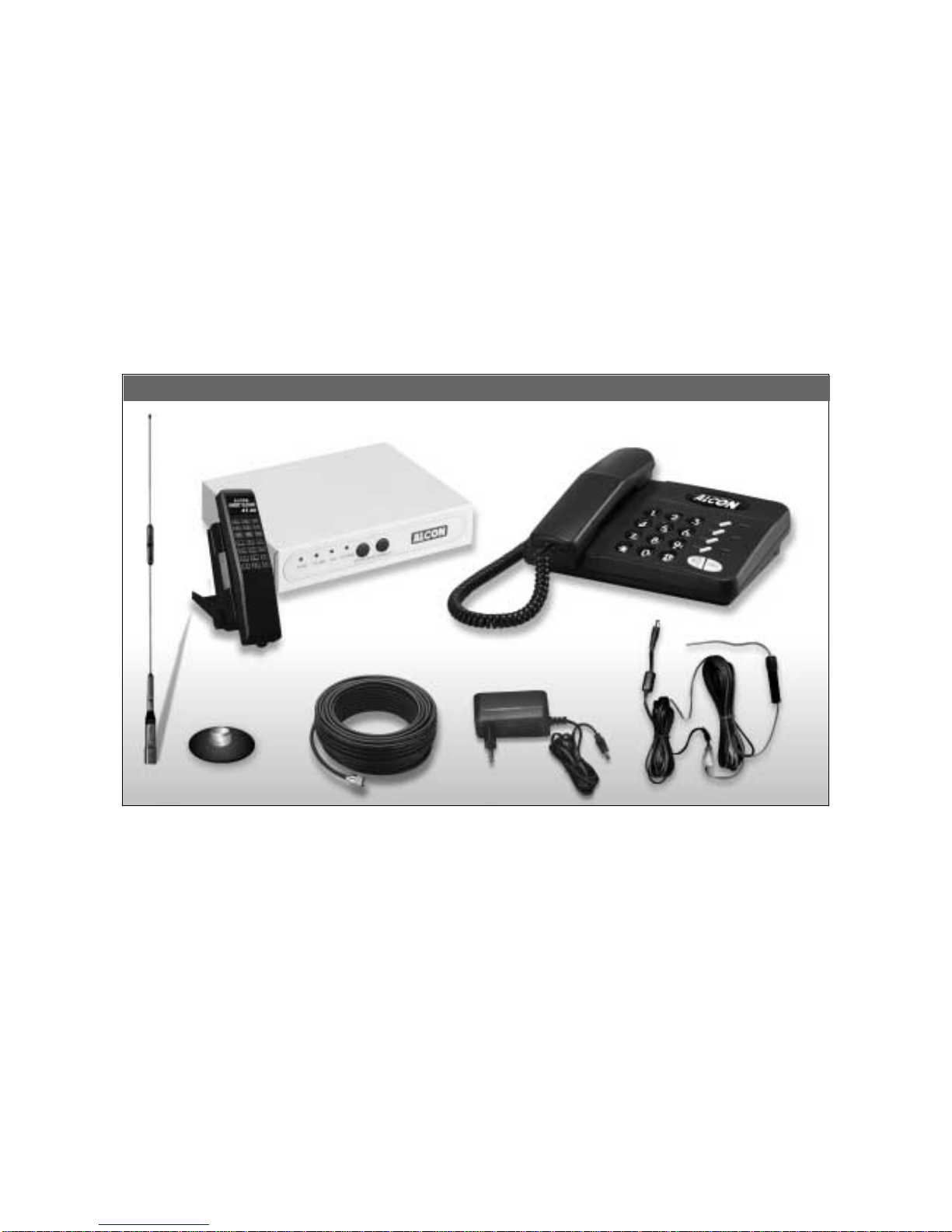
STANDARD PACKAGE...................................................................................................................4
FUNCTION KEYS............................................................................................................................5
ANSWERING A CALL....................................................................................................................6
PLACING A CALL...........................................................................................................................7
INTERCOM FUNCTION {BETWEEN REMOTE/MOBILE AND BASE UNIT} ..............................................9
TRANSFERRING CALLS .............................................................................................................10
3-WAY CONFERENCE CALLS ...................................................................................................11
REDIAL FUNCTION .....................................................................................................................12
HOLD FUNCTION.........................................................................................................................12
FLASH FUNCTION .......................................................................................................................13
TEMPORARY TONE DIALING....................................................................................................13
SETTING A REPRESENTATIVE NUMBER FOR REMOTE/ MOBILE UNIT..........................14
ANTENNA INSTALLATION.........................................................................................................15
2
ALCON-7 OPERATION GUIDE
ALCON- SPECIAL TELECOMMUNICATIONS CO., LTD. a professional maker of high
quality communication equipment, is proud to present its newest model : ALCON-7 Pointto
point / point to Mobile cordless telephone system. This ALCON product will give you years of
performance if you read and follow carefully the instructions contained in this manual.

3
♦POINT-TO-POINT OR POINT-TO-MOBlLE USE
♦HIGH PERFORMANCE
♦UNlVERSAL INTERFACE ON THE REMOTE/MOBILE FOR FAX / DATA OR OTHER
TELECOM EQUIPMENT USE
♦ECONOMlCAL AND EASY TO USE
♦EXCELLENT SIGNAL QUALITY FOR LONG RANGE USE
♦RF STABlLITY & DURABILlTY
♦SCRAMBLER FUNCTlON
♦4O CHANNELS FREQUENCY AUTO SCAN
♦TWO-WAY PAGING & lNTERCOM
♦MODULAR DESIGN
FEATURES:
Base Unit
AT-526
Normal
Telephone
Switching Adaptor A-7 Antenna
STANDARD PACKAGE
ALCON-7 BASE UNIT AND REMOTE / MOBILE
Standard Accessories for ALCON-7 S.S.
Base Unit x 1
Remote / Mobile Unit x 1
Switching Adaptor x 2
A-7 Antenna x 2
5DFB 20m Cable x 2
AT-526 Normal Telephone x 1
User’s Manual x 1
Remote / Mobile Unit
Standard Accessories for ALCON-7 S.S.
5DFB 20m Cable

4
Base Unit
AT-80 Telephone
Switching Adaptor
DC Cord
1/2
λ
Car Antenna
Magnetic Car
Antenna Mount
Remote / Mobile Unit
Standard Accessories for ALCON-7 S.M.
5DFB 20m Cable
Standard Accessories for ALCON-7 S.M.
Base Unit x 1
Remote / Mobile Unit x 1
Switching Adaptor x 1
5DFB 20m Cable x 1
A-7 Antenna x 1
AT-80 Telephone x 1
1/2 λ Car Antenna x 1
Magnetic Car Antenna Mount x 1
DC Cord x 1
User’s Manual x 1

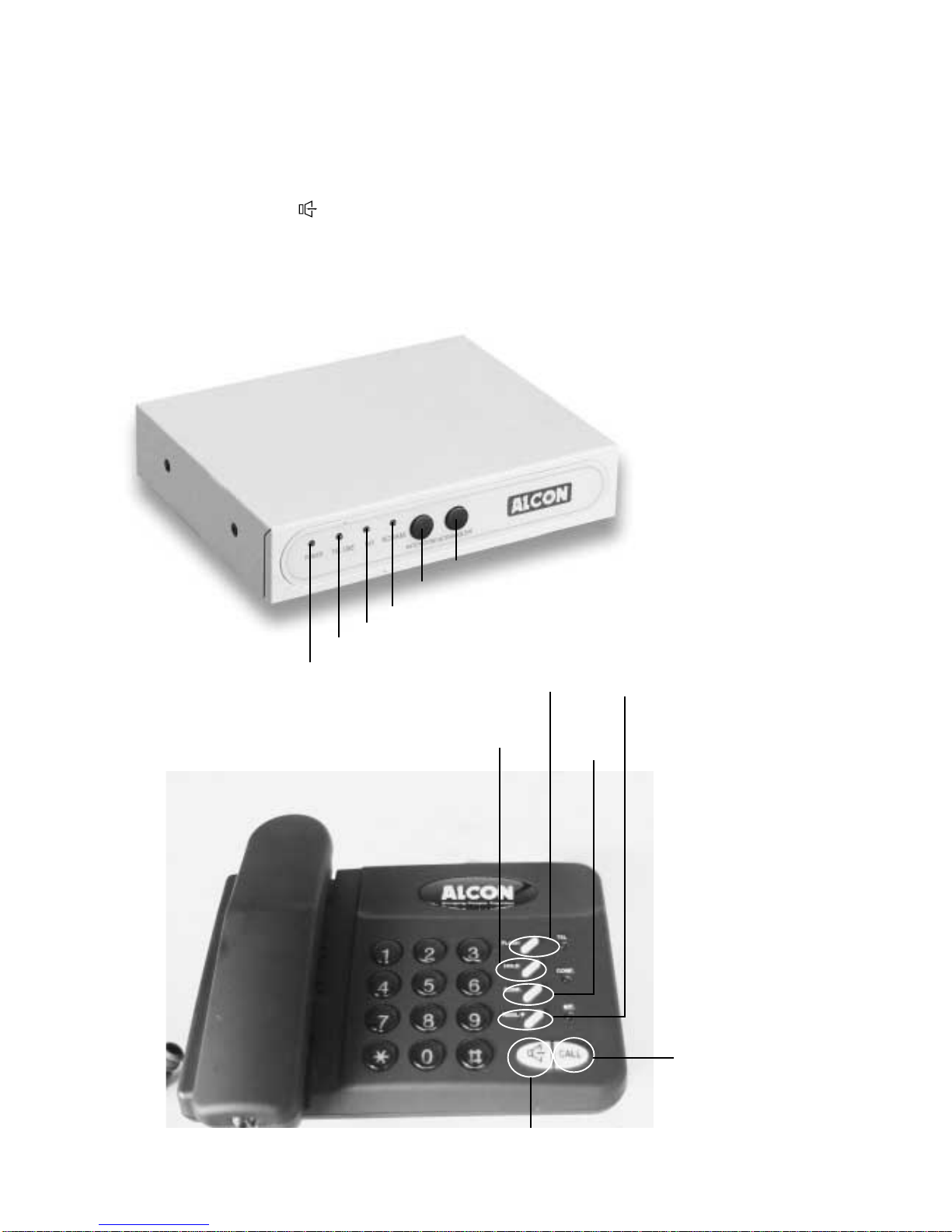
FUNCTION KEYS :
5
Intercom Key
Hold Key
Power indicator
Three-Way
Conference
Call
Speakerphone Key
Flash Key Redial Key
In Use indicator
Intercom indicator
Scramble indicator
Intercom Key
Scramble Key
Base Unit REDIAL Redial Key
FLASH Flash Key
HOLD Hold Key
CONF Three-Way Conference Call
Speakerphone Key
Remote/Mobile Unit Scramble Scramble Key
Intercom Intercom Key

ANSWERING A CALL
ANSWERING WITH THE ALCON-7 Remote Unit
Make sure the Remote POWER switch is ON.
1. When a call comes in, the Normal Telephone will ring.
The TEL indicator will flash.
2. Pick-up the handset of the Normal Telephone and begin
your conversation.
The TEL indicator will illuminate.
3. Hang up .
ANSWERING WITH THE BASE UNIT
There are two methods to answer a call with the base unit:
A. Picking up the Handset from the Base Unit
B. Using the Speakerphone (Hands-Free)
A. Picking up the Handset from the Base Unit
1. When a call comes in, the base unit will ring.
The dialing buttons and TEL indicator will flash.
2. Lift the handset from the base unit to answer a call.
The TEL indicator and dialing buttons (green light) will
illuminate.
3. To hang up, return the handset to the base unit.
B.Using the Speakerphone
1. When a call comes in, the base unit will ring.
The dialing buttons and the TEL indicator will flash.
2. Press or any key to answer the call.
The TEL indicator, dialing buttons (green light) and (red
light) will illuminate.
3. Press to hang up.
NOTE :
●
If you use the speakerphone (hands-free) on the base unit to talk without pressing again after
finishing a conversation, the telephone line will remain busy.
●
If the base TEL indicator or digit buttons are illuminated, that represents a certain remote/mobile is in
use.
SPEAKERPHONE AND BASE RECEIVER VOLUME ADJUST
There is a VOLUME control on the right side of the base unit. Adjust it upward to increase the
volume or downward to decrease the volume.
6

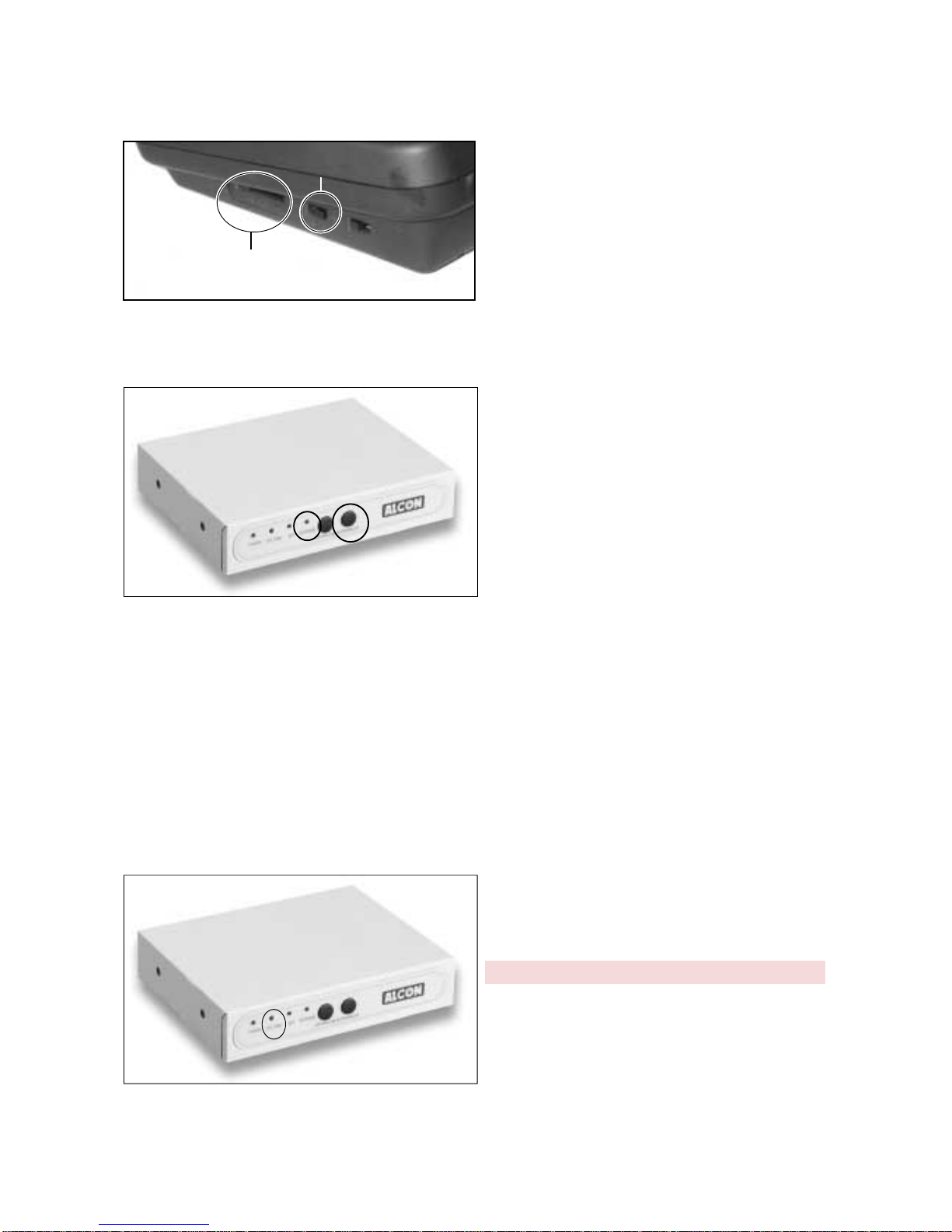
RINGER VOLUME CONTROL
Set the RINGER switch on the middle right side
of the base unit to ON (up) or OFF (down).
SCRAMBLE FUNCTION
To prevent somebody from eavesdropping on your conversation, use the Scramble function. .
1. Press the Scrambler button located on the
front of the remote unit to engage the
scramble function. When the SCRAM
indicator is illuminated, the scramble
function has engaged.
2. Press the Scramble button again to disengage
the scramble function. When the SCARM
indicator is not illuminated, the scramble
function has been disengaged.
NOTE :
●
If there is blackout when the system had the Scramble Function engaged or disengaged, the system
will always return to that setting when the power returns.
●
The system should be in standby mode to engage or disengage the scramble function.
PLACING A CALL
Remote / Mobile UNIT
Switch the Remote/ Mobile unit ON (the POWER indicator should illuminate), making sure that
the telephone cord is plugged into the house
socket.
1. Pick up the telephone handset of the normal
telephone and check if there is dial tone.
The TEL indicator will illuminate.
2. Dial the number you wish to call.
3. Hang up the handset when you have finshed
the call.
7
VOLUME CONTROL
RINGER ON/OFF SWITCH

BASE UNIT
There are two methods to place a call using the base unit.
A. Picking up the Receiver from the Base
Unit
1. Listen for a dial tone by lifting the Receiver from the
base unit.
The TEL indicator and dialing buttons (green light) will
illuminate.
2.Dial the number you want to call.
When you press the digit buttons, the buttons that are
being pressed will turn from green to red.
3.Return the Receiver to the base unit after finishing a
conversation.
B. Using the Speakerphone
1. Press to get a dial tone.
The TEL indicator, dialing buttons (green light) and
(red light) will illuminate.
2. Dial the number you want to call.
3. Press again to hang up.
NOTE :
l
When the Base unit of the Remote/ Mobile unit is used for an outside call, the other users in the
system do not have access to the system.
l
There is a MUTE button on the right side of the Remote/ Mobile unit. The person who is on the other
side of the conversation won’t be able to hear you if this button is pushed activating this function.
TONE / PULSE MODE PROGRAMMING
Base Unit
There is a P / T Switch on the upper side of the base unit. You can switch the unit to the P (Pulse)
or T (Tone) telephone system depending on which one you use in your country.
Remote/Mobile Unit
The Remote/Mobile Unit only has T (tone)
mode.
8
P / T SWITCH
12

INTERCOM FUNCTION
{BETWEEN REMOTE/ MOBILE UNIT AND BASE UNIT}
A : Remote / Mobile CALLING BASE UNIT
Remote / Mobile
1. Press INTERCOM. The base will emit two short
“beeps”.
The Remote/Mobile unit INT indicator will begin to flash.
2. Lift the telephone handset and wait for somebody to
activate the Base Unit.
Once the Base unit is in use, the INT indicator will
continuously illuminate.
3. To finish the conversation, return the handset to the Base
unit.
Note :
ll
If you press INTERCOM without picking up the handset of the normal telephone and the Base unit
user picks up their handset, the Remote/Mobile unit will emit a quick beeping sound.
Base Unit
1. The base unit will ring.
The INT and CALL indicator will illuminate and the repre-
sentative no. of Remote/ Mobile (no.1) unit will flash.
2. Press any key or lift the receiver from the base unit to
answer the call.
The INT, CALL, and dialing buttons will
illuminate during the conversation.
3.To finish the conversation, press CALL or return the
receiver to Base unit and hang up the telephone handset
of Remote/ Mobile unit.
B : BASE CALLING REMOTE / MOBILE UNIT
Base Unit
1. Press CALL.
The CALL indicator will illuminate.
2. Press digit No. 1 (this represents the Remote/ Mobile
unit).
The CALL indicator will illuminate and digit No.1will flash.
The CALL and the digit button no. 1 will continuously
illuminate during the conversation call.
9
1
2

Remote/ Mobile unit
1. The Remote/ Mobile unit will ring.
The INT indicator will flash. This means that the Base unit
is calling the Remote/ Mobile unit.
2. Once you lift the telephone handset, you can begin you
conversation .
The INT indicator will continuously illuminate.
3. To finish the conversation, press CALL or hang up the
telephone handset of Remote/ Mobile unit.
NOTE :
l
When the distance between Remote/ Mobile unit and Base unit is too far, the INT indicator will flash
several times without ringing.
TRANSFERRING CALLS
FROM BASE UNIT TO Remote/Mobile
{Base Unit Answering or Placing a Call}
Base Unit
1. Press HOLD.
The call will be put on hold automatically.
2. Press CALL.
The CALL indicator will illuminate.
3. Press the digit button no. 1 to call the Remote/ Mobile
unit.
The digit button no. 1 will flash and that means the
Remote/ Mobile unit is being called. Remote/ Mobile Unit
Remote/Mobile
1.The Remote/ Mobile unit will ring.
The INT indicator will flash and the telephone set will ring.
2.Pick up the telephone handset to begin the conversation.
The INT indicator will illuminate during the conversation.
3.To hand up, press CALL or return the telephone handset.
The Base unit will return to Standby mode.
The TEL indicator on the Base unit will flash.
4.The Remote/ Mobile unit can answer the call that is on
hold.
The Remote/Mobile unit TEL indicator will illuminate.
10
1
2
3
Table des matières