
AITZ Blackbox GB-100 Manuel utilisateur

AITZ Blackbox

Contents
1. Introduction ………………………………………… 3
2. Cautions before using …………………………… 4
3. Cautions when using …………………………… 5
4. Features …………………………………………… 7
5. Components ………………………………………… 8
6. Part names ……………………………… 9
7. Button, LED indication …………………………… 10
8. Installation …………………………………………… 11
9. Functions……………………………………… 13
10. GB-100 GUI …………………………………………… 16
11. PC viewer …………………………………………… 23
12. Setting ……………………………………………… 32
13. Smartphone connection ………………………… 34
GB-100 User
Manual 2
14. Create the icon in smartphone ……………… 39
15. Specifications…………………………………… 40
16. A/S ……………………………………………… 41

Introduction
•Thank you for purchasing GB-100.
•GB-100 is offered ADAS(Advanced Driver Assist System) which are Lane departure
system(LDWS) and Blind spot assist sensor(BSA), also save the front/rear image with sound.
•GB-100 can save the driving/accident image and sounds together, also check the video image by
3.5 inch full touch screen.
AITZ is a trademark belonging to ATM CO., LTD.
All contents of this manual and publications of the manufacturer are protected by intellectual property rights.
The product and manual can be changed for further improvement without any notice to users.
The image which in this manual should not be different with actual image.
The manufacturer shall not be liable for product failure or damages due to misuse, incorrect installation or
unauthorized alteration.
Please do not operate this device and touch the LCD during the driving for safety.
Please use this product safety after reading this manual carefully.
GB-100 User
Manual 3

Cautions before using
•Warranty and Limited Liability
GB-100 is a supplementary device for your safe driving. The manufacturer shall not be liable for any loss or
damage caused by product failure, data loss or use of the product.
This product is used to record and save video. Some functions may not be available depending on the driving
or vehicle’s environment. Performance of the device may also vary as the firmware will be updated from to
time for further improvement.
Although this product can save and record video images of the vehicle’s accident, the manufacturer does not
guarantee that all accidents are recorded by the product. Accidents caused by tiny impact can not recorded as
the event video when the motion sensor does not work.
•Caution in Use of Micro SD card
Micro SD card is consumable, so please check the recording filed regularly. If the microSD card is not working,
change the microSD card.
If there is a important data, please back up to the other storage media.
Check the recording files and format the microSD card regularly.
※ Micro SD is very important for recording, so please keep the caution before using.
※ If the Micro SD has damaged or lost files, manufactures doesn’t have any responsibility.
※ For using safety Micro SD card, please format the microSD card twice a month.
GB-100 User
Manual 4

Cautions when using
•This section is for safety and proper use of the product to prevent safety accidents. The
manufacture shall not be responsible for troubles caused by use of the product in violation of the
instructions.
Warning ) This message shows that will influence high risk for injury or death to user.
When install the power, please use the cables which provided by ATM. If use other cables, manufacture
doesn’t have any response.
If remove the power cable, do not the wet hand. It may cause electric shock.
Do not disassemble, repair or modify the product. It can cause damage and electronic.
Please remove the power from product when not used the car longtime. It cause of fire or car battery
discharge.
Please install the product a windscreen avoid deep tinted windows or metal coating. GPS receiving error will
be happen, and recording resolution will be indistinct.
Do not operating or states during driving. It could be cause of accident. Please use device after safety parking.
GB-100 User
Manual 5

Cautions when using
Caution ) Injury or property damage can be caused for users the this contents are not followed.
To connect the power cable, please insist on getting cabling done by an authorized personnel from master.
Do not impact to the product. The product will be broken.
Please install the product avoid the drivers sight.
Pleas keep the windshield clean. Foreign materials may prevent normal recording of images.
Do not use the sharp things on LCD screen. If use this, LCD screen or touch panel will be damaged.
Avoid the direct sun light when parking. If used for long hours in an air-tight environment inside a car and in
direct sunlight, the product may malfunction.
Reflections of images of Navigation HIPASS may cause poor recording quality.
Do not use sharp devices on the LCD. The touch panel or LCD may be damaged by sharp devices when the
blackbox is set up with them on the LCD.
When the Micro SD Card is full, the oldest file in the card will be overwritten by a new file. Please back up
data periodically to prevent unwanted data loss.
Please watch out for using Micro SD card and removing it. Please remove the power cable before inserting or
removing the Micro SD Card.
GB-100 User
Manual 6

Features
•Front/Rear HD-HD high resolution video
•Full Touch LCD Screen(3.5”)
•Max 120°wide angle
•Driving recording
•Event recording : Save the event file when external shock occur
•Enforced recording : Record the enforced file by button
•Parking recording : Motion detected sensor working when parking mode
•Parking impact recording : Save the damaged video when parking mode
•Super Cap : Record the normally when shut-down the device
•ADAS Package1 : LDWS(Lane departure warning system) - Option
•ADAS Package2 : BSA(Blind spot assist sensor) - Option
•Save the speed/location by GPS - Option
•Voice guidance
•Cut-off voltage
•High-quality MIC
•Exclusive PC viewer
GB-100 User
Manual 7

Components
GB-100 User
Manual 8
Optio
n
ADAS
Package(option)
Basic
components
BSA LDWS
WIFI dongle
GPS module
Quick guideMicro SD cardRear camera
GB-100 device
Main power cable TAPE Sheet
Bracket TAPEBracket

Part names
①Camera lens
②Touch LCD(3.5”)
③Enforced recording button
④Power button
⑤Volume
⑥Operated LED
⑦Micro SD card Slot
⑧WIFI dongle port
⑨GPS port
⑩Reset button
⑪Rear camera port
⑫I/F port
⑬Power port
⑭Security LED
⑮Bracket
GB-100 User
Manual 9
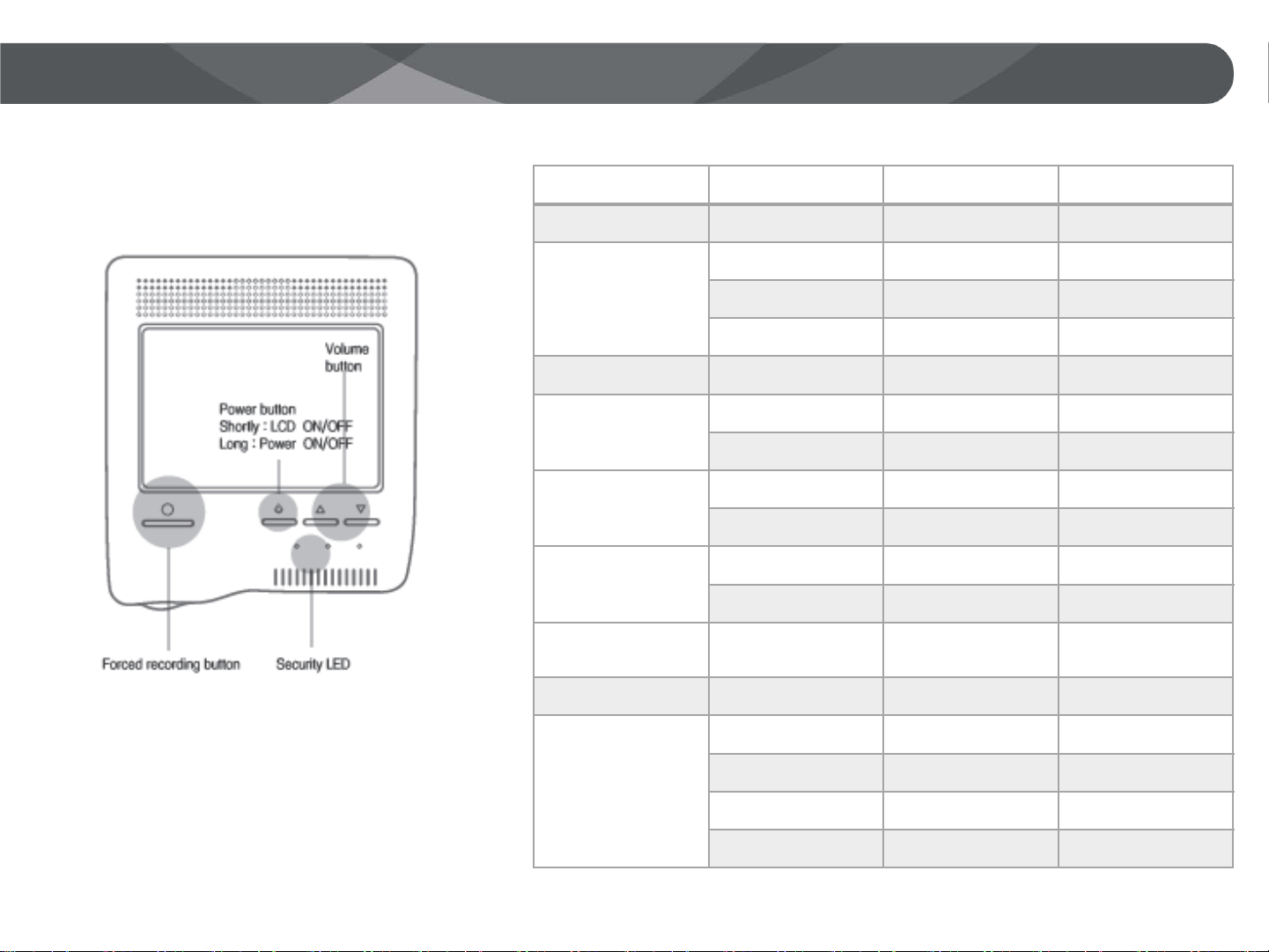
Button, LED opreation
•LED indication
GB-100 User
Manual 10
Status RED YELLOW BLUE
Power ON ON ON
Booting
(Follow the step)
OFF OFF ON
OFF ON ON
ON ON ON
Recording start OFF OFF OFF
Pause, Format,
Pre-view
(Repeat)
OFF ON ON
OFF OFF OFF
Parking mode
(Repeat)
OFF ON OFF
OFF OFF ON
Motion detection
(Repeat)
ON ON ON
ON OFF OFF
Event / User
recording ON ON OFF
Driving recording ON ON ON
Power off
(Follow the step)
OFF ON ON
OFF OFF OFF
ON ON ON
OFF OFF OFF
Table des matières


