Airlink101 AWMB100 Manuel utilisateur

802.11g Wireless Music Bridge
Model # AWMB100
User’s Manual
Ver. 1A

Table of Contents
1 Introduction ................................................................................................................ 1
1.1 FEATURES................................................................................................................1
2 Quick Start Guide....................................................................................................... 2
2.1 INSTALLING SOFTWARE .............................................................................................2
2.2 RUNNING SETUP WIZARD .......................................................................................... 3
2.3 CONNECTING TO THE MUSIC BRIDGE........................................................................10
3 Using the Wireless Audio Center............................................................................ 13
3.1 AUDIO LINK TAB......................................................................................................13
3.2 AUDIO SETTING ......................................................................................................14
3.3 MIXER....................................................................................................................16
3.4 EFFECT.................................................................................................................. 17
3.5 KARAOKE ............................................................................................................... 19
3.6 FLEXBASS.............................................................................................................. 19
3.7 INFORMATION .........................................................................................................20
4 Wireless Modes of operation .................................................................................. 22
4.1 ACCESS POINT .......................................................................................................22
4.2 CLIENT MODE......................................................................................................... 22
5 Advanced Network Configuration........................................................................... 24
5.1 SETUP WIZARD....................................................................................................... 24
5.2 STATUS..................................................................................................................26
5.3 WIRELESS.............................................................................................................. 28
5.3.1 Basic Settings.................................................................................................28
5.3.2 Advanced Settings .........................................................................................29
5.3.3 Security .......................................................................................................... 33
5.3.4 Access Control...............................................................................................35
5.3.5 Site Survey..................................................................................................... 37
5.4 TCP/IP.................................................................................................................. 37
5.5 OTHER SETTINGS ...................................................................................................38
5.5.1 System Log .................................................................................................... 38
5.5.2 Statistics......................................................................................................... 39
5.5.3 Upgrade Firmware.......................................................................................... 40
5.5.4 Save/Reload Settings..................................................................................... 40
5.5.5 Password........................................................................................................41
5.5.6 Logout ............................................................................................................41
Appendix - Specifications .......................................................................................... 43
Technical Support....................................................................................................... 44

1
1 Introduction
The AirLink101 Music Bridge is a network audio device and wireless Access Point. It
allows you to stream all of your audio content from your PC to speakers in your living
room or bedroom, in the glory of 5.1 surround sound.
As an audio device, AirLink101 Music Bridge is essentially a “wireless sound card”,
which plays back all of your computer’s audio. This means that, unlike other wireless
media players on the market, AirLink101 Music Bridge allows you to play your
copyright-protected music and audio from any program.
As a full-featured wireless router, AirLink101 Music Bridge provides WPA, WPA-
2/802.11i, or WEP encryption, giving you a high level of protection for your data and
privacy. The MAC Address filter prevents unauthorized devices from accessing your
wireless network, and a web-based utility is provided to allow you to easily make
changes to your networking settings.
1.1 Features
Audio
•Streams all of your audio from your PC to the stereo system in your house using
AirLink101 Music Bridge wireless audio technology.
•Outputs audio to 5.1 channel sound systems, headphones, or digital (S/PDIF)
receivers.
•Streams music to the AirLink101 Music Bridge from any program on your PC.
•Keeps track of your audio and networking settings with the Wireless Audio Center.
Networking
•Supports WPA, WPA-2, and WEP encryption.
•Can act as a DHCP server or client.
•Adjustable Tx power, Tx rate, and SSID broadcast.
•Web-based network management tool.
•MAC filtering for wireless networking.

2
2 Quick Start Guide
2.1 Installing Software
Note: The setup should be done from the computer you want to use with the music
bridge.
Step 1 Insert the Utility CD into your CD-ROM drive. When the autorun screen
appears, select Install Utility and Driver from the menu.
Note: If the autorun window does not appear automatically, go to Start -> Run and type
D:\Utility\Setup.exe (where Dis the letter of your CD-ROM drive) and click OK.
Step 2 Click Next at the welcome screen.

3
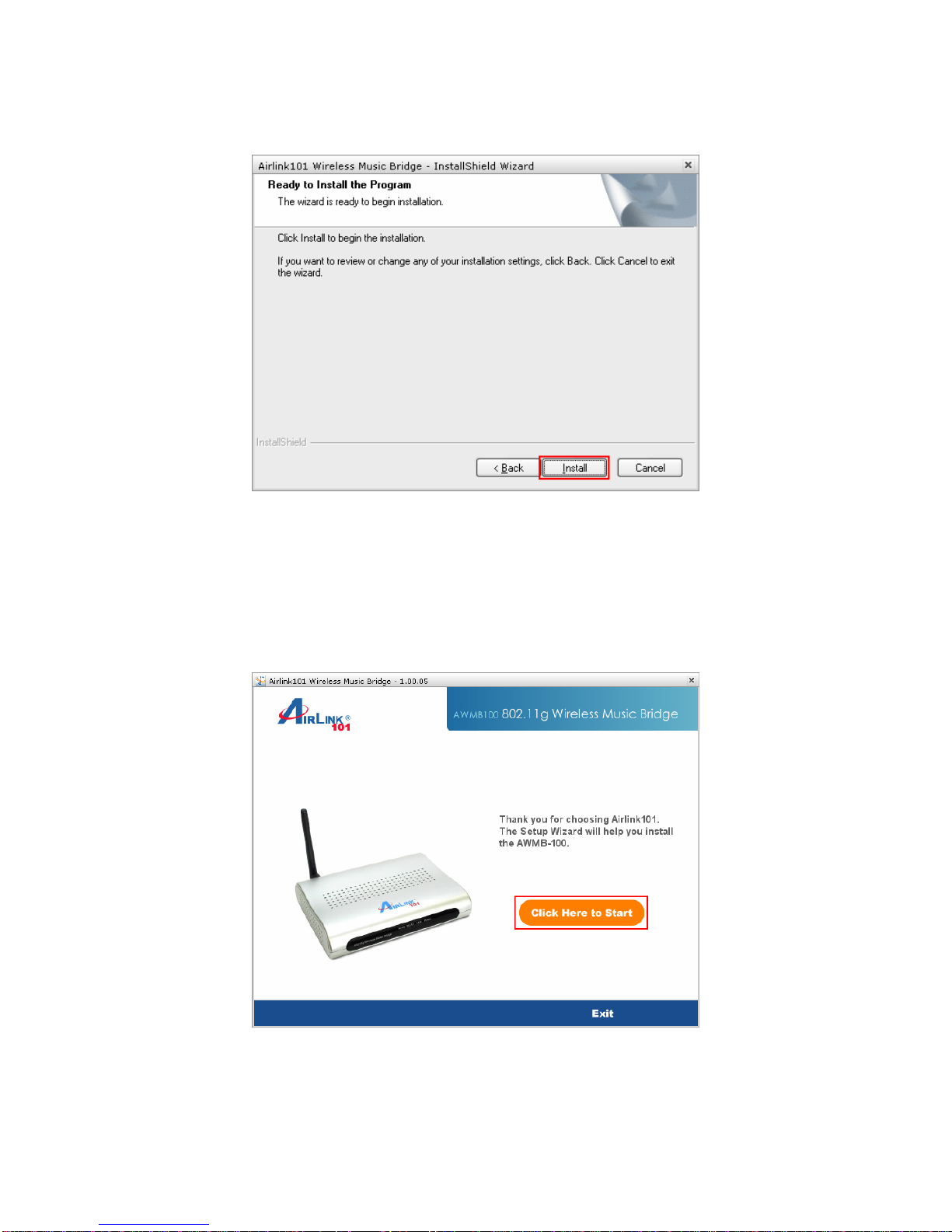
Step 3 Click Install at the installation screen.
2.2 Running Setup Wizard
Step 1 After the software installation finished, the setup wizard will automatically
appear. Click on the Click Here to Start.
If the wizard does not come up, you can go to Start > All Programs >Airlink101
Wireless Music Bridge > AWMB100 Setup Wizard.

4
Step 2 Power on the Wireless Music Bridge. Click Next.
Step 3 Connect one end of a networking cable to the computer you plan to use with the
music bridge, then connect the other end to the Ethernet port on the back of the music
bridge. Click Next.

5
Step 4 Verify if the LEDs LAN and Power and on. Click Next.
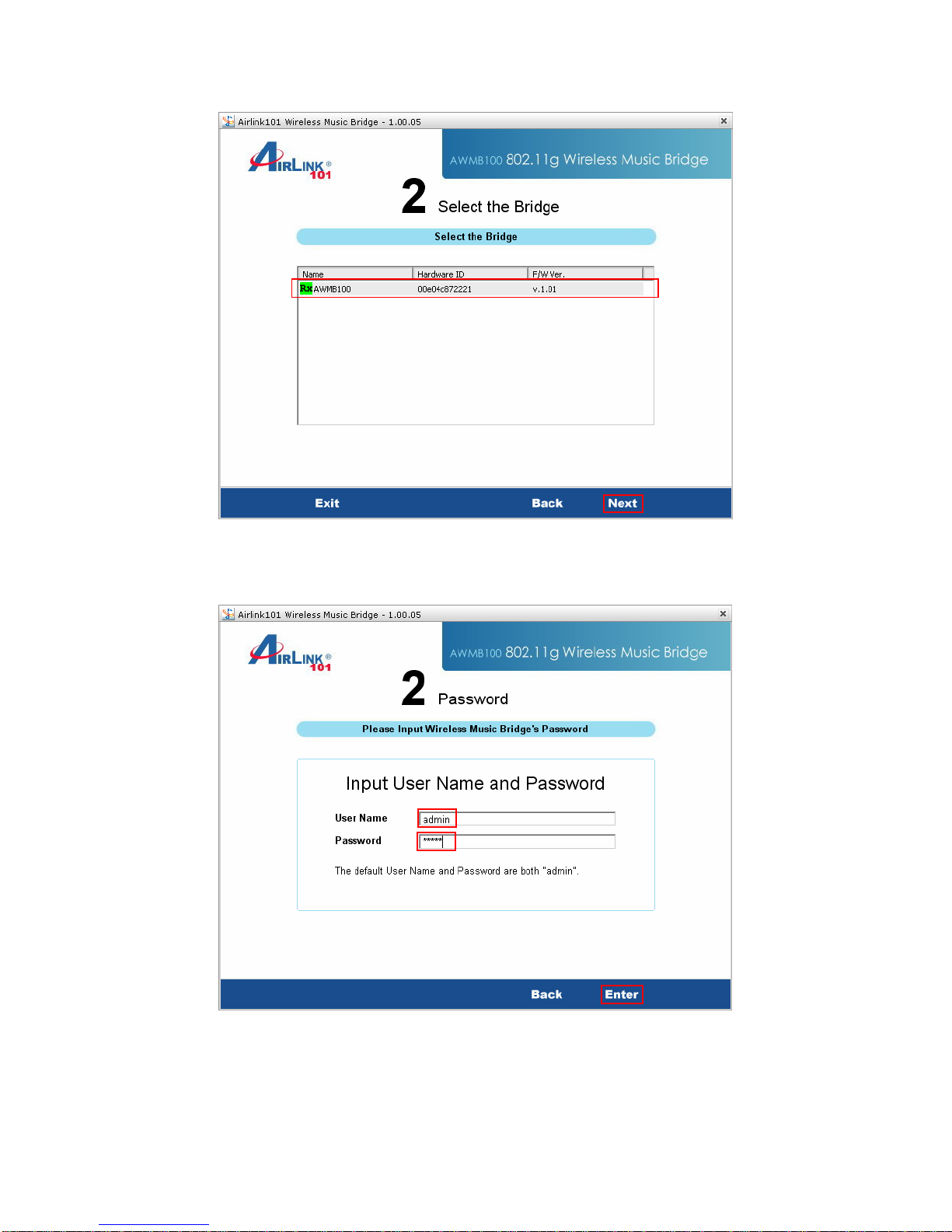
Step 5 A list will appear showing your Music Bridge. Select it from the list and click
Next. If nothing appears on the list, make sure that the music bridge is connected to
your computer and properly powered on. Also make sure that you disable any software
firewalls you have installed on your computer.

6
Step 6 The default username for the music bridge is admin and the default password is
admin. Enter this into the appropriate boxes and click Enter.
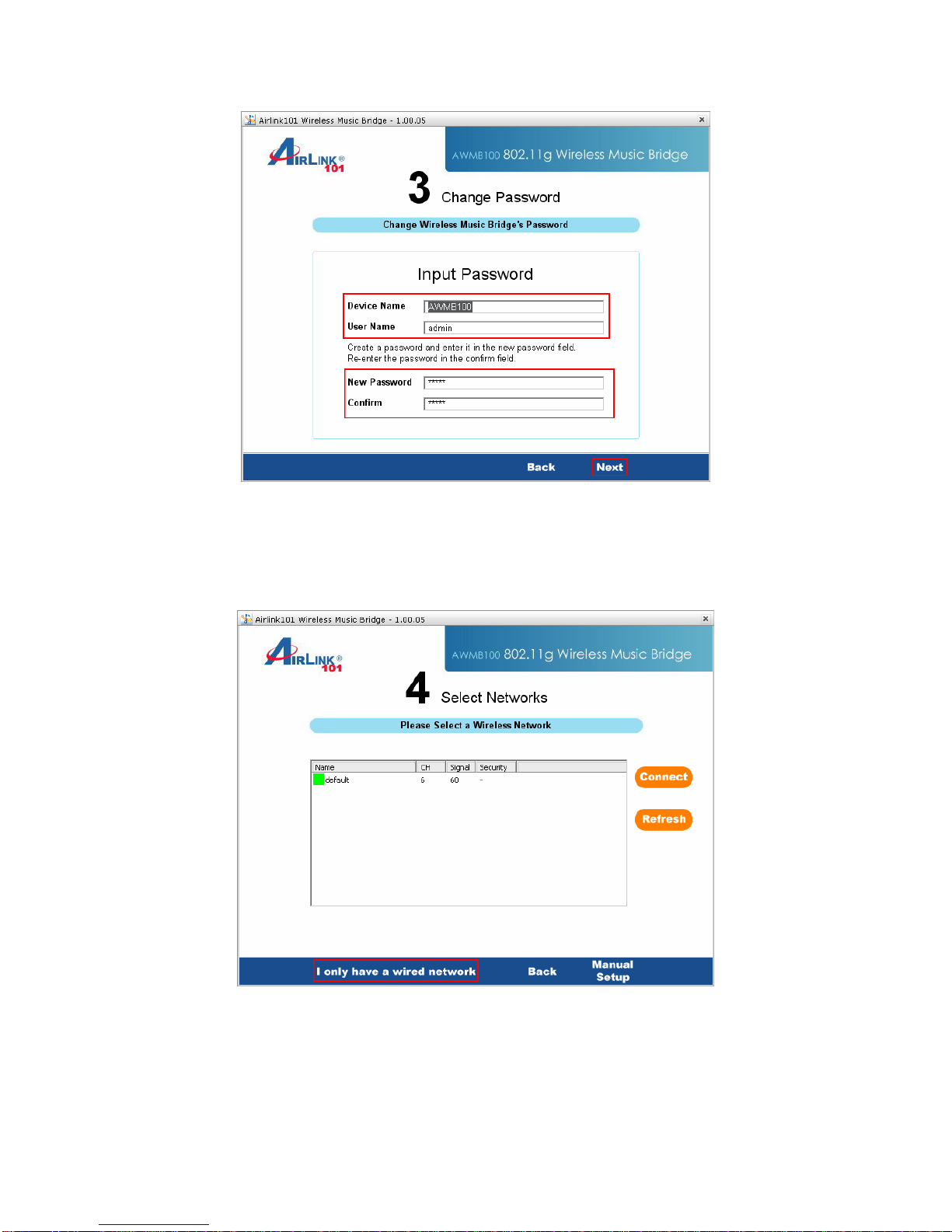
Step 7 This screen allows you to change the device name, username, and password.
If you want to change any of this information, enter it into the boxes and click Next. You
can also leave the default settings and click Next.

7
Step 8 If you are not using the wireless function of the music bridge, click on I only
have a wired network and the configuration is complete. You can now connect the
music bridge to your router and start playing music. If you plan to use the music bridge
wirelessly, go to Step 9.
Step 9 Select your network from the list and click connect.

8
Step 10 If your network is encrypted, enter the encryption information at the next screen
and click Next.
Step 11 The setup is complete. Click on Finish to save the settings.
Autres manuels pour AWMB100
1
Table des matières
Autres manuels Airlink101 Matériel réseau
Manuels Matériel réseau populaires d'autres marques

Matrix Switch Corporation
Matrix Switch Corporation MSC-HD161DEL Manuel utilisateur

B&B Electronics
B&B Electronics ZXT9-IO-222R2 Manuel utilisateur

Yudor
Yudor YDS-16 Manuel utilisateur

D-Link
D-Link ShareCenter DNS-320L Manuel utilisateur

Samsung
Samsung ES1642dc Instructions d'utilisation

Honeywell Home
Honeywell Home LTEM-PV Instructions de montage