Aero HygenX RAY Manuel utilisateur

2021-0914
2022-07-05
Principal Display Panel
Aero HygenX
RAY
AUTONOMOUS UVC ROBOT
REGISTRATION NO. 34541 PCPA
KEEP OUT OF REACH OF CHILDREN
This device is intended for commercial or industrial use only
READ LABEL AND THIS OPERATING MANUAL BEFORE USING.
WARNING - UV radiation emitted at 254 nm from this device
Reduces micro-organisms on surfaces
Aero HygenX Inc.
217-150 Katimavik Road
Ottawa, Ontario
K2L 2N2
CANADA
1-800-260-0787
NOTICE TO USER: This pest control product is to be used only in accordance with the directions on
the label. It is an offence under the Pest Control Products Act to use this product in a way that is
inconsistent with the directions on the label.

2
Manual
RAY Operating Manual
READ AND SAVE THESE INSTRUCTIONS!
THIS DEVICE IS INTENDED FOR COMMERCIAL OR INDUSTRIAL USE ON AIRCRAFT ONLY.
BEFORE USING THIS DEVICE READ ALL INSTRUCTIONS, WARNINGS AND CAUTIONS IN
THIS MANUAL AND ON THE PRODUCT LABEL.
TABLE OF CONTENTS
1.
PRECAUTIONS ............................................................ 3
2.
FEATURES AND CONTROLS ..................................... 6
3.
OPERATION ................................................................. 8
4.
TRANSPORTING THE DEVICE ................................ 13
5.
BATTERY CHARGING ............................................... 13
6.
MAINTENANCE & CLEANING ................................... 14
7.
TROUBLESHOOTING ................................................ 18
8.
WARRANTY ............................................................... 20
9.
SPECIFICATIONS ...................................................... 22

3
1. PRECAUTIONS
WARNING
UV radiation emitted at 254nm from this device. Unintended use of the device, or
damage to the housing, may result in exposure to ultraviolet radiation. Ultraviolet
radiation may cause eye and skin irritation. Avoid exposing eyes and skin to
ultraviolet radiation by always using the robot in the autonomous mode.
DANGER
Direct exposure to UVC can be dangerous and result in a sunburn-like
reaction to the skin and serious damage to the cornea. Never operate the
Aero HygenyX Ray - Autonomous UVC Robot with anyone in the cabin.
Direct exposure to UVC is dangerous. UVC products are not meant to
be used in applications or activities which may cause and/or lead to
death, personal injury and/or damage to the environment.
FIRST AID
Take label, manual or product name and Pest Control Product Registration Number
with you when seeking medical attention.
a. Personal UVC dosimeter indicators are recommended for staff involved with the
operation of RAY. (www.uvcdosimeters.com/personal-uvc-indicator/)
(According to the American Conference of Government Industrial Hygienists
(ACGIH), the Threshold Limit Value (TLV) for UVC is 6 mJ/cm² per workday, as
indicated in the Documentation of the Threshold Limit Values and Biological
Exposure Indices, 8th Edition, Copyright 2020.)
b. This device contains a
Lithium Iron Phosphate (LiFePo4) Battery
. To reduce the risk
of fire, electric shock, or injury, refer to the “MAINTENANCE & CLEANING” section
for instructions on battery replacement. To eliminate any possible exposure to UVC
light, ensure the Master Power Switch is off and the battery disconnected before
servicing the device. The battery must also be disconnected before shipping.
c. The battery in this device must only be charged using the charger supplied by Aero
HygenX. Charging with unapproved chargers may result in battery damage,
explosion or fire.
d. The UVC lamps in this device contain amalgam which contains traces of mercury
(Hg) stabilized as an alloy. Dispose of or recycle UVC lamps according to applicable
laws. (Visit: www.lamprecycle.org). Should lamps require replacement, they must be
replaced with lamps approved and certified by Aero HygenX. Failure to do so could
result in damage to the machine or the production of ozone.
e. Use Aero HygenX RAY – Autonomous UVC Robot only as described in this Operating
Manual. Do not carry out any maintenance other than that shown in this manual, or

4
as advised by a company supervisor. This device is not intended for use by persons
with reduced physical, sensory or reasoning capabilities, or lack of experience and
knowledge, unless they have been given supervision or instruction concerning use
of the device by a person responsible for their safety.
f. Disconnect battery when not in use for extended periods and before maintenance or
servicing. If the device is not working as it should, has received a sharp blow, has
been dropped, damaged, left outdoors, or dropped into water, do not use and contact
a company supervisor. When service or repair is required, a company supervisor
should contact the Aero HygenX Helpline (1-800-260-0787).
IMPORTANT SAFETY FEATURES
Aero HygenX RAY – Autonomous UVC Robot is equipped with LIDAR, SONAR and onboard
cameras which are used for guidance and to detect objects, motion of persons or other obstructions
which will impede its movement.
The following list outlines the important safety features of Aero HygenX RAY – Autonomous UVC
Robot and the corresponding response of the unit when operating in the autonomous mode.
Auto-Delay during Start-Up: To prevent exposure to UVC light during operation, Aero
HygenX RAY – Autonomous UVC Robot is equipped with a configurable time delay between
directional input on the device, until lamp illumination. This auto-delay allows time for the
operator to exit the aircraft and close the aircraft door before the lamps commence warm-
up. The default value for the auto-delay is 30 seconds. The auto-delay can be set to any
desired time interval (in seconds) between directional input and lamp illumination.
Object and Motion detection within 0.5 metres (1.64 feet): If an object or any motion is
detected within 0.5 metres of the device, Aero HygenX RAY – Autonomous UVC Robot will
stop and the UVC lamps will extinguish. Operator input is required before RAY will re-start.
Human Face detection up to 3 metres (9.84 feet): If a human face is detected within 3.0
metres of the device, Aero HygenX RAY – Autonomous UVC Robot will stop and the UVC
lamps will extinguish. Operator input is required before Aero HygenX RAY – Autonomous
UVC Robot will re-start.
Speed limitation 0.2 metres/second (0.66 feet/second): This is the maximum speed of the
device. For most sanitizing procedures, Aero HygenX RAY – Autonomous UVC Robot will
operate at speeds between 0.1m - 0.15m/second (0.33-0.49 feet/second).
Auto-shutoff if no motion detected: If Aero HygenX RAY – Autonomous UVC Robot
determines it is not safe to proceed (i.e., becomes impeded by an aircraft seat or object on
the floor), it will shut off following no motion detected for more than 20 seconds.

5
STOP button on Touchpad: The STOP button can be pushed at any time to cancel all inputs.
Pushing the STOP button will stop the disinfection sequence.
Emergency Pushbuttons: If either of the red Emergency Pushbuttons on the top of the
device are pressed, Aero HygenX RAY – Autonomous UVC Robot will:
a) remove power from lamps; and
b) remove power from drive unit.
Protective Cage: Aero HygenX RAY – Autonomous UVC Robot is equipped with a protective
cage to prevent damage to the lamps during transport of unit. Although the cage is
removable, Aero HygenX recommends leaving the cage on during operation of unit.
Environmental Cover: In addition to the cage, Aero HygenX RAY – Autonomous UVC Robot
also comes with an environmental cover, which fits over top of the cage, providing protection
from water/moisture/dust ingress. The environmental cover should be in place when the
device is being transported outdoors.
Amber Warning Lights: During the start-up sequence, amber flashing lights on either end of
the top cover illuminate indicating that the UVC lamps are now armed and the system is
powered for use. (The start-up sequence is initiated by ensuring the Emergency
Pushbuttons are UP, followed by the Master Power Switch being turned ON)
Master Power Switch: The large red rotary knob on the back end of Aero HygenX RAY –
Autonomous UVC Robot is the Master Power Switch. Turning the Master Power Switch OFF
disconnects the Main Battery from all electronics and lamps and allows for safe transport or
maintenance of the unit.
Use this unit only in the manner intended by the manufacturer. If you have questions, contact the
manufacturer at the address or telephone number on the label. For more information regarding
automatic safety features, contact the Aero HygenX Helpline @ (1-800-260-0787).

6
2. FEATURES AND CONTROLS
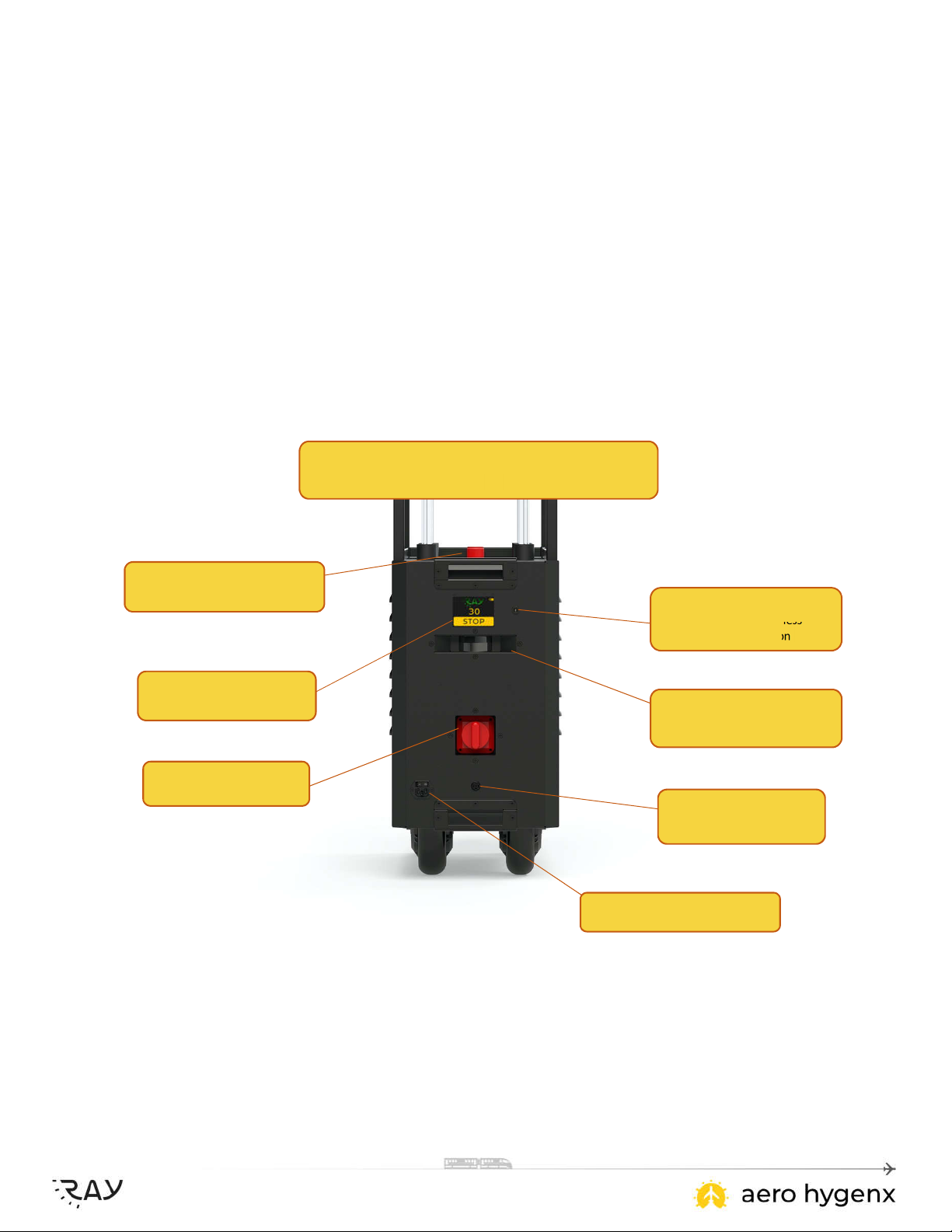
REAR VIEW
REAR Touchpad
Countdown and Auto-pause
Master Power Switch
Full Power Disconnect
REAR
Camera
Situational Awareness
Human Detection
Emergency Push Button
UVC and Drive Unit Power Down
REAR Lidar
Autonomous Guidance
REAR Sonar
Object Detection
Battery Charging Receptacle
Autonomous Robotics

7
FRONT VIEW
FRONT
Camera
Situational Awareness
Human Detection
FRONT
Lidar
Autonomous Guidance
FRONT Sonar
Object Detection
FRONT Touchpad
Simple Built-in Touch Screen

8
3. OPERATION
TREATMENT OF THE AIRCRAFT
Supported efficacy claims for hard and soft surfaces within an aircraft cabin*
Treatment Cycle Supported Claims
Single pass at 0.125 m/s Kills 99.999% of SARS-CoV-2
Two passes at 0.125 m/s Kills 99.999% of SARS-CoV-2
Reduces viruses by 99%
Two passes at 0.125 m/s with a 40 s stationary phase
at each row of seats
Kills 99.999% of SARS-CoV-2
Kills 99.99% of viruses
Two passes at 0.125 m/s with a 4.5 minute stationary
phase at each row of seats
Kills 99.999% of SARS-CoV-2
Kills 99.99% of viruses
Kills 99.9% of bacteria
*Applicable only when surfaces are less than 1.5m away from the path of travel
a. The use of this device is a supplement to, and not a substitute for, standard
disinfection control practices; users must continue to follow all current infection
control practices, including those related to the cleaning and disinfection of
environmental surfaces.
b. The following procedure outlines the steps necessary to treat the aircraft, using
UVC light, following routine operations or following carriage of individuals who have
been exposed to an infectious disease.
c. Ensure all personnel involved in the task familiarize themselves with the required
safety precautions and operating instructions associated with the device. (Refer to
“PRECAUTIONS” section above.)
d. Treatment of an aircraft using UVC light is based on the assumption of a clean
aircraft. Visible soil and liquid spills, including bodily fluids, must be removed from
aircraft surfaces prior to the commencement of treatment. If necessary, seek
guidance from the local health authority or medical professional if notified of the
presence of bodily fluids, prior to the commencement of treatment.
e. Ensure the following Tools and Equipment are available prior to commencing
treatment:
1. Protective clothing.
2. Safety goggles for eye protection.
3. Personal UVC Exposure Indicatorp
4. Warning placards.
f. Put up external warning placards when UVC treatment of the aircraft is in progress.
All unnecessary personnel should be kept at a distance until the task is completed.
g. Prepare the aircraft cabin for treatment. Ensure all flight crew and passengers are
not in the treatment area and their belongings and garbage have been removed
from the aircraft.

9
AREA OF COVERAGE
a. Aero HygenX RAY – Autonomous UVC Robot incorporates a unique design which
has been engineered for both single and dual-aisle aircraft. The lamp array allows
for maximum UVC light exposure on to the high-touch surfaces of an aircraft. To
sanitize or disinfect, the UV light must have direct line-of-sight with target surfaces.
b. By eliminating the need for an operator to be present during the treatment process,
the autonomous operation of Aero HygenX RAY – Autonomous UVC Robot allows
for safe UVC treatment at the push of a button.
c. The powerful 24V LiFePo 50Ah battery allows for a minimum of 6 dual-pass
treatment before recharging is required.
START SEQUENCE
Aero HygenX RAY – Autonomous UVC Robot has 3 modes of Operation:
(1) FORWARD:
Aero HygenX RAY – Autonomous UVC Robot will move down the aisle (away from the operator)
until detecting a wall or obstruction and will then come to a STOP.
(2) LOOP:
Aero HygenX RAY – Autonomous UVC Robot will move in the direction of the chevron labelled “1”
until detecting a wall or obstruction, stop momentarily, then reverse direction and move back down
the aisle, in the direction of the chevron labelled “2”, until detecting another wall or obstruction, and
will then come to a stop.
(3) REVERSE:
Aero HygenX RAY – Autonomous UVC Robot will move down the aisle (towards the operator) until
detecting a wall or obstruction and will then come to a STOP.

10
Once Aero HygenX RAY – Autonomous UVC Robot is in position
in the aircraft aisle, and the environmental cover has been
removed, the Master Power Switch is turned to the ON position.
(Power-up is verified by amber flashing lights on the top of the unit).
The device will now go through a short System Health Check.
When the System Health Check is complete, the “RAY” logo turns
green and the device is ready for use.
The operator then selects a directional command; either
FORWARD, REVERSE, or LOOP.
The touchpad now reverts to the Countdown mode (shown here),
commencing the auto-delay of 30 seconds before lamp warm-up.
This countdown allows time for the operator to exit the aircraft.
Ce manuel convient aux modèles suivants
1
Table des matières
Manuels Robotique populaires d'autres marques

STEMCenter USA
STEMCenter USA Pi-Bot v2.00 Manuel utilisateur

SunFounder
SunFounder PiDog Manuel utilisateur

Universal Robots
Universal Robots UR5 Manuel utilisateur

Universal Robots
Universal Robots E Series Manuel utilisateur

YASKAWA
YASKAWA MOTOMAN-MPL80 II Manuel utilisateur

EFORT
EFORT ECR5 Manuel d'instructions