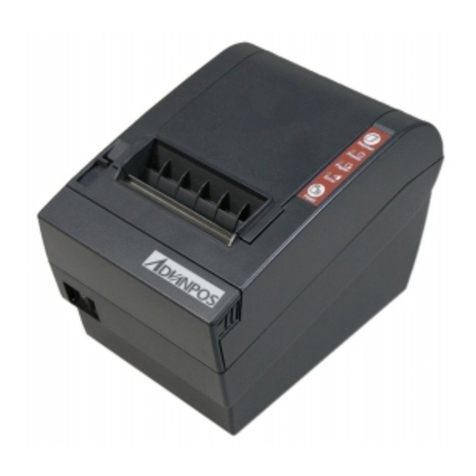
AdvanPOS WP-T800 Manuel utilisateur

1 Station Thermal Line
Receipt Printer
MODEL :
WP-T800
VERSION
: 1.00

WP-T800 1 Station Thermal Line Printer
CONTENTS
1. GENERAL DESCRIPTION..............................................................................3
1.1 OVERVIEW................................................................................................... 3
1.2 FEATURES ................................................................................................... 3
1.3 ACCESSORIES.............................................................................................. 3
2. MAIN SPECIFICATIONS.................................................................................4
3. EXTERNAL APPEARANCE AND PART DESCRIPTIONS............................5
4. INSTALLATIONS.............................................................................................6
4.1 HOW TO CONNECT POWER ADAPTER............................................................ 6
4.2 HOW TO CONNECT CASH DRAWER ............................................................... 6
4.2 SETTING OF THE PRINTER COVER AND SETTING PAPER ................................. 7
5. CONTROL PANEL ..........................................................................................8
5-1. BASIC OPERATION ...................................................................................... 8
5-2. SWITCH OPERATION (COMBINED SWITCH OPERATION).................................. 9
5-3. SETTING................................................................................................... 11
5-3-1. BAUD RATE............................................................................................11
5-3-2. SELECT HANDSHAKING BUSY CONDITION......................................11
5-3-3. SELECT PRINTING SPEED................................................................... 11
5-3-1. SELECT PRINT DENSITY...................................................................... 11
6. INTERFACE SPECIFICATIONS ...................................................................12
6.1 CHANGING THE INTERFACE CARD ................................................................ 12
6.2 SERIAL INTERFACE SPECIFICATIONS ............................................................ 12
6.3 PARALLEL INTERFACE SPECIFICATIONS ........................................................ 13
7. DRAWER KICK CONNECTOR.....................................................................15
7.1 SPECIFICATIONS ........................................................................................ 15
7.2 CONNECTOR
’
S PIN CONNECTION ................................................................ 15
8. CONTROL CODE..........................................................................................16
8.1 ATTACHED COMMAND DESCRIPTION ........................................................... 16
8.2 CONTROL CODES ...................................................................................... 17
9. CHARACTER CODE TABLES......................................................................26
9.1 INTERNATIONAL CHARACTER SETS .............................................................. 26
9.2 CODE PAGE: 00H TO 7FH.......................................................................... 27
9.3 CODE PAGE: PC437 (USA, EUROPEAN STANDARD) ................................... 28
- 1 -

WP-T800 1 Station Thermal Line Printer
9.4 CODE PAGE: KATAKANA (JAPANESE)........................................................... 29
9.5 CODE PAGE: PC850 (MULTILINGUAL)......................................................... 30
9.6 CODE PAGE: PC860 (PORTUGUESE).......................................................... 31
9.7 CODE PAGE: PC863 (CANADIAN-FRENCH) ................................................. 32
9.8 CODE PAGE: PC865 (NORDIC) .................................................................. 33
9.9 CODE PAGE: PC852 (EASTERN EUROPE)................................................... 34
9.10 CODE PAGE: PC866 (RUSSIAN)............................................................... 35
9.11 CODE PAGE: PC857 (TURKISH) ............................................................... 36
9.12 WINDOWS CODE PAGE............................................................................. 37
10. EXTERNAL DIMENSIONS..........................................................................38
- 2 -

WP-T800 1 Station Thermal Line Printer
1. GENERAL DESCRIPTION
1.1 Overview
The WP-T800 Series Line Thermal Receipt Printer is designed for use with
ECR, electronic instruments, computer peripheral equipment, kitchen
printers and so on.
1.2 Features
1). Compact desktop Line Thermal printer.
2). Easy loading designed for dropping the paper roll
3.). Interface conformity to RS-232C, centronics ,USB port depends on the
Interface card which is removeable and other option of Interface for
different application.
4). Command protocol is compatible with ESC/POS.
5). 2 drawer kick-out.
6). The resident data buffer has storage capacity of about 128K-bytes,
enable data to be received even while printing.
7). Support download bit image, directly bit image and bar-code printing.
8). The sensors include paper end, paper near end and cover sensor.
1.3 Accessories
The following parts are included in this set of printer. Please confirm.
Paper roll (1 roll)
Power adapter (1 unit)
Power core (1 unit)
User
痴
ma nual (1 booklet)
Option( one of items below will be included)
Cable for RS-232C (depend on RS-232C interface card) (1 unit)
Cable for Centronics (depend on Centronics interface card) (1 unit)
Cable for USB (depend on USB interface card) (1 unit)
- 3 -

WP-T800 1 Station Thermal Line Printer
2. MAIN SPECIFICATIONS
Item Description
1 Printing method Thermal line
2 Printing speed Approx. 150~220mm / second
3 Number of columns 40 columns
4 Character structure 12x24 (alphanumeric)
5 Line pitch 1/6 inch (4.23mm)
6 Detector Paper end,Paper near end, cover
7 Paper Single-ply thermal paper roll
Paper roll 79.5 ±0.5 (W) x 83 (max) mm
8 Reliability 100KM
9 Power supply 24VDC / 2.1A .
10 Interface RS-232C, Centronics and USB
11 Weight Approx.1.25Kg
12 External dimensions 140.7(W) x 190(D) x 133(H)mm
13 Operating temp. 0 to 40℃
14 Storage temp. -20 to 60℃
15 SRAM 128 KB
16 FLASH 512 KB
- 4 -

WP-T800 1 Station Thermal Line Printer
3. EXTERNAL APPEARANCE AND PART DESCRIPTIONS
1)
1Printer cover
2Cover open lever
3Cutter cover
4Power switch
5Control panel
6DIP switch cover
7Interface connector
8Power connector
9Cash Drawer connector
- 5 -

WP-T800 1 Station Thermal Line Printer
4. INSTALLATIONS
4.1 How to Connect Power Adapter
(1) Ensure that the power switch is
OFF.
(2) Plug the power connector into the
printer
痴
powe r connector at the
arrow mark facing upward.
(3) Plug the power cord into the outlet,
and turn on the power.
(4) Connector Specifications shows as
below:
Pin Number Signal Name
1 +24VDC
2 GND
3 NC
Shell Frame GND
4.2 How to Connect Cash Drawer
(1) Ensure that the power switch is OFF.
(2) Plug the cash drawer connector into the
Drawer kick out connector at the arrow
mark facing upward.
(3) Plug the connector into the RJ11 phone
jack.
Note: Power for drawer kick out is 24vdc, if
voltage of cash drawer is different, it may
cause cannot open situation or harm the cash
drawer.
- 6 -

WP-T800 1 Station Thermal Line Printer
4.2 Setting of the Printer Cover and Setting Paper
(1) Push the cover open lever, and open
the printer cover
(2) Remove any used paper roll’s core,
and insert the paper roll as picture
bellows shown:
Put the paper roll into paper trough and pull
(3) Pull out the leading edge of paper ,
No
paper thickness are 0.06-0.10mm
out the leading edge of the paper as picture
above shown.
m
close the printer cover
te :
1.
2.paper width are range from 79-80m
3.Roll diameter max. 83mm
- 7 -

WP-T800 1 Station Thermal Line Printer
WP-T800 1 Station Thermal Line Printer
- 8 -
5. CONTROL PANEL
5-1. Basic Operation
1. Feed Line feed button
When this push-button switch is pressed once briefly (for
0.5 seconds or less), the paper is fed forward by one line.
When it is held down continuously, the paper is fed
forward continuously until the switch is released.
2. Repeat Repeat button
When on page mode or line mode situation, there maybe
paper jam or paper exhaust situation , please press
repeat button, then printer will repeat the last event which
was not complete.
3. Power lamp (green LED)
Lights indicate power well.
4. Paper lamp (Yellow LED)
•Lamp indicator will remain lighting when paper near
end.
•Lamp indicator will keep sparkling when paper end, and need to
replace a new one.
The flash timing chart shows as below:
Printer status Blinking Pattern
Paper end
ON
OFF
500 ms
ON
OFF
Paper near end
Table 5-1. SEL Lamp Display
5. Error lamp (red LED)
When printer cover is not properly closed or paper jam happen on
cutter part or paper is not put properly , the erroe indicator lamp(red
LED) will light.
- 8 -

WP-T800 1 Station Thermal Line Printer
5-2. Switch Operation (Combined Switch operation)
T1. SELF PRINT TES
LF + POWER ON (Turn
t
h
he power on while
olding the LF button
epressed, the buzzerd
gives one short beep.)
p
t
s
e hen
the LF button is held
Self-testing will be
erformed according to
he VER. NO., printer
ettings and characters
tc (Ref. sheet1). W
again after self-printing
stopped, the printer will
p
is mode, it is necessary
rint out again. To turn off
th
to turn off the printer
power completely.
- 9 -
Autres manuels pour WP-T800
1
Table des matières
Autres manuels AdvanPOS Imprimante