
Advanced T2 Manuel utilisateur

T2 Installation Guide

Contents
Specification 01
Installation 02
Placement
Installation Steps
IP65 Protection
Powering on and Resetting the T2
Cabling Options
Connectivity 08
03
04
06
07
07
Networking
Device Registration
08
09

Authentication Modes Face/Finger/Card/Fob
Contactless Clocking
Onboard User Enrolment
HD Biometric Camera
Internal Proximity Reader
Integrated Card Enrolment
Supported Users 10,000
Case PTFE Coated Aluminium Alloy
Networking Ethernet, Wi-Fi b/g/n/ac
Environmental IP65 Certified
Typical Power Consumption 11W
Power Source DC or PoE+ (802.3at)
Mains Adapter Optional
Operating Temperature Range -10 to 40°C
Certifications UKCA/CE/RCM
Dimensions (H x W x D mm) 296 x 126 x 40
Specification
1

Installation
Before use the device should be wall mounted using the
supplied bracket. The T2 supports a wide variety of installa-
tion options.
If installed correctly, the T2 can offer full IP65 environmental
protection to support use both outside and in challenging
environments.
The unit may be powered by a dedicated 12V DC power
supply. Advanced only recommend the use of a DC power
supply certified and supplied by Advanced.
Alternatively it can be powered from a Power over Ethernet
source (802.3at compatible).
2
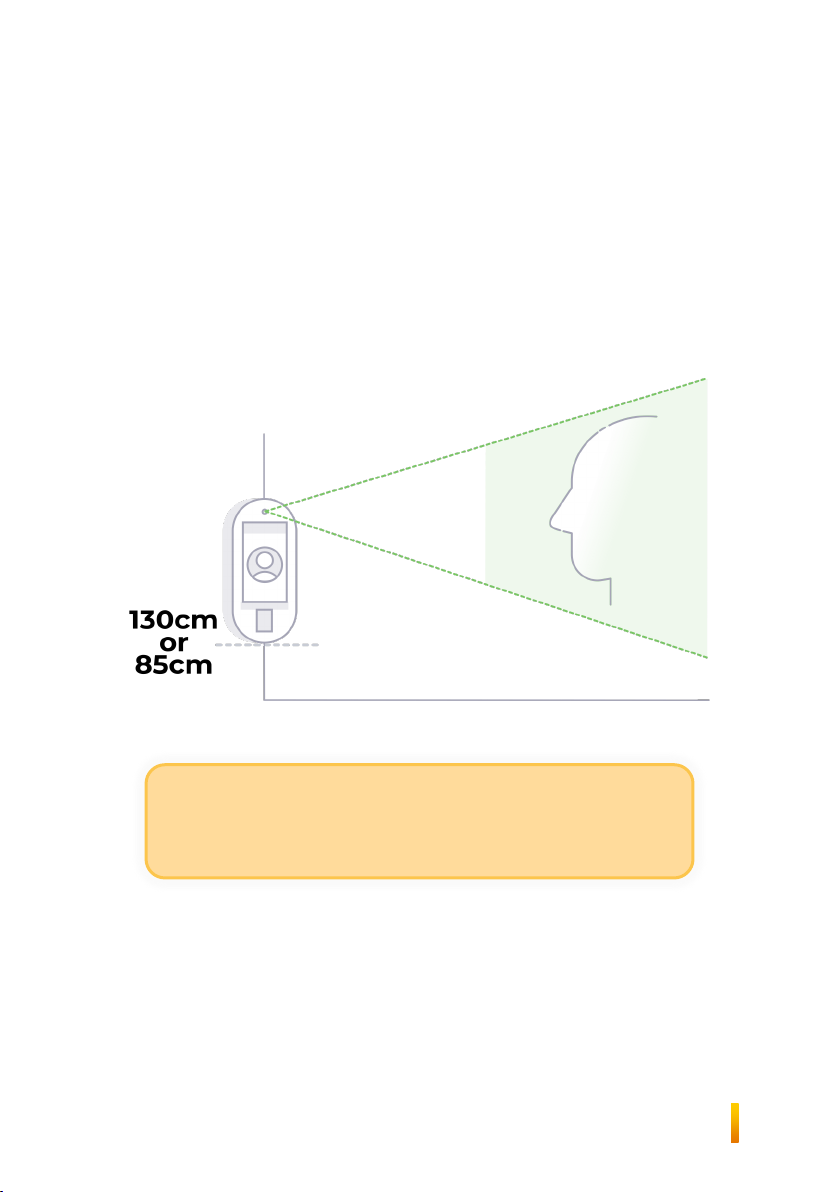
Placement
If the T2 is to be used for authentication using face biometrics,
height from the ground is a critical factor when considering
where to place the device.
The measurement chosen will depend on the accessibility
needs of the installation.
Consider the environment’s lighting when placing a
face authentication unit. Bright lights behind faces
may limit the unit’s ability to correctly identify users.
3

Installation Steps
Run all cables to the terminal mounting point.
The cables can enter the T2 from the top, bottom
or rear. Only the rear can be used if an IP65
installation is required.
1
Break out the required opening in the mounting
bracket to allow the cables to enter the unit.
2
If required, apply sealant around the channels on
the rear of the bracket.
3
4

Using 4mm screws, fix the mounting bracket to
the wall, ensuring the sealant creates a good seal
with the wall if applicable.
4
Connect the cables to the unit.
6
Using the switch on the rear of the unit, turn the
T2 unit on.
8
Push the unit onto the bracket and slide it down.
9
Fit and tighten the two security screws to the
bottom of the unit.
10
If the access control board is fitted, insert the
ribbon cable at both ends.
7
5
If required, fit the screw bungs over the screws
5

IP65 Protection
The provided rubber seals must be fitted to the
four screw holes in the mounting bracket
1
The cables must enter through the opening in
the rear of the mounting bracket. The upper and
lower cable entries must be left intact
2
Exterior grade sealant should be applied to the
guide channels in the rear of the mounting
bracket, to seal the unit against the wall
3
6

Powering on and resetting the T2
Your T2 will need switching on during the installation process
(see Installation Steps, step 8). The switch is located on the rear
of the device. The device can be switched on before power is
applied to the input.
The reset switch is also located on the rear of the device. To
reboot the device, press and release the button. To enter
factory reset mode, push and hold the button, or power the
unit on while holding the button.
The unit allows you to reset to the factory-original operating
system, revert to the previously installed version, or reinstall the
current version.
Cabling Options
The T2 can be used with a provided DC power supply which
uses either a barrel-jack connection for convenience, or it can
take the power input from screw terminals, providing higher
flexibility during installation.
The gigabit ethernet port uses a standard RJ-45 connector.
CAT-5E cable or better is recommended. External cables or
cables longer than 30m connected to the ethernet port must
be shielded.
7

The T2 clocking terminal is part of the Advanced Device and
Access Manager, which is a SaaS solution hosted on cloud
infrastructure. Therefore, the T2 must be able to connect to the
cloud infrastructure to operate properly.
While the T2 will continue to work while offline, a connection is
required to pick up employee or configuration updates, and to
send out clocking or enrolment data. Clocking data will not be
received by the Time and Attendance application until the
cloud connection is restored.
The T2 uses standard TCP/IP networking and can be config-
ured to use wired ethernet (1000/100 Mbps) or Wi-Fi b/g/n/ac
(2.4/5GHz). Whichever is chosen, the T2 can be configured to
use either a static IP address or pick up an IP address using
DHCP.
Optionally, a cellular router can be purchased to provide a net-
work connection to the T2, either over Ethernet or Wi-Fi.
No special configuration of your firewall should be necessary
providing the T2 is granted internet access. If your security
policy mandates tight control, please refer to the T2 Network
Requirements document for details.
If a MAC address is required to allow the device onto the local
network, it can be displayed on-screen once the T2 is installed
by navigating to the network settings screens.
Connectivity
Networking
8
Table des matières


