silver s ot on white, while to the eye there is contrast the reflectivity of the two is sometimes nearly
the same. If there is trouble with certain materials detecting the target you can rint the target in a
yellow or white field. The size of the yellow field should be larger than the scan length. (N te: in
order to get an accurate scan no other rinted marks may a ear in the yellow scan area. The rint-
er color alignment marks can a ear on the inside edge of the target or the other side of the media.)
The mark should be laced at least 0.5 inches (12 mm) from the edge of the media and the s acing
between frames should be at least 0.5 inch (12 mm). (Advanced usage: You can lace the target
closer to the edge of the material if you use inside out scanning. See Web Site Co y or CD Co y)
Explanati n f SmartMarkTM
The theory of o eration relies on the SmartMark sensor sending an analog
signal to the embedded com uter during a scan. The data is analyzed after
the scan to automatically create a threshold, find the edge of the target and
eliminate noise. The i-TECH scans the mark in both x and y directions and
calculates the intersection of the 2 scans. The i-TECH com uter then as-
signs that intersection as the 0,0 oint of the i-TECH coordinate system and matches that to the ori-
gin oint (minimum x, minimum y) of the HPGL cut file.
The i-TECH uses a s ecial HPGL command, FO, to start the registration mark sensing function. It
automatically re-registers the coordinate each time the FO HPGL command is received. As art of
the setu a “x move between jobs” is in ut via the rinter driver o tions which moves the sensor to
the a roximate osition of the next co y’s or next frame’s registration mark. The i-TECH ex ects
the target for the next frame to be within ½ the scan distance of the end of the frame.
The Red LED ointer must be manually ositioned with the joystick buttons at the a roximate 0,0
coordinate osition rior to sending the first job. The SmartMark system automatically re osi-
tions the sensor for subsequent co ies.
The ositioning rocess must be re eated if the joystick buttons are used. This is hel ful because it
allows the system to be reinitialized when needed.
Once the LED ointer is ositioned as shown, the SmartMark is ready to o erate and will scan
the registration mark when it receives a FO command in the job stream whether on the first co y or
on subsequent co ies. Since the FO command is embedded in the beginning of the cut file the scan
of the registration mark is erformed at the beginning of each co y or frame of labels and on subse-
quent co ies.
Types f SmartMarkTM Scanning
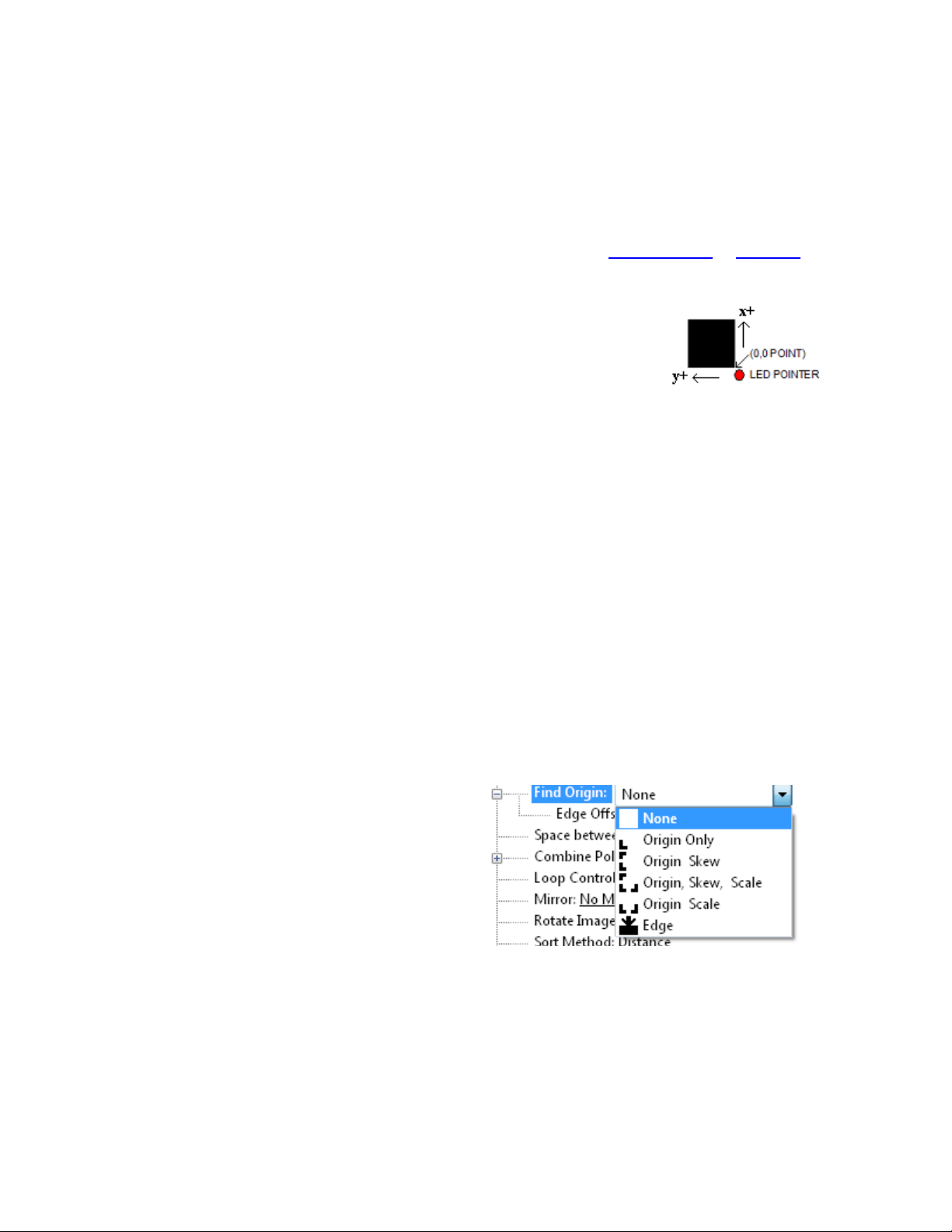
There are five ty es of SmartMarkTM scanning
available. They are shown in the image to the
right. The scan ty e is selected in the rinter driver
references.
Origin Skew, Origin Skew Scale, and Origin Scale
are the only ty es normally used on the cutter.
Origin Skew is used if the media is not necessarily
loaded straight. This scans the origin and the skew
mark and rotates the cut image to match the cut location at the two scanned locations. No scaling
of the cut image is erformed with Origin Skew scanning. If you cuts do not match in size from
the rint you either have to calibrate to rinter or use a different find origin ty e.
Origin Skew Scale does alignment at the origin, rotation and scaling in both x and y axes are re-
formed. This scan ty e requires that the sensor size arameter be correct so that cut image is same
size as rinted image.
Origin Scale does alignment at the origin, rotation and x-axis only scaling at the scale oint. It as-
sumes that the scaling in the y-axis is correct. If the rinter you are using has a x axis scaling error
6