
Acrosser Technology AND-APL1E Series Manuel utilisateur


AND-APL1Ex
2Acrosser Technology Co., Ltd.
To read this User Manual on your smart phone, you will have to install an
APP that can read PDF le format rst. Please nd the APP you prefer from
the APP Market.
Ver: 101
Date: Jan. 10, 2022
Disclaimer
For the purpose of improving reliability, design and function, the information in
this document is subject to change without prior notice and does not represent a
commitment on the part of Acrosser Technology Co., Ltd.
In no event will Acrosser Technology Co., Ltd. be liable for direct, indirect, special,
incidental, or consequential damages arising out of the use or inability to use the
product or documentation, even if advised of the possibility of such damages.
Copyright
This document contains proprietary information protected by copyright. All rights are
reserved. No part of this manual may be reproduced by any mechanical, electronic,
or other means in any form without prior written permission of Acrosser Technology
Co., Ltd.
Trademarks
The product names appear in this manual are for identication purpose only. The
trademarks and product names or brand names appear in this manual are the
property of their respective owners.
Purpose
This document is intended to provide the information about the features and use of
the product.
Audience
The intended audiences are technical personnel, not for general audiences.
WARNING
Danger of explosion if batteries are incorrectly replaced. Always replace the
battery with the same specications. Dispose of used batteries according to the
manufacturer's instructions.
Before running the system, make sure the power cord is rmly plugged into the
socket.
CAUTION
IEC 60417-6042 (2010-11) IEC 60417-6172 (2012-09)
All power cords must be disconnected during product repair.

AND-APL1Ex
3www.acrosser.com
Table of Contents
1. Product Specications .................................................................. 5
1.1. Specications ............................................................................................................. 5
1.2. Package Contents ...................................................................................................... 7
2. Hardware Information ................................................................... 8
2.1. Dimensions................................................................................................................. 8
2.2. Jumpers and Connectors ..........................................................................................11
2.3. List of Jumpers ......................................................................................................... 13
2.3.1. CMOS Setting Selection (CN2)..................................................................... 13
2.4. List of Connectors..................................................................................................... 13
2.4.1. Digital I/O (CN9)............................................................................................ 14
2.5. 2.5” Hard Drive Installation....................................................................................... 15
3. AMI BIOS Setup ........................................................................... 18
3.1. System Test and Initialization ................................................................................... 18
3.2. AMI BIOS Setup ....................................................................................................... 18
3.3. Setup Submenu: Main.............................................................................................. 19
3.4. Setup Submenu: Advanced...................................................................................... 19
3.4.1. Advanced: Trusted Computing...................................................................... 20
3.4.2. Advanced: CPU Conguration ...................................................................... 21
3.4.3. Advanced: SATA Drives ................................................................................ 22
3.4.4. Advanced: USB Conguration ...................................................................... 23
3.4.5. Advanced: Hardware Monitor........................................................................ 24
3.4.6. Advanced: SIO Conguration........................................................................ 25
3.4.6.1. Serial Port Conguration ................................................................ 25
3.4.7. Advanced: Serial Port Console Redirection .................................................. 26
3.4.7.1. Console Redirection Settings ......................................................... 27
3.4.7.2. Legacy Console Redirection Settings ............................................ 29
3.4.7.3. Serial Port for Out-of-Band Management/Windows Emergency
Management Services (EMS) ........................................................ 30
3.4.8. Advanced: LAN Bypass Conguration .......................................................... 31
3.4.9. Advanced: Power Management .................................................................... 32
3.4.10. Advanced: Digital IO Port Conguration ....................................................... 33
3.5. Setup submenu: Chipset .......................................................................................... 34
3.5.1. Chipset: North Bridge.................................................................................... 34
3.5.2. Chipset: SCC Conguration .......................................................................... 35
3.6. Setup submenu: Security ......................................................................................... 36
3.7. Setup submenu: Boot............................................................................................... 37
3.8. Setup submenu: Exit ................................................................................................ 38


AND-APL1Ex
5www.acrosser.com
1. Product Specifications
AND-APL1Ex networking appliance product effectively handles Software Dened-
WAN (SD-WAN), Virtual Customer Premise Equipment (vCPE) technology, Unied
Threat Management (UTM), Virtual Private Networking (VPN), Intrusion Detection
and Prevention Systems (IDS, IPS), Firewall technology, and Load Balancing
applications.
The AND-APL1Ex is powered by an Intel®Celeron®Processor N3350 or E3940
processor and has onboard LPDDR4 2GB memory and 8GB eMMC. Measuring only
165 x 92 x 40mm, the appliance is small enough for even the most crowded ofces.
Despite its modest dimensions, it still houses two USB3.0 ports and a console port
alongside its four LAN ports.
1.1. Specifications
(Specications are subject to change without notice.)
Platform
Form Factor • Desktop Network Appliance
Processor • AND-APL1E1: Intel®Celeron®Processor N3350 SoC
• AND-APL1E2: Intel®Celeron®Processor E3940 SoC
Chipset • SoC
System Memory • Onboard LPDDR4 2GB memory
• 1x DDR3L SO-DIMM socket (For AND-APL1E2 only)
Network
Ethernet • Intel®i211 GbE x 4
Bypass • 1 pair bypass function (For AND-APL1E1 only)
Display
Graphic Controller • Intel®Integrated
Storage
HDD • 2.5” HDD Bay x 1
CF/CFast/mSATA • Onboard 8GB eMMC, SATA 6.0 Gb/s port x 1

AND-APL1Ex
6Acrosser Technology Co., Ltd.
Internal/Expansion Interface
Mini-PCIe Slot • With USB 2.0 signal x 1, with SIM socket (For AND-
APL1E2 only)
Universal Serial Bus • USB 3.0 x 2
Miscellaneous
RTC • Internal RTC
Watchdog Timer • 1~255 steps by software programmable
TPM • (TPM v1.2 9660/TPM2.0 9665 Optional) (For AND-
APL1E1 only)
GPIO • 4-bit input, 4-bit output optional (For AND-APL1E1 only)
FAN • 1 (For AND-APL1E1 only)
MTBF (Hours) • 166,000
Color • Black
I/O Interface
Front Panel • Power LED x 1 Status LED x 1 HDD Active LED x 1
Bypass LED x 1
• LAN LEDs x 8
Rear Panel • USB 3.0 Port x 2 RJ-45 Port x 4
• RJ-45 Console x 1
• 12V DC Power Input x 1
• Reset Button x 1
• Power Button x 1 (For AND-APL1E2 only)
• Antenna Hole x 2 Optional (For AND-APL1E2 only)
Environmental Parameters and Dimension
Power Requirement • 12V DC Power
Operating Temperature • 32°F ~ 104°F (0°C ~ 40°C )
Storage Temperature • -4°F ~ 140°F (-20°C ~ 60°C)
Operating Humidity • 10%~80% relative humidity, non-condensing
Storage Humidity • 10%~80% @40°C; non-condensing
Vibration • 0.5 Grms/ 5 ~ 500Hz / operation (2.5” HDD)
• 1.5 Grms/ 5 ~ 500Hz / non operation
Shock • 10 G peak acceleration (11 m sec. duration), operation
• 20 G peak acceleration (11 m sec. duration), non
operation


AND-APL1Ex
9www.acrosser.com
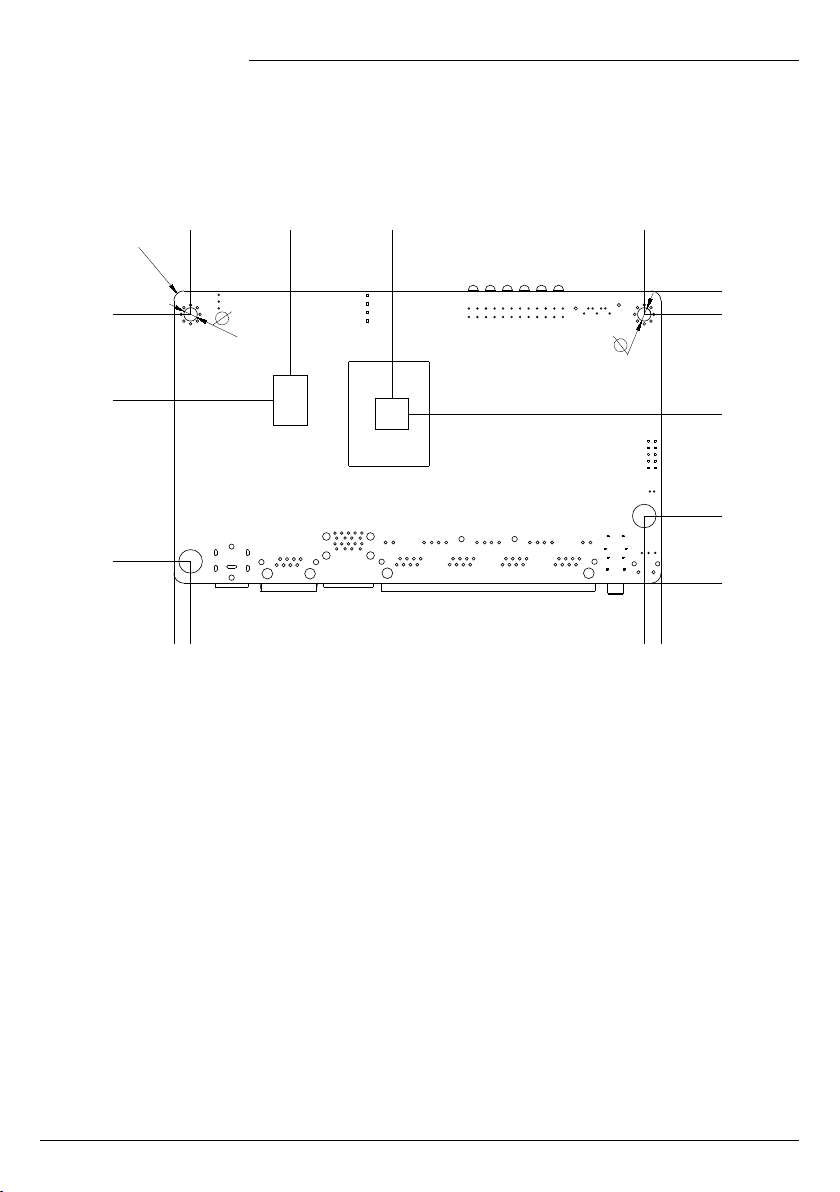
Board Component Side:
87
0
9
27.28
42.32
74.08
80.27
81.75
14.11
5.77
7.3
71.88
R3
1.72
2.94
22.91
29.24
34.32
39.4
44.48
49.56
54.64
87.35
131.62
10.79
85.8
69.03
123.59
78.09
67.03
10.9
5.39
10.23
19.79
145
0
8
11.28
24.29
40.04
55.79
71.54
89.53
114.38
127.8
3.34
32.22
55.42
16.2
1.6
Note: There is no SIM/DDR/mini-PCIE connector on AND-APL1E1.
Ce manuel convient aux modèles suivants
2
Table des matières
Autres manuels Acrosser Technology Serveur

Acrosser Technology
Acrosser Technology AR-R5800 Manuel utilisateur

Acrosser Technology
Acrosser Technology ANR-SKB2N ACN Series Manuel utilisateur

Acrosser Technology
Acrosser Technology ANR-C62 N1Series Manuel utilisateur

Acrosser Technology
Acrosser Technology ANR-C236N1-K2D00 Manuel utilisateur

Acrosser Technology
Acrosser Technology ANR-C62-N1 Series Manuel utilisateur

Acrosser Technology
Acrosser Technology ANR-DNV3N3 Series Manuel utilisateur

Acrosser Technology
Acrosser Technology AAD-C622A Series Manuel utilisateur


