
Acrosser Technology AAD-C622A Series Manuel utilisateur

AAD-C622AX
User Manual
Acrosser Technology Co., Ltd.
www.acrosser.com
AAD-C622AX Series
Intel®2nd XEON Cascade Lake
In-Vehicle Server
• Cascade Lake, 5x PCIe[x16] Exp. Slots
• Air Cooling System

AAD-C622AX
2Acrosser Technology Co., Ltd.
To read this User Manual on your smart phone, you will have to install an
APP that can read PDF le format rst. Please nd the APP you prefer from
the APP Market.
Ver: 100-001
Date: Dec. 20, 2021
Disclaimer
For the purpose of improving reliability, design and function, the information in
this document is subject to change without prior notice and does not represent a
commitment on the part of Acrosser Technology Co., Ltd.
In no event will Acrosser Technology Co., Ltd. be liable for direct, indirect, special,
incidental, or consequential damages arising out of the use or inability to use the
product or documentation, even if advised of the possibility of such damages.
Copyright
This document contains proprietary information protected by copyright. All rights are
reserved. No part of this manual may be reproduced by any mechanical, electronic,
or other means in any form without prior written permission of Acrosser Technology
Co., Ltd.
Trademarks
The product names appear in this manual are for identication purpose only. The
trademarks and product names or brand names appear in this manual are the
property of their respective owners.
Purpose
This document is intended to provide the information about the features and use of
the product.
Audience
The intended audiences are technical personnel, not for general audiences.
WARNING
Danger of explosion if batteries are incorrectly replaced. Always replace the
battery with the same specications. Dispose of used batteries according to the
manufacturer's instructions.
Before running the system, make sure the power cord is rmly plugged into the
socket.
CAUTION
IEC 60417-6042 (2010-11) IEC 60417-6172 (2012-09)
All power cords must be disconnected during product repair.

AAD-C622AX
3www.acrosser.com
Table of Contents
1. System Introduction ...................................................................... 5
1.1. Specications ............................................................................................................. 5
1.2. Package Contents ...................................................................................................... 8
1.3. System Dissection...................................................................................................... 9
1.3.1. Dimensions ..................................................................................................... 9
1.3.2. Front I/O Panel...............................................................................................11
1.3.3. Rear I/O Panel .............................................................................................. 15
2. Components Assembly ............................................................... 17
2.1. CPU & Memory Replacement .................................................................................. 17
2.2. M.2 M key Swappable Storage Bay ......................................................................... 24
2.3. 2.5” Hard Disk Replacement .................................................................................... 27
2.4. Installing Graphics Cards ......................................................................................... 30
2.5. External USB Plug Holder Connection..................................................................... 33
2.6. Antenna Installation.................................................................................................. 35
2.7. Power Inlet & Cover Assembly ................................................................................. 36
2.8. LAN & 10G Testing Cable Connection ..................................................................... 39
2.9. Foot-stand Installation .............................................................................................. 42
3. BIOS Settings ............................................................................... 45
3.1. Main Setup ............................................................................................................... 45
3.2. Advanced Setup ....................................................................................................... 47
3.2.1. Trusted Computing........................................................................................ 47
3.2.2. Power Sub System........................................................................................ 48
3.2.3. W83627DHG Super IO Conguration .......................................................... 49
3.2.4. W83627DHG HW Monitor............................................................................. 50
3.2.5. USB Conguration ........................................................................................ 52
3.2.6. CSM Conguration........................................................................................ 53
3.2.7. NVMe Conguration...................................................................................... 54
3.3. IntelRCSetup ............................................................................................................ 55
3.3.1. PCH SATA Conguration............................................................................... 55
3.3.2. Audio Conguration....................................................................................... 56
3.4. Processor ................................................................................................................. 57
3.4.1. Processor Conguration................................................................................ 57
3.4.2. Intel VT for Directed I/O (VT-d) ..................................................................... 58
3.5. Security Setup .......................................................................................................... 59
3.6. Boot Setup................................................................................................................ 60
3.7. Save & Exit Setup..................................................................................................... 61

AAD-C622AX
4Acrosser Technology Co., Ltd.
4. Software Installation and Programming Guide ........................ 62
4.1. Introduction............................................................................................................... 62
4.1.1. Environment .................................................................................................. 62
4.1.1.1. Overview ........................................................................................ 62
4.1.2. GPIO and Watchdog ..................................................................................... 62
4.1.2.1. Overview ........................................................................................ 62
4.1.3. Power Subsystem ......................................................................................... 62
4.1.3.1. Overview ........................................................................................ 62
4.2. API List and Descriptions ......................................................................................... 63
4.2.1. General ......................................................................................................... 63
4.2.2. GPIO and Watchdog ..................................................................................... 63
4.2.2.1. GPIO .............................................................................................. 63
4.2.2.2. Watchdog ....................................................................................... 64
4.2.3. Power Subsystem ......................................................................................... 65
4.3. Appendix A................................................................................................................ 71
5. FAQ ............................................................................................... 72
Q 1. Where is the serial number located on my system ?................................................ 72
Q 2. How to active the second SIM card Quectel EM06-A/EM06-E 4G ?........................ 72
Q 3. How to active the second SIM card Quectel EM12-G 4G ? .................................... 72
Q 4. How to active the second SIM card SIMCOM SIM8202G 5G ? .............................. 72
Q 5. How to switch over Sierra Module Dual SIM Setting ?............................................. 73
Q 6. How to run the GPS funtion in both 4G and 5G networks ?..................................... 76

AAD-C622AX
5www.acrosser.com
1. System Introduction
AAD-C622AX is an in vehicle server which designed for autonomous vehicle
developer for collecting data sets, improving self driving algorithm and build up high
denition map.
This in vehicle server feature with Intel 2nd Gen. Xeon SP processor, a server
graded CPU, that can support multi-core with hyper threading. Thanks to Xeon SP
processor, this system can support three GPU card for intensive graphic processing,
image recognition, and even articial intelligence.
In addition to powerful high performance CPU and mutiple GPU cards, this system
supports two 10GbE and two GbE ports and four swappable SSDs to have collected
data set transferred to data center quicker and easier. More important, AAD-C622AX
is dedicated to operate in vehicle environment, not only anti-shock/vibration design
to ensure the system works well on the road, it also can endure -20~60°C without
problem. AAD-C622AX is the best PC server for autonomous vehicle.
1.1. Specifications
(Specications are subject to change without notice.)
System
CPU • Main system: Intel®2nd Gen. Xeon Scalable Processor
Chipset • Intel C622
Memory • 6x DDR4-2666 RDIMM (up to 6x64GB)
Display
Graphic Controller • Via AST2510, support 1920x1200 at 60Hz
Video Interface • VGA DB9 Connector
Storage
SATA
M.2
• 2x 2.5” Internal SSD Bracket
• 2x M.2 M key swappable SSD bay for M.2 NVME device
Communication and I/O
Mini PCI-e • 1x Mini PCI-e Socket
• Mini-PCIe for Wi-FI (PCIe + USB)(Full size)
M.2 • 1x M.2 B key socket(3042) for install wireless module
• Dual SIM sockets (USB 2.0 + USB 3.0+PCIe x1)

AAD-C622AX
6Acrosser Technology Co., Ltd.
PCIe Slot • 3x PCIe Gen3 x16 slots (Triple width Full Len) (Gen3 x8
signal, via CPU)
• 2x PCIe Gen3 x16 slots (Gen3 x4 signal, via CPU)
• Could support up to 3 graphics cards
SIM Slot • 2x SIM slots for 4/5G module
Disk Bay • 2x M.2 NVME swappable bay
Ethernet • 6x M12 X-Coded GbE LAN[1:6] (Intel i210-IT)
• Could support extra 2 x M12 X-Coded 10GbE by
optional accessory kit
USB • 8x USB 3.2 Gen1x1
VGA • 1x VGA (Optional)
Serial Port • 2x COM – DB9 (RS232/RS422/485)
CANBUS • Support up to 8 ports CAN bus or 8 ports CAN-FD by
optional accessory kit
• For CAN-FD application, install only on PCIEX8P1~3
GPIO • GPIO 4-in / 4-out
• Digital Input
Input Channels: DI x 4
Input Voltage: 0 to 28 V DC
Digital Input Levels for Dry Contacts: (Default)
• Logic level 0: Close to GND
• Logic level 1: Open
• Digital Input Levels for Wet Contacts:
• Logic level 0: +3 V max.
• Logic level 1: +10 V to +30 V (COM to DI)
• Isolation: 2 kV optical isolation
• Digital Output
Output Sink to ground current: maximum 50mA per
channel
• Output Channels: DO x 4, sink type
• On-State Voltage: 24 VDC nominal, open collector to
30V
LED • Power LED
• HDD LED
• Status LED
DC-in • 12V DC-in power input: 1x 2pin (12v DC to ATX power
1000W)
• 24/48V DC-in power input: USA terminal block (2x 24v /
48V DC to ATX power)
Ignition Pin • Ignition Connector: 1x 3-pin terminal block

AAD-C622AX
7www.acrosser.com
Other Features
Audio • 3x Audio Jack: (on-board is the master)
Green: Audio Out
Blue: Remote Switch
Pink: Mic In
CMOS Clear Button • RTC (+/- 2 seconds for 24 hours)
• Lithium Battery (3V) for CMOS data backup
Hardware Monitoring • CPU Voltage
• CPU and System Temperature
Watchdog Timer • Software Programmable 0~255 Seconds,
0 = disable timer.
Security • TPM 2.0 (Inneon chipset)
Antenna
Antenna Type • Reserved for installation of 6x optional SMA-type
antennas.
Software
OS Support • Kernel Linux 4.18 kernel & above
Mechanical & Environment
Thermal Design • Air Cooling
• Smart Fan controled
Chassis • Metal enclosure
Dimension • AAD-C622A1: 359*280*510 mm without wall mount kit
• AAD-C622A2: 359*200*510 mm without wall mount kit
Vibration (with SSD) • Operating: IEC 60068-2-64, 5~500Hz, 3GRMS(CF/
SSD)
Shock (with SSD) • Operating: IEC 60068-2-27, 50G 500m/s2 11MS
Operating Temperature • -20 ~ 60°C (-13~140°F)
Storage Temperature • -40°C ~ 80°C (-40°F ~ 176°F)
Humidity • 10~90%, non-condensing
Certication • CE / FCC class B / E Mark / cULus / RoHS

AAD-C622AX
8Acrosser Technology Co., Ltd.
1.2. Package Contents
Check if the following items are included in the package.
Item Q’ty
�AAD-C622AX (A1 or A2) 1
�System Driver CD 1
�Screw Pack 1
�Bracket 2
�Rubber 8
�Ignition Terminal Block 1
�M12 GbE Cable 6
�GPU Card Retaining Set 1

AAD-C622AX
10 Acrosser Technology Co., Ltd.
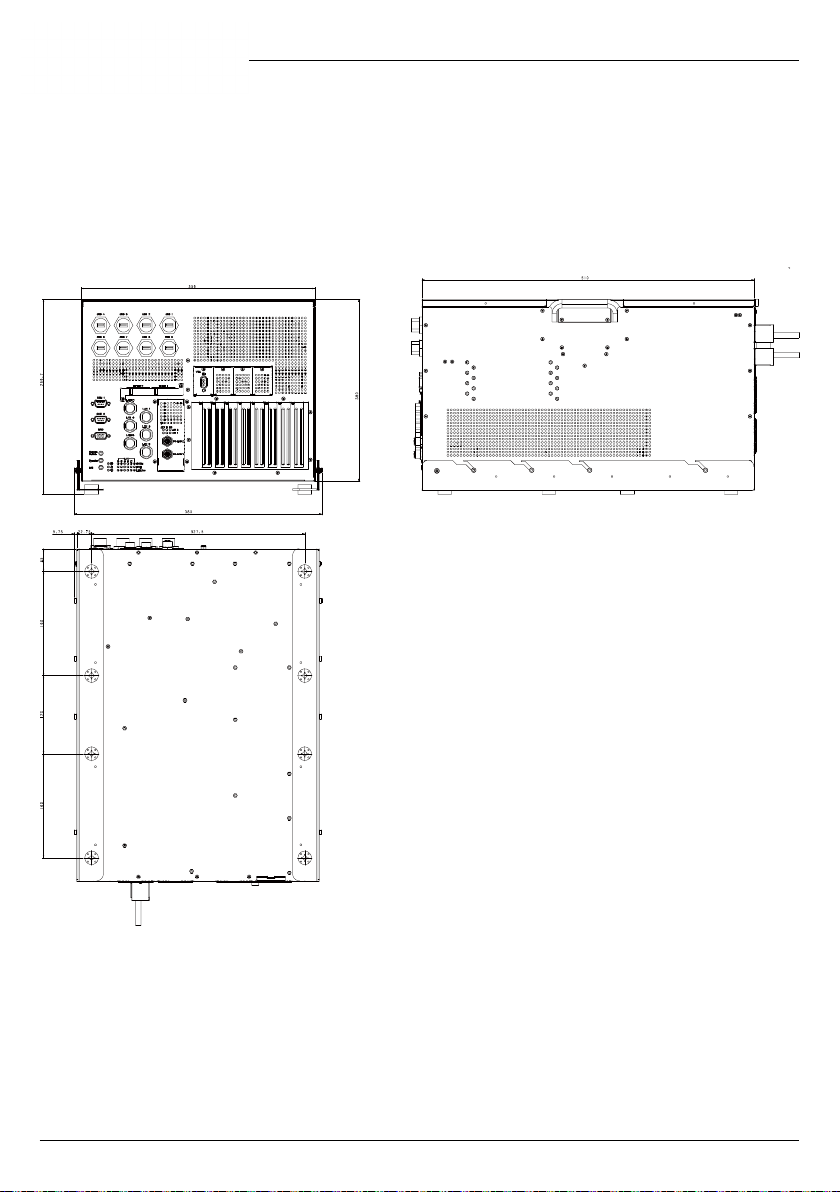
AAD-C622A2:
Ce manuel convient aux modèles suivants
2
Table des matières
Autres manuels Acrosser Technology Serveur

Acrosser Technology
Acrosser Technology ANR-C62 N1Series Manuel utilisateur

Acrosser Technology
Acrosser Technology ANR-SKB2N ACN Series Manuel utilisateur

Acrosser Technology
Acrosser Technology ANR-C236N1-K2D00 Manuel utilisateur

Acrosser Technology
Acrosser Technology AND-APL1E Series Manuel utilisateur

Acrosser Technology
Acrosser Technology ANR-DNV3N3 Series Manuel utilisateur

Acrosser Technology
Acrosser Technology AR-R5800 Manuel utilisateur

Acrosser Technology
Acrosser Technology ANR-C62-N1 Series Manuel utilisateur


