ACR Electronics AISLink CA2 Manuel utilisateur

CA2
Y1-03-0294 Rev. A912S-02862
WWW.ACRARTEX.COM
THE SCIENCE OF SURVIVAL
AIS Class A Transceiver
INSTALLATION MANUAL

© 2020 ACR Electronics
The technical data, information and illustrations contained in this manual were believed
to be correct at the time of print. ACR Electronics reserve the right to change specica-
tions and other information contained in this manual as part of our continual improvement
process.
No part of this manual may be reproduced, stored in a retrieval system or transmitted in
any form, electronic or otherwise, without the prior permission of ACR Electronics.
No liability can be accepted for any inaccuracies or omissions in this manual.
ADDITIONAL INFORMATION
CA2 USER MANUAL Y1-03-0293
CA2 QUICK REFERENCE GUIDE Y1-03-0295
CA2 INLAND WATERWAYS SUPPLEMENT Y1-03-0363

28/04/2020 Y1-03-0294 Rev. A 3
CA2 Installation Manual
1. General 4
1.1 Exposure to RF Electromagnetic Energy 4
1.2 CA2 Overview 4
1.3 Warnings 5
1.4 CA2 Box Contents 6
1.5 Example Systems 7
2. Installation 8
2.1 Unit Dimensions 8
2.2 Power Requirements 8
2.3 Making the Connections 13
2.4 Antenna Installation 18
2.5 Mounting Templates 21
3. Basic Operation 22
3.1 Front Panel 22
3.2 Front Panel Controls Explained 22
3.3 User Interface Overview 30
3.4 Menu Structure 31
4. Commissioning 32
4.1 Advanced Settings 32
4.2 Input / Output Set-up 35
4.3 Ships Static Data Set-up 37
4.4 Default Voyage Settings 38
5. Input / Output Sentences 39
5.1 IEC-61162 (NMEA0183) Sentences Supported 39
5.2 Sentence Priority and input ltering 41
5.3 Signature Requests supported for AIS Query ($AIAIQ,xxx)41
5.4 Property Values supported by the EPV sentence 42
5.5 IEC-61162-1 (NMEA0183) Sentences Output 43
5.6 Sentence output ltering 44
6. Glossary and Abbreviations 45
7. Fault Finding 46
8. Specications 47
9. Spares and Accessories 47
10. Maintenance 48
10.1 Product Cleaning 48
10.2 Service and Maintenance 48
10.3 Firmware Updates 48
10.4 Routine equipment checks 49
11. Approvals 49
12. Installation Record 50

4 Y1-03-0294 Rev. A 28/04/2020
CA2 Installation Manual
1. GENERAL
1.1 Exposure to RF Electromagnetic Energy
This product complies with EN62311 and RSS-102 (Canada).
This product has been evaluated for compliance with the FCC RF exposure limits given in
CFR 47 part 1.307(b) at a distance greater than 50cm from the antenna.
1.2 CA2 Overview
1.2.1 AIS Explained
The Automatic Identication System (AIS) was designed as an aid to collision-avoidance in
the marine industry and is a signicant development in navigational safety. It is now widely
used at sea to provide vessels with a live accurate picture of marine trac in the surround-
ing area.
The CA2 from ACR is a fully compliant AIS Class A Transceiver. It has both ush panel and
free standing mounting options for easy installation into almost any position and location
ensuring optimal use of bridge space.
The CA2 automatically sends continuous transmissions of your vessels information using
a common VHF frequency which can be received by all other AIS equipped vessels and
shore-based stations within its range. Vital information such as MMSI, GNSS location,
position, speed, course, etc. is shared and displayed on the rapid response, full colour LCD
display. This information helps to provide situational awareness and can signicantly assist
in collision avoidance.
The CA2 from ACR is a universal Class A transceiver capable of exchanging dynamic and
static ship data with other AIS systems. The dynamic data such as location, speed over
ground, course over ground, heading, rate of turn is calculated automatically using the
internal GNSS receiver. The static data such as MMSI, call sign and name, type of ship,
length and beam is programmed into the AIS receiver after installation. Voyage-relat-
ed data such as destination, ETA, hazardous cargo and ship’s draught can also be pro-
grammed into the CA2 when appropriate.

28/04/2020 Y1-03-0294 Rev. A 5
CA2 Installation Manual
1.3 Warnings
This product is designed to assist navigation and should not be used in the place of ap-
propriate navigational judgement. AIS should be used as a complement to navigation and
should not be used to replace installed equipment such as RADAR or ECDIS.
!It is highly recommended that the operator of the CA2 read and follow the
operation instructions within this manual to ensure accurate operation.
Failure to do so may impair proper functionality.
!The coastal mapping on this device is provided for guidance purposes only.
Ithasnotbeenveriedorapprovedfornavigationalusebyanymarineor
waterway authority and therefore must only be used for reference purpos-
es or in conjunction with other approved navigational mapping sources.
!This product is designed to assist navigation and should not be used in
the place of appropriate navigational judgement. AIS should be used as a
complement to navigation and is not a replacement for installed RADAR or
ECDIS equipment.
!AIS devices such as the CA2 from ACR can only monitor other AIS
equippedvesselsandtheOceroftheWatch(OOW)shouldalwaysbe
awarethatothersurroundingvesselsmaynotttedwithAISequipment.
! TheCA2shouldbeinstalledbyaqualiedinstallerortechnicianandthe
installation instructions included in this manual must be followed succinct-
ly and carefully without deviation.
!The AIS antenna emits low levels of electromagnetic radio frequency ra-
diation which can be hazardous to health. All persons must maintain safe
distance of 3m horizontally and 1m vertical from the AIS antenna whilst
transmitting.
!It is recommended that the ACR CA2 is used in conjunction with the sup-
plied GNSS antenna. Use of an alternative GNSS antenna may impair the
functionality of the ACR CA2.
!All maintenance and/or repair work should be carried out by trained per-
sons authorized by ACR. Do not attempt to disassemble this equipment as
doingsomaycausere,electricalshock,seriousinjuryormalfunctionof
equipment. This product contains no user-serviceable parts.
! DonotinstalltheCA2inaammableatmospheresuchasanengineroom
or near to fuel tanks.
!Do not install the CA2 in a location subject to excessive solar heat such as
in direct sunlight or underneath a windshield.
!The CA2 is a maritime radio transmitter and is subject to radio licensing
laws. Please contact the relevant authority in your country for further
information regarding radio license requirements.
!False information transmitted by the CA2 can result in risk to other vessels
as well as your own. It is the user’s responsibility to ensure that vessel
sensorsareconguredandcalibratedcorrectlyandthatallAIStransmis-
sion information from your vessel is accurate and up to date.

6 Y1-03-0294 Rev. A 28/04/2020
CA2 Installation Manual
1.4 CA2 Box Contents
No. Item No. Item
1CA2 8Cable Ties (10)
2GNSS Antenna (inc. 10m cable &
mount)
9Terminal Connectors
(18, 9, 5 and 2 way)
3Documentation 10 Wiring Card
4Cable Support 11 Mounting Screws
5Coax Cable Boots and seals 12 USB On-the-Go Cable
6Mounting Gasket (2) 13 USB Cable
7Mounting Bracket Assembly

28/04/2020 Y1-03-0294 Rev. A 7
CA2 Installation Manual
1.5 Example Systems

8 Y1-03-0294 Rev. A 28/04/2020
CA2 Installation Manual
2. INSTALLATION
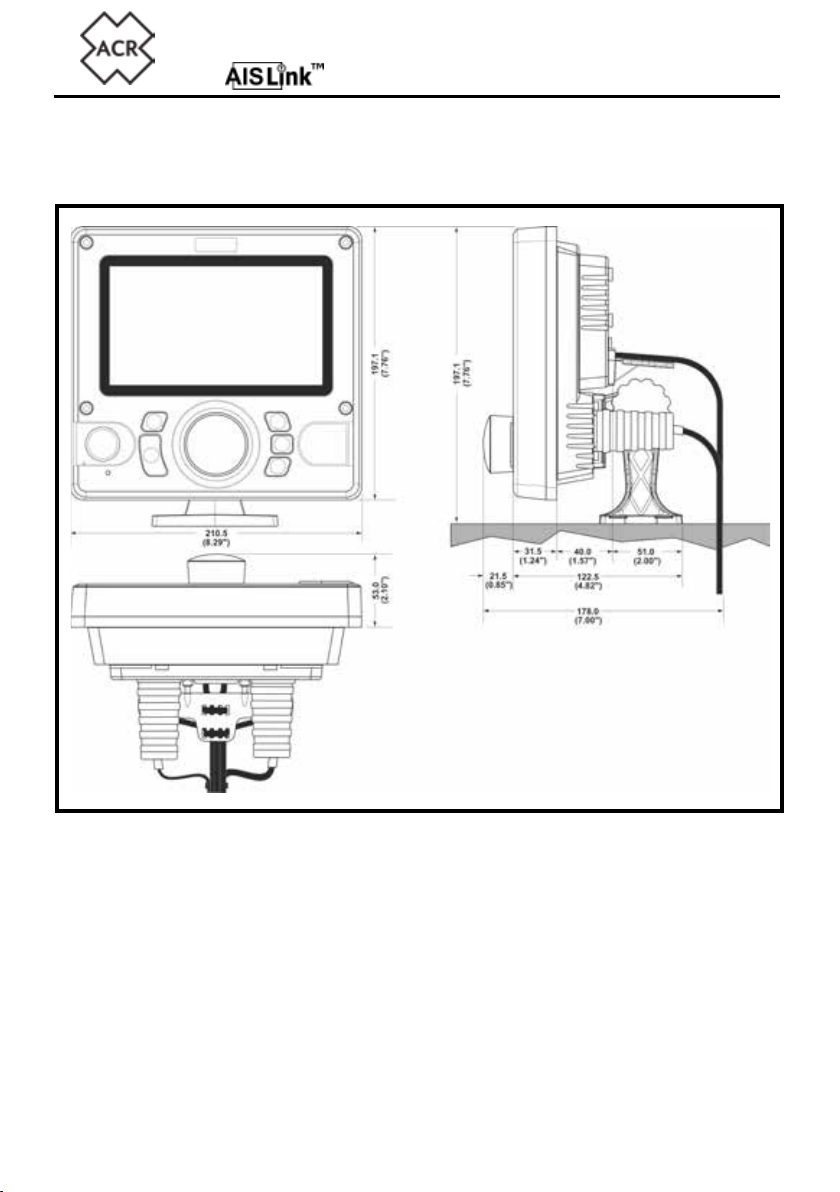
2.1 Unit Dimensions
Installation templates are on the centre pages of this manual.
2.2 Power Requirements
!Connection to an emergency power source is an IMO requirement for
SOLAS vessels.
The power supply current ratings and recommended fusing or circuit breaker currents are
as follows:
• A 12VDC supply should be able to provide 4.0A and be fused at 8.0A.
• A 24VDC supply should be able to provide 2.0A and should be fused at 4.0A.

28/04/2020 Y1-03-0294 Rev. A 9
CA2 Installation Manual
2.2.1 Cable protection and retaining
The rear case of the CA2 unit has been created to allow for simple and eective installation
of the connecting cables to allow for maximum protection and robustness.
It is advisable to insert the required cables into the rear cover BEFORE installation.
The two coaxial cables (VHF antenna and GNSS antenna) are secured through rubber
boots and the interface cables are passed through rubber grommets and secured to the
cable support. Select the appropriate boot ends for the cable being used and feed the
cables through the boots
Plan what interface cables are required and use a pair of long nosed pliers to remove the
required water seal plugs from the retaining grommets. Pass the cables through the grom-
mets and secure with cable ties leaving appropriate length for the connections.
VHF Antenna Connector
The rubber boot caps supplied are suitable for up to 10mm diameter coaxial cable, select
the appropriate cap and pass it over the cable followed by the boot before connecting the
cable to a suitable PL259 plug. Pass the plug and cable through the hole in the rear cable
cover and insert the boot and boot cap ready for nal installation.
GNSS Antenna Connector
The rubber boot caps supplied are suitable for 3mm or 6mm diameter coaxial cable. If the
supplied cable is long enough to connect directly then cut the boot cap and slot it around
the cable. If a cable extension has been used select the appropriate cap and pass it over
the cable followed by the boot before connecting the cable to a suitable TNC plug. Pass
the plug and cable through the hole in the rear cable cover and insert the boot and boot
cap ready for nal installation. If the boot cap has been cut secure it around the cable with
a cable tie.
Data Cables
Cut and remove the plastic plugs from the appropriate access grommets on the rear cable
cover.
NOTE: Only remove the plastic plugs required leaving the others in place to
prevent water access to the rear of the main unit.
The grommets are suitable for cable diameters between 4mm and 6mm. Pass the required
cables through the grommets and secure with the cable ties provided.

10 Y1-03-0294 Rev. A 28/04/2020
CA2 Installation Manual
Cable Restraint Bracket
Attach the restraint bracket to the rear case using the two self tapping screws supplied.
Once all the antenna and data connectors have been routed to the CA2 and cut to length
use the supplied cable ties to secure all cables to the restraint bracket.
2.2.2 Surface Mounting the Transceiver
The transceiver unit can be mounted directly to a suitable at mounting surface where
access to the rear for cable connection is possible.
!Before mounting to an existing surface check the viewing angle details. If
uncertain apply power to the unit and test for view-ability before installa-
tion.
Create a cut-out using the template in the centre of this manual and drill 8x mounting
screw holes suitable to take No.6 (3.5mm) self tapping screws(supplied).
NOTE: If the mounting surface is too thin or of unsuitable material for self
tapping screws it is advisable to use M4 stainless steel bolts with nuts
and shake proof washers.
Attach the 4 gasket strips to the rear of the rear cable cover ensuring the tabs locate cor-
rectly to provide a seal.
Feed the required cables through the cable management system and secure leaving ap-
propriate length to complete the connections. Secure the cables to the cable restraint and
then secure the rear cable cover to the mounting surface using the appropriate screws or
bolts.
! Takecarenottoover-tightenthexingscrewstopreventdamagetothe
plastic.
See section 2.2 Making the Connections on page 13 of this manual.
Autres manuels pour AISLink CA2
2
Table des matières
Autres manuels ACR Electronics Émetteur-récepteur

ACR Electronics
ACR Electronics 2680 Instructions d'installation

ACR Electronics
ACR Electronics AISLink 57456 Guide de l'utilisateur

ACR Electronics
ACR Electronics AISLink CB2 Manuel utilisateur

ACR Electronics
ACR Electronics AISLink CA2 Manuel utilisateur

ACR Electronics
ACR Electronics AISLink CA2 Manuel utilisateur