
Abseco AFI-2M2S00 Manuel utilisateur

©2021 Abseco International Pvt. Ltd. / www.abseco.in
Product Familiarization & Installation Guide
Abseco® AFi Series Smart Switch
AFI-2M2S00
Revision No.: Initial Issue
Dated: Aug 01, 2021
Printed in India
Abseco International Pvt. Ltd.

Product Familiarization & Installation Guide - Regulatory Information
Abseco
®
AFi Series Smart Switch - AFI-2M2S00 Page 2
Copyright Information
Copyright ©2021 by Abseco International Pvt. Ltd.
All rights reserved. No part of this publication or design may be reproduced, distributed, or
transmitted in any form or by any means, including photocopying, recording, or other
electronic or mechanical methods, without the prior permission of the publisher.
Notice
The only warranties for Abseco products and services are set forth in the express
warranty statements accompanying such products and services. Nothing herein should
be construed as constituting an additional warranty. Abseco shall not be liable for
technical or editorial errors or omissions contained herein. The Abseco International Pvt.
Ltd shall not be liable for incidental or consequential damages in connection with, or
arising out of the furnishing, performance, or use of this document and the program
material which it describes.
Trademarks
• ABSECO, the Abseco logo, and AFi Series are property of Abseco International Pvt. Ltd.
• The Works with Google Assistant logo is a trademark of the Google Inc.
• Amazon Alexa, Works with Amazon Alexa are registered trademarks of Amazon.com, Inc.
• The Bluetooth word mark and logos are owned by the Bluetooth SIG, Inc. and any use of
such marks by Abseco is with approval.
• Other brands and their products are trademarks or registered trademarks of their
respective holders.
• The copyrights to certain photos within this document are retained by the original
owners.
Warranty
All electronic devices are warranted against manufacturing defects for two years from
the date of purchase. In the event of defects, Abseco will repair or, at its discretion,
replace the warranted product if delivered to an Abseco authorized dealer along with a
duly stamped guarantee card and sales receipt that shows the date of purchase along
with the serial no. of the product. This warranty excludes defects due to abnormal load,
abuse or failure to use the product in accordance with the instructions. Abseco shall not
be liable for any other damages, whether incidental, consequential or otherwise.

Product Familiarization & Installation Guide - Introduction and Safety Information
Abseco
®
AFi Series Smart Switch - AFI-2M2S00 Page 3
Introduction
Abseco® AFi Series Smart Switch module is an innovative, futuristic and affordable smart
automation device which give users total control of their lights, appliances and electrical
outlets through various control methods such as smartphones, voice assistants, network
profiles, and cloud services such as IFTTT.
Our smart-touch solution provides a comprehensive automated home or business
electrical control ecosystem, offering users unparalleled levels of control and visibility
over their home or business lighting, heating, and cooling systems, all delivered in one
affordable, accessible, and easy-to-use package.
Safety Information
Always follow all basic electrical/electronic safety precautions when using this smart
switch (product) to prevent risk of injury from fire or electric shock, or product damage.
• Read and understand all guidelines provided in this document regarding safety,
warranty, installation, and use before installation/use of the product.
• All instructions and safety precautions detailed in this guide must be strictly followed.
Observe all warnings and instructions marked on the product.
• If the instructions and safety precautions detailed in this manual are not correctly
followed, Abseco International Pvt. Ltd. cannot be held responsible for any personnel
injury and/or equipment/product damage.
• To prevent electric shock, disconnect both the poles of the main supply before installing
the product.
• Do not install this product where it can come in contact with water. Never do installation
of the product with wet hands. Dry your hands to avoid electrical shock/injury.
• Product must be installed securely on a wall/surface without uneven gaps.
• This product is a single pole switch and disconnects only one pole when it is in OFF
condition.
• Installation of the product must be performed by a qualified electrical technician.
• Product damage caused by incorrect installation or use is not covered under warranty
and the related warranty claims will be rejected.
• There are no user serviceable parts inside the product. Product repair/servicing must
only be carried out by a qualified service personnel authorized by the company.

Product Familiarization & Installation Guide - Product Overview
Abseco
®
AFi Series Smart Switch - AFI-2M2S00 Page 4
Main Features
• Works with Amazon Alexa and Google Home, commanded by your voice
• Control your home with your smartphone or tablet from anywhere any time with
Abseco App
• Refined look and feel
• Made of fire resistant, safe and durable materials
• Waterproof tempered glass touch panel with advance capacitive touch technology
• Multiple colour choices to choose from to match with any room decor
• Standalone smart switch module - no need for a separate control hub
• Inbuilt overload and surge protection
• Functional module design to easily replace your traditional mechanical switch
• Separate indicators for on/off status and touch switch illumination for ease of detection
during night
• Simple retrofit installation; does not require special wiring
• Employs microprocessor for saving presets and functional status in case of power
failure
• Out of the box compatibility for 2-Way connection
• Inbuilt sub-metering capability
Technical Specifications
Parameter Specification
Switch Classification Wi-Fi Smart Wall Switch
Model No. AFI-2M2S00
Power Supply Mode Live Wire; Requires a
Neutral Line
Rated Current 6 A
Rated Voltage and
Frequency
100-250 VAC,
50-60 Hz
Wi-Fi Frequency 2.4 GHz
Wireless Standard IEEE802.11 b/g/n
Bluetooth Version 4.2
Product Familiarization & Installation Guide - Product Overview
Abseco
®
AFi Series Smart Switch - AFI-2M2S00 Page 5
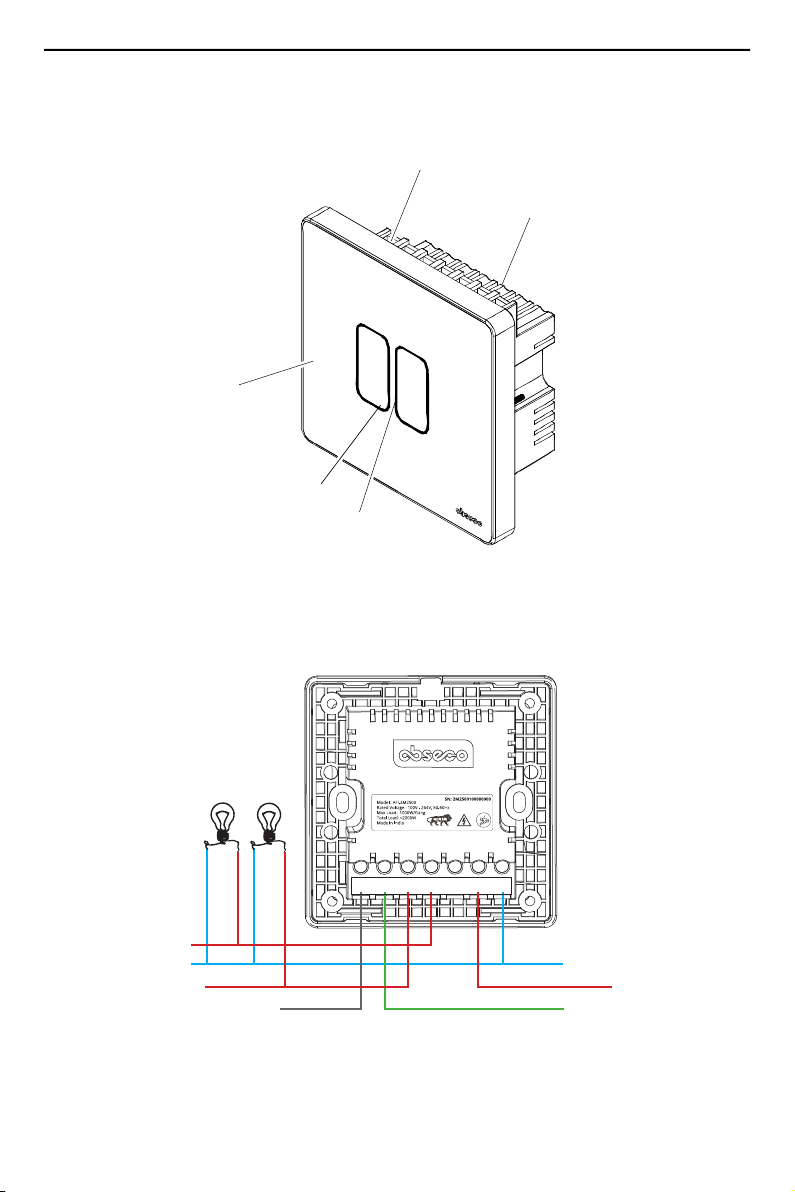
Parts Identification
Power Connection Terminals
POWER CONNECTION
TERMINALS
REAR ENCLOSURE
TOUCH PANEL
INDICATOR LIGHT
ON/OFF TOUCH SWITCH
L1 (Line-In)L2 (Line-Out)
L1 (Line-Out)
N (Neutral)
Sa (2-Way)
Sb (2-Way)
N
(Neutral)
LL1
(2-Way)
SaSb
(2-Way) (Line-Out)
L2
(Line-Out) (Line-In)
MAIN

Product Familiarization & Installation Guide - Installation Instructions
Abseco
®
AFi Series Smart Switch - AFI-2M2S00 Page 6
Installation Instructions
1. Connect the electrical wires to the terminals of the switch module as shown in
the wiring diagram for either 1-Way or 2-Way installation.
Figure 1: Wiring Diagram - 1-Way Installation
Figure 2A: 2-Way Installation
L1 (Line-In)L2 (Line-Out)
L1 (Line-Out)
N (Neutral)
Sa (2-Way)
Sb (2-Way)
N
(Neutral)
LL1
(2-Way)
SaSb
(2-Way) (Line-Out)
L2
(Line-Out) (Line-In)
MAIN
SWITCH
MODULE 1
SWITCH
MODULE 2

Product Familiarization & Installation Guide - Installation Instructions
Abseco
®
AFi Series Smart Switch - AFI-2M2S00 Page 7
Figure 2B: Wiring Diagram - 2-Way Installation
2. Insert the switch module into the switch mount box and secure with 2 screws.
3. Align and position the front touch panel (face plate) onto the switch module.
Sa (2-Way)
L
(Line-In)
N
(Neutral)
Sb (2-Way)
L1 (Line-Out)
L2 (Line-Out)
L1
(2-Way)
SaSb
(2-Way) (Line-Out)
L2
(Line-Out)
N
(Neutral)
L
(Line-In)
MAIN
N
(Neutral)
L
(Line-In)
L1
(2-Way)
SaSb
(2-Way) (Line-Out)
L2
(Line-Out)
SWITCH
MODULE
SCREW
(2 PLACES)

Product Familiarization & Installation Guide - Installation Instructions
Abseco
®
AFi Series Smart Switch - AFI-2M2S00 Page 8
4. Carefully press the touch panel by applying even force on all sides until it is
seated securely on the switch module.
Make sure that the touch panel is seated correctly without any uneven gaps.
5. After installation, switch on the main electrical power supply and verify that the
touch switch is working correctly.
TOUCH PANEL

Product Familiarization & Installation Guide - Setting Up the Smart Switch
Abseco
®
AFi Series Smart Switch - AFI-2M2S00 Page 10
Setting Up the Smart Switch - Installing Abseco Smart App and User
Registration
1. Install the Abseco App on your smartphone or tablet.
Open Google Play Store or Apple Store,
then search for Abseco App and install
it.
2. Open the Abseco App and select “Sign Up” option.
You will be presented with a User Agreement and Privacy Policy screen. Read the
user agreement and privacy policy and select “Agree” to continue to the user
registration screen.
3. To register yourself on the App, select your country from the selection field and
enter a valid email address or mobile number and select “Get Verification Code”.
You will now receive a verification code on email/mobile number.
NOTE: Country/region once set during registration cannot be changed.

Product Familiarization & Installation Guide - Setting Up the Smart Switch
Abseco
®
AFi Series Smart Switch - AFI-2M2S00 Page 11
Setting Up the Smart Switch - Using the Abseco App
Enter the verification code and if the
code is correct, you will be presented
with Set Password screen. Set your
desired password and select “Done”.
NOTE: Password should contain
6 - 20 alpha-numeric
characters.
After setting the password, you will be
automatically redirected to the App
Permissions screen.
4. The permissions necessary for the App
to function correctly will be selected by
default. If you are agreeing to give App
the necessary permissions, select “Go
to App”.
1. After successfully logging in, you will
be presented with the device
management main screen.
The user profile can be seen at the top
left corner.
To add personal information and
customize basic user profile settings,
click on the user profile icon.
Upload a profile photo, set a
Nickname for the user profile and set
the applicable timezone.
2. Select “Me” in the lower right corner
and select “Home Management” to go
to the Home Management screen.
3. Select “My Home” to go to the
“Complete Home Information” screen.
Ce manuel convient aux modèles suivants
1
Table des matières
Autres manuels Abseco Changer


