3S Vision N5071 Manuel utilisateur


N5071Speed Dome Network Camera H.264 / D1 Real-Time
- 2 -
TABLE OF CONTENT
INTRODUCTION .......................................................................................................................................................................... 4
FEATURES.......................................................................................................................................................................................... 4
PACKAGE CONTENTS............................................................................................................................................................................5
SYSTEM REQUIREMENTS ............................................................................................................................................................ 6
VIEW OF N5071 SPEED DOME NETWORK CAMERA .................................................................................................................... 7
Physical Description................................................................................................................................................................... 7
Dimension Diagram................................................................................................................................................................... 8
GETTING STARTED............................................................................................................................................................................... 9
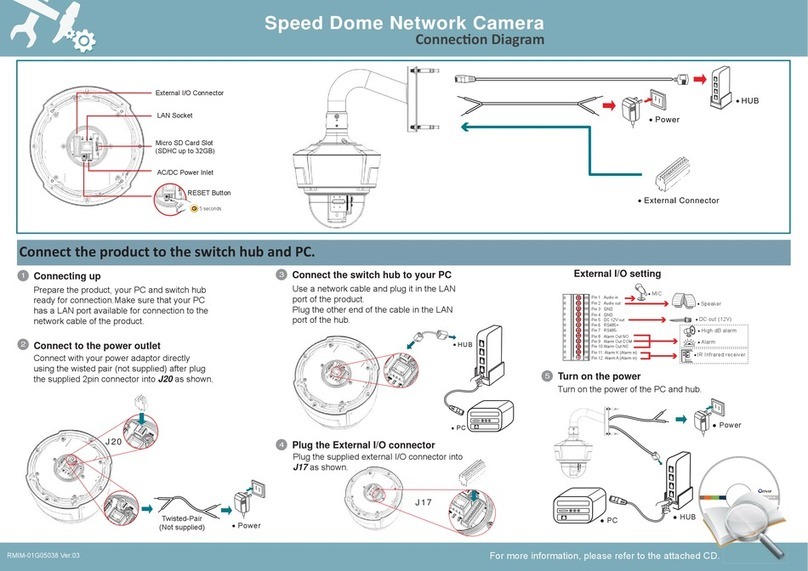
MAKING CONNECTIONS ........................................................................................................................................................... 11
Power ......................................................................................................................................................................................11
Audio In ................................................................................................................................................................................... 12
Lan........................................................................................................................................................................................... 12
TRIPOD MOUNTING ................................................................................................................................................................. 13
SOFTWARE INSTALLATION ........................................................................................................................................................ 14
READY TO USE .......................................................................................................................................................................... 16
ACCESS TO THE IP CAMERA................................................................................................................................................................. 16
VIEW OF CAMERA MAIN PAGE ................................................................................................................................................. 18
LIVE VIEW .......................................................................................................................................................................................18
3Svision Logo...........................................................................................................................................................................18
Product Name ......................................................................................................................................................................... 19
Mode ....................................................................................................................................................................................... 19
Language................................................................................................................................................................................. 20
Video Format ..........................................................................................................................................................................21
View Size .................................................................................................................................................................................22
Streaming................................................................................................................................................................................23
Color ........................................................................................................................................................................................ 24
Brightness............................................................................................................................................................................................... 25
Contrast .................................................................................................................................................................................................. 25
Saturation............................................................................................................................................................................................... 25
Set to default .......................................................................................................................................................................................... 25
Alert.........................................................................................................................................................................................26
Alert Message ......................................................................................................................................................................... 27
Alert Message Text ................................................................................................................................................................................. 27
Disable.................................................................................................................................................................................................... 28
Alert Snapshot ........................................................................................................................................................................................ 28
Clear ....................................................................................................................................................................................................... 28
Shortcuts ................................................................................................................................................................................. 29
+ZOOM IN............................................................................................................................................................................................... 29
-ZOOM OUT ............................................................................................................................................................................................ 30
Original Size............................................................................................................................................................................................ 30
Full Screen............................................................................................................................................................................................... 31
Jitter Time............................................................................................................................................................................................... 31
Record..................................................................................................................................................................................................... 32
Snapshot................................................................................................................................................................................................. 33
Version.................................................................................................................................................................................................... 33
Shortcut Bar ............................................................................................................................................................................ 34
Microphone ............................................................................................................................................................................................ 34
Buzzer ..................................................................................................................................................................................................... 34
Path ........................................................................................................................................................................................................ 35
Snapshot................................................................................................................................................................................................. 37
Record..................................................................................................................................................................................................... 37
Shortcut Bar Message............................................................................................................................................................................. 37

N5071Speed Dome Network Camera H.264 / D1 Real-Time
- 3 -
SETTING USER PREFERENCES............................................................................................................................................................... 39
Basic Setting............................................................................................................................................................................40
System .................................................................................................................................................................................................... 40
System Setting................................................................................................................................................................................... 40
System Log ........................................................................................................................................................................................ 41
Video/Image........................................................................................................................................................................................... 42
Video................................................................................................................................................................................................. 42
PreProc/Overlay ................................................................................................................................................................................ 43
Sensor ............................................................................................................................................................................................... 44
Audio ...................................................................................................................................................................................................... 46
User ........................................................................................................................................................................................................ 47
Network.................................................................................................................................................................................................. 50
Network Setting ................................................................................................................................................................................ 50
Services Setting ................................................................................................................................................................................. 51
Stream Setting................................................................................................................................................................................... 51
PPPoE Setting (Dial-up Networking Setting)...................................................................................................................................... 53
DDNS (Dynamic Domain Name Server)............................................................................................................................................. 55
UPnP (Universal Plug and Play) ......................................................................................................................................................... 56
SMTP (Mail Server Setting)................................................................................................................................................................ 59
Samba ............................................................................................................................................................................................... 60
Notification ....................................................................................................................................................................................... 61
Multicast ........................................................................................................................................................................................... 62
Date/Time .............................................................................................................................................................................................. 63
IP Filter ................................................................................................................................................................................................... 64
Application Setting .................................................................................................................................................................. 65
Event....................................................................................................................................................................................................... 65
Event ................................................................................................................................................................................................. 66
Trigger ............................................................................................................................................................................................... 69
Event Servers (Upload Server) ........................................................................................................................................................... 71
Motion Detection.................................................................................................................................................................................... 73
Blind Detection ....................................................................................................................................................................................... 74
Privacy Mask........................................................................................................................................................................................... 75
Firmware upgrade .................................................................................................................................................................................. 77
Factory Default ....................................................................................................................................................................................... 79
Reboot .................................................................................................................................................................................................... 82
APPENDIX ................................................................................................................................................................................ 83
CHANGE THE INTERNET EXPLORER SETTINGS .......................................................................................................................................... 83
SET UP THE ROUTER SETTING WITH IP CAMERA ......................................................................................................................................84
DDNS APPLICATION.......................................................................................................................................................................... 85
How to apply and setup the DDNS service? ............................................................................................................................ 85
How to check if the DDNS service is successful?...................................................................................................................... 90
MOBILE APPLICATION ........................................................................................................................................................................91
Symbain System ...................................................................................................................................................................... 95
iPhone System .........................................................................................................................................................................98
SUPPORT THE CELLULAR /MOBILE PHONE LIST ....................................................................................................................................103
MULTICAST APPLICATION..................................................................................................................................................................104
H264 (Main) .......................................................................................................................................................................... 107
H264 (Sub).............................................................................................................................................................................108
Motion JPEG .......................................................................................................................................................................... 109
TROUBLESHOOTING AND FAQS..........................................................................................................................................................112

N5071Speed Dome Network Camera H.264 / D1 Real-Time
- 4 -
Introduction
N5071 is a Speed Dome Network Camera which is with H.264 high resolution.
Unlike traditional CCTV, it is built in the Web Server and Camera to provides users with
mechanism for the 24 hours security and it can deliver dual video streams simultaneously
(H.264 or Motion JPEG), allowing for optimization in image quality and bandwidth. It provides
a professional application to remote monitors. (VMS)
It provides intelligent image detection system that can lock or target automatically and enlarge
the image when an abnormal object is detected.
It offers many application functions such as DDNS, samba, FTP, Mail, Multicast, motion
detection, privacy mask, event management and multi-level passwords for meeting user
variety level of security needs.
Features
N5071 can operate smoothly without the need to install additional software or hardware. All
you need is a PC that is equipped with IE browser (6.0 or above) and connect the Internet
Camera to the network to monitor the pre-set places remotely. It provides you with protection
of your personal, home, and property security.
H.264/MJPEG Dual Codec & Streaming simultaneously
Up to D1 (704x576@25fps/704x480@30fps)
CIF (352x288@25fps/352x240@30fps)
QCIF (176x144@25fps/176x112@30fps)
High Resolution of 600TVL
18X~36X in optical zoom (Optional with WDR)
Digital I/O for External Sensor and Alarm
Mechanical ICR
Intelligent Video Analytics
3GPP Supported
IP66 Weather proof

N5071Speed Dome Network Camera H.264 / D1 Real-Time
- 5 -
Package Contents
After unpacking, check that if all the following items have been included:
N5071 Speed Dome Network Camera
Installation CD (Manual & Software)
Installation Guide
Gloves
Assembly Kit
AC24V Power Supply
Contact your dealer immediately if any items are missing, appear damaged, or if the unit does not work.

N5071Speed Dome Network Camera H.264 / D1 Real-Time
- 6 -
System Requirements
Before installing N5071 Speed Dome Network Camera, please make sure your system has
the following recommended minimum hardware requirements.
Internet Environment
Ethernet 10/100M Ethernet
Monitor System Requirements
OS support Windows 2000, XP, Vista and 7
Browser support Internet Explorer 6.x or later
Hardware CPU: Pentium 4 2.4 GHz or later
Memory: 512 MB (1G MB recommended)
VGA card resolution: 1024x768 or higher

N5071Speed Dome Network Camera H.264 / D1 Real-Time
- 7 -
View of N5071 Speed Dome Network Camera
Physical Description
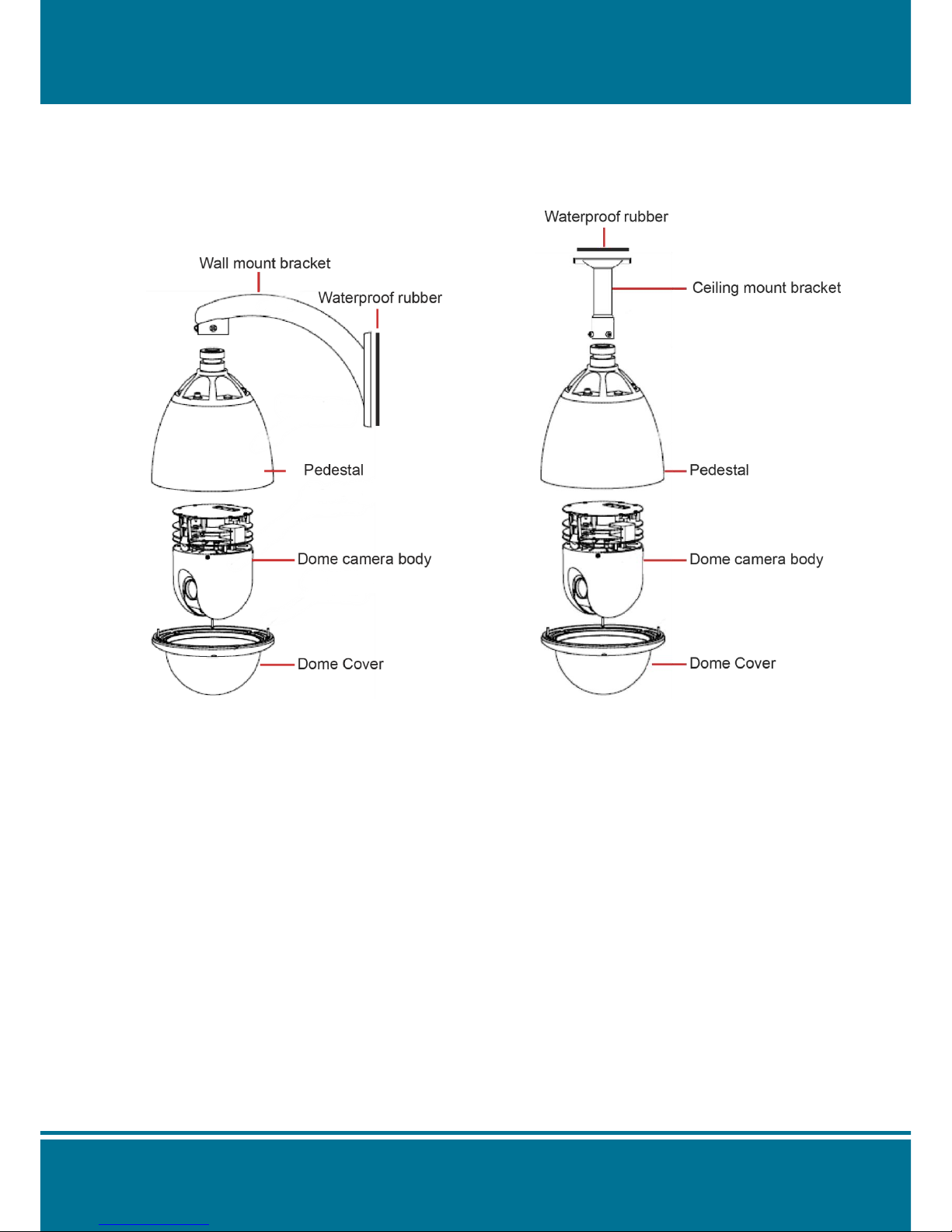
NOTE :
There are 2 different types for installations. Wall Mount and Ceiling Mount. It depends on the
type of model you are purchasing.

N5071Speed Dome Network Camera H.264 / D1 Real-Time
- 8 -
Dimension Diagram
Wall mount
Ceiling Mount

N5071Speed Dome Network Camera H.264 / D1 Real-Time
- 9 -
Getting Started
Before getting to start N5071 Speed Dome Network Camera, please adjust N5071 in
accordance with the following steps first.
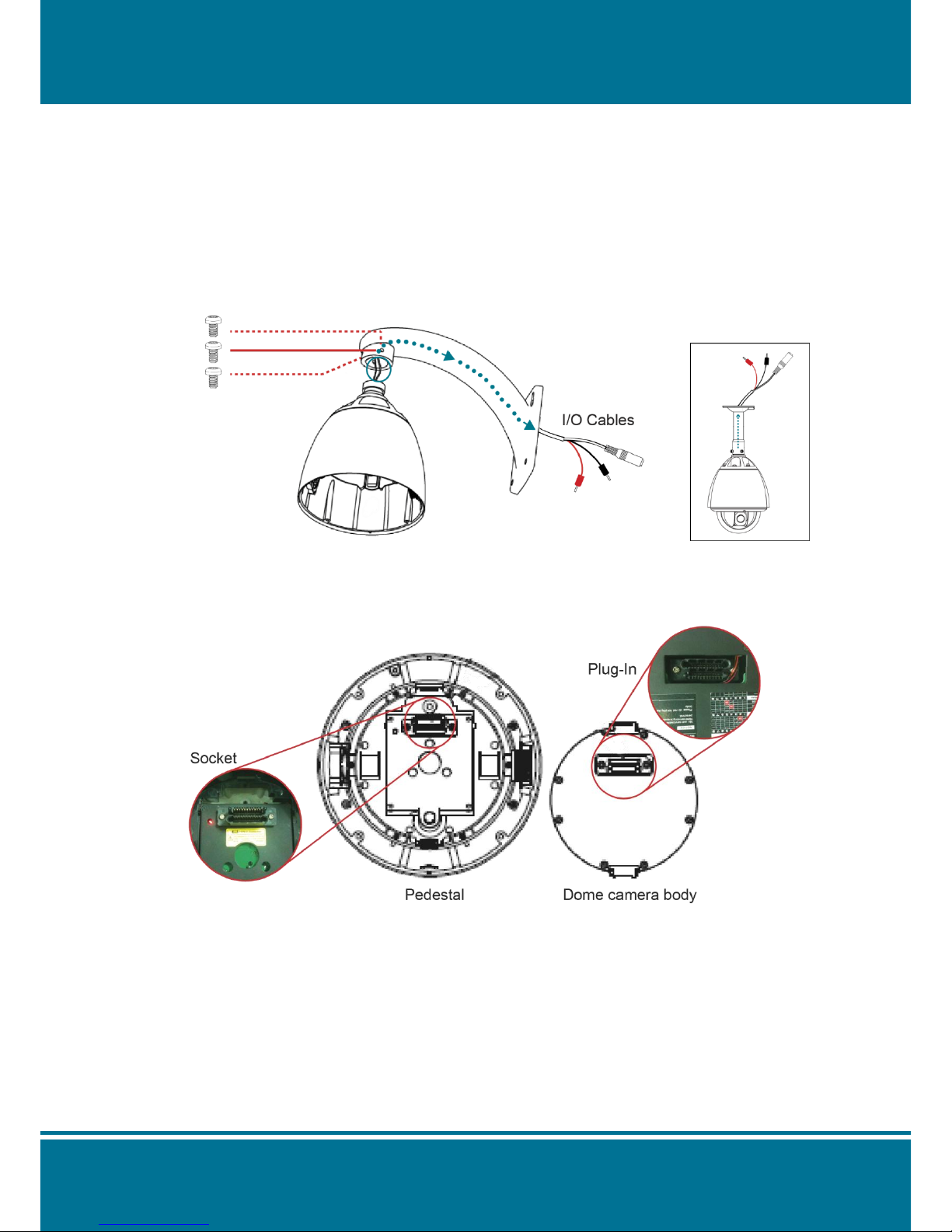
1. Stabilize the Hardware
Use the screwdriver to lock the bracket and Pedestal securely by three M6 screws after the
I/O cables are put into the bracket.
2. Set the address, system baud rate and protocol by configuring DIP switches SW1 and
SW3 which are located on the bottom of the dome camera body.

N5071Speed Dome Network Camera H.264 / D1 Real-Time
- 10 -
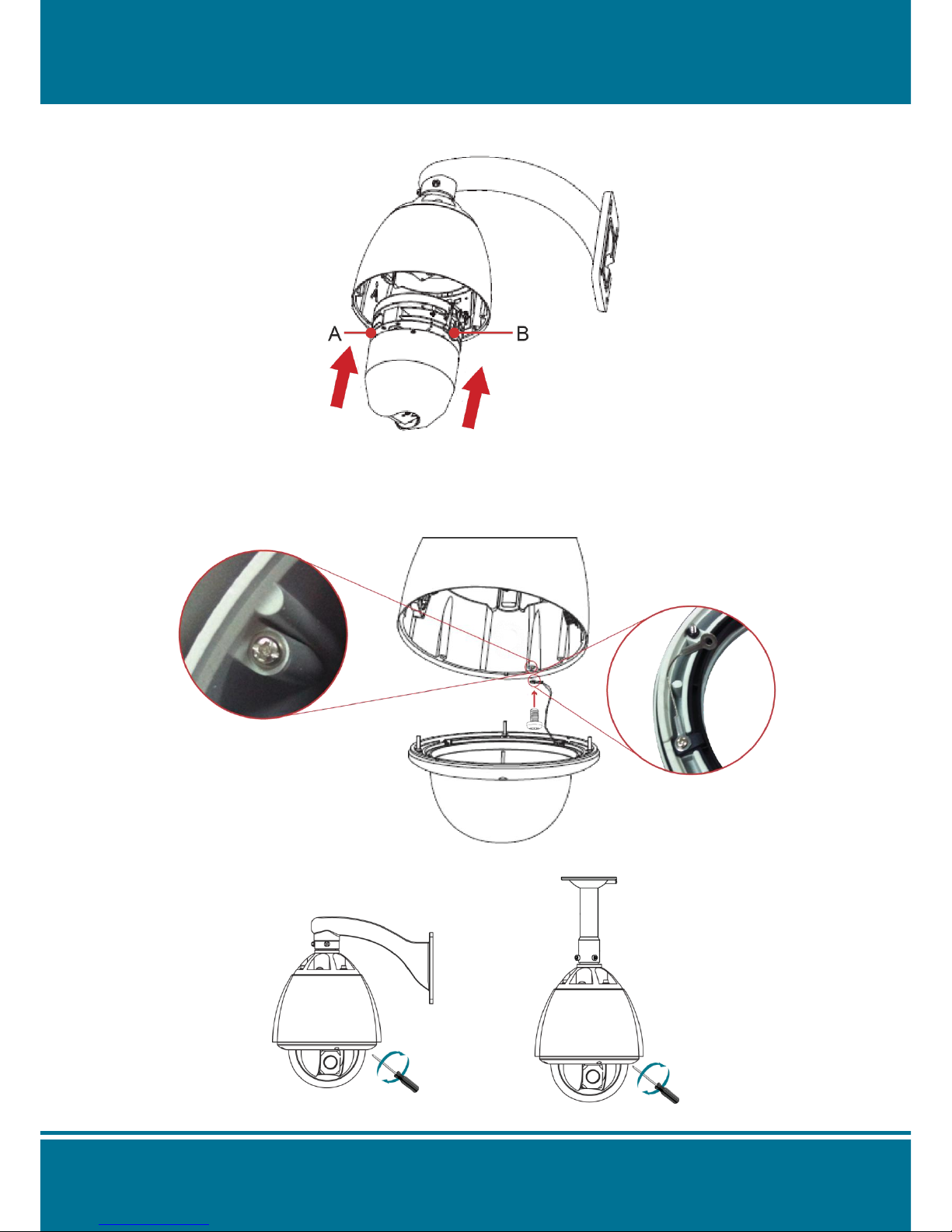
3. Assembling the dome camera body by plug-in the socket and pressing the lock gently
downward to the pedestal with two hands on the side of the dome camera body.
NOTE :
Make sure the plug-in is fully locked by the socket.
4. Attach the dome cover to the pedestal with rope.
5. Use the screwdriver to lock the dome cover with screws.
Table des matières
Autres manuels 3S Vision Caméra de sécurité

3S Vision
3S Vision N5072 Manuel utilisateur

3S Vision
3S Vision N1011 Manuel d'instructions

3S Vision
3S Vision N9071 Manuel utilisateur

3S Vision
3S Vision N1072 Manuel utilisateur

3S Vision
3S Vision N8072 Manuel utilisateur

3S Vision
3S Vision N9012 Manuel

3S Vision
3S Vision N5011 Manuel d'instructions

3S Vision
3S Vision N6074 Manuel utilisateur