
3Com DSm415 Manuel d'installation et d'exploitation

DSm415/p/f/pf
Product Information Guide

DSm415 Product Information Guide
March 2004 2
Contents
PRODUCT OVERVIEW 3
TARGET & VOLUMES 4
SCAN TO E-MAIL 6
NETWORK TWAIN 8
SCANROUTER V2 LITE AND DESKTOPBINDER V2 LITE 8
HIGH PRODUCTIVITY 9
FAX FEATURES 10
HIGH SPEED 10
OTHER CONVENIENT FEATURES 10
LAN-FAX
11
INTERNET FAX
12
PRINTER FEATURES 13
VERSATILE NETWORK CONNECTIVITY 14
RPCS DRIVER
14
WEB IMAGE MONITOR 15
SMARTDEVICEMONITOR 16
CONFIGURATION AND OPTION INTERCHANGEABILITY 17
INTERNAL OPTIONS 18
OPTION/SUPPLY INTERCHANGEABILITY 18
MEMORY CONFIGURATION 19
FAX MODEL
19
MFP (EXPANDED TO PRINTER, SCANNER, OR FAX FEATURE)19
MAIN UNIT SPECIFICATION 20
ENGINE 20
GENERAL FEATURE 21
ENHANCED FEATURE 22
FAX FEATURES 23
GENERAL FEATURE 23
TRANSMISSION FEATURES 24
RECEPTION FEATURES 25
TELEPHONE FEATURES 25
LAN-FAX BASIC SPECIFICATIONS 26
INTERNET FAX (T.37 FULL MODE) BASIC SPECIFICATION 26
GENERAL FEATURES OF PRINTER CONTROLLER 27
CONTROLLER OPTIONS 28
SUPPORTED ENVIRONMENTS 29
CONFIGURATION OF PRINTER AND SCANNER RELATED ITEMS 31
USB2.0 INTERFACE (STANDARD)32
WIRELESS LAN INTERFACE (OPTION) …IEEE802.11B33
IEEE 1394 INTERFACE (OPTION)34
BLUETOOTH INTERFACE (OPTION)35
SCANNER FEATURES 36
SCAN TO E-MAIL SPECIFICATION 36
SCANROUTER V2 LITE AND DESKTOPBINDER V2 LITE 37
NETWORK TWAIN DRIVER 38
AUTO DOCUMENT FEEDER 39
SUPPLY SPECIFICATION 39
ENVIRONMENTAL SPECIFICATION 40

DSm415 Product Information Guide
March 2004 3
Product Overview
DSm415pf with optional 1 tray paper bank
Operation Panel
Simple designed operation panel; 4-line, 27-digit display for easy operation with 4 direction cursor keys
Basic Model
Copier, Fax, Printer and scanner
ADF (standard)
Max.30sheets
Bypass Tray: 100 sheet
standard duplex unit
Internal Tray
Output Capacity:
250 sheets
1 tray paper bank:
Paper capacity:500sheets
DSm415pf
as
“
All-in-one
”
model:
Copier + Fax + Printer + Scanner
Standard Tray
250 sheets
DSm415 Product Information Guide
March 2004 4
Target User Classification and Reliability
Small office users (1-4 people) or business personal machines
Replace the 12 –15cpm analog copier and 1st generation digital copier by offering the
following features:
Compact size
4-line LCD offers easy operation
Quick warm-up (10 seconds for basic copier recovery time)
Scan to E-mail feature
Duplex capability
Mid to large offices as a work group fax or division printer or scanner
Scanner features are available on printer option (Scanner & Printer option). Replace
stand-alone fax machines. Install Printer & Scanner option to acquire print volume. All-in-
one (copier, fax, printer and scanner) multi-function product to be used in mid to large
offices
Mid to Large offices as a business personal machine
All-in-one (copier, fax, printer and scanner) multi-function product to be used in large
offices
Large
(300)
Middle
(30-299)
Centralized
Small Work Group
Business Personal
Main Target is small workgroup
;
Average print/copy volume: 2k/month
Max print/copy volume: 5k/month
Small
(1 -29 )

DSm415 Product Information Guide
March 2004 5
Recommended Volumes
DSm415 1302/1305/1308/ +
1302f/1305f/1308f Remarks
Unit life Approx. 300K or 5
years which ever
comes first
Approx. 300K or 5 years
which ever comes first
ACV 2K outputs/ month 2K outputs/ month Copy, fax, print total
outputs
Max CV 5K outputs/ month 5K outputs/ month
Duty 15K 15K

DSm415 Product Information Guide
March 2004 6
Key Features
Scan to E-mail
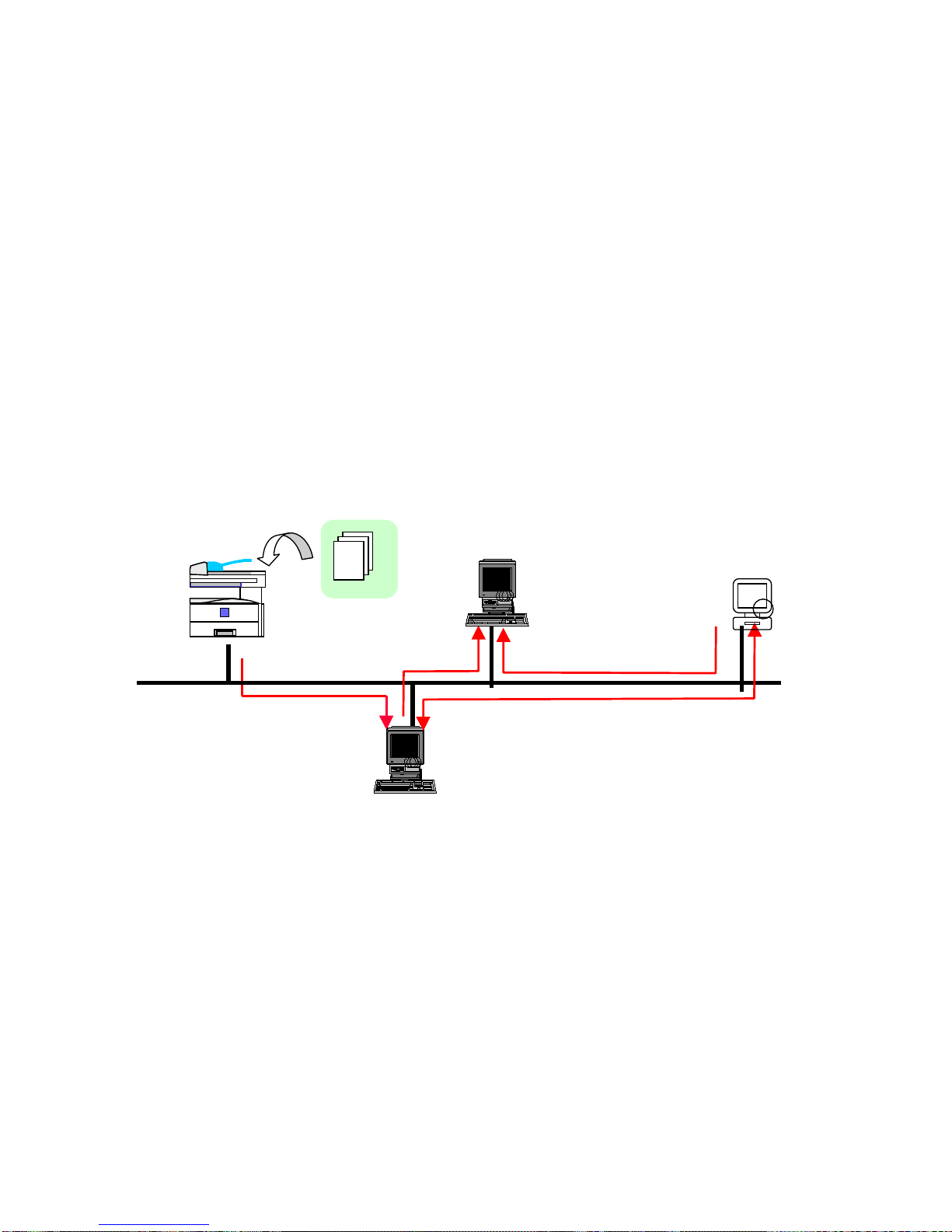
Available with the Printer/Scanner option and a great advantage for small office users and
work group users. Scanned documents are directly delivered to PCs through the Internet.
Easy Installation; Delivery server and designated software for Scan to E-mail are not
required. Easy Operation; Operation of Scan to E-mail is almost same as that of fax
function. Cost Saving;Customer can save transmission cost by sending data over
Internet.
LAN
Scanner Features
- Scan to E-mail
Web Utilities
- Web Image Monitor
- SmartDeviceMonitor
Fax Features
- Internet Fax
- LAN Fax
Network Ready Pinter
- NIB Standard
- USB 2.0 Standard
-
RPCS Printer
Driver
SMTP
mail
Server
Scan to email
Standard duplex

DSm415 Product Information Guide
March 2004 7
Contents of E-mail
Attention To ( Max 150 addresses)
Sender’s Name Key operator’s E-mail address or selectable form address book
Subject Customer can select and/or enter “subject”using hard keyboard on
operation panel. (Max 64 characters)
Body Message Fixed message is attached to the e-mail. Message language is
selectable by user.
The following message is attached:
-Greeting: “This E-mail was sent from xxxx (host name, machine
model name)”
-Scan date:
-Queries to: Key operator’s E-mail address
Scanned Data Attached file (Name of scanned data is named
automatically by machine.)
Varied Menu of Scan Mode
Scan Mode
Text For text original
OCR* For OCR purpose
Text /
Photo For original containing text and
photo
Photo For photo original
*OCR for scan mode does not mean OCR scanning. OCR mode creates the data that is
best match to OCR scanning.
Resolution:
100dpi / 200dpi / 300dpi / 400dpi / 600dpi
Return receipt mode
Return receipt is available with Scan to E-mail.
File Format:
Single Page TIFF/ Multi page TIFF/ PDF
DSm415 Product Information Guide
March 2004 8
Network TWAIN
A network TWAIN driver is available with the Printer/Scanner option.
Interface:
Standard: Ethernet 10/100BaseTX
Option: Wireless LAN interface (IEEE802.11b), IEEE1394/IP over
ScanRouter V2 Lite and DeskTopBinder V2 Lite
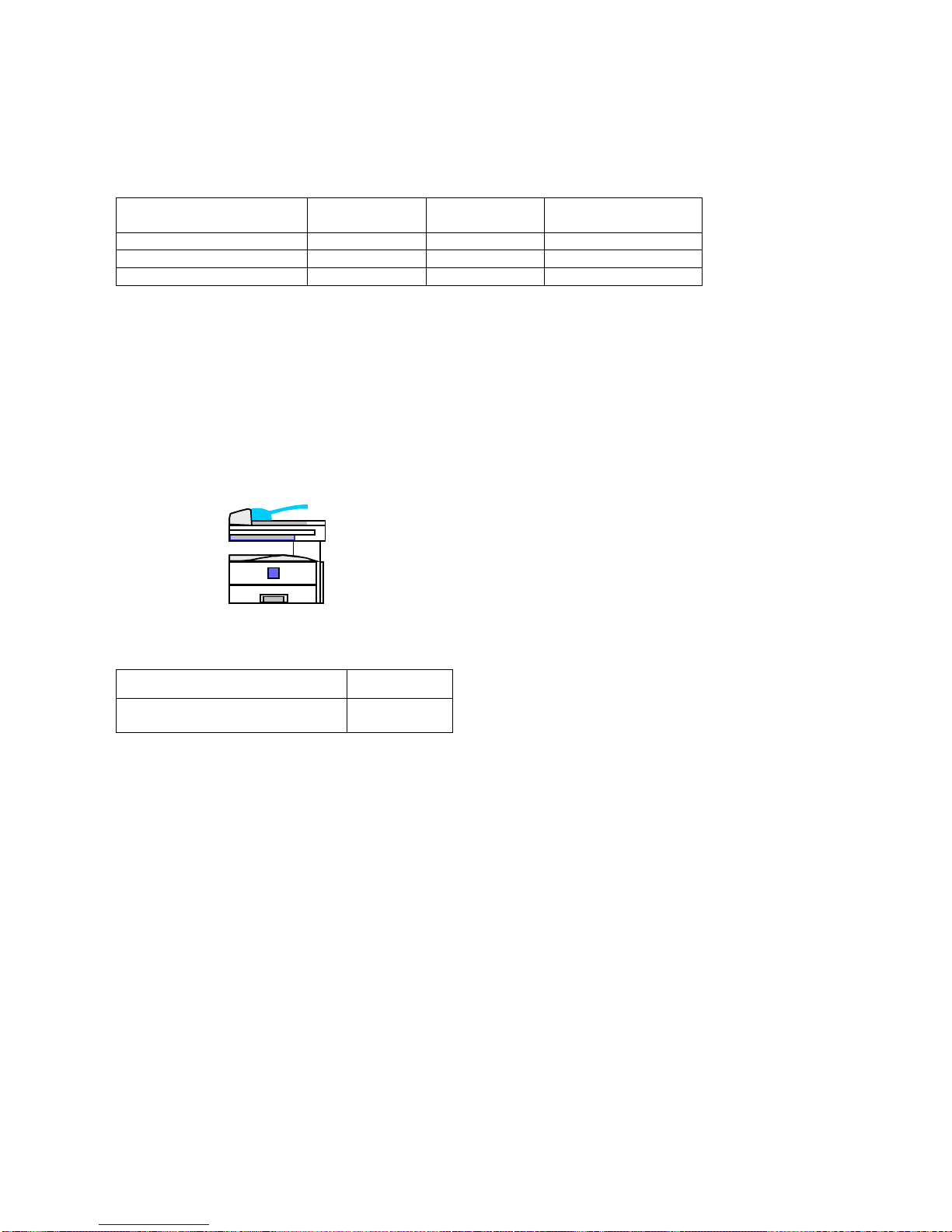
In addition to Scan to E-mail, ScanRouter and DeskTopBinder are standard with the
Printer/Scanner option allowing users in the network environment to distribute scanned
images to the client PC in the network. With the Network Scanner the new DSm415
becomes a highly productive black & white scanner.
Client PC can receive documents automatically or manually by using DeskTopBinder.
Client PC can view and copy documents from the In-Tray by using DeskTopBinder.
Documentssent are saved to the specified Windows folder(s) via delivery server.
ScanRouter V2 Lite and DeskTopBinder V2 Lite are on the CD-ROM provided with the
Printer/Scanner option. ScanRouter V2 Professional and DeskTopBinder V2 Professional
are optional.
Documents
Send to
ScanRouter Server
Delivery
Server
File Server
Client PC
Scanning
LAN
Access
Distribute/Access
Distribute
(Registration of destination address: Max 100)
DSm415 Product Information Guide
March 2004 9
Productivity
Less warm up time and first copy speed
DSm415
(Basic) DSm415
(MFP*) 1302/1305/1308/f
Warm-up Time (sec.) 15 30 20
Recovery Time (sec.) 10 10 20
First Copy Speed (sec.) 7.5 7.5 8
*MFP: with full external options.
Warm-up time: The time it takes for the machine to reach operating temperature from the
status of main-switch off.
Recovery time:The time it takes for the machine to reach operating temperature from
Sleep mode (Auto off mode).
Standard Duplex
Duplex Print capability enhances not only copying features but also printer features.
Duplex productivity
Product Name DSm415
Duplex Productivity
versus simplex (approx) 60%
Standard
Duplex

DSm415 Product Information Guide
March 2004 10
Fax Features
High Speed
Modem speed: 33.6Kbps
Transmission speed: 2 sec (with JBIG)
Address Book
Speed Dial: Max. 150
Quick Dial: Max. 16
Group Dial: Max. 10
Users can resister 150 of speed dialswhereas the 1302/1305/1308/f had50 speed dials.
Both Fax number and E-mail addresses can be registered in the same dial key which are
managed in the common address book and easily registered/changed/deleted through
Web. You can assign a maximum of 16 Speed dial numbers to Quick dial. Quick dials can
also be shared by Fax and E-mail.
Other Convenient Features
Serial Broadcasting of Fax and E-mail.
SAF memory storage (ITU-T No.1 chart): 160 sheets
Ce manuel convient aux modèles suivants
3
Table des matières


