
Zycoo IA03 Manuel utilisateur


Contents
Overview................................................................................................................................................................... 1
Product Overview ................................................................................................................................................ 1
Product Specifications......................................................................................................................................... 1
Basic Settings ...........................................................................................................................................................2
Web Interface Login ............................................................................................................................................2
Device Info.......................................................................................................................................................... 4
Network Settings ................................................................................................................................................ 6
SIP Account .........................................................................................................................................................7
Advanced SIP Settings ............................................................................................................................................ 8
Audio Codecs ...................................................................................................................................................... 8
SIP Call Settings ................................................................................................................................................. 8
Advanced System Settings ...................................................................................................................................... 9
Volume Control .................................................................................................................................................. 9
I/O Settings ........................................................................................................................................................ 9
Time Settings .....................................................................................................................................................12
Language Settings .............................................................................................................................................12
Upgrade ............................................................................................................................................................. 13
Reboot & Reset .................................................................................................................................................. 13

IP Audio Dispatch APP User Guide | ZYCOO Co., Ltd.
1
Overview
Product Overview
ZYCOO SIP Safety intercom IA03 and IV03 are SIP enabled intercom devices which can be used for consulting
and SOS applications.
By default, IA03 can be used as a voice intercom and IV03 has a built-in HD camera which can support video
intercom. If there is an existing IP camera, this can be linked with IA03 for video intercom. IP cameras which
support RTSP, such as Dahua and Hikvision IP cameras can be linked with IA03.
Based on SIP and with PoE support, the installation of the IA03 and IV03 only requires a PoE enabled
network cable, no power supply and extra wiring is required.
Each of the intercom devices has been equipped with a programmable dial button, any desired number can be
preconfigured. By pressing the button users can talk with the target number in hands-free mode.
IA03 and IV03 have been equipped with digital level input for connection of sensors, and also with a relay
switch which can be used to connect door magnet. The action (open/close the door) of the relay switch can be
controlled by DTMF signal, intercom call status and the sensor input signal.
In addition to working with ZYCOO IP Audio Center, the IA03 and IV03 intercoms can be also integrated with
third-party SIP servers and the features detailed above are still applicable.
Product Specifications
• Speaker Components: Ø 40 mm x 12.7 mm (1.6 x 0.5 in)
• Sensitivity: 90±3dB
• Distortion: <10%, 1000Hz 0.1w/1m
• Rated Power: 3W
• Max Power: 4W
• Frequency Range: 630Hz~4.5KHz
• Acoustics: Mono
• Microphone: -36±2dB RL=2.2K Vs=2.0V
• Relay Switch: Max voltage AC 125V-1A/DC 60V-1A
• Video Resolution (IV03): 1920*1080@20fps, 1280*720@25fps

IP Audio Dispatch APP User Guide | ZYCOO Co., Ltd.
2
Basic Settings
Web Interface Login
By default, the SIP safety intercom devices’ IP assignment has been configured as DHCP. Please ensure there’s
DHCP server available in the LAN where the SIP safety intercom devices are installed. If there’s no DHCP
server available or DHCP fails, you’ll have to use the failover IP address 192.168.1.101 to access the web
management interface. Press and hold the call button for 5 seconds then release, the device will announce its
IP address. Input the IP address in the browser address bar to open the web management interface of the SIP
safety intercom. The login screen is shown as below image, here we take IA03 SIP safety intercom as an
example.
Use the default login credentials to login to the web management interface.
Default username: admin
Default password: admin
For the safety of the intercom device, it is recommended to change the default password on first login, please
go to Settings -> Change Password page to change the password.

IP Audio Dispatch APP User Guide | ZYCOO Co., Ltd.
3

IP Audio Dispatch APP User Guide | ZYCOO Co., Ltd.
4
Device Info
After login, you’ll first see the Device Info screen.
SIP STATUS
• SIP Account: The SIP number configured on this device.
• SIP Server: The SIP server (ZYCOO IP Audio Center or other IP PBX) address.
• Register Status: The SIP number registration status.
DEVICE INFORMATION
• Device Model: The device model, IA03 or IV03.
• Hardware Version: Device hardware version.
• Software Version: Device software version, can be upgraded.
• Speaker Volume: The current volume level of the device.
• Device Description: The device description will be used to display as the tab name of the web browser.
This is useful when configuring multiple devices using the same web browser. Click on the button to
edit.

IP Audio Dispatch APP User Guide | ZYCOO Co., Ltd.
5
After modification, the tab name will change.
NETWORK INFORMATION
• Mac Address: Shows the device Mac address.
• IP Assignment: Shows the network mode of the device, either STATIC or DHCP.
• IP Address: Shows the current IP address of the device.
• Subnet Mask: Shows the current subnet mask of the device.
• Default Gateway: Shows the current default gateway of the device.
• Primary DNS: Shows the current primary DNS of the device.
• Alternative DNS: Shows the current alternative DNS of the device.

IP Audio Dispatch APP User Guide | ZYCOO Co., Ltd.
6
Network Settings
To change the IP assignment from DHCP to Static IP, please go to Settings -> Network Settings page.
Turn the DHCP switch button off to show the network parameter settings.
Network Configuration Parameters
• IP Address: Enter a vacant IP address within your LAN.
• Subnet Mask: Enter the subnet mask of your LAN.
• Default Gateway: Enter the default gateway of your LAN, this is essential for the SIP safety intercom
device when the IP Audio Center or other SIP server is installed outside the LAN.
• Primary DNS: Enter an effective primary DNS server address.
• Alternative DNS: Enter an alternative DNS server address, when the primary DNS fails, alternative DNS
will be used.

IP Audio Dispatch APP User Guide | ZYCOO Co., Ltd.
7
SIP Account
For SIP account settings, go to SIP Settings -> SIP Account page.
SIP Account Configuration Parameters
• SIP Server: Enter the IP address or domain name of the SIP server. Default SIP port is 5060, if the SIP
server uses other port number as SIP port, please enter the server address in the format of
“ip_address:port” or “domain_name:port”.
• User ID: The SIP account number provided by SIP server.
• Password: The corresponding password of the SIP account.
• Register Expiration(S): SIP register expiration time.
• Starting RTP Port: The starting local RTP port number.
• Enable Integration with ZYCOO IP Audio Center: If the SIP safety intercom device is registering to
ZYCOO IP Audio Center, this parameter needs to be enabled, otherwise do not enable it.
• Activate: Used to enable or disable the SIP register.
IP Audio Dispatch APP User Guide | ZYCOO Co., Ltd.
8
Advanced SIP Settings
Audio Codecs
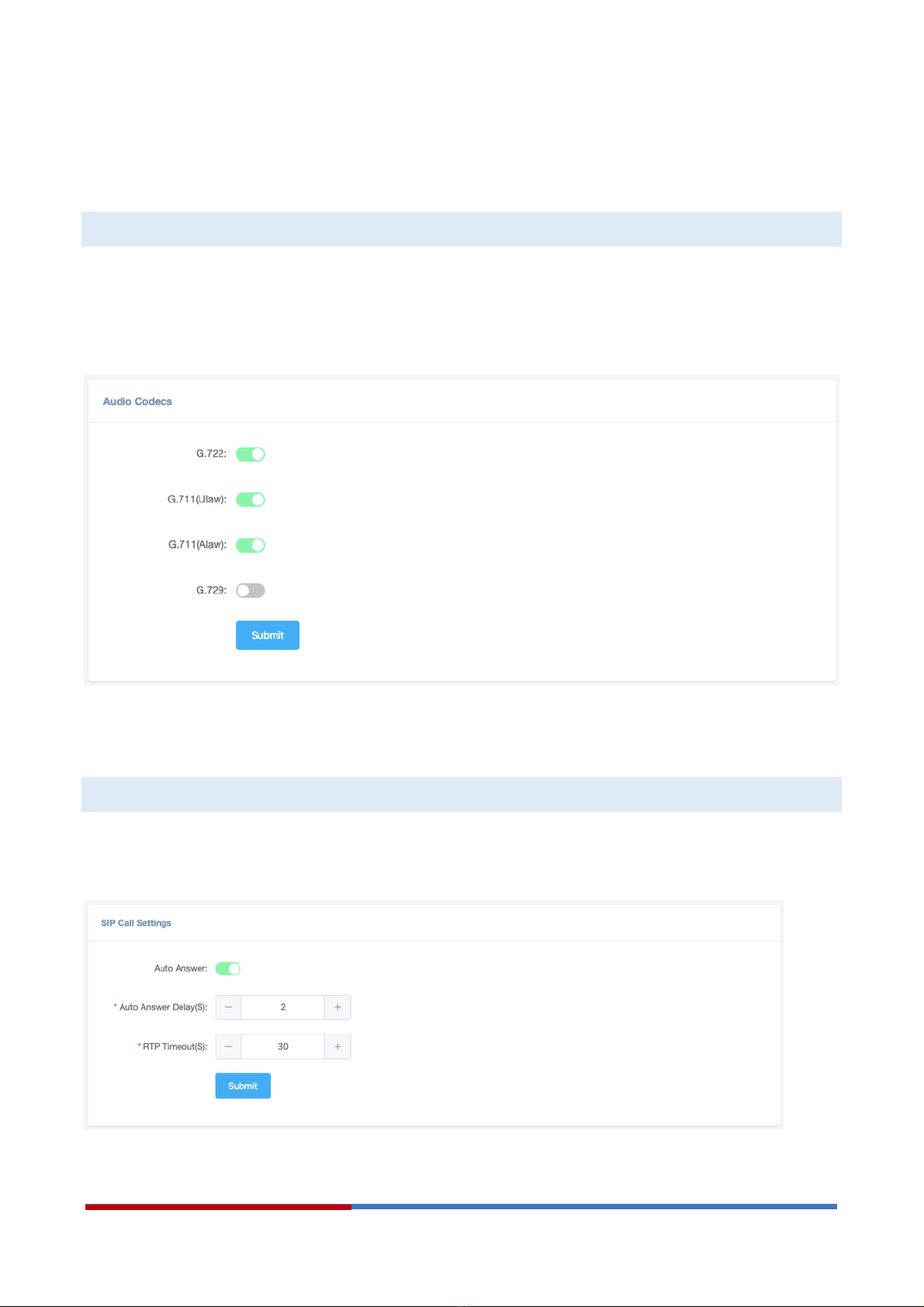
The SIP safety intercom device supports 4 audio codecs: G.722 (wideband codec), G.711(Ulaw), G.711(Alaw)
and G.729.
To enabled or disable an audio codec/codecs, please go to SIP Settings -> Audio Codecs page.
Please keep at least one codec enabled which is also supported by the SIP server, otherwise SIP calls will not
work.
SIP Call Settings
The SIP Call Settings are used to configure the SIP safety intercom of how to handle the SIP calls. Please go to
SIP Settings -> SIP Call Settings page.
Autres manuels pour IA03
2
Ce manuel convient aux modèles suivants
1
Table des matières
Autres manuels Zycoo Système d'interphone


