ZyCast SG-289 Manuel utilisateur

USER’S GUIDE
S
S
SG
G
G-
-
-2
2
28
8
89
9
9
V1.1
ZyCast Technology Inc.
No. 33, Lane 181, Chung Hwa Road Section 4, Hsin Chu, Taiwan
Tel:+886-3-5400949 Fax:+886-3-5400413

ZyCast
SG-289 User’s Manual v1.1
1
Contents
1. Introduction ………………………………………………………..…………. 2
1.1 Overview ……………………………………………………………………2
1.2 Features ………………………………………………………………..… 2
1.3 Electrical Characteristics ………………………………………………. 3
2. Hardware ……………………………………………………………………… 4
2.1 Dimension …………………………………………………………………. 4
2.2 Accessories …………………………………………………………..……… 4
2.3 Description …………………………………………………………...…..… 5
3. Operation ……………………………………………………………………… 9
3.1 Getting Start …………………………………………………………………. 9
3.2 GPS Viewer for Testing ………………………..…………………………… 11
3.3 Function ……………………………………………………………………… 11
3.4 Navigation …………………………………………………………………….. 11
3.5 Data Usage …………………………………………………………………….. 12
4. Warranty ……………………………………………………….…………… 14
Appendix: Software Specification …………………………………….. 15
Appendix: Time Zone Table …………………………………………….. 24

ZyCast
SG-289 User’s Manual v1.1
2
1. Introduction
1.1 Overview
The ZyCast SG-289 Data Logger GPS Receiver is a LCD Display device providing solution with
Bluetooth, UART interface and built-in rechargeable battery for high sensitivity to tracking signal.
The SG-289 receiver incorporates a high sensitivity SiRF Star chipset for GPS signal acquisitionⅢ
and tracking. The SiRF Star chipset is with extremely high sensitivity for GPS signal acquisition andⅢ
tracking. This Bluetooth GPS receiver allows you to receive GPS data on mobile hand-held devices. By
sending the GPS data wirelessly, you may place this receiver on a position with best signal reception
without the constraint of annoying wires. The receiver is equipped with a portable, rechargeable, with
removable battery, just like a mobile phone. The receiver is very suitable for broad applications such as
vehicle navigation, mapping, surveying, security, agriculture, etc. Only a clear view of sky and a battery
power are necessary to the unit. With its low power consumption, the receiver tracks up to 20 satellites at
a time while offering fast time-to-first-fix, re-acquires satellite signals less than 1 second (average) and
updates position data every second. The device is with SD card supported for data recording in text file.
1.2 Features
The SG-289 provides a host of features that make it easy for integration and use.
1. With SiRF Star high sensitivity chipset.Ⅲ
2. High sensitivity and high performance receiver tracks up to 20 satellites.
3. High speed signal acquisition using 200,000 time/frequency search channels.
4. Built-in WAAS/EGNOS demodulator without additional hardware.
5. With the highly sensitive software to get the fast acquisition and reacquisition in the urban, canyon
and foliage environments.
6. Equipped with Li-ion rechargeable battery for long operating hours.
7. Over temperature protection for the battery.
8. Compatible with Bluetooth devices with Serial Port Profile (SPP).
9. Built-in high gain antenna.
10. Three LEDs show Bluetooth, GPS, and battery status.
11. LCD Display shows time, longitude, latitude, elevation, etc.
12. SD/MMC card supported for data storage in text file.
13. Supports standard NMEA-0183 data protocol and SiRF binary code at 19200 baudrate.
14. Built-in rechargeable battery for memory and RTC backup and for fast TTFF.
15. Flash-based program memory, new software revisions upgradeable through serial interface.
16. Compact and sleek design ideal for portable applications.

ZyCast
SG-289 User’s Manual v1.1
3
1.3 Electrical Characteristics
General Frequency L1, 1575.42 MHz
C/A code 1.023 MHz chip rate
Channels 20 channels all in view tracking
Antenna internal
Sensitivity
Tracking -159 dBm typical
Accuracy
Position < 10 meters, 2D RMS
<7meters2DRMS,WAAScorrected
1-5meters,DGPScorrected
Time 1 microsecond synchronized to GPS time
Datum Default WGS-84
Acquisition Rate (Open Sky)
Hot start 1 sec, average
Warm start 38 sec, average
Cold start 42 sec, average
Reacquisition 0.1 sec, average
Dynamic Conditions
Protocol message NMEA-0183
DefaultNMEA
Altitude < 18,000 meters (60,000 feet)
Velocity < 515 meters/sec (1,000 knots)
Acceleration < 4 G
Jerk 20 meters/sec max
GPS protocol GGA, GSA, GSV, RMC, 19200 baudrate, (GLL, VTG, and
ZDA optional)
8 bits data, 1 stop bit, no parity.
Bluetooth Characteristics
BT Compliant Version1.1
RF Tx Power Class 2 (4 dBm max)
Receiver sensitivity -80 dBm with BER<0.1%
Communication distance 10 meter typically
Communication profile Serial Port Profile (SPP)
Power Consumption
Main power input 5.0 ± 5% VDC input
Operation Current 75 mA average in normal mode

ZyCast
SG-289 User’s Manual v1.1
4
Battery Source Rechargeable and removable1200 mAh Lithium-ion battery
with 5V DC input charging circuit
Charging time Fully charged 2.5 hours typical
Operation time 12 hours after fully charged in continuous tracking mode
Environmental Characteristics
Operating temperature range -10 oC to +60 oC
Storage temperature range -20 oC to +70 oC
Charging temperature range 0 oC to +45 oC
Operating humidity:5% to 95%, no condensing
Dimension 93.1 mm (L) x 45.7 mm (W) x 22.8 mm (H)
Weight <70 g (Battery & SD/MMC Card not included)
2. Hardware
2.1 Dimension
The receiver enclosure is with the dimension: 93.1 mm (L) x 45.7 mm (W) x 22.8 mm (H)
2.2 Accessories
1, A 1200 mAh Lithium-ion rechargeable battery.
2, A vehicle lighter adapter assembly for battery recharge.
3, A household power adaptor assembly for battery recharge.
4, A USB cable assembly with “A” plug to mini USB plug.
5, User manual and CD.

ZyCast
SG-289 User’s Manual v1.1
5
2.3 Description
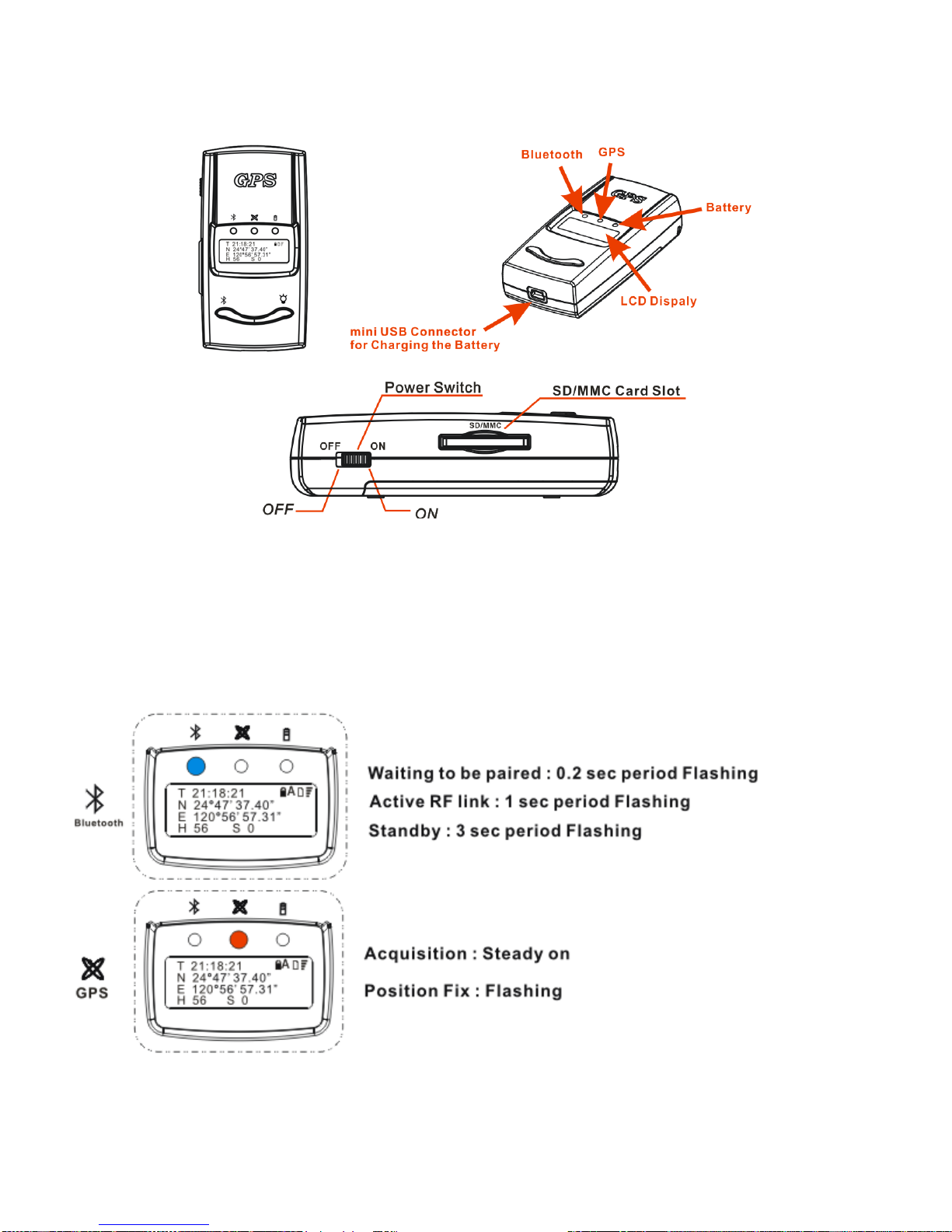
1, Body of the Bluetooth GPS unit is as shown in the figure.
There are three LED windows on the front cover to indicate the GPS, Bluetooth and battery
status. One LCD display panel on the front cover shows time, longitude, latitude, height, speed,
battery status, SD/MMC Card, and satellite signal status. Detailed LED and LCD indications
are described in next paragraph. The battery on/off switch and SD/MMC card slot are located
on the same broadside of the body. The mini USB port for charging the battery is on the down
side of the body.
2, LED status

ZyCast
SG-289 User’s Manual v1.1
6
Remark: Battery charging suspended (protection when charging overtime or battery overheat)
Unplug the power plug and wait for a moment to resume charging.
3, LCD Indication
The LCD display panel shows the following message:
LPlease put a SD/MMC card in the slot before turning on the device.
The SD/MMC card should be formatted to FAT file system.

ZyCast
SG-289 User’s Manual v1.1
7
4, Bluetooth/Backlight usage (The default of Bluetooth/Backlight is ON.)
1.Under normal operation status, press button “A” for 1 second and then release to turn
off/on Backlight.
2.Under normal operation status, press button “B” for 1 second and then release to turn
off/on Bluetooth.
LUnder Recorder USER mode, the Bluetooth ON/OFF setting function will be
disabled. If you want to turn on/off Bluetooth under USER mode, please use
Bluetooth setup described in 5. Display Setup below.
5, Display Setup (Please refer to Appendix: Time Zone Table for time zone adjustment.)
1. Press button “A” for 2 seconds then release to enter into setup menu.
2. Press “Select” for 1 second to increase the parameter figure.
3. Press “Next” for 1 second to select different parameters.
4. After finishing setup, press “Exit” for 1 second to back to operation status.
LWhenever setting up, the power of the device must be turned off then on again to
reactivate the signal.

ZyCast
SG-289 User’s Manual v1.1
8
6, SD/MMC Recorder Setup (The default of Recorder is AUTO.)
1. Press Button “B” for 2 seconds then release to enter SD/MMC recorder setup function
2. Press “Select” for 1 second to increase the parameter figure.
3. Press “Next” for 1 second to select different parameters.
4. Under USER mode, the Bluetooth ON/OFF setting function will be disabled. Press button
“B” for 1 second to record, recording once per press button.
5. Under AUTO mode, the recording is as follows:
Speed Record
0 Km/h No record
Under 10 Km/h Record once per 2 seconds
Under 40 Km/h Record once per 5 seconds
Under 70 Km/h Record once per 8 seconds
Under 100 Km/h Record once per 10 seconds
Over 100 Km/h Record once per 20 seconds
LWhenever setting up, the power of the device must be turned off then on again to
reactivate the signal.

ZyCast
SG-289 User’s Manual v1.1
9
3. Operation
3.1 Getting Start
Step 1: Battery Installation
(a) Slide the power switch to “OFF” position.
(b) Press the “PUSH” button then slide the bottom cover off.
(c) Insert the Li-ion battery into the compartment. Note the orientation of the battery.
(d) Slide the bottom cover back to locked condition.
Step 2: Charge
Please charge the battery to full capacity when first time to use. Connect the attached adaptor cord to the
mini USB jack, as shown in the following figure.
Table des matières