Zhongyi CA103 Manuel utilisateur

CA103&CA102S
Handy Multi-Functions Calibrator [User’s Manual]
http://www.zhoyi.com
Shaoxing Zhongyi Electronics Co.,Ltd.

CA103&CA102S Handy Multi-functions Calibrator Operating Instruction
1
Introduction
Notes
•The information contained in this manual is subject to change without
notice. Furthermore, the actual display items may differ slightly from the
ones appearing in this manual.
•Every effort has been made to ensure the information contained
herein is accurate. However, should any concerns, errors, or emissions
come to your attention, or if you have any comments, please contact us.
•Copying or reproduction of any or all of the content of this manual
without permission is strictly prohibited.
•The warranty is included in this manual. Be sure to read the warranty
to ensure you understand the terms, and then store it in a safe place. (The
warranty cannot be reissued.)
Revision Information
1st Edition: June 2014
Thank you for purchasing the Shaoxing Zhongyi Electronics
Co.,Ltd. developing CA103&CA102S Handy Multi-Functions Calibrator
.This User’s manual contains useful information regarding the
instrument's functions and operating procedures, as well as that
observed during use. To should be precautions ensure proper use of the
instrument, read the manual thoroughly before operating it. After you
have finished reading this manual, store it in the carrying case for
whenever a question arises. quick reference.
http://www.zhoyi.com

CA103&CA102S Handy Multi-functions Calibrator Operating Instruction
2
Checking the Contents of the Package
After opening the package, check the following items before use. If
the product is not the one you ordered, any item is missing, or there is a
visible defect, contact the dealer from whom you purchased the instrument.
Main Unit:
Check that the model name given on the name plate on the back
panel of the instrument matches the one on your order.
•Model
Model CA103、CA102S
•Serial No.
Should you need to contact the dealer from whom you purchased the
instrument, have your unit's serial number handy to give to the person.
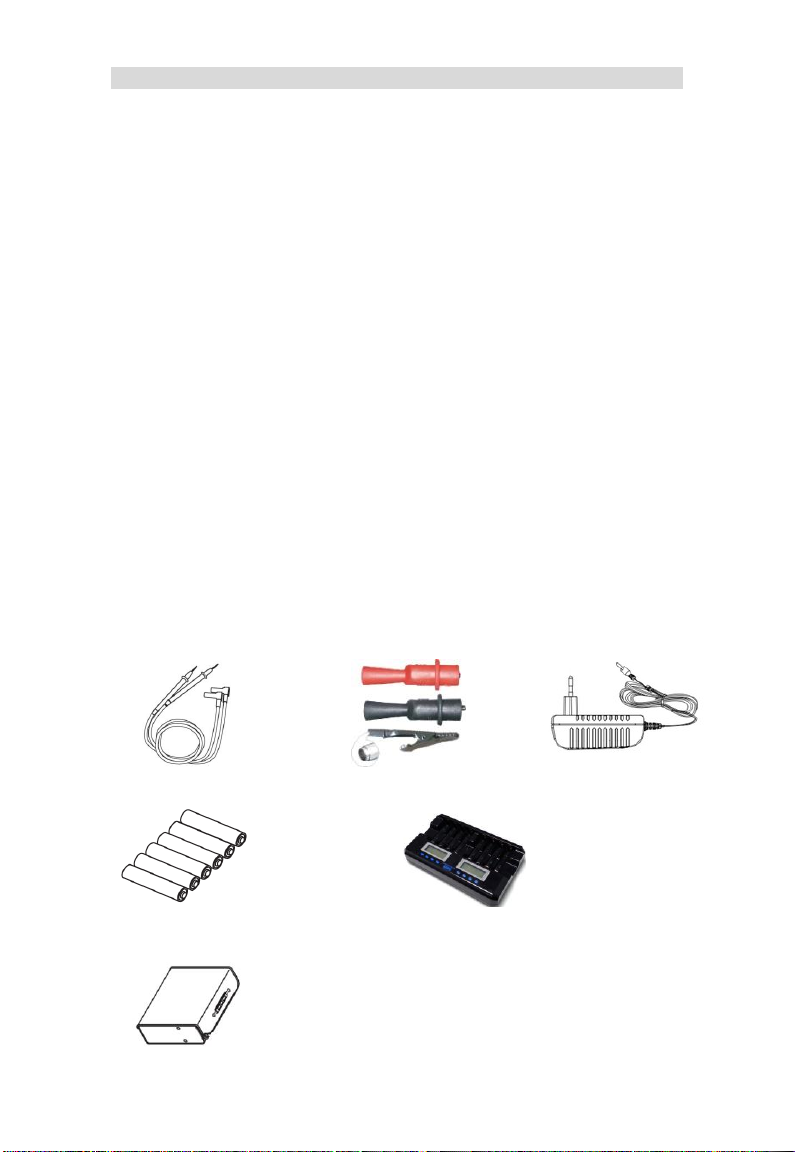
Accessories:
Measurement lead cables
(CA-B01)
Alligator clip
(CA-B02)
AC Adapter
(CA-P01)
Ni-MH charge battery (CA-C02)
Carrying case (CA-B03)
Battery charger (CA-W01,Sold separately)
http://www.zhoyi.com

CA103&CA102S Handy Multi-functions Calibrator Operating Instruction
3
Safety Precautions
When operating the instrument, strictly observe the precautions in thi
s manual to ensure correct and safe operation. If you use other than as inst
ructed in this manual, our company is not liable for any damage that may re
sult.
Safety Symbols
Warning
Indicates a hazard that may result in the loss of life or serious injury of the
user unless the described instruction is abided by.
Caution
Indicates a hazard that may result in an injury to the user and/or physical
damage to the product or other equipment unless the described instruction
is abided by.
☞ Note
Indicates information that is essential for handling the instrument or should
be noted in order to familiarize yourself with the instrument's operating
procedures and/or functions.
Tip
Indicates additional information to complement the present topic.
http://www.zhoyi.com

CA103&CA102S Handy Multi-functions Calibrator Operating Instruction
4
Be sure to comply with the following safety precautions. Failure to do
so may result in loss of life or injury to personnel from such hazards as ele
ctrical shock, or damage to the instrument.
Warning
●Prohibition of Use in Gaseous Environments
Do not operate the instrument in the presence of inflammable and
explosive gases or vapors. Operating the instrument in such an
environment is extremely hazardous.
●External Connections
When connecting the instrument to the object to be tested or an external
control circuit, or if you need to touch any external circuit, turn off the power
to the circuit and make sure that no voltage is generated.
●Correct Use of Lead Cables
Be sure to correctly use the measurement lead cables and source lead
cables without mistaking them.
●Remove the Casing
Removing the casing and disassembling or modifying the instrument is
strictly prohibited. Some parts inside the instrument are extremely
dangerous because hey use a high voltage. When the instrument needs an
internal inspection or calibration, contact our company or the dealer from
whom you purchased the instrument.
To use the AC adapter safely, be sure to comply with the following
precautions.
Warning
● Power Supply
Make sure that the rated power supply voltage of the instrument matches
the voltage of the power supply before turning on the power.
http://www.zhoyi.com

CA103&CA102S Handy Multi-functions Calibrator Operating Instruction
5
Contents
INTRODUCTION.........................................................................................1
CHECKING THE CONTENTS OF THE PACKAGE.....................................2
SAFETY PRECAUTIONS............................................................................3
1. PRODUCT OUTLINE..............................................................................7
2. NAMES AND FUNCTIONS OF PARTS...................................................8
3. BEFORE STARTING SOURCE OR MEASUREMENT .........................10
3.1 USAGE PRECAUTIONS.........................................................................10
3.2 CONNECTING A POWER SUPPLY ...........................................................12
3.2.1Using an AC Adapter.........................................................12
3.2.2 Using an NiMH Battery Pack............................................12
3.3TURNING THE POWER ON AND OFF ......................................................14
3.3.1 Turning the Power On and Off .........................................14
3.3.2 Screen saver....................................................................14
3.3.3 Auto Power Off.................................................................14
3.4 OPERATING ENVIRONMENT..................................................................14
4. SOURCE...............................................................................................15
4.1 CONNECTING THE SOURCE TERMINALS.................................................15
4.2 SOURCE KEYS OPERATION..................................................................15
4.3 SOURCE DC VOLTAGE (DCV) SIGNALS ................................................16
4.4 SOURCE DC CURRENT (DCMV) SIGNALS.............................................16
4.4.1 Source DC Current Signals............................................16
4.4.2 20 mA SINK Function.....................................................17
4.5 SOURCE DC VOLTAGE (DCMV) SIGNALS..............................................18
4.6 SOURCE RESISTANCE (RESI) SIGNALS ................................................19
4.7 SOURCE THERMOCOUPLE (TC) SIGNALS ..............................................19
4.8 SOURCE FREQUENCY SIGNALS............................................................20
http://www.zhoyi.com

CA103&CA102S Handy Multi-functions Calibrator Operating Instruction
6
5. MEASUREMENT ..................................................................................20
5.1 MEASURING DC VOLTAGE (DCV) ........................................................21
5.2 MEASURING DC CURRENT (DCMA).....................................................21
5.2.1 Measuring DC Current.....................................................21
5.2.2 Measuring 24V LOOP......................................................22
5.3 MEASURING DC VOLTAGE (DCV) ........................................................22
5.4 MEASURING RESISTANCE TEMPERATURE DETECTOR(RTD)....................23
5.5 MEASURING THERMOCOUPLE (TC) ......................................................24
5.6 MEASURING FREQUENCY (FREQ) .......................................................25
6. PARAMETERS SETTING .....................................................................25
6.1 GENERAL PARAMETERS SETTING ..........................................................26
6.2 SECOND LEVEL (CALIBRATION)PARAMETER SETTING..............................27
7. NTERNATIONAL TEMPERATURE SCALE ITS-90...............................29
8. CHARGING...........................................................................................30
9. SPECIFICATIONS.................................................................................31
9.1 CA103 SOURCE UNIT RANGE AND ACCURACY ........................................31
9.2 CA103 MEASUREMENT UNIT RANGE AND ACCURACY...............................32
9.3 CA102S SOURCE UNIT RANGE AND ACCURACY ......................................33
9.4CA102S MEASUREMENT UNIT RANGE AND ACCURACY ............................34
http://www.zhoyi.com

CA103&CA102S Handy Multi-functions Calibrator Operating Instruction
7
1. Product Outline
Generation (SOURCE)
Function
Range
DC Voltage (DCV)
100mV, 6V
DC Current (DCA)
24mA, 24mA SINK
Resistance (Ω)
500Ω
Thermocouple (TC)
S,K,E,T,J,B,
R,N,WRe3-25
Frequency (FREQ)
1000Hz, 5kHz
Measurement (MEASURE)
Function
Range
DC Voltage (DCV)
30V, 100mV
DC Current (DCA)
30mA
Resistance temperature detector(RTD)
Cu50, Pt100
Thermocouple (TC)
S,K,E,T,J,B,
R,N,WRe3-25
Frequency (FREQ)
5kHz
http://www.zhoyi.com

CA103&CA102S Handy Multi-functions Calibrator Operating Instruction
8
2. Names and Functions of Parts
Output Range
Output Function
Output Value
Additional Information
Power Key
Numeric Key
Pen Outlet
Power Indicator
Charge Indicator
Function key
Direction key
Measurements
Measurement Range
Measurement Function
http://www.zhoyi.com

CA103&CA102S Handy Multi-functions Calibrator Operating Instruction
9
Function keys
Source Keys :Changes the source function. The measurement
sequence is DCV->DCmA->DCmV->R->TC->F->
(DCV).
:Changes the range for each function.
(DCmA–Range, it will switch to the follow the
sequence: 0-24mA->Sink1-24mA.
(RTD–Range, it will switch to the follow the sequence:
Cu50—>Pt100.
TC–Range, it will switch to the follow the sequence:
S->K->E->T->J->B->R->N->W325).
Measure Keys :Changes the measure function. The measurement sequence
is DCV->DCmA->DCmV->RTD->TC->F->(DCV).
:Changes the range for each function.
Common Keys
:Output value reset to default values.
:Enter to query mode for parameter setting and
escape to main screen.
:Confirmation button.
Direction keys
:Set the main screen and check the screen when the
cursor position value..Amend digit in parameter
setting.
:Locate cursor bits for the digit amending
Numeric Keys
:Key in the input/output setting, query reading directly.
http://www.zhoyi.com
Ce manuel convient aux modèles suivants
1
Table des matières
Manuels Équipement de test populaires d'autres marques

SMART
SMART KANAAD SBT XTREME 3G Series Manuel utilisateur

Agilent Technologies
Agilent Technologies BERT Serial Manuel utilisateur

Agilent Technologies
Agilent Technologies N3280A Manuel utilisateur

Vernier
Vernier Go Direct Voltage Manuel utilisateur

Lifeloc
Lifeloc R.A.D.A.R. Manuel utilisateur

Fluke
Fluke T5-600 Instructions d'utilisation et d'installation