
Zeemote JS1 Manuel utilisateur

USER GUIDE
USER GUIDE •GUIDE D'UTILISATION
GUIDA DELL'UTENTE •BEDIENUNGSANLEITUNG
GUÍA DE USUARIO •MANUAL DO UTILIZADOR

For your convenience this User Guide is provided in English,
Spanish, French, Italian, German, and Portuguese.
À toutes fins utiles, ce guide d’utilisation est fourni en
anglais, allemand, espagnol, français, italien et portugais.
Questa guida utente viene fornita in inglese, spagnolo,
francese, italiano, tedesco e portoghese.
Diese Bedienungsanleitung wurde in englischer Sprache
verfasst und für Sie ins Französische, Italienische,
Deutsche, Spanische und Portugiesische übersetzt.
Para su comodidad, este Manual del usuario ha sido
traducido a los siguientes idiomas: inglés, español,
francés, italiano, alemán y portugués.
Para sua conveniência, este manual do utilizador
é fornecido em inglês, espanhol, francês, italiano,
alemão e português.

1
About Your Zeemote™JS1 Bluetooth Controller.............................3
Installing the Batteries..................................................................4
Zeekey™Controller Software and Games Compatibility...............5
Getting Started - Zeemote™JS1 featuring Zeekey........................8
Getting Started - Zeemote Ready™Games.................................11
TABLE OF CONTENTS
À propos de la manette Bluetooth Zeemote™JS1.......................14
Installation des piles ...................................................................15
Compatibilité des jeux et du logiciel de la manette Zeekey™.....16
Introduction - Zeemote™JS1 avec Zeekey...................................19
Introduction - Jeux Zeemote Ready™...........................................22
TABLE DES MATIÈRES
Controller Bluetooth Zeemote™JS1.............................................25
Installazione delle batterie ..........................................................26
Software del Controller Zeekey™e compatibilità con i giochi.....27
Introduzione - Zeemote™JS1 con Zeekey....................................30
Introduzione - Giochi Zeemote Ready™.......................................33
SOMMARIO

2
Über den JS1 Bluetooth-Controller von Zeemote™......................36
Einsetzen der Batterien................................................................37
Software für den Zeekey™-Controller and kompatible Spiele.....38
Erste Schritte mit dem Zeemote™JS1 und Zeekey......................41
Erste Schritte mit Zeemote Ready™-Spielen...............................44
INHALTSVERZEICHNIS
Acerca del Mando Bluetooth Zeemote™JS1................................47
Instalar las pilas..........................................................................48
El software Zeekey™del Mando y compatibilidad con juegos....49
Primeros pasos: función Zeekey del Mando Zeemote™JS1........52
Primeros pasos: juegos Zeemote Ready™...................................55
ÍNDICE
Acerca do Controlador Bluetooth Zeemote™JS1.........................58
Instalar as pilhas.........................................................................59
Software de controlador Zeekey™e compatibilidade com jogos...60
Introdução - Zeemote™JS1 com Zeekey......................................63
Introdução - Jogos Zeemote Ready™...........................................66
ÍNDICE
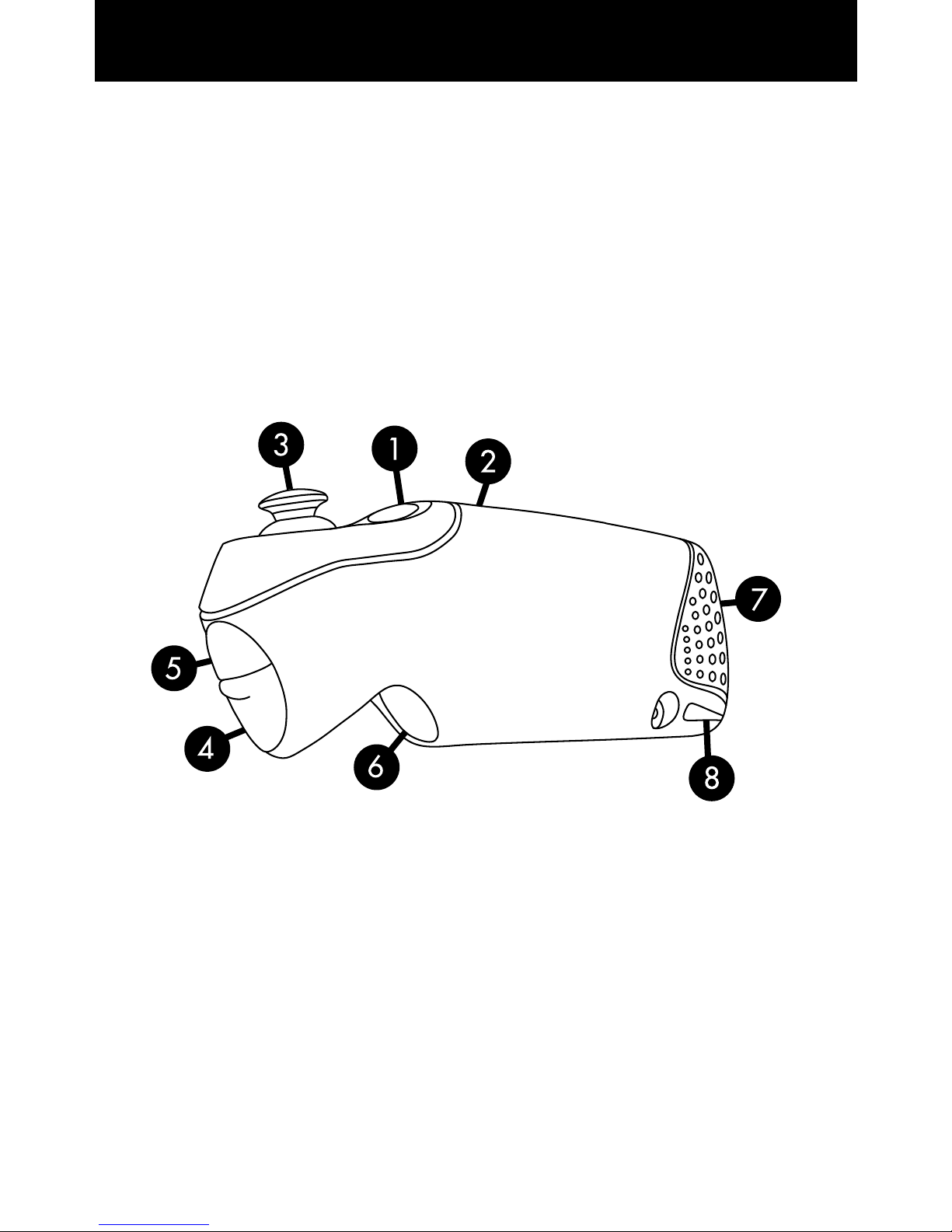
3
1. D: Action/Power Button
(Power on/off: Hold for
3 seconds)
2. Indicator Light
• FlashingQuickly:
Ready to Connect
• FlashingSlowly:
Connected
3. Thumbstick
4. A: Action Button
5. B: Action Button
6. C: Action Button
7. Battery Door
8. Lanyard Anchor
Thank you for purchasing the Zeemote™
JS1 Bluetooth® Mobile Gaming Controller.
The Zeemote JS1 is designed to provide you with hours of
the World’s Best Mobile Gaming Experience!
ENGLISH

4
The Zeemote JS1 Controller uses two AAA batteries. Follow
directions below to insert the batteries. Once the battery door
has been removed there is a +/- diagram on the body of the
JS1 that shows you the proper way to insert the batteries.
The Zeemote JS1 Controller has a 50+ hour battery life for
hours of fun and immersive game play. In order to conserve
battery power, the Zeemote JS1 will turn off:
1. If it is not connected to the phone for 5 minutes
2. If it is connected to the phone, but has not been used for
over 20 minutes
Squeeze battery
door on both sides
Slide door up…
…then out
Insert batteries
(Note: Picture shows
proper battery
installation.)

5
Zeemote JS1 Compatibility
Using your Zeemote JS1:
1. The Zeemote JS1 Featuring Zeekey Controller Software
is compatible with all mobile games on specific mobile
devices.
2. Zeemote Ready Games are optimized for compatibility
between the mobile device, controller and specific
games.

6
Zeemote JS1 Featuring Zeekey Controller Software
About Zeekey™Controller Software
All Mobile Games are compatible with the Zeemote JS1 when
using the Zeekey™Controller Software. The Zeekey Control-
ler Software is an application for your mobile device that
enables the Zeemote JS1 to have the following features:
1. Precise and responsive control of all mobile games
2. Navigate your device and control other applications such
as the music player, web browser and more
3. Mobile Console Gaming Experience: Play mobile games
anytime, anywhere on any screen by combining a mobile
device with “TV Out” and a Zeemote JS1.
TO DOWNLOAD THE FREE ZEEKEY CONTROLLER
SOFTWARE AND TO CHECK DEVICE COMPATIBILITY
GO TO WWW.ZEEMOTE.COM/ZEEKEY

7
Zeemote Ready™Games
About Zeemote Ready™Games
Your Zeemote JS1 will also work with Zeemote Ready™
Games that have support for the JS1 Controller built into the
games. Zeemote Ready™games feature:
1. Game Play optimized for use with the controller
2. In-Game Zeemote JS1 Controller Detection and
Auto Connect
3. Controller Settings in the option menu
If your phone makes use of Zeekey Controller Software it
must be turned off when playing Zeemote Ready™Games.

8
Getting Started
Zeemote JS1 Featuring Zeekey Controller Software
1) Insert the batteries into your Zeemote JS1 Controller
2) Turn on your phone
3) Activate Bluetooth®on your phone
4) Determine if your phone requires Zeekey Controller
Software. If not, please proceed to Page 11 - “Getting
Started with Zeemote Ready™” instructions.
5) Download Zeekey to your phone
Free Download – www.zeemote.com/zeekey
•Enter www.zeemote.com/zeekey into your phone’s
browser to download and install the software
•You can also download Zeekey to your computer and
install to your phone with a cable.
•After installation you will typically find Zeekey on the
phone’s main menu screen or within the “Application”
folder, “Download” folder, or “My Own” folder.
Installation location will vary by phone.
6) Locate and launch Zeekey:
•Go to Phone Menu
•To Launch Zeekey: Search for a Zeemote JS1
Controller icon named ‘Zeekey’ on the Main Menu or
in the “Application”, “Download” or “My Own” folder.
Installation location will vary by phone. Once found,
select ‘Zeekey’ to start the controller software.
•Some phones may present the following message:
“Zeekey is requesting changes to its application control
permissions.” Please click “View”, then “Menu Key”
then “Save”.
Autres manuels pour JS1
1
Table des matières
Langues :
Autres manuels Zeemote Manettes de jeux vidéo


