Yamaha RM-TT Manuel utilisateur

BOUNDARY MICROPHONE
MICROPHONE DE SURFACE
МИКРОФОН ГРАНИЧНОГО СЛОЯ
界面麦克风
RM-TT
EnglishDeutschFrançaisEspañolPortuguêsItalianoРусский
中文한국어日本語
Installationshandbuch
IT
PT
ES
FR
DE
Manuel d’installation
Manual de instalación
Manual de instalação
Manuale di installazione
Installation Manual
EN
RU Руководство по установке
ZH
KO
설치설명서
安装说明书
JA 施工説明書

RM-TT Installation Manual
2
PRECAUTIONS.............................................................................................................3
NOTICE .........................................................................................................................5
INFORMATION..............................................................................................................6
INTRODUCTION ...........................................................................................................8
Included items..................................................................................................................................... 8
Reference manuals ............................................................................................................................. 8
CONTROLS AND FUNCTIONS....................................................................................9
Top panel/side panel........................................................................................................................... 9
Bottom panel......................................................................................................................................10
INSTALLING ON A TABLE......................................................................................... 11
Without mounting onto the table ........................................................................................................11
When mounting onto the table ...........................................................................................................12
MAIN SPECIFICATIONS.............................................................................................15
Dimensional diagram .........................................................................................................................17
CONTENTS
(bottom_en_01)
The model number, serial number, power requirements, etc., may be found on or near the name plate,
which is at the bottom of the unit. You should note this serial number in the space provided below and
retain this manual as a permanent record of your purchase to aid identification in the event of theft.
Model No.
Serial No.

English
3
RM-TT Installation Manual
PLEASE READ CAREFULLY BEFORE PROCEEDING
Please keep this manual in a safe place for future reference.
WARNING
Always follow the basic precautions listed below to avoid the possibility of serious
injury or even death from electrical shock, short-circuiting, damages, fire or other
hazards.These precautions include, but are not limited to, the following:
Fire warning
• Do not place any burning items or open flames near the product, since they may cause a fire.
CAUTION
Always follow the basic precautions listed below to avoid the possibility of physical
injury to you or others.These precautions include, but are not limited to, the
following:
If you notice any abnormality
• If any of the following problems occur, immediately disconnect the LAN cable from the
product.
- The LAN cable becomes frayed or damaged.
- Unusual smells or smoke are emitted.
- Some object, or water has been dropped into the product.
- Cracks or other visible damage appear on the product.
Then have the product inspected or repaired by qualified Yamaha service personnel.
Do not open
• This product contains no user-serviceable parts. Do not attempt to disassemble the internal
parts or modify them in any way.
Water caution
• Do not expose the product to rain, use it near water or in damp or wet conditions, or place on
it any containers (such as vases, bottles or glasses) containing liquids which might spill into
any openings.
PRECAUTIONS
Yamaha cannot be held responsible for damage caused by improper use or modifications to the
product, or data that is lost or destroyed.

4RM-TT Installation Manual
Location and connection
• When connecting this product with a PoE injector or a PoE network switch, use a LAN cable
which supports PoE. If you connect a cable that does not comply with specifications, or
connect a flat type or slim type cable, fire or malfunctions might occur.
• Do not damage the LAN cable. Failure to observe this precaution could result in fire, electric
shock, or damage to the product.
- Do not place heavy objects on the cable.
- Do not process the cable in any way.
- Do not use staples to fix the cable in place.
- Do not apply excessive force to the cable.
- Be sure to keep the cable away from anything hot.
• Do not place the product in an unstable position or a location with excessive vibration, where
it might accidentally fall and cause injury.
• Keep this product out of reach of children. This product is not suitable for use in locations
where children are likely to be present.
• Do not place the product in a location where it may come into contact with corrosive gases or
salt air. Doing so may result in malfunction.
• Do not route a LAN cable where someone might trip over them, such as in a location where
people pass. Tripping on a cable may cause a person or this product to fall down, resulting in
personal injury or damage to the product.
• Before moving the product, remove the connected LAN cable.
• Install in the manner instructed in the manual. Falling may result in injury or damage.
• Confirm that the finished installation is safe and secure. Also, carry out safety inspections
periodically. Failure to observe this may cause devices to fall and result in injury.
• Always consult qualified Yamaha service personnel if the product installation requires
construction work. Improper installation might cause accidents, injuries, damage or
malfunction of this product.
Handling caution
• Do not rest your weight on the product or place heavy objects on it.

English
5
RM-TT Installation Manual
To avoid the possibility of malfunction/damage to the product, damage to data, or damage to other
property, follow the notices below.
Handling and maintenance
• Do not use the product in the vicinity of a TV, radio, or other electric products. Otherwise, the
product, TV, or radio may generate noise.
• Do not install the product in a location where magnetic fields are strong. Otherwise, it might
cause the product to malfunction.
• Do not expose the product to excessive dust or vibration, or extreme cold or heat, in order to
prevent the possibility of disfiguration, unstable operation, or damage to the internal
components.
• Do not install in locations where temperature changes are severe. Otherwise, condensation
may form on the inside or the surface of the product, causing it to break.
• If there is reason to believe that condensation might have occurred, leave the product for
several hours without turning on the power until the condensation has completely dried out, in
order to prevent possible damage.
• Do not use a LAN cable that comes into contact with the product case or applies excessive
force to the connector.
• Do not touch the interior of a port with your fingers or any metallic object.
• Do not place vinyl, plastic or rubber objects on the product, since this might cause alteration
or discoloration.
• When cleaning the product, use a dry and soft cloth. Do not use paint thinners, solvents,
cleaning fluids, or chemical-impregnated wiping cloths, since this might cause alteration or
discoloration.
NOTICE

RM-TT Installation Manual
6
About functions/data bundled with the product
• Warning: Operation of this product in a residential environment could cause radio
interference.
• This product uses Dante Ultimo. Refer to the Audinate website (English) for details on the
open source licenses for the particular software.
https://www.audinate.com/software-licensing
Refer to the website below for the licensing terms of the open source software used in this
product.
U.S.A. and Canada
https://uc.yamaha.com/support/
Other countries
https://download.yamaha.com/
About this manual
• This Manual uses the following signal words for the important information:
• The illustrations as shown in this manual are for instructional purposes only.
• The company names and product names in this manual are the trademarks or registered
trademarks of their respective companies.
• Yamaha continuously makes improvements and updates to the software included in this
product. You can download the latest software from the Yamaha website.
• Unauthorized copying of this document in part or in its entirety is prohibited.
INFORMATION
WARNING This content indicates “risk of serious injury or death.”
CAUTION This content indicates “risk of injury.”
NOTICE Indicates content that you must observe in order to prevent the
product from malfunctioning, being damaged, or operating
incorrectly, and to avoid data loss.
IMPORTANT Indicates content that you must know in order to operate and use the
product correctly.
NOTE Indicates information that is related to operation and use. Read this
for your reference.

English
7
RM-TT Installation Manual
About transfer/disposal
• If you transfer the product to a third party, pass this manual and accessories along with it.
• This product contains recyclable components. When disposing of this product, please
contact the appropriate local authorities.

8RM-TT Installation Manual
Thank you for purchasing the Yamaha RM-TT boundary microphone. This unit is a PoE-
powered tabletop microphone. It is compatible with Dante and can be used in combination
with the RM-CR signal processor. Be sure to read this manual before using the unit.
Included items
• Tabletop mounting adaptor : 1
• Mounting screws : 3
•Spacers :3
• Installation Manual (this document) : 1
Reference manuals
• For details on connecting this unit to the RM-CR, refer to the RM-CR Reference Manual.
• For details on the functions and specifications of this unit, refer to the RM-TT Reference
Manual.
Both publications are available on the Yamaha website.
U.S.A. and Canada
https://uc.yamaha.com/support/
Other countries
https://download.yamaha.com/
INTRODUCTION

English
9
RM-TT Installation Manual
Top panel/side panel
1(Mic) buttons/indicators
Touch a button to turn on/off the microphone. All four buttons/indicators work together.
2STATUS indicator
Indicates the status of this unit using a color and flashing pattern. For details, refer to
the RM-TT Reference Manual.
3RESET button
Use to reset the settings by long-pressing with a fine-tipped object, then releasing it.
CONTROLS AND FUNCTIONS
Mic indicator Microphone status
Green ON
Red OFF
Long press STATUS indicator Reset target
4 seconds to less than
8 seconds
Flashes blue twice per second
(during long-pressing/resetting)
Network-related settings
8 seconds to less than
12 seconds
Flashes blue three times per second
(during long-pressing/resetting)
All settings (automatically
restarts after reset)
1
2
3

10 RM-TT Installation Manual
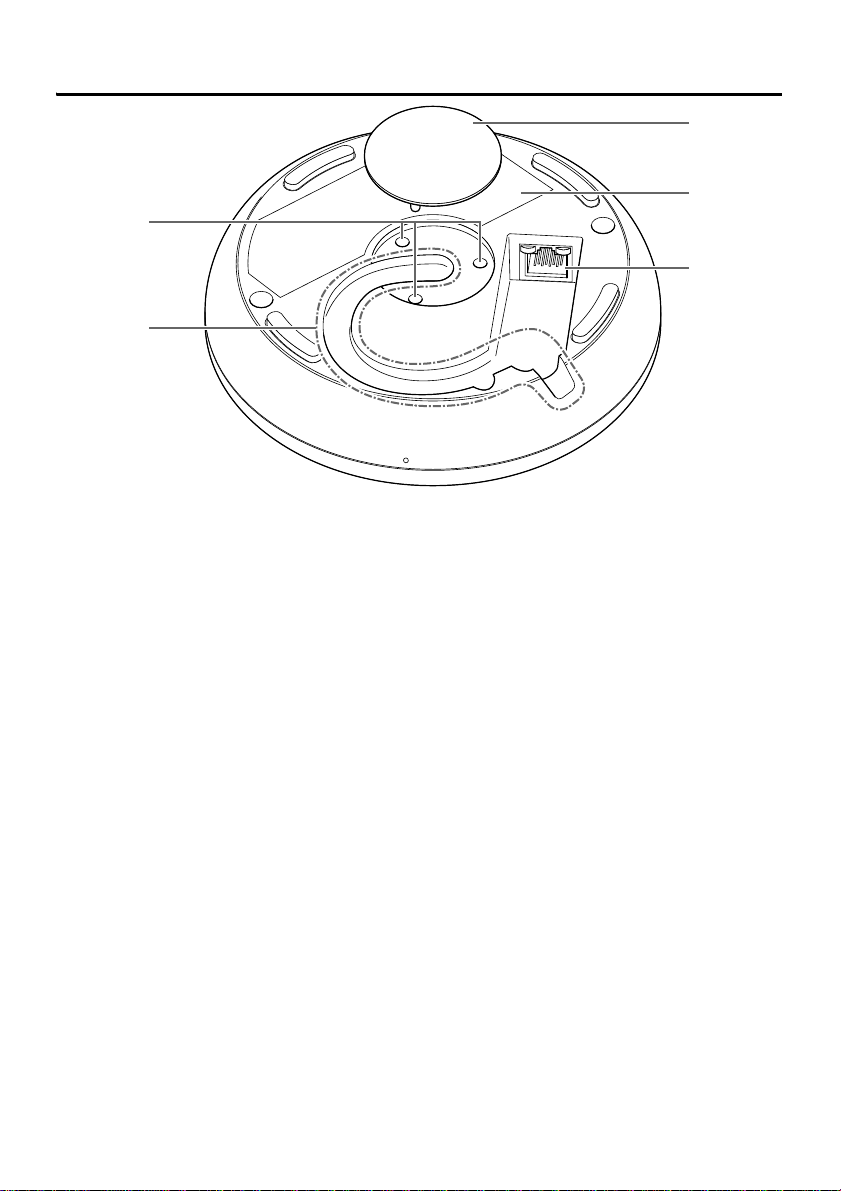
Bottom panel
1Mounting screw holes
Use for installing the mounting screws.
2Cable slot
Use for routing the LAN cable.
3Cap
Remove when mounting this unit onto a table.
4Product label
Provides information about this unit and marks of conformity with various standards.
5Dante/PoE port
This is an RJ-45 port to which you can connect an LAN cable (CAT5e or higher) via an
IEEE802.3af compliant a PoE injector or the PoE network switch to a Dante unit. For
details on injectors, refer to the RM-TT Reference Manual.
NOTICE
: Do not connect this product to a public Wi-Fi and/or Internet service directly. Only
connect this product to the Internet through a router with strong password
protections. Consult your router manufacturer for information on optimum security
practices.
: Do not connect any device here other than a Dante-compatible device or a
device (including a computer) that supports gigabit Ethernet.
4
3
5
2
1
Autres manuels pour RM-TT
1
Ce manuel convient aux modèles suivants
2
Table des matières
Langues :
Autres manuels Yamaha Microphone

Yamaha
Yamaha RM-CG Manuel utilisateur

Yamaha
Yamaha AG01 Manuel utilisateur

Yamaha
Yamaha Subkick SKRM100 Manuel utilisateur

Yamaha
Yamaha RMWAP8 Manuel utilisateur

Yamaha
Yamaha MZ103Be Manuel utilisateur

Yamaha
Yamaha PGM1 Manuel utilisateur

Yamaha
Yamaha PJP-25URS Manuel utilisateur

Yamaha
Yamaha XW-CS-700 Manuel utilisateur

Yamaha
Yamaha RM-TT Manuel utilisateur

Yamaha
Yamaha DM-105 Manuel utilisateur