
Xsensor ForeSite Intelligent Surface System Manuel utilisateur

This user guide covers how to install and maintain the
ForeSite Intelligent Surface system and its components.
ForeSite®Intelligent
Surface System
USER GUIDE

ForeSite Intelligent Surface System
User Guide
Copyright © 2020-2022XSENSOR Technology Corporation
All rights reserved
All trademarks appearing in this document belong to XSENSOR Technology Corporation.
The XSENSOR Pressure Imaging System is protected by copyright law. Unauthorized reproduction or
redistribution of XSENSOR software is prohibited. No part of this document may be reproduced or transmitted
in any form without the express written permission of XSENSOR Technology Corporation.
For support, contact [email protected]
Phone: 403-266-6612
Published:2022-11-29
Part number:ASY-05-00080-14

XSENSOR Technology Corporation 3of 46
Table of Contents
Introduction.......................................................................................................... 4
Introduction ......................................................................................................................................................... 4
Intended Use........................................................................................................................................................ 5
Essential Performance .........................................................................................................................................6
Symbol Guide ....................................................................................................................................................... 7
Compliance with Standards................................................................................................................................. 8
Warnings and Cautions ........................................................................................................................................ 9
Description of Components ............................................................................................................................... 11
Power Supply and Power Cord .......................................................................................................................... 13
Installation.......................................................................................................... 14
Inspect ForeSite IS Components Before Using ................................................................................................ 14
Installing the ForeSite IS Overlay...................................................................................................................... 15
Installing the ForeSite Intelligent Mattress ...................................................................................................... 20
Connecting the Power Supply............................................................................................................................ 21
Connecting the Sensor....................................................................................................................................... 22
Securing the USB-to-tablet Connection............................................................................................................ 23
Finish Making the Bed........................................................................................................................................ 25
Maintenance and Cleaning................................................................................. 26
Maintenance....................................................................................................................................................... 26
Cleaning the Display and Connections.............................................................................................................. 27
Cleaning and Disinfecting the Sensor Surface .................................................................................................. 28
Cleaning the Top of the System......................................................................................................................... 31
Cleaning the Mattress Underneath the ForeSite Intelligent Overlay ............................................................... 32
Cleaning the Underside of the System .............................................................................................................. 33
Storing the System and Display Terminal ......................................................................................................... 34
Storage and Transport Conditions..................................................................................................................... 39
End of a System's Product Life .......................................................................................................................... 40
Specifications ..................................................................................................... 41
Specifications..................................................................................................................................................... 41
Compliance with Emission and Immunity Standards....................................................................................... 43
Contact Information ........................................................................................... 46
Contact Information........................................................................................................................................... 46

XSENSOR Technology Corporation 4of 46
Introduction
•
•
•
•
•
•
•
•
•
•
The ForeSite® Intelligent Surface System (ForeSite IS) is a continuous skin monitoring mattress system for
clinicians that improves patient safety and reduces staff workload. It’s powered by XSENSOR’s Intelligent
Dynamic Sensing platform, which enables precise measurements and features highly detailed visualizations
and smart data with AI-powered analysis — resulting in optimized performance, comfort, and safety.
ForeSite IShelps clinicians:
Increase patient safety by validating that repositioning regimes have effectively redistributed pressures,
thereby reducing the risk of injury.
Improve staff workload by identifying highest-risk patients and body regions using detailed image
visualizations.
Individualize patient care with AI/ML to inform advanced prevention strategies to maintain healthy skin
for at-risk patients.
Real-time, easy-to-understand pressure images generated by the ForeSite IS System identify areas that are
experiencing elevated pressures, giving clinicians the information they need to make body position
adjustments before pressure injuries occur.
The sensor array for the ForeSite ISSystemcomes in two form factors:
The ForeSite Intelligent Mattress, a fully integrated mattress solution; and
The ForeSite Intelligent Overlay, a fitted mattress cover overlay designed to fit over existing hospital
mattresses.
Both options are embedded with a high resolution array of over 1,500 flexible sensor cells.
The sensor surfaces connect to a touch-screen Display Terminal running the ForeSite Viewersoftware
application.
The ForeSite Viewercontinuouslymonitors the patient's body surface pressuresand displays real-time
pressure images of elevated pressures, providing actionable insights. Software features include:
Visual display markers that clearly identify areas of the body that have been under sustained pressure;
A patient turn clock that tracks the time since the last reposition, visually notifying the clinician that it is
time to adjust the patient's body position; and
A history of recent turns, including pressure exposure data, that allows caregivers to see at a glance the
turn history of the patient and if their turn strategy needs to be modified.
Additional key features include:
A centralized dashboard, which provides real-time, detailed injury risk and turn history for all monitored
patients; and
The cloud database, which provides access to individual and multi-patient history reports for
compliance review and development of best practice.
ForeSite Reports
ForeSite Reports is an optional reporting application that integrates directly into ForeSite Viewer.
ContactXSENSORfor more details.

ForeSite Intelligent Surface SystemUser Guide Introduction
XSENSOR Technology Corporation 5of 46
•
•
Intended Use
The ForeSite Intelligent Surface System is specifically intended to assist with the turn management and
repositioning of patients susceptible to pressure injuries in medical, nursing and long term-care facilities. The
ForeSite IS system provides continuous monitoring features that help clinical staff more effectively execute the
pressure relief and patient turning schedules that are commonly included in a medical institution’s clinical
pathway.
The device only measures pressure at the support surface. The device is not intended to measure:
quantitatively a physiological or anatomical parameter
a quantity or a measurable characteristic of energy or substances delivered to or removed from the
human body
There are no known contraindicationsto its use. For any questions or concerns in regards to the safety of this
product, do not hesitate to contact XSENSOR.

ForeSite Intelligent Surface SystemUser Guide Introduction
XSENSOR Technology Corporation 6of 46
Essential Performance
There is no essential performance. The ForeSite IS system is not intended to replace current best practices for
the prevention of pressure injuries. It is intended to provide additional monitoring and data collection while
standard monitoring techniques and turn schedules are maintained.
ForeSite Intelligent Surface SystemUser Guide Introduction
XSENSOR Technology Corporation 7of 46
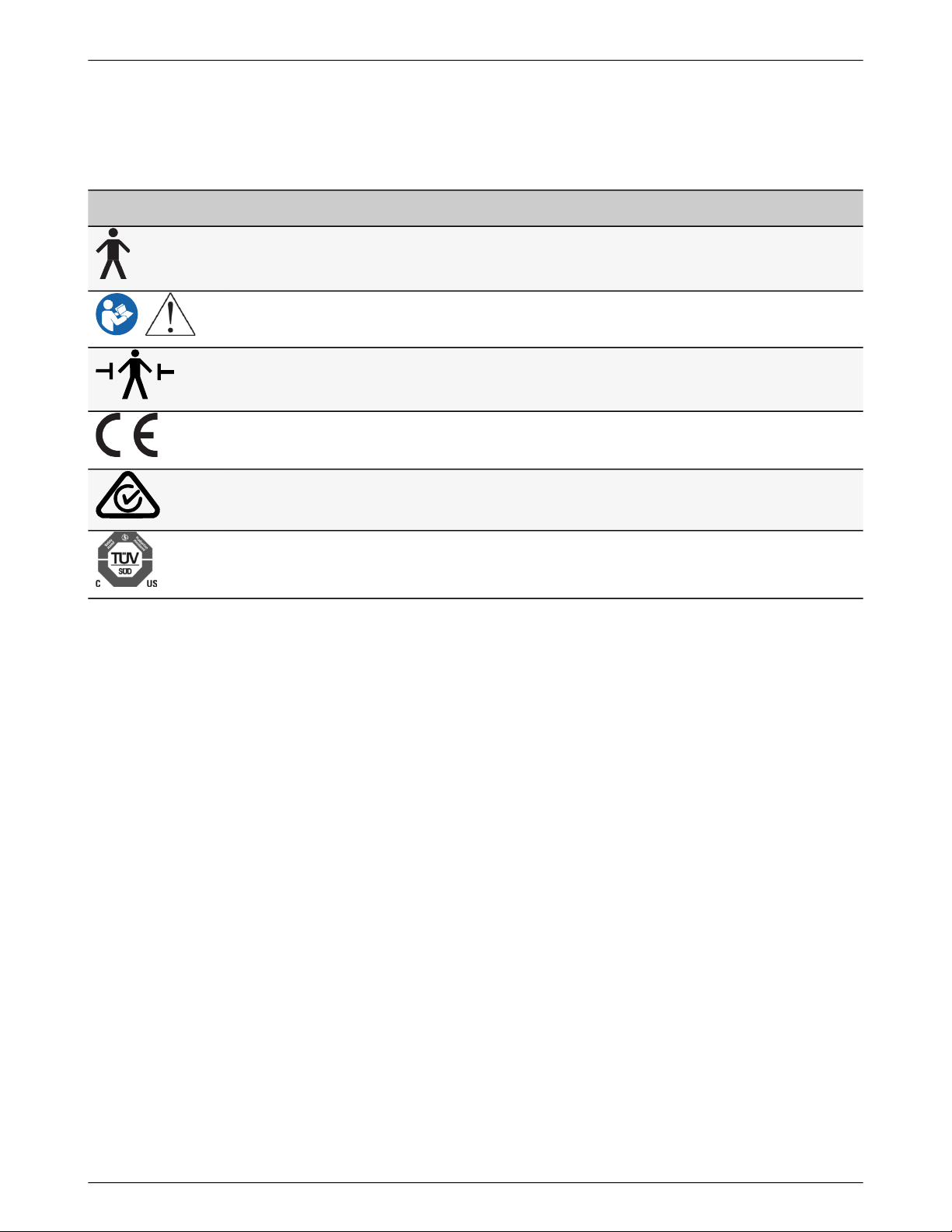
Symbol Guide
The ForeSite Intelligent Surface System uses the following symbols on the components.
THIS LABEL… IDENTIFIES THIS...
Type B Applied Parts - Attention, consult accompanying documents
Refer to the User Manual for important warnings and operating instructions
Type B Defibrillator Proof
Approved for sale in the European Economic Area
Approved for sale in Australia and New Zealand
Tested and approved by TUV (Technischer Überwachungs-Verein)

ForeSite Intelligent Surface SystemUser Guide Introduction
XSENSOR Technology Corporation 8of 46
•
•
•
•
•
Compliance with Standards
The ForeSite IS System is compliant with the following standards:
Mode of Operation: Continuous
Class I Equipment
Type B Applied Part. No electrical contact with patient in normal use
Electrical/Mechanical Safety: IEC 60601-1:2005/A1:2012 Edition 3.1
Electromagnetic Compatibility: IEC 60601-1-2:2014 Edition 4.0
For more information on compliance with emission and immunity standards, see Compliance with Emission
and Immunity Standards.

ForeSite Intelligent Surface SystemUser Guide Introduction
XSENSOR Technology Corporation 9of 46
1.
2.
3.
4.
5.
6.
7.
8.
9.
10.
11.
12.
13.
14.
15.
16.
Warnings and Cautions
The ForeSite Intelligent Surface System has been designed and tested in accordance with the previously
mentioned safety standards. To ensure safe use of the product, follow all safety and operating instructions in
this guide. At the end of your system's product life, please contact XSENSOR for instructions for safe disposal.
The ForeSite IS System is intended for use by healthcare professionals only. ForeSite IS must be installed and
used as described in this User Guide.
Warning: Use only the supplied power supply (Model Delta Electronics MDS-060AAS19 B) and cable
with the ForeSite IS System. Power supplies specified are part of the equipment. Do not position any
part of the equipment to keep it from disconnecting from the mains, should the need arise. In case of
emergency, unplug the device to isolate it from the mains.
Warning: ForeSite IS should only be configured as indicated in the hardware section of the User
Guide. Modification of this equipment is prohibited. To ensure grounding reliability, connect the
equipment to a receptacle with proper electrical grounding. For medical applications, connect the
equipment to a receptacle marked “Hospital Only,” “Hospital Grade,” or an equivalent.
Warning:Do not attach or connect any external accessories, including computers, cables, or
peripherals, to theForeSite IS Display Terminal input/output ports (USB, Ethernet, serial, and power).
Warning: Do not use the ForeSite IS System if any of the cables to and from any of the enclosed units
are damaged or visibly separating from the enclosures. This includes the power supply, or sensor USB
cable.
Warning: Do not use the equipment in the presence of a flammable anesthetic mixture with air,
oxygen, or nitrous oxide.
Warning: The ForeSite IS System is intended for use by health care professionals only.
Warning: The ForeSite IS Display Terminal may become hot with extended use in a hot environment.
Handle with care and avoid contact with hot surfaces. Do not place tablet on any body surface. Place on
a hard surface and do not impede airflow.
Warning: Administrative options settings must be reviewed and selected by a qualified medical
practitioner.
Warning: Do not use the ForeSite IS Sensor to lift the patient or to help remove the patient from the
bed.
Warning: The ForeSite IS Sensor is not intended for direct contact with the patient and must be
covered with a fitted cotton sheet.
Warning: The sensor is not defibrillator-proof unless covered with a fitted cotton sheet, minimum
0.01 in. (0.254 mm) thick, or equivalent.
Warning: Do not attempt to service or maintain the ForeSite IS equipment when in use with a
patient.
Caution: The ForeSite Intelligent Overlay and ForeSite Intelligent Mattress with embedded sensors
should be cleaned between each use. Unplug all product components from the wall outlet before
cleaning. Never intentionally expose the system to moisture other than the specified cleaning agents.
Refer to Maintenance and Cleaningfor more information.
Caution: The side of the system with labeling must face towards the patient’s body for medical safety
compliance.
Caution: Do not use the ForeSite IS System if the system's covering material is visibly damaged or
punctured. Ensure that patients making contact with the sensor do not have sharp objects on their
person, and that no sharp objects make contact with the sensor, as it may puncture the sensor during
use.
Caution: The ForeSite IS System is designed for indoor use only.

ForeSite Intelligent Surface SystemUser Guide Introduction
XSENSOR Technology Corporation 10of 46
17.
18.
19.
20.
Caution: For information regarding the safe disposal of your ForeSite IS Display Terminal, contact
your local XSENSOR representative or XSENSOR directly.
Caution: Only use the USB communication cable provided with the ForeSite IS System. The USB
cable length cannot exceed 10 feet (3 meters).
Caution: Ensure power cords do not trail on the ground, to avoid tripping hazards.
Caution: Avoid damage to the Display Terminal. Never place or rest another object on it while it is not
in use.
If any of these warnings or cautions are unclear, please contact XSENSOR Technology Corporation
immediately for more information.
Table des matières


