XMOD Xbox One 100 Manuel utilisateur

100 PLUS
XMOD Modded Controller
User’s Manual

Turn on your wireless controller and the console
▪Press the Xbox button on the wireless controller to turn on both the controller and the
console.
▪Open the battery door of the Xbox One wireless controller.
▪Insert batteries to align with the polarity as indicated inside the battery compartment.
▪Reinsert the battery door.
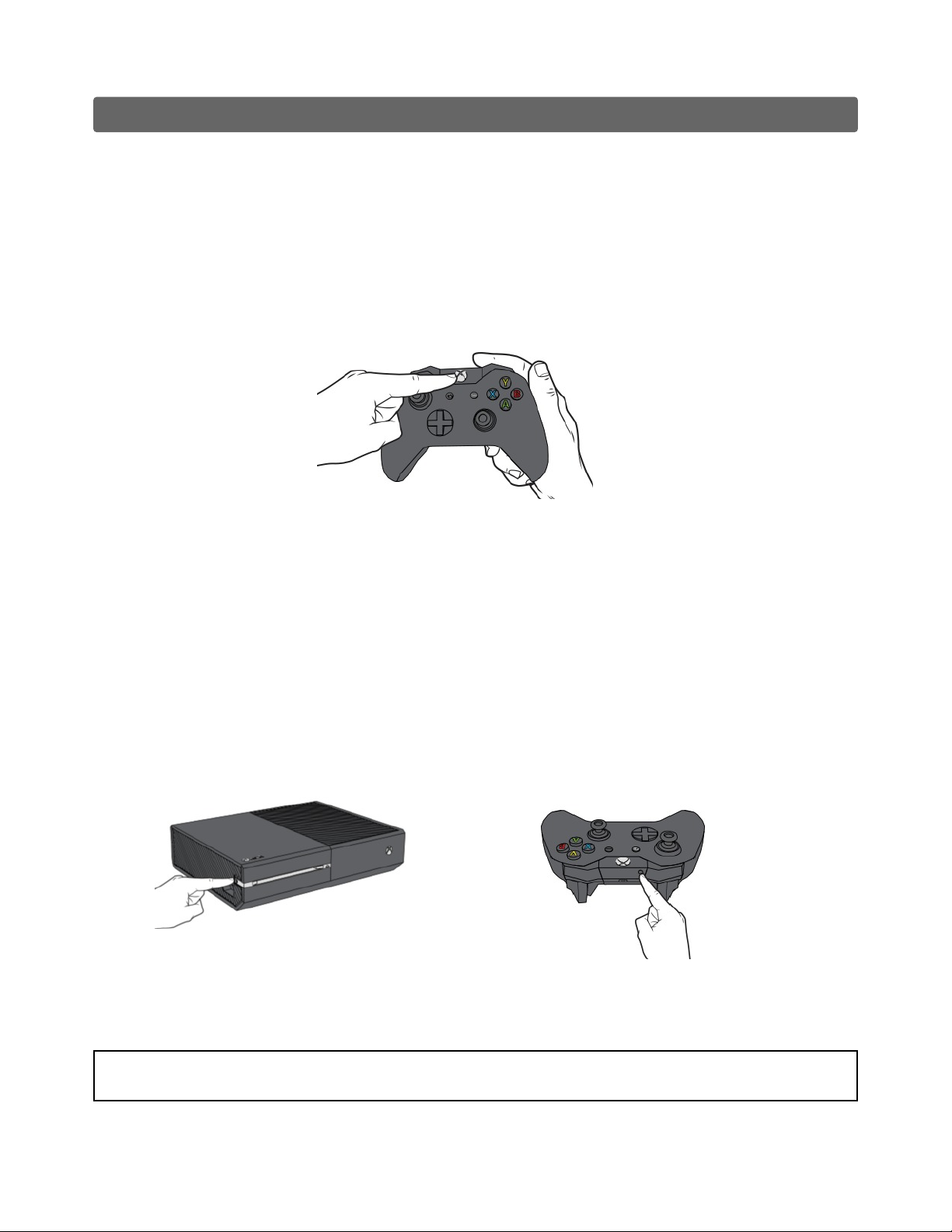
Enroll the controller using the console’s connect button
▪Power on your Xbox One console.
▪Insert AA batteries (or rechargeable batteries from the Xbox One Play & Charge Kit) into the
controller.
▪Turn on your controller by pressing and holding the Xbox button until the controller turns on.
▪The Xbox button will pulse, indicating it’s not yet connected to a controller. If the Xbox
button is lit solid, then the controller is already connected.
Your controller is now connected to your console. Repeat this procedure for every extra controller you want
to add.
STARTUP: By default, the Rapid Fire mod is turned OFF at startup
XBOX ONE 100
XMOD Modded Controller

Our XMOD RAPID FIRE CONTROLLER uses the RIGHT and LEFT TRIGGERS to fire your weapon.
Simply choose the rapid fire setting you are most satisfied with, and press the triggers to fire.
It will dramatically increase your performance and accuracy during the game play.
With 10 fully adjustable speeds and many different sub-modes and special functions you can have
more than 100 combinations making this controller complete enough for any game.
This XMOD RAPID FIRE CONTROLLER has been designed specifically for the Call of Duty series, but
works great for almost all first person shooters.
Key Features
•XBOX ONE Microsoft Wireless Controller
•XMOD® RAPID FIRE MOD CHIP
•10 Rapid Fire Speeds - Fully adjustable
• Adjustable Right Trigger Pull Level
•Ultra-fast Rapid Fire ON/OFF
•Ultra-fast switch modes & functions
• Switch modes FORWARD & BACKWARD
• Add/Remove Speeds (2-10)
•2Custom LEDs indicators
•Beeper Indicator (Adjustable Tone)
• Master Reset to Default Settings
• Default or Tactical buttons Layout
• Jitter Modes
• Drop Shot
• Jump Shot
• Kneel Shot
• LT Cancellation
•Quick Scope (Adjustable Delay)
• Sniper Breath
• Auto Aim
• Quick Aim
• Akimbo-Mimic
• Akimbo-Burst
• Dual Triggers
• Burst Fire (2-5 round burst)
RS
LS
MODE
RT
LT
XBOX ONE 100
XMOD Modded Controller

XBOX ONE 100
XMOD Modded Controller
SWITCH RAPID FIRE ON/OFF
This function will just turn the Rapid Fire on/off, the Special Functions will remain active.
Useful when primary and secondary weapons have different fire rates.
●Press and Hold the RIGHT Thumbstick.
●Tap the Mode button.
TURN ALL MODES AND FUNCTIONS ON/OFF
This function will switch ALL modchip Rapid Fire and Special Functions on/off.
●TURN ON: Hold the Right Thumbstick and tap the MODE button.
●TURN OFF: Press and simultaneously HOLD the RIGHT Stick and MODE button for 2 seconds.
RAPID FIRE
This controller comes by default with 6 pre-programmed speeds. You have the option of add up to
10 speeds, or you can even remove them leaving just 2 active speeds.
Every speed is adjustable. This allows versatility across shooters, and also with future games.
Each game, and sometimes each weapon within each game, require a different and specific speed
setting to achieve the proper firing rate.
Although this chip is very fast, you are still limited by how fast the game allows a weapon to shoot.
Shooting speed in some games are also limited in game by the weapon's rate of fire and animations.
You can slow down full automatic weapons to pinpoint precision or even speed single shot
weapons.
In some Call of Duty games you must set the fire rate just below the allowed limit for some weap-
ons, otherwise, if your fire speed is too fast for the game, your weapon will be blocked
HOLD TAP
LED FEEDBACK
Rapid Fire ON
Flashing
Rapid Fire OFF
Solid
HOLD TAP
LED FEEDBACK
MOD ON MOD OFF
HOLD
2 SECONDS
RS
MODE
RS
MODE

RS
LS
XBOX ONE 100
XMOD Modded Controller
Changing Rapid Fire speeds:
This XMOD Controller has 10 different modes/speeds which are all Programmable. The default
speeds for each mode are listed below.
To switch/cycle speeds:
■Forward: Hold the A button and tapd the Mode button.
■Backward: Hold the B button and tap the mode button.
You will see the LEDs flash indicating the mode/speed you are current in.
TIP: Tap the X button to stop the led blinking (if you don’t want to count them for a faster operation)
FACTORY DEFAULT
SPEEDS
Speed 1: 8 sps.
Speed 2: 9 sps.
Speed 3: 10 sps.
Speed 4: 15 sps.
Speed 5: 20 sps.
Speed 6: 25 sps.
Speed 7: 8 sps.
Speed 8: 8 sps.
Speed 9: 8 sps.
Speed 10: 8 sps.
Switch
Forward
Switch
Backward
Mode
Button
The controller will always remember the last mode you were using before powering down.
By Default, at startup all modchip Special functions and Rapid Fire will be OFF.
MODE
HOLD TAP
A
MODE
TAP
HOLD
B
Blink
LED FEEDBACK
FORWARD BACKWARD
JITTER When this “Special Function” is enabled the controller will cycle through 2 modes:
FAST (1 Blink) // SLOW (2 Blinks)
A
MODE MODE
B

XBOX ONE 100
XMOD Modded Controller
SPECIAL FUNCTIONS
This XMOD XBOX ONE modded controller has several special functions that can be quickly activated
at any time, with or without Rapid Fire.
These functions will only work with DEFAULT BUTTONS LAYOUT settings and you can still use
your XBOX buttons as normal.
Drop Shot, Drop Aim Shot and Kneel Shot can be set to use with TACTICAL BUTTONS LAYOUT.
This exclusive features will work with all Call of Duty games.
•JITTER MODES
This advanced feature uses a glitch in some Call of Duty games that allows some weapons to shoot
faster than normal. Two Jitter speeds: Slow - Fast. Regular Jitter and Aim Assisted (while scoped, jit-
ter turns off). User programmable speeds.
•DROP SHOT
This automatic drop shot feature allows you to quickly lay down and fire with the click of the RIGHT
TRIGGER (RT).
When you come face to face with an opponent just push the RT and it will drop you all the way to
the ground, aim and shoot, all in one action, when your opponent shoots over your head.
•KNEEL SHOT
The kneeling position is best to use when seconds count and you need better accuracy than
standing can give you. Kneel Shot is quicker than Drop Shot.
Pressing the Right Trigger (RT) will automatically aim and fire in kneeling position.
•JUMP SHOT
The automatic Jump Shot mode works similar to Drop Shot. Just push the Right Trigger (RT) to
jump and aim at the same time while shooting.
•AIM CANCELLATION (Drop/Jump/Kneel Shot)
This feature will toggle (on/off) the automatic AIM function (no aiming) while Drop Shot, Jump Shot
or Kneel Shot functions are active.
•BURST FIRE
Auto Burst allows users to set “single shot” weapons to burst fire rounds of 2, 3, 4, and 5 shots.
The controller will burst at the same speed you currently have selected.
•QUICK SCOPE
With quick scope, as soon as you look down the sight by holding LT, the XMOD Controller will
automatically hold your breath for you to steady your aim, which you would usually have to click in
the left thumb stick to do and then fire shortly after.
As well as the rapid fire speed, the timing (shoot delay) of the Quick Scope can be fully adjusted.
Note: With this function when you push the RIGHT TRIGGER (RT) only, you will aim and shoot
(with or without Rapid Fire), all in one action.

XBOX ONE 100
XMOD Modded Controller
•SNIPER BREATH
This mode was specially designed for sniper rifles in Call of Duty and Battlefield games. Upon
activation, the mode will automatically hold sniper’s breath when scoping.
You no longer have to push the LEFT Thumb stick to hold breath.
Note: With this function when you push the RIGHT TRIGGER (RT) only, you will aim and shoot
(with or without Rapid Fire), all in one action.
•QUICK AIM
Pressing RT will automatically initiate LT aim. As long as RT is held, you will aim down the sights.
It can be used with or without Rapid Fire.
•AUTO AIM
This function allows you to head tracks your closest enemy. Any time you press the Left Trigger (LT)
to aim, it’s going to lock under the nearest enemy.
Auto Aim Mode was specially designed to be used OFFLINE with some Call Of Duty games such
as Zombie in Black Ops and Campaign in Modern Warfare 2 and 3.
•DUAL TRIGGERS
With this feature Rapid Fire can be controlled independently on LEFT and RIGHT TRIGGERS.
•AKIMBO - MIMIC
Akimbo Mimic modes allow you to control dual-wielded guns with only one fire trigger (RT) instead
of using two triggers. Trigger copy with or without rapid fire for all Call of Duty series.
When dual wielding or using akimbo, holding RT will rapid fire both pistols.
In this mode you can aim with LT: When LT is held, the controller shoots like normal (with or
without Rapid Fire) and automatically back to Akimbo mode when LT is released.
Perfect setup for using any fully automatic primary and dual pistols.
•BEEPER INDICATOR
Audio Beep Modes/Function indicator. Beeper tone can be adjusted to your preference.
Sound indicator is enabled by default and can be turned off.
•ADD-REMOVE SPEEDS
This controller can be programmed to use with 2 to 10 different Rapid Fire speeds.
It will have 6 pre-programmed speeds by Factory Default. You can decrease this number up to
2 (two) or increase them up to 10 (ten) speeds.
•ADJUSTABLE TRIGGER PULL LEVEL
You can adjust the Rapid Fire threshold on the RT from a very short trigger pull to all the way down.
That means that you can set the Right Trigger pull weight to engage the Rapid Fire according to
your preferences.

XBOX ONE 100
XMOD Modded Controller
OPERATING THE SPECIAL FUNCTIONS (SF)
To activate any Special Function (SF):
■Press & Hold the LEFT Thumbstick (LS) and Tap the MODE button.
■Release the 2 buttons.
■The LEDs will stay solid waiting for your input.
MODE
HOLD TAP
LED FEEDBACK
Solid - Waiting
LS
After entering in the “Special Function” (SF) mode you will have 4 options:
1. Tap the correspondent Button to ENABLE the desired function.
2. Tap the same button to DISABLE the current selected function.
3. Tap the MODE button to turn ALL Special Functions OFF.
4. Hold the Right Trigger and tap MODE to EXIT without making any change.
Example: How to enable Drop Shot
To Enable the Drop Shot:
■Enter in “SF” by holding LS and then Tap the MODE button.
■Release the 2 buttons.
■Both LEDs will stay solid waiting for your input.
■After entering in “SF”: Tap the “B” button to enable the Drop Shot.
To Disable the Drop Shot:
■Repeat the same actions to enter in “SF”.
■Tap the “B” button the MODE button to disable the Drop Shot.
You can also disable all active functions by tapping the MODE button after entering in “SF”.
If you have multiple functions active, let’s say you have Akimbo with Drop Shot and you want to
disable just one of them, just tap the correspondent button after entering in “SF” to deactivate that
function.
If you made a mistake or you changed your mind after entering in “SF” and you want to keep playing
with the current function selected just hold the MODE button for 3 seconds to EXIT/CANCEL
without making any change.
LS
MODE

RS
LS
RS
LS
XBOX ONE 100
XMOD Modded Controller
1
AFTER entering in “Special Modes”: TAP the Function Button
DROP
SHOT
JUMP
SHOT
KNEEL
SHOT
SNIPER
BREATH
QUICK SCOPE
AKIMBO
LT CANCEL
TAP Left Trigger
MODE
All Functions OFF
2
AFTER entering in “Special Modes”: HOLD RT and TAP the Function Button
QUICK
AIM
AUTO AIM
DUAL
TRIGGERS
BURST
FIRE
BEEPER
RT
JITTER
HOLD MODE x 3 sec.
Cancel / No Change
QUICK AIM CANCEL
TAP Left Trigger
Drop-Jump-Kneel Shot
RT

XBOX ONE 100
XMOD Modded Controller
SPECIAL FUNCTIONS – Page 1
DROP AIM SHOT B
JUMP AIM SHOT A
KNEEL AIM SHOT X
AKIMBO Y
QUICK SCOPE LS Adjustable Delay
SNIPER BREATH RS
LT CANCELLATION LT Drop/Jump/Kneel Shot, Jitter
SPECIAL FUNCTIONS - Page 2 - HOLD Right Trigger
JITTER XAdjustable - 2 Speeds
DUAL TRIGGERS Y
BURST FIRE XAdjustable - 2-5 Round
AUTO AIM AOffline- Campaign
QUICK AIM LS Adjustable - 2 Speeds
BEEPER RS On/Off Option - Adjustable
QUICK AIM CANCEL LT Drop/Jump/Kneel Shot
SPECIAL FUNCTIONS ON / OFF
ALL FUNCTIONS OFF MODE Turn All functions OFF
CANCEL / EXIT HOLD MODE x 3 sec Cancel / No Change
Some function can be combined like Akimbo with Jitter, Jitter with Jump Shot, etc.
If you try to enable any function that cannot be combined with the current/active function, this
current function will be turned OFF and replaced with the new one selected.
For example: You have the Akimbo/Dual Wield with Drop Shot enabled. At some point you pick a
Sniper rifle and you want to activate the Quick Scope or the Sniper Breath function, just by enabling
one of them will automatically turn the current Akimbo function OFF and it will be replaced with the
new selection.
Table des matières
Autres manuels XMOD Manettes de jeux vidéo