
XD JAM Manuel utilisateur

RCS recycled plastic JAM
wireless headphone
Copyright© XD P329.79X

Content
English p. 3
Deutsch p. 9
Español p. 15
Français p. 12
Italiano p. 21
Svenska p. 18
Nederlands p. 6
Polski p. 24

ENGLISH
Congratulations on your JAM headphone.
This BT headphone allows you to enjoy your music without wires.
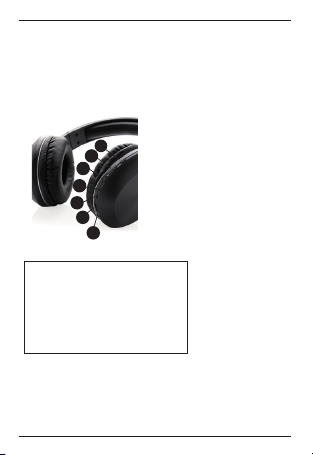
1. On/o button (Power on/o) &
Pick up call/end call - Pause/Play)
2. Volume+ / Next Track
3. Volume-/ Previous Track
4. LED Indicator light (BT)
5. Aux in port
6. Micro USB port
7. MIC
CHARGING:
1. Connect the charger to the charging port.
2. While charging the LED indicator will be solid red. When fully
charged the LED indicator will turn o automatically.
SPECIFICATION:
Battery capacity: 200mAh
BT version : 5.1
Pairing name : “RCS JAM headphone”
Charging time: 1,5 hours
Playing time: 5 hours
Speaker driver: 40mm
S/N Ratio: ≥76dB
Frequency range: 20Hz-20KHZ
Operation range : 10M
DEVICE LAYOUT:
1.
2.
3.
4.
6.
5.
7.

PAIRING:
1. Turn on the headphones by pressing and holding down the phone
button on the headphones for three seconds
2. The device’s LED indicator will illuminate. The LED indicator light will
blink between red and blue when it is in pairing mode.
3. On the mobile device (smartphone/tablet) turn on the BT connection.
4. Select “RCS JAM headphone” in the available Wireless devices on your
mobile device.
To reconnect:
Simply turn on the headphones and have BT turned on your mobile device
and the headphones will automatically reconnect.
CALLS:
Incoming calls: During incoming calls the headphones will acknowledge
there is an incoming call. If music is playing it will mute the music.
To accept the call: Press the Play/ Pause button (1)
End call: Press the Play / Pause button (1)
Ignore call: Press and hold the Phone/Play/Pause button for 2 seconds.
FAQ:
• How far will the Bluetooth headphones work from the paired device?
The Bluetooth will stay connected to the paired device up to 30ft/10M
• Headphones will not connect to phone Be sure the headphones and
phone are in pairing mode
• No sound on headphones Make sure the headphones are properly
paired and connected to the phone and be sure you are within the
30ft/10M distance
• Headphones will not start ,make sure the headphones are charged

NOTICE:
1. Keep the product dry; do not place the product in damp places
2. Keep out of direct sunlight and high temperatures High temperatures
may result in damage
3. Keep out of cold temperatures, this will help avoid internal damage
4. Do not disassemble the product
5. Avoid dropping the headphones
6. Do not continue to charge the headphones over 10 hours
7. When charging use the Micro USB charging cord that came with the
headphones.
DANGER!
To avoid hearing damage, limit the time you use headphones at high
volumen and set the volumen to a safe level. The louder the volumen, the
shorter the safe listening time is.
NEDERLANDS
Gefeliciteerd met je JAM hoofdtelefoon met BT.
Met deze BT-hoofdtelefoon luister je draadloos naar je favoriete muziek.
OVERZICHT APPARAAT:
1. Aan/uit-knop & Oproep beantwoorden/
oproep beëindigen & Pauze/Afspelen)
2. Volume+ / Volgende nummer
3. Volume- / Vorig nummer
4. Ledlampje (BT)
5. Aux in-poort
6. MicroUSB-poort
7. MIC
OPLADEN:
1. Sluit de oplader aan op de oplaadpoort.
2. Tijdens het opladen begint het ledlampje rood te branden Wanneer het
product volledig is opgeladen, zal het ledlampje uit gaan.
SPECIFICATIE:
Batterijvermogen: 200 mAH
Bluetooth-versie: 5.1
Naam voor koppelen: “RCS JAM headphone”
Oplaadtijd 1.5 uur
Afspeeltijd: 5 uur
Speakerschijf: 40mm
Signaal-ruisverhouding: ≥76dB
Frequentiebereik: 20 Hz-20 KHz
Werkbereik: 10 m
DEVICE LAYOUT:
1.
2.
3.
4.
6.
5.
7.

EERSTE KOPPELING:
1. Schakel de hoofdtelefoon in door de telefoonknop op de hoofdtelefoon
drie seconden ingedrukt te houden
2. Het ledlampje van het apparaat begint te branden. Het ledlampje knippert
rood en blauw wanneer het apparaat in de koppelmodus staat.
3. Schakel BT in op het mobiele apparaat (smartphone/tablet).
4. Selecteer ‘RCS JAM headphone’ in de lijst met draadloze apparaten op je
apparaat.
BELLEN:
Inkomende oproepen: Tijdens inkomende oproepen herkent de hoofdtele-
foon dat je wordt gebeld. Als muziek wordt afgespeeld, zal dit de muziek
dempen.
Om de oproep aan te nemen, druk je op de knop Afspelen/pauzeren.
Oproep beëindigen: Druk op de knop Afspelen/pauzeren.
Oproep weigeren: Houd de knop Telefoon/Afspelen/Pauzeren 2 seconden
ingedrukt.
VEELGESTELDE VRAGEN:
• Wat is het maximale bereik van de BT-hoofdtelefoon ten opzichte van
het gekoppelde apparaat? Het BT-apparaat blijft tot 10 m gekoppeld
met het apparaat.
• Hoofdtelefoon maakt geen verbinding met telefoon: zorg dat de
hoofdtelefoon en de telefoon in de koppelmodus staat
• Geen geluid vanuit de hoofdtelefoon: zorg dat de hoofdtelefoon
is gekoppeld en verbonden met de telefoon en dat je binnen 10 m
afstand bent.
• Hoofdtelefoon start niet op: zorg dat de hoofdtelefoon is opgeladen.

OPMERKINGEN:
1. Houd het product droog; bewaar het niet op een vochtige plaats.
2. Stel het product niet bloot aan direct zonlicht en hoge temperaturen.
Hoge temperaturen kunnen het product beschadigen.
3. Stel het product niet bloot aan koude temperaturen. Hierdoor kan
interne schade worden voorkomen.
4. Haal het product niet uit elkaar.
5. 5.Laat de hoofdtelefoon niet vallen.
6. Laad de hoofdtelefoon niet langer op dan 10 uur achter elkaar.
7. Gebruik de meegeleverde micro-USB-kabel om de hoofdtelefoon
op te laden.
GEVAAR!
Om gehoorschade te voorkomen, moet u de tijd dat u een koptelefoon met
hoog volume gebruikt beperken. Zet het volume altijd op een veilig niveau.
Hoe hoger het volume, hoe korter de veilige luistertijd is.

DEUTSCH
Herzlichen Glückwunsch zu Ihrem neuen JAM BT-Kopfhörer.
Mit diesem BT-Kopfhörer kommen Sie überall ohne Kabel in den Musikgenuss.
LAYOUT DES GERÄTS:
1. Ein/Aus-Taste und Anruf
annehmen/beenden&Pause/Wiedergabe
2. Lautstärke+/nächster Titel
3. Lautstärke-/vorheriger Titel
4. LED-Kontrollleuchte (BT)
5. Aux in-Anschluss
6. Micro-USB-Port
7. MIC
TECHNISCHE DATEN:
Akkukapazität: 200 mAh
BT-Version: 5.1
Name für die Kopplung: „RCS JAM headphone“
Aufladezeit: 1.5 Stunden
Wiedergabezeit: 5 Stunden
Lautsprechertreiber: 40 mm
Signal-/Rauschverhältnis: ≥76dB
Frequenzbereich: 20 Hz - 20 kHz
Reichweite: 10 m
LADEN:
1. Das Ladegerät mit dem Ladeanschluss verbinden.
2. Beim Aufladen leuchtet die LED-Anzeige durchgehend rot. Wenn das
Gerät vollständig aufgeladen ist, erlischt die LED-Anzeige.
DEVICE LAYOUT:
1.
2.
3.
4.
6.
5.
7.

KOPPELN:
1. Zum Einschalten der Kopfhörer die Telefontaste an den Kopfhörern drei
Sekunden lang gedrückt halten.
2. Die LED-Anzeige des Geräts leuchtet auf. Im Pairing-Modus wechselt die
LED-Anzeigezwischen rot und blau.
3. Am mobilen Gerät (Smartphone/Tablet) die BT-Verbindung einschalten.
4. Aus den am mobilen Gerät verfügbaren Drahtlos-Geräten
„RCS JAM headphone“ auswählen.
ANRUFE:
Eingehende Anrufe: Bei eingehenden Anrufen bestätigen die Kopfhörer,
dass ein Anruf eingegangen ist. Die Musikwiedergabe wird dann
stummgeschaltet.
Um den Ruf anzunehmen, die Taste Wiedergabe / Pause drücken.
Anruf beenden: Die Taste Wiedergabe / Pause drücken.
Anruf ignorieren: Die Taste Telefon/Wiedergabe/Pause 2 Sekunden lang
gedrückt halten.
HÄUFIG GESTELLTE FRAGEN:
• Über welche Entfernung vom gekoppelten Gerät funktionieren die
BT-Kopfhörer? BT bleibt über 30 Fuß/10 m mit dem gekoppelten Gerät
verbunden.
• Die Kopfhörer verbinden sich nicht mit dem Telefon. Darauf achten, dass
Kopfhörer und Telefon im Pairing-Modus sind.
• Kein Ton am Kopfhörer. Darauf achten, dass die Kopfhörer richtig gekoppelt
und mit dem Telefon verbunden sind sowie die Entfernung von bis zu 30
Fuß/10 m eingehalten wird.
• Die Kopfhörer booten nicht. Darauf achten, dass die Kopfhörer
geladen sind.
Ce manuel convient aux modèles suivants
1
Table des matières
Langues :
Autres manuels XD Casque sans fil


