
XAVI Technologies Corp. XW501B Manuel utilisateur


2
XAVi Technologies Corporation
Tel: +886-2-2995-7953
Fax: +886-2-29957954
9F, No. 129, Hsing Te Road, Sanchung City,
Taipei County 241,
Taiwan
Copyright © 2005, XAVi Technologies Corporation
Information in this manual is subject to change without notice. No part of this
manual may be reproduced or transmitted in any form or by any means,
electronic or mechanical, including photocopying or scanning, for any purpose,
without the written permission of XAVi Technologies Corporation.
XAVi Technologies Corporation provides this documentation without warranty
of any kind, implied or expressed, including, but not limited to, the implied
warranties of merchantability and fitness for a particular purpose.

3
CERTIFICATION NOTICE
Federal Communications Commission Compliance Notices
To ensure continued compliance, use only shielded interface cables when
connecting to the computer or peripheral devices. Any changes or
modifications not expressly approved by the party responsible for compliance
could void the user’s authority to operate this equipment.
This device complies with 15 of the FCC Rules. Operation is subject to the
following two
Federal Communication Commission (FCC) Statement:
NOTE: This equipment has been tested and found to comply with the limits for
a Class B digital device, pursuant to part 15 of the FCC Rules. These limits are
designed to provide reasonable protection against harmful interference in a
residential installation.
This equipment generates, uses and can radiate radio frequency energy and, if
not installed and used in accordance with the instructions, may cause harmful
interference to radio communications. However, there is no guarantee that
interference will not occur in a particular installation. If this equipment does
cause harmful interference to radio or television reception, which can be
determined by turning the equipment off and on, the user is encouraged to try
to correct the interference by one or more of the following measures:
Reorient or relocate the receiving antenna.
Increase the separation between the equipment and receiver.
Connect the equipment into an outlet on a circuit different from that to which
the receiver is connected.
Consult the dealer or an experienced radio/ TV technician for help.
Changes or modifications not expressly approved by the party
responsible for compliance could void the user’s authority to operate the
equipment.
The antenna(s) used for this transmitter must not be co-located or
operating in conjunction with any other antenna or transmitter.
The manufacture is not responsible for any radio or TV interference
caused by unauthorized modifications to this equipment. Such
modifications could void the user’s authority to operate the equipment.

4
Table of Contents
CERTIFICATION NOTICE ............................................. 3
Federal Communications Commission Compliance Notices.....3
Federal Communication Commission (FCC) Statement:............3
INFORMATION TO USER ............................................. 5
Introduction............................................................................................5
Package Contents................................................................................5
System Requirements.........................................................................5
How to Install XW501B:................................................ 6
Phase I -Install XW501B Driver......................................................6
Phase II -Install XW501B Hardware Winzard ..............................8
Verifying XW501B USB Adapter for Windows:........ 12
Use the XW501B Utility:............................................. 13
Troubleshooting ......................................................... 19

5
INFORMATION TO USER
Introduction
Congratulations on purchasing this 802.11g WLAN USB Adapter. The
XW501B USB Adapter 54 Mbps data rate provides an equivalent Ethernet
speed to access corporate networks or the Internet in a wireless
environment. And also provides easy plug & play Installation program on
any computer with USB interface. When installed, the XW501B USB
Adapter is able to communicate with any 802.11g-compliant product,
allowing you to work anywhere in the coverage area, enjoying its
convenience and mobility.
Package Contents
The shipment should contain the following items. Please check each item
below and ensure that all items listed in below are included in the
shipment. If any of the listed items are damaged or missing, please notify
your local dealer.
XWAVE Series: XW501B WLAN USB Adapter should contain:
802.11g WLAN USB Adapter
CD-ROM (containing Drivers and Manual)
System Requirements
Windows ME/ 2000/ XP
If any item is missing, please contact your product provider.

6
How to Install XW501B:
Phase I -Install XW501B Driver
1. Turn on the computer and insert the driver CD into the appropriate drive.
The installation & driver CD will automatically activate the Auto Run
Installation program after you insert the disk into your CD drive.
2. The install will automatically appear.
3. Click Next to continue.
Do not insert your WLAN Adapter into the USB slot until you
have finished the software installation.
7
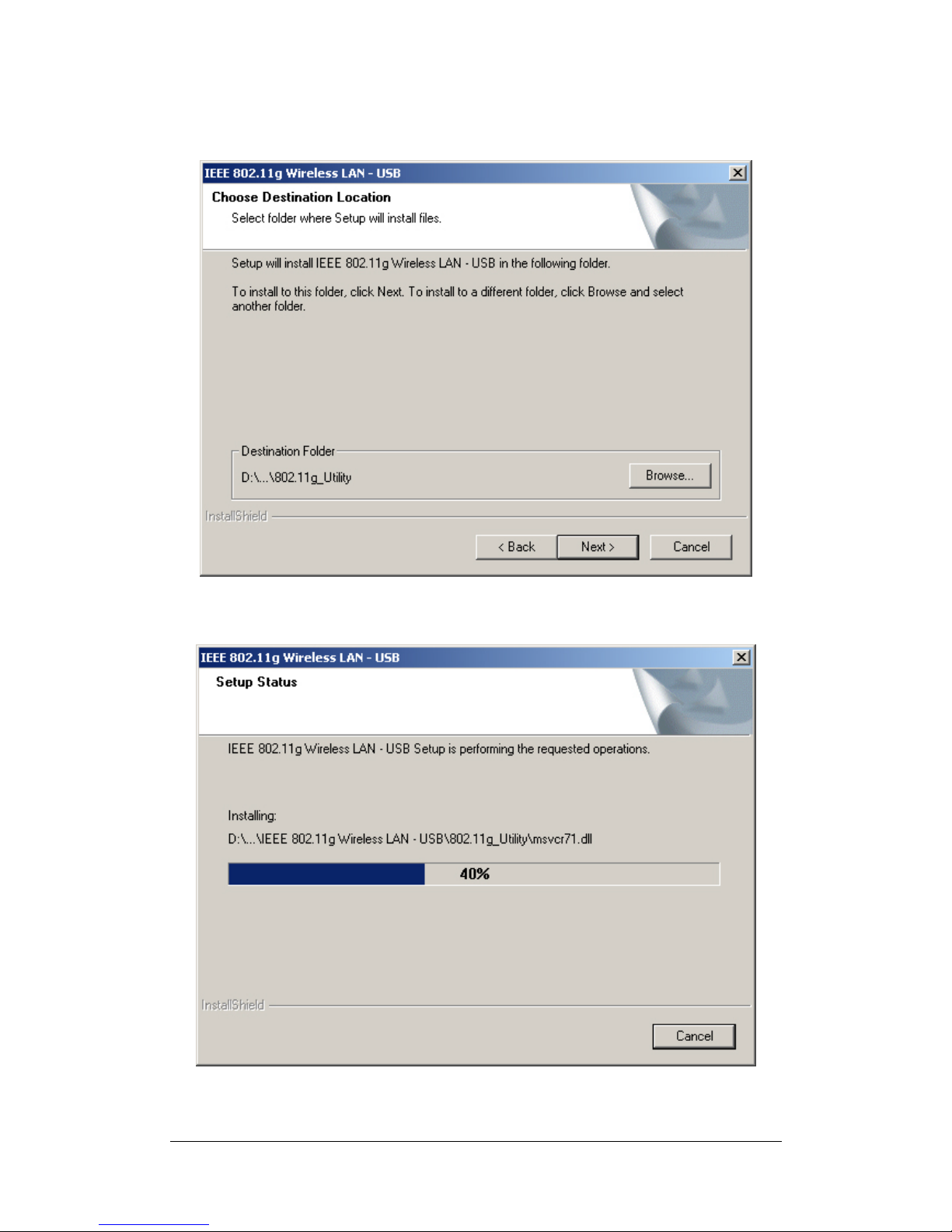
4. Click Next to install at the designated folder. Or, click “Browse” to select
different folder.
5. Start copying files until it finish the installation.

8
6. Click Finish to complete installation.
If the AutoRun function on your computer does not
automatically start, the select your CD-ROM driver and
double-click the file, SETUP.EXE under the Windows
director
y
.

9
Phase II -Install XW501B Hardware Winzard
1. Find the location of the USB slot on your desktop or laptop. And insert the
802.11g WLAN USB Adapter into the USB slot on your desktop or laptop.
2. After inserting the WLAN Adapter into your computer, Windows will
automatically detect that new hardware has been installed. Depending on
which operating system you are using, the steps and screens may differ
slightly. Click “Next” to continue installing.

10
3. For searching a suitable driver automatically, check the item as shown
below.
4. Select “CD-ROM drivers” for looking for suitable drivers for XW501B.
Table des matières


