X-mini HAPPY Manuel utilisateur

X-mini™ HAPPY

X-mini™ HAPPY
CE Certificate
Declaration of Conformity
X-mini™ HAPPY Capsule Speaker™
EC-Declaration of Conformity to the essential requirements of the
applicable 89/336/EEC as last amended by EC Directive 93/68/EEC
We, (Xmi Pte Ltd), declare under our sole responsibility as authorized
representative that the following product
Brand Name: X-mini™
Model Name: X-mini™ HAPPY Capsule Speaker™
Model No.: XAM5
Is fully in conformity with the essential requirement of the European
Council Directive 93/68/EEC.
This declaration is based on the full compliance of the product with
the following European standards:
EN 55022: 2006 + A1: 2007
EN 55024: 1998 + A1: 2001 + A2: 2003

X-mini™ HAPPY
Introduction
Congratulations on your purchase of an X-mini™ product. Xmi Pte Ltd
introduces the latest evolution of its Capsule Speaker™ genus, the
X-Mini™ HAPPY. The newest addition to the X-Mini™ series has protean
capabilities and is equipped with an MP3 player and in-built SD/SDHC card slot.
The X-Mini™ HAPPY Capsule Speaker™ is the first Portable Music Player (PMP) to
be developed by the multi-award-winning company.
Safety Rules
1) Please follow the rules depicted in this manual closely to ensure your safety. Before
using the speaker, we would strongly encourage you to read through this user manual.
2) Be wary of any edges, uneven surfaces, metal parts, accessories and its packaging so as
to prevent any possible injury or damage.
3) Keep this speaker out of reach of children. Take note that this speaker is not edible and
should not be placed in your mouth.
4) Do not modify, repair or dismantle the speaker. Doing so may result in fires, electric
shocks, complete breakdown of the speaker, etc. All of which, are not covered under
warranty.
5) Do not use any diluents or volatile liquid to clean the speaker. Keep in mind that the
surface of the speaker should only be wiped with a clean dry cloth.
6) Do not use this speaker in locations where there are high-temperatures or high
humidity levels (For instance, bathrooms); ideally, the speaker should be used in a
location free of dust and exposure to direct sunlight.
7) Do not insert foreign objects, such as pins, into this speaker.
8) Do not touch this speaker when your hands are wet as this may result in electric
shocks.
9) Turn down the volume before/while using this speaker as sudden loud sounds may
damage it.
10) Refrain from dropping the speaker as well as avoid any collision with other objects.
11) Do not use this speaker when in hazardous locations.
12) Should any abnormal situations or problems occur while using the speaker,
discontinue use of speaker immediately.

X-mini™ HAPPY
Package Contents
The Package will contain the following
1 x X-mini™ HAPPY Capsule Speaker™
1 x User Manual
1 x USB Charging Cable
1 x Protection Pouch
1 x microSD card
1 x Earphone

X-mini™ HAPPY
Connection Diagram
Speaker Driver
Extendable
Resonator TM
Buddy Jack TM
Mini USB Port
Mute Button
SD Card Slot
Build-in 3.5mm
Audio Cable
LED Light
Volume Control
Multi-function Jog Dial

X-mini™ HAPPY
Mode of Usage
MP3 playback mode
1 Insert supplied SD card into the SD slot
(Store your favourite songs!)
2 Turn on the X-mini™ HAPPY Capsule Speaker™ at the Multi-
function Jog Dial
(Press down and hold for few seconds)
3 Hold onto the top of the speaker and twist
anti-clockwise to reveal the BXS resonator
External Storage Mode
1 Insert supplied SD card into the SD slot
2 Connect one end of the supplied USB cable
to X-mini™ HAPPY Capsule Speaker™ mini USB port and the other end to
the USB port located on your computer

X-mini™ HAPPY
Mode of Usage
External Source playback mode
1 Ensure the SD card is ejected from SD slot
2 Turn on the X-mini™ HAPPY Capsule Speaker™
with the Multi-function Jog Dial
(Press down and hold for few seconds)
3 Take out the built-in audio cable from the bottom of the X-
mini™ HAPPY Capsule Speaker™ and connect it into any
multimedia device with a 3.5mm audio port
4 Hold onto the top of the speaker and twist anti-clockwise
to reveal the Bass Xpansion System™ (BXS™) resonator

X-mini™ HAPPY
Earphone Mode
1 Insert supplied SD card into the SD slot
(Store your favo vurite songs!)
3 Turn on the X-mini™ HAPPY Capsule Speaker™ at the Multi-function Jog Dial
(Press down and hold for few seconds)
4 Press the "MUTE" button to turn on music on the
X-mini™ HAPPY Capsule Speaker™ and continue to
enjoy your favourite tunes through the earphones

X-mini™ HAPPY
Buddy-Jack™
This all new feature enables you to connect one X-mini™ HAPPY
Capsule Speaker™ to another to form a self-powered, bass-enhanced
portable speaker system with a virtually endless ‘‘daisy chain’’ of
speakers. With this feature, you can now combine your X-mini™
HAPPY Capsule Speaker™ together with your friends’. You may also
connect previous generations of X-minis™ or even earphones into the
‘‘Buddy-Jack™’’ to expand on volume or multi-functionality
Connect other X-mini™ series into the Buddy-Jack™ to create jaw-
dropping audio!

X-mini™ HAPPY
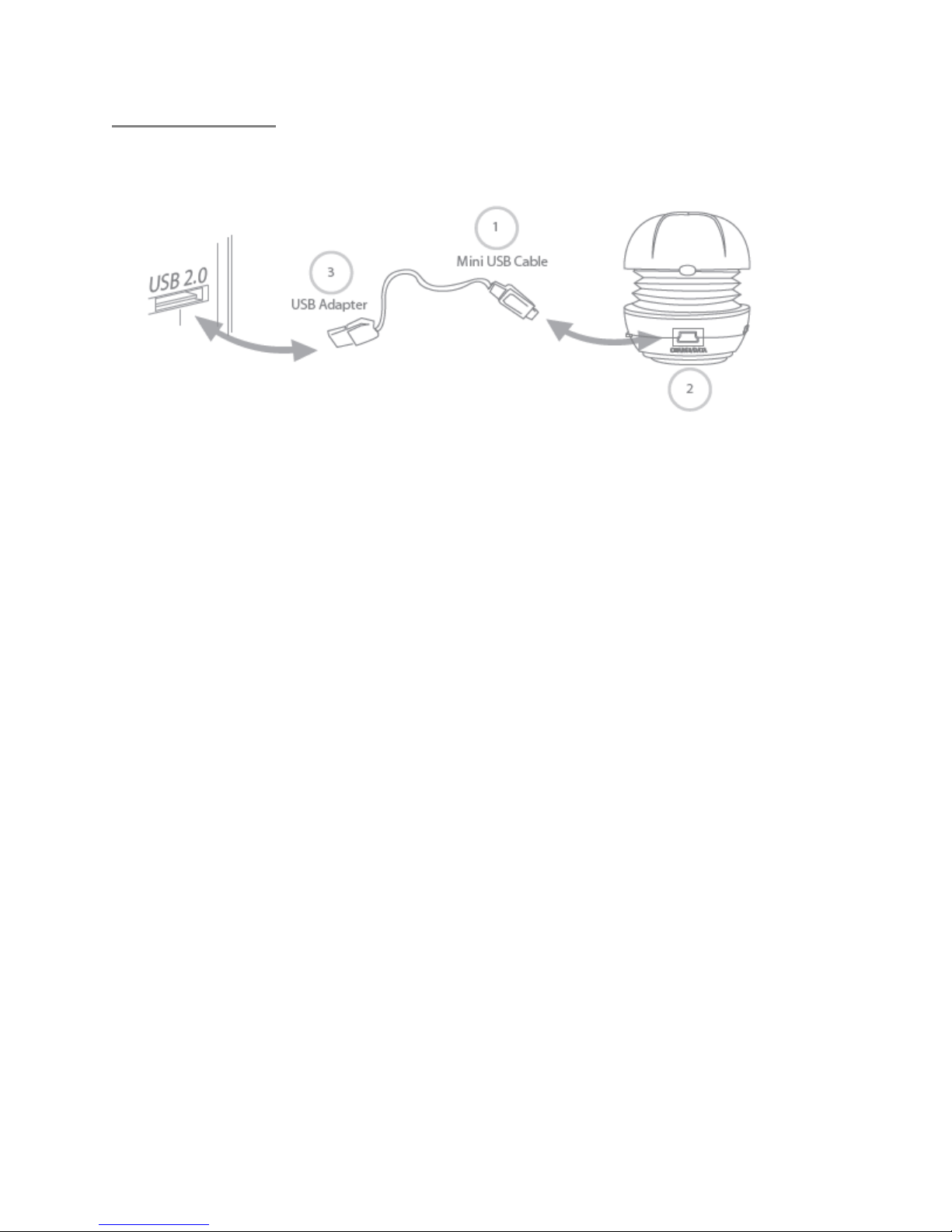
Charging
1 Connect part 1 to 2 (mini-USB plug connects to X-mini™ HAPPY Capsule
Speaker™)
2 Connect part 3 (USB Adaptor) to a free USB port located on your computer
3 Speaker will go into External Storage mode
4 LED indicator will flash Red and Blue
5 LED will turn Purple to indicate that the speaker is fully charged
LED Indications:
Purple - -- Fully Charged
Red and Blue (alternate flashing) - -- Charging mode
Purple (flashing) - -- Read/Write to SD card
Red (flashing) - -- On MP3 playback mode, playing audio file
Red - -- On MP3 playback mode, paused playback
Blue (flashing) - -- Playing through the 3.5mm audio cable or SD card has been
ejected
Ce manuel convient aux modèles suivants
1
Table des matières