
WorkPro MULTIPLAYER 10 WEB Manuel utilisateur

Rev. 12.04.02
User Manual / Instrucciones de Usuario
MULTIPLAYER 10 WEB

Table of contents
Safety Information
Front Panel
Remote Control
Rear Panel
OPERATION
1. System Setting
2. Connecting to a network
2.5 Manual setting
3. Internet Radio
4. Music Player
5. FM Radio
ESPAÑOL
Pag. 2
Pag. 5
Pag. 6
Pag. 7
Pag. 8
Pag. 9
Pag. 10
Pag. 12
Pag. 14
Pag. 16
Pag. 18
ENGLISH Pag. 1
EN
1 User Manual/Manual de Uso MULTIPLAYER 10 WEB

Thank you for deciding on purchasing this quality product. The user manual will give you a general idea how
this device operates, as well as provide you with information on cleaning and safety procedures. Please take
a few minutes to read and follow all safety and operating instructions found in this manual carefully, in order
to maintain this product condition and ensure safe operation.
Dear customer,
Please adhere to all of the safety information/instructions found in this instruction
manual!
Explanation of symbols
An exclamation mark is intended to inform the user of important information, operati-
on or maintenance instructions or that special attention is required.
This symbol is intended to alert you to the presence of unprotected, live parts or com-
ponents found within the product’s enclosure or of dangerous connections that upon
contact may be of suficient magnitude to constitute a risk of electric shock. Cables
intended for such connections should only be connected by qualifed personnel or you
should only use ready to connect cables. There are no user-serviceable parts found
inside the device, therefore the device is never to be opened.
Before use
Please read this instruction manual thoroughly before operating this device and retain it for further
reference, questions and use. Following and heeding all information found in this instruction manual
shall maintain this products condition and ensure safe operation.
Safety Information
2 User Manual/Manual de Uso MULTIPLAYER 10 WEB
EN

› In order to completely cut of the power supply to the device, unplug the power
plug from the wall outlet. Merely turning the device of with the ON/OFF button is
not sufcient enough. Make sure that receptacles are easily accessible.
We assume no liability for personal or property damage resulting from the failure
to comply with the safety instructions, improper operation and handling. Under
such circumstances, all claims under warranty will become void.
The following safety and hazard warnings are not only for the protection of your device, but also
serve as a protection against potential health hazards. Please take time to read the following
instructions carefully.
› For safety and licensing (CE) reasons any unauthorized modifcation and/or change
on the device is forbidden and will void the warranty and all warranty claims.
› Any persons operating, installing, setting up, or servicing this device must be trained
and qualifed accordingly and observe these operating instructions.
› Ensure that the device has been set up accordingly by following all instructions
› This is a protection class II device. Make sure that the voltage supply of the power
outlet used meets the required voltage specifications (230 V/50 Hz).
› Power supply cables should be routed so that they are not likely to be walked on,
squished or pinched by items placed upon or against them, paying particular attention
to cords at plugs, convenience receptacles, and the point at which they exit from
the device. Avoid exposing the cable to extreme heat or cold. Ignoring the above
mentioned could result in cable damage and present the dangerous risk of electric
found in the instruction manual.
› Should any evident damage be seen on the device or on the connection cables, do
not come in contact with or touch these. Switch of the corresponding circuit breaker
in the power distribution panel frst, before carefully unplugging the power plug from
the wall outlet. Do not operate this device further! Please contact or take it to a
qualifed service technician/specialty workshop.
shock.
3 User Manual/Manual de Uso MULTIPLAYER 10 WEB
EN

› Unplug the device from the power outlet, if it is not in use for a longer period of time.
› For safety reasons, always unplug the device from the power outlet during thunder
storms.
› Eliminate potential tripping hazards by routing cables in such a way that no one can
trip or stumble over them.
› Never use the device, if the power cable or device is damaged.
This device is not suitable for children.
Small children are unaware of the serious and immediate dangers involved
when exposing themselves to or handling electronic devices. Furthermore,
this product contains small parts that could be swallowed.
› Keep packaging and protective foil away from children at all times to a void the dan-
ger of sufocation.
› The device should never come in contact with water or moisture.
› To prevent the risk of fire or electric shock make sure that liquids, such as dripping or
splashing water, rain or moisture, do not come in contact with the device and power
supply plug
› Operate this device in a moderate climate and never expose it to extreme tempera-
tures, such as high humidity.
›
›
Condensation can build up suddenly, when this device is brought from a colder
Make sure the device is properly ventiled during operation and never operate it in
into a warmer area (e.g. when transporting). Should this happen, allow the device to
constricted arerad, such as for example in a bookcase or shelf. Never block ventilation
warm up to room temperature first before using.
openings with magazines, curtains or similar.
› Always pull on the plug’s grips and never on the cable to remove from a wall outlet.
4 User Manual/Manual de Uso MULTIPLAYER 10 WEB
EN

2. WHEN PLAY MODE IS TUNER, PRESS TO AUTO SCAN PREVIOUS STATION
WHEN PLAY MODE IS MEDIA PLAYER, PRESS TO SKIP TO PREVIOUS TRACK.
1. WHEN PLAY MODE IS TUNER , PRESS TO AUTO SCAN NEXT STATION,
WHEN PLAY MODE IS MEDIA PLAYER ,PRESS TO SKIP TO NEXT TRACK.
3. WHEN PLAY MODE IS TUNER ,PRESS TO SEE INFORMATION OF FM RDS
WHEN PLAY MODE IS MEDIA PLAYER, PRESS TO PLAY, PRESS AGAIN TO PAUSE.
4. PLAY MODE CHANGE. PRESS TO SELECT ONE MODE WITHIN FM, INTERNET RADIO,
MEDIA PLAYER.
5. MENU: PRESS TO GO TO MENU SCREEN
6. BACK : PRESS TO GO TO PREVIOUS MENU SCREEN
7. POWER SWITCH
8. ENCODER:
PRESS & HOLD TO STORE STATION OR FILE IN A PLAYLIST.
WHEN IN MENU SCREEN, TURN LEFT OR RIGHT TO MOVE MENU ITEM.
PRESS TO CONFIRM THE SELECTION.
9. STEREO/MONO AUDIO MODE SETTING FOR FM
10. USB JACK
Front panel
1 2
3
4
6 5 8 7
10 9
5 User Manual/Manual de Uso MULTIPLAYER 10 WEB
EN

Remote control
+
-
INFO STEREO MONO MUTE
MODE
STANDBY
1
4
7
2
5
8
3
6
9
P 10 scan
enter
MENU
PRESET
+
-
enter
PRESET
NAVIGATION: Use these buttons to control the highlight line
in the menu using UP and DOWN arrows.
Use the right and left arrows to navigate between submenus.
ENTER: Use this button to confirm.
PLAY/PAUSE: Use this button to start and pause playbacks in media player
mode.
Skip forward & Skip back: Skip to the next or previous item in the
playback list (it does not work with Internet Radio).
Stop: Stop all playback.
Browse through the preset stations
MODE Browse through the modes (Internet Radio, FM Radio and Music
Player).
INFO More information about the current station (title, time).
STEREO Switch to stereo playback ( when activated it apprears in the screen
the next icon
MUTE Mute all audio output
1-10 Allows to select directly the saved station. If you want to save a new
station, hold the desired button 5 seconds until the screen shows
Preset Stored.
P Open Playlist or the radio stations list.
SCAN Starts automatic scan in the FM radio mode.
STANDBY Switch ON/OFF the device.
The remote control requires two "AAA" batteries for operation. Remove the battery compartment
lid carefully. Remove the used batteries and insert the news ensurig the correct polarity
6 User Manual/Manual de Uso MULTIPLAYER 10 WEB
EN
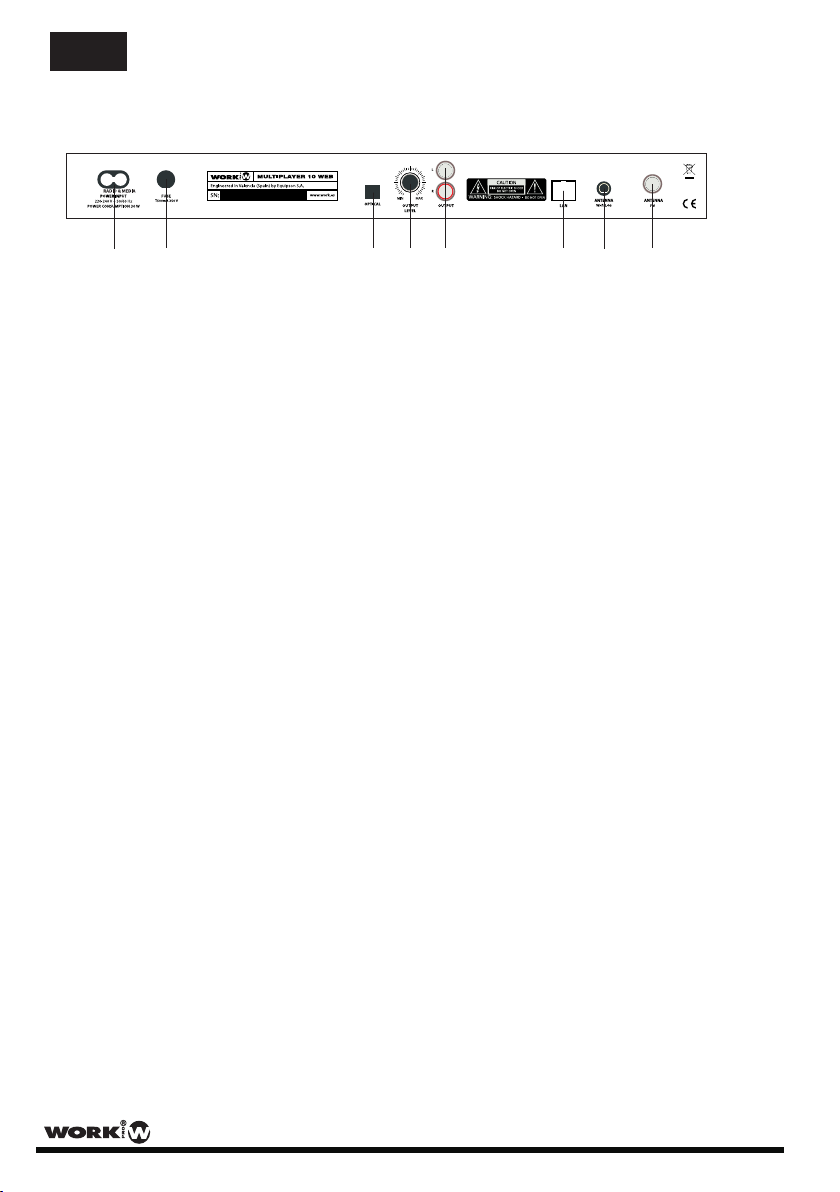
Rear panel
1 2 3 4 5 6 7 8
1. MAIN SUPPLY: Connect the included Mains cable to supply the device. Connect it to a correct
voltage value outlet.
2. FUSE: Protection fuse (500 mA). If it blows, change it for the same type. If it blows again, stop to
use the device and contact with a technical to repair it.
3. OPTICAL OUTPUT: It allows a connecting with an optical compatible device.
4. OUTPUT LEVEL: Turn it clockwise to increase the output level. Turn it anticlockwise to reduce the
output level.
5. OUTPUT: 2x RCA connectors for unbalanced output. Connect them to a mixer system.
6. LAN: Connect the device to a network through a Cat-5 cable in order to use the Internet Radio or
Music Player functions.
7. WiFi ANTENNA: Connect the attached antenna in order to use the Internet Radio and Music Player
functions through a WiFi connection.
8. FM ANTENNA: Connect the attached antenna in order to use the FM Radio function.
7 User Manual/Manual de Uso MULTIPLAYER 10 WEB
EN

1. System Setting
This configuration appears in the three operation modes (Internet Radio, Music Player and FM radio).
The options are the followings:
Equalizer >
Network >
Time/Date >
Language >
Factory Reset >
Software Update >
Setup wizard >
Info >
1.1 Equalizer: It is possible to select 8 prefixed tone controls between: Normal, Flat, Jazz, Rock, Movie,
Classic, Pop, News. It is possible to select the tone value manually (My EQ profile setup)
and to store it to select in the future (My EQ).
1.2 Network: Allow to configure a network (Wired or Wireless for Internet radio and Music Player). See the
Connecting to a Network section in this user manual for more information.
1.3 Time/Date: Allows to:
- Configure the Time/Date manually.
- Select the update way (FM, Network, No update)
- Select the format (12/24)
- Select the Time Zone
- Enable or Disable Daylight saving
1.4 Language: Allows to select English/German language.
1.5 Factory Reset: Delete all configuration, stored stations, etc. allowing to setup the device as new.
1.6 Software update: It is possible to setup the autocheking function to update the device software.
1.7 Setup Wizard: The device will be configured automatically in the next starting process.
1.8 Info: Show the software version in the display.
8 User Manual/Manual de Uso MULTIPLAYER 10 WEB
EN

2. Connecting to a network
- You will need a network connection for "Internet Radio" and "Music Player" operating modes.
- You will need either a router and RJ 45 cable or a WLAN router together with the required password
to establish a connection to your network.
- Your router must have a broadband internet connection for "Internet Radio" operation and to perform
software updates.
- When you select "Internet Radio" or "Music Player" modes, your device will try to connect to a network.
If this is the first time that a connection has been made or stored network are not accesible, the the
"Network Wizard" will start. To start the "Network Wizard" manually, select the following:
MENU > System settings > Network > Internet Wizard
Using this function, the device will search an operative network, asking us about:
- WLAN region ( select a country or region from the list)
- Network name (select the desired network)
- An encrypted wireless network will require a password.
Use the navigation button or the dial encoder to move the cursor through the displayed fuctions.
Inside Network function you can also select:
2.1 Internet Wizard
2.2 PBC Wlan setup: Allow to setup a PBC (Push Button Configuration) Wlan connection. Follow the
displayed instructions.
2.3 View setting: After setup the network, this function offers informations about Active connection, MAC,
DHCP state, SSID, etc.
2.4 Wlan Region: Allows to select a country/region
2.5 Manual setting: Allows to setup the network configuration manually. You can select Wired or Wireless
network, modifying all parameters. Follow the displayed instructions.
2.6 Network Profile: All configurated network can be stored here and to select it again without setup it
again.
9 User Manual/Manual de Uso MULTIPLAYER 10 WEB
EN
Table des matières
Langues :


