
WorkPro DIGILINE MX MKII Manuel utilisateur

DIGILINE MX MKII
User Manual
Version1.1

DIGILINE MX MKII
USER MANUAL
VERSION 1.1
DIGILINE MX MKII www.workpro.es 1
SAFETY INSTRUCTIONS
1. Read this manual carefully.
2. Follow all instructions and warnings.
3. Only use accessories specified by WORK PRO.
4. Follow the safety instructions of your country.
5. Be careful with sound levels.
SYMBOLS
The following symbols are used in this document:
This symbol indicates a potential risk of harm to a person or damage to the product. You
can also notify the user of the instructions that must be followed strictly to ensure the
installation or safe operation of the product.
This symbol notifies the user about the instructions that must be followed strictly to ensure the
correct installation or operation of the product.
This symbol notifies the user about additional information or optional instructions.
WELCOME TO WORK PRO
Thank you for choosing the WORK PRO DIGILINE MX MKII system.
This document contains essential information on the use of the system. Read this document carefully to
become familiar with the system.
Please check the WORK PRO website regularly to download the latest version of the document and
software updates: https://www.workpro.es/

DIGILINE MX MKII
USER MANUAL
VERSION 1.1
DIGILINE MX MKII www.workpro.es 2
CONTENT
1. INTRODUCTION.................................................................................................................................3
2. FEATURES..........................................................................................................................................3
3. DEVICE DESCRIPTION........................................................................................................................4
Front Panel.................................................................................................................................4
Rear Panel..................................................................................................................................5
Connections ...............................................................................................................................5
3.3.1. Inputs........................................................................................................................... 5
3.3.2. Enabling MIC inputs .................................................................................................... 6
3.3.1. Outputs........................................................................................................................ 6
4. SETTING THE DEVICE.........................................................................................................................7
Setting through WorkCAD3 Configurator ..................................................................................7
4.1.1. DSP .............................................................................................................................. 9
4.1.2. GPIOs......................................................................................................................... 13
4.1.3. LMI input ................................................................................................................... 16
4.1.4. Presets....................................................................................................................... 17
4.1.5. Setup ......................................................................................................................... 18
Project saving and device syncing............................................................................................19

DIGILINE MX MKII
USER MANUAL
VERSION 1.1
DIGILINE MX MKII www.workpro.es 3
1. INTRODUCTION
Digiline MX MKII is an 8x8 audio matrix with DSP, adaptable to most of your needs. The device
has balanced inputs and outputs to provide it with greater immunity against electromagnetic
interference.
Digiline MX MKII is a versatile device supporting control through its GPIs, dedicated wall
controls like the WNC1, custom layouts with WorkCAD3 Editor or third-party systems. Also, it
supports control by both UDP and RS232 commands.
2. FEATURES
Analogical audio inputs
Number of inputs
8 balanced Mic or Line inputs
Audio connector
4 x Euroblock, 12 pin 3.81mm
Input sensitivity (Line)
-6 dBu
Mic fixed gain
43.5 dB
Analogical audio outputs
Número de salidas
8 balanced outputs
Conector de audio
2 x Euroblock, 12 pin 3.81mm
Audio processing
8 filters.
2 High pass crossover filters, Low Pass.
Weighted matrix of sum of inputs inputs
Compressor / Limiter / Noise Gate
General
SNR
> 100 dB
THD + N
< 0.01 %
DSP Architecture
32 bit processing with 40 bits of precision.
Sample frequency
48000 Hz
Filter types (input/output)
Low pass, High pass, Low Shelving, High
Shelving, Band pass, Peak, Notch y All pass.
Crossover filter types
Butterworth, Linkwith-Riley, Bessel
Memories
8 memories
Thir-party control
UDP , RS232

DIGILINE MX MKII
USER MANUAL
VERSION 1.1
DIGILINE MX MKII www.workpro.es 4
Network
Connector
RJ-45
Protocol of control
OSC over UDP and RUDP
Ports
UDP 9000 / RUDP 9002
Ethernet
100 base TX
GPIO
GPI
Pull Up resistor, 5 Vdc max
GPO
TTL 3.3V, 30mA
Others
Main supply
AC 90-264 V
Consumption
50 W
Dimensions
109mm×133.75mm×40.45 mm
Weight
360 g
3. DEVICE DESCRIPTION
Front Panel
1. Input Signal/Clipping. LEDs indicating the signal level at the input.
2. Output/Clipping. LEDs indicating the signal level at the output.
3. Power. LED indicating that the device is on.
4. LAN. LED indicating that there is an Ethernet connection.
1
2
3
4

DIGILINE MX MKII
USER MANUAL
VERSION 1.1
DIGILINE MX MKII www.workpro.es 5
Rear Panel
1. MIC 1-8 inputs. MIC level balanced inputs.
2. LINE 1-8 inputs. LINE level balanced inputs.
3. PAD Selection. 20 dB attenuator for each input.
4. PHANTOM Power. 15V phantom power.
5. 1-8 Outputs. Balanced outputs.
6. LMI. Level Measurement Input. Mic level input that allows actions to be taken
when a certain threshold is exceeded.
7. GPIOs. General purpose digital inputs and outputs.
8. RS 232 Port. Serial port for thrid-partty control.
9. RJ45 connnector for LAN. TCP/IP connection through ethernet.
10. AC Main supply. 90V-264V.
Connections
Digiline MX consists of 8 Line level inputs and 8 Mic level inputs, which are summed by
hardware.
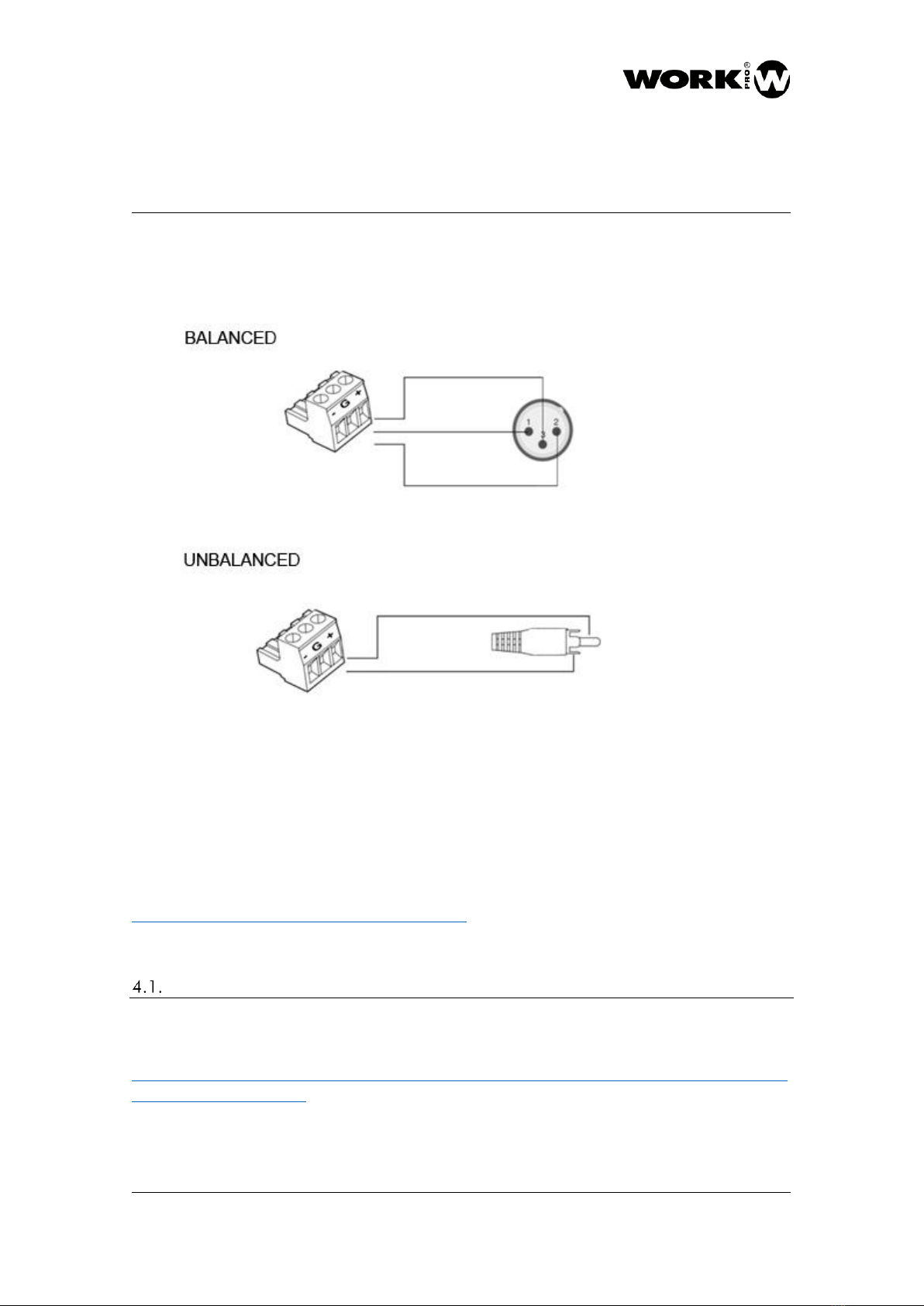
The following shows how to make the connections depending on the type of source.
BALANCED
3.3.1.
Inputs
1
2
4
3
5
6
7
8
9
10

DIGILINE MX MKII
USER MANUAL
VERSION 1.1
DIGILINE MX MKII www.workpro.es 6
UNBALANCED
In order to avoid unwanted noise, the Mic inputs are disabled, if you want to use them, they
must be enabled with the jumpers supplied with your Digiline MX MKII.
To do this, unscrew the top cover of your Digiline MX and include the necessary jumpers
according to the inputs you want to enable.
3.3.1. Outputs
3.3.2.
Enabling MIC inputs
DIGILINE MX MKII
USER MANUAL
VERSION 1.1
DIGILINE MX MKII www.workpro.es 7
The following point shows how to make the connections depending on the type of device to
be connected.
4. SETTING THE DEVICE
Device configuration must be done using the WorkCAD3 Configurator software, which you
can download at the following link.
https://www.equipson.es/productos/workcad-3
Setting through WorkCAD3 Configurator
After configuring the device at the IP level and updating it if necessary (see WorkCAD3
Configurator manual), proceed with its configuration.
https://www.eafg.es/productos/Docs/Manuales/WorkCAD3_Configurator_Manual_EN_1_2
_20190325181306.pdf
DIGILINE MX MKII
USER MANUAL
VERSION 1.1
DIGILINE MX MKII www.workpro.es 8
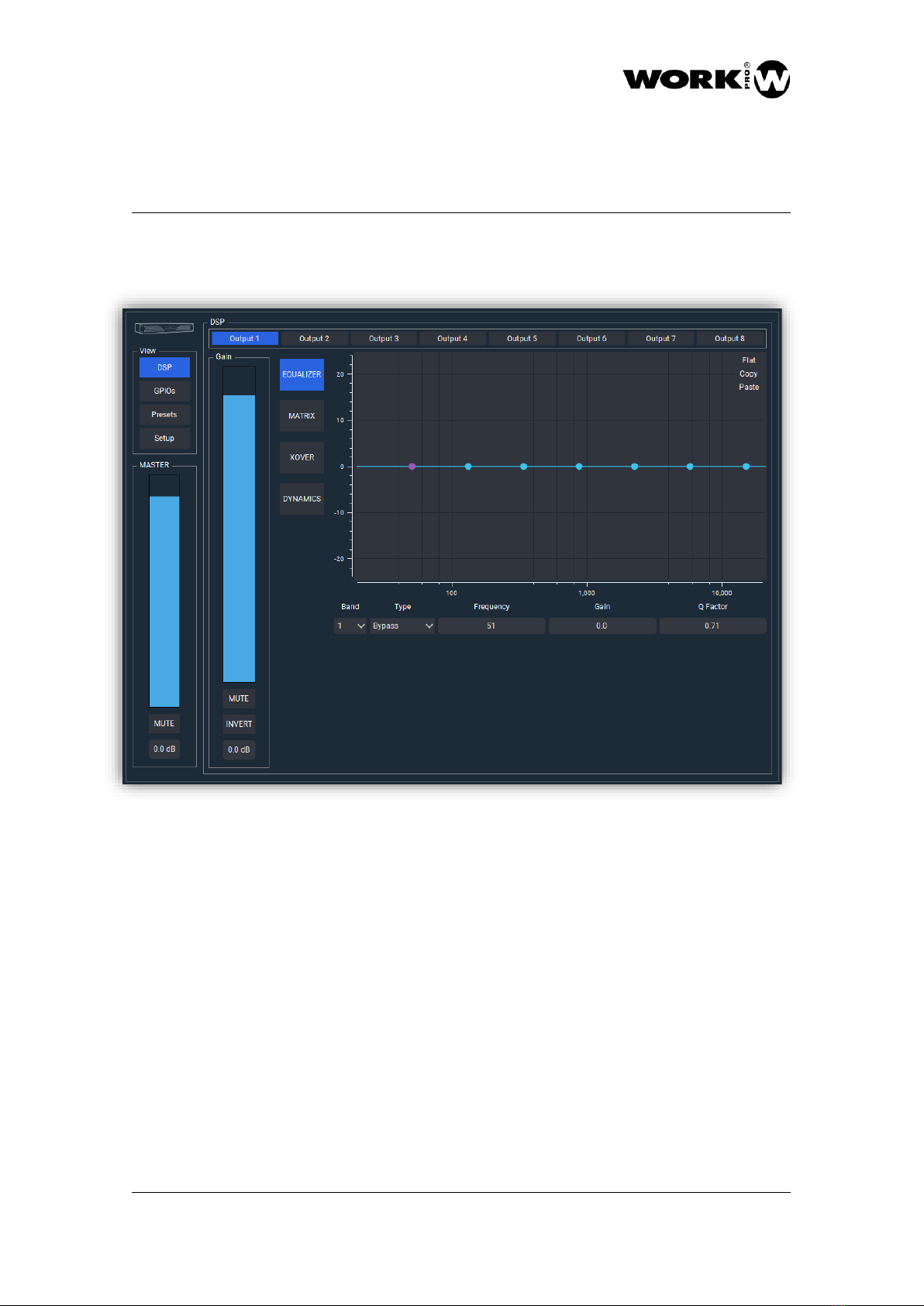
If you click with the left button of the mouse on the device, the configuration interface will
open where the following parameters to configure appear.
-VIEW
•DSP button. Allows you to choose the display of the processing fields.
•GPIOs. Allows you to access to GPIOs setup.
•Presets button. Allows the management of presets and device boot mode.
•Setup. It allows access to the configuration of certain functions other than
audio management.
-MASTER: It allows the modification both graphically and numerically of the general
volume control of the device. In addition, it has a MUTE button.

DIGILINE MX MKII
USER MANUAL
VERSION 1.1
DIGILINE MX MKII www.workpro.es 9
-DSP Area: It is the area where the processing of the device's outputs is configured.
•Output selection field. Allows you to choose the output you want to work on.
The parameters to be controlled will vary depending on whether an input or
an output has been chosen.
•Gain. Allows you to control the volume or reverse the polarity of the selected
output.
•EQUALIZER. There are 8 filters applicable to each of the outputs. To apply
them, we must select the band (filter number), the type of filter, the
frequency, the gain and the Q factor. It is also possible to apply a filter using
the mouse and acting on the points that appear in the image and that
represent the 8 available filters.
4.1.1.
DSP
Table des matières


