
wiwa NVC 303 Manuel utilisateur

NVC 303 IP Camera
User Guide
Quick Start Manual
Version: 1.0.2

NVC 303
Quick Start Manual
Copyright ©2007, WIWA 1 of 48
Table of Content
1. Installation & Settings ....................................................................................................... 2
1.1. System requirement:........................................................................................ 2
1.2. Install IP camera ................................................................................................. 2
1.2.1. Install on ceiling........................................................................................... 2
1.2.2. Install on the wall......................................................................................... 5
1.3. Connect IP camera cable.................................................................................... 7
1.4. Internet connection ............................................................................................. 8
1.5. Start IP camera ................................................................................................. 10
1.6. How to use IPCameraSearcher.........................................................................11
2. Start Internet Explore Browser........................................................................................ 21
3. IE function interpretation................................................................................................. 26
3.1. Basic Configuration........................................................................................... 26
3.1.1. Status ........................................................................................................ 26
3.1.2. Video & Audio Settings.............................................................................. 28
3.1.3. Networking ................................................................................................ 30
3.1.4. Wireless Settings....................................................................................... 31
3.1.5. PPPoE....................................................................................................... 34
3.1.6. DDNS........................................................................................................ 35
3.1.7. DATE & TIME............................................................................................ 36
3.1.8. Log ............................................................................................................ 37
3.2. Advance Configuration ..................................................................................... 38
3.2.1. MAINTENANCE........................................................................................ 38
3.2.2. ADMINISTRATOR..................................................................................... 39
3.2.3. CHANGE PASSWORD............................................................................. 41
3.2.4. SMTP ........................................................................................................ 42
3.2.5. FTP............................................................................................................ 43
3.2.6. PTZ............................................................................................................ 44
3.2.7. ALARM EVENT......................................................................................... 45
3.2.8. Special Setting........................................................................................... 47
3.3. REC View.......................................................................................................... 48

NVC 303
Quick Start Manual
Copyright ©2007, WIWA 2 of 48
1. Installation & Settings
1.1. System requirement:
OS:Windows 2000 or Windows XP
Communication:TCP/IP
Interface:10/100M base LAN
Browser:Internet Explore
1.2. Install IP camera
We have two way to install this IP camera.
One is install on ceiling. Another is install on the wall.
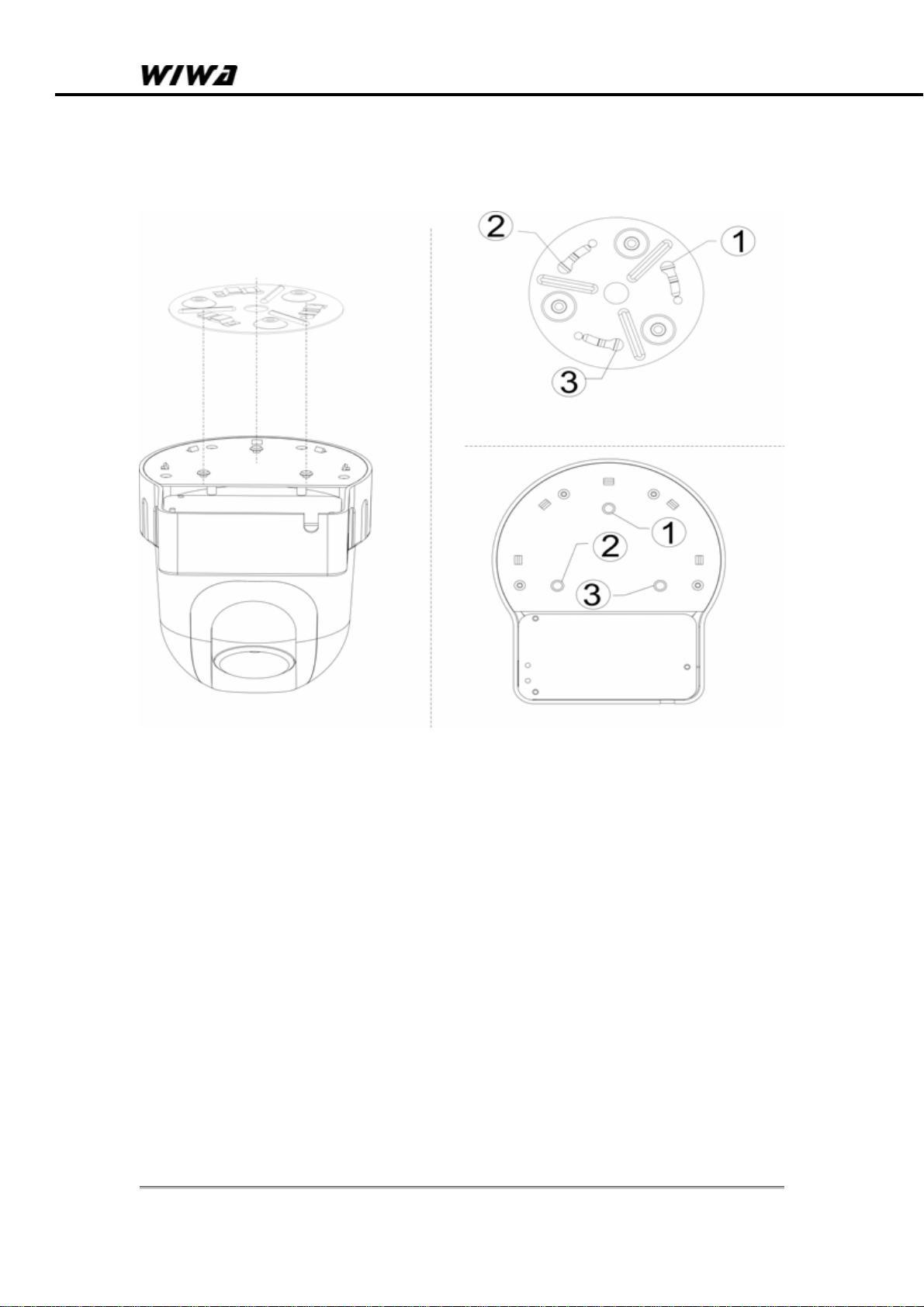
1.2.1. Install on ceiling
Step 1. Install bracket on ceiling
NVC 303
Quick Start Manual
Copyright ©2007, WIWA 3 of 48
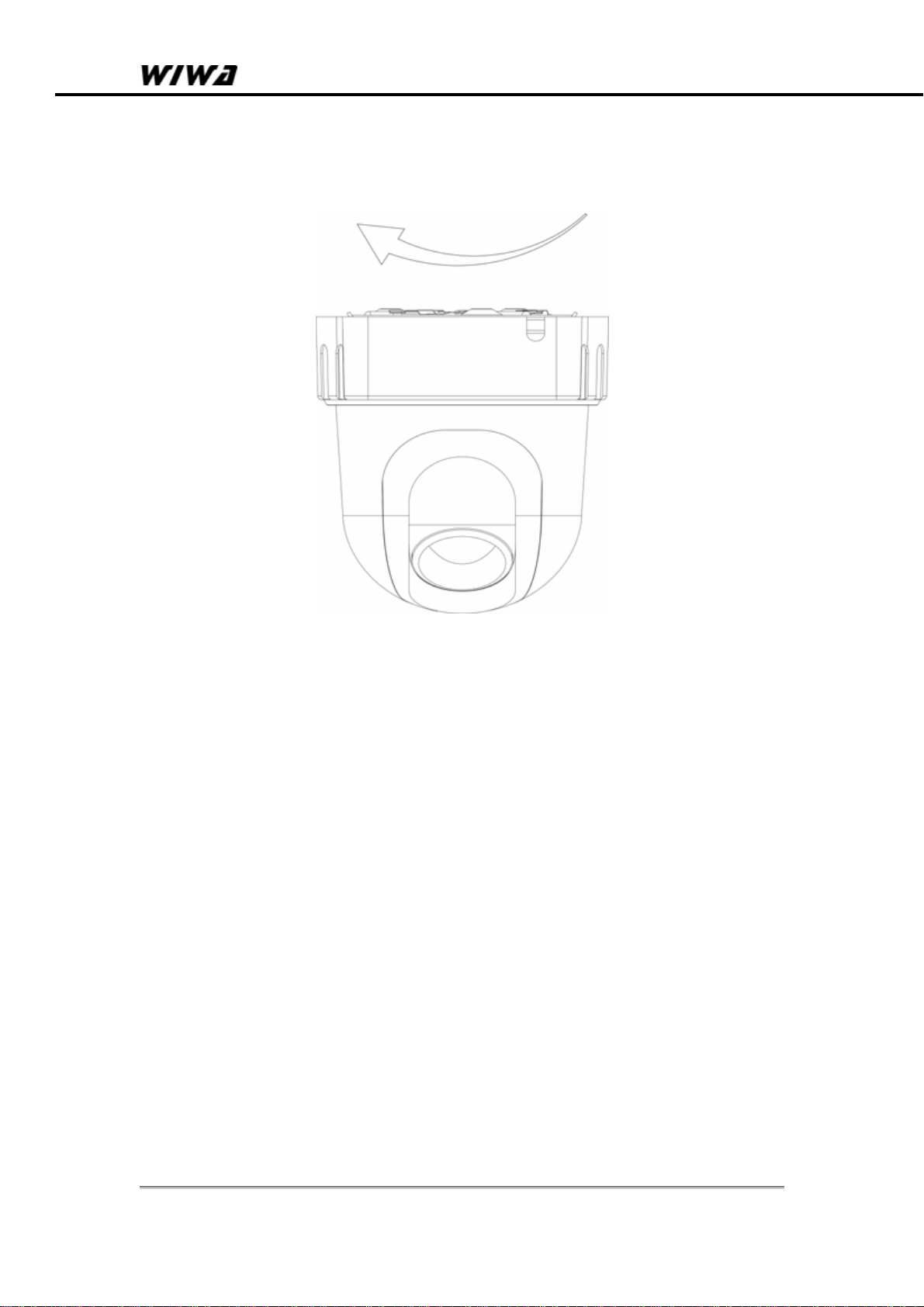
Step 2. Install IP camera to bracket
NVC 303
Quick Start Manual
Copyright ©2007, WIWA 4 of 48
Step 3. Rotate Ip camera clockwise until hear a click sound.

NVC 303
Quick Start Manual
Copyright ©2007, WIWA 5 of 48
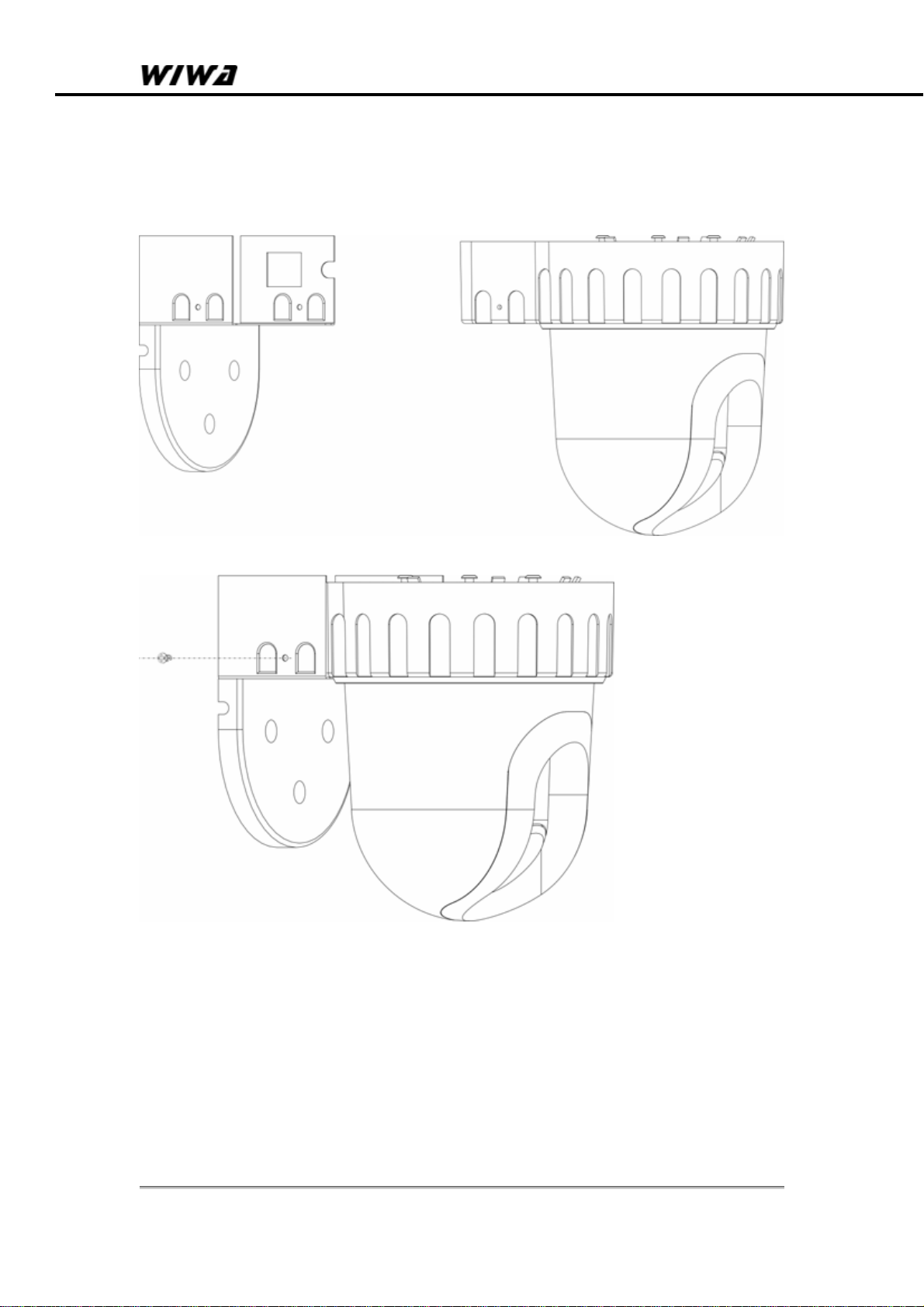
1.2.2. Install on the wall
Step 1. Install bracket on the wall
NVC 303
Quick Start Manual
Copyright ©2007, WIWA 6 of 48
Step 2. Install IP camera on the bracket

NVC 303
Quick Start Manual
Copyright ©2007, WIWA 7 of 48
1.3. Connect IP camera cable
When you test a new NVC 303 IP camera, you need connect power
plug to power socket and connect Ethernet cable to IP camera
Ethernet socket.

NVC 303
Quick Start Manual
Copyright ©2007, WIWA 8 of 48
1.4. Internet connection
Reference for Intranet and Internet connection methods:
Internet refers to Public IP Address, while Intranet refers to Private
IP Address.
Private IP Address ranges:
• 10.0.0.0 through 10.255.255.255
• 172.16.0.0 through 172.31.255.255
• 192.168.0.0 through 192.168.255.255
Intranet:To have a successful connection, IP camera and the
client should in the same networking environment, and their
Private IP Address should be on the same Subnet. It is shown
in the picture below.
Internet
Method ONE:IP camera connects to Internet via router. At
this moment, IP camera’s setting is Private IP Address. To
properly connect to Internet, the client should go through with
router’s forward rules. It is shown in the picture below.
Internet
IP camera router
Ethernet

NVC 303
Quick Start Manual
Copyright ©2007, WIWA 9 of 48
Method TWO:IP camera connects to Internet directly. If it is
a fixed IP, you have to type the IP Address provided by your ISP.
If it is a floating IP, you have to type the account and password
provided by the ISP to dial-up.
Internet
IP camera
Table des matières


