
Wintal MICRO2+ Manuel utilisateur

MICRO2+
USER MANUAL

Wintal MICRO2+ USER MANUAL
Contents
BRIEF INTRODUCTION....................................................1
FEATURE ..................................................................................1
BASIC PERFORMANCE ...........................................................1
PRODUCT DETAILS .........................................................2
PACKING LIST ..........................................................................2
FRONT VIEW ............................................................................ 2
BACK VIEW ............................................................................... 3
REMOTE CONTROL .................................................................4
BASIC OPERATION ..........................................................7
USAGE PREPARING ................................................................ 7
OPERATION OF PRODUCT USAGE ...............................9
SETUP MENU ......................................................................... 11
PICTURE VIEW MODE ...........................................................13
MUSIC PLAY MODE................................................................14
MOVIE PLAY MODE................................................................15
SUBTITLE................................................................................16
MAINTENANCE NOTICE ................................................19
FAQ ..................................................................................20
OTHERS ..........................................................................22

1
Brief introduction
Feature
This product is a new type of high-definition home video
player, which can play your favorite pictures, audio/videos
files from the built-in external storage device and memory
card including SD (Secure Digital) card, MMC (Multi
Media Card) to a connected audio/video playback device.
With Full-HD 1080P HDMI Output, you can be sure the
Micro2+ will be your player of choice!
Basic performance
Video Format: MKV, AVI, MP4, MPG, FLV, VOB, DAT,
RM/RMVB
Audio Format: MP3, WMA, AAC, APE, OGG, FLAC
Image Format: JPG/BMP/PNG
USB HOST: Connection USB mass storage device
HDMI: High Definition Multimedia Interface
1080P output: Full-HD 1080P (1920x1080) output

2
Product details
Packing list
Check the accessories. If there are some missing, please
contact your supplier immediately
Item Quantity
Media player 1
Power adaptor 1
Remote control 1
AV cable 1
Batteries 2
User’s Manual 1
Front view
Element Definition
Element Remark
1 USB
HOST
supports multiple external USB
storage devices
2 LED Light LED light display

3
3 IR Infrared sensor
4 2-in-1card
reader Supports SD, MMC
How to use memory cards: The Product has an integrated
multimedia card reader supporting memory cards
including SD, and MMC. Gently insert the memory card
into the reader with the arrow side upward until there is a
“click” sound.
Back View
Element Definition
Element Remark
1 AV
Outputs composite video
2 HDMI Outputs digital signal via HDMI port
3 Digital
Coax
Output option “SPDIF”/”RAW” audio
via coax port
4 DC IN Inputs power

4
Remote control

5
BUTTON FUNCTION
POWER Turn on and off in the stand by mode
MUTE Turn on or shut audio output
HOME Switch to the main menu.
AUDIO Switch the audio format output
ZOOM Zoom in/out.
TV SYSTEM
Press to switch between NTSC, PAL,
480P, 576P, 720P 50HZ, 720P 60HZ,
1080I 50HZ and 1080I 60HZ, 1080P
24HZ , 1080P 50HZ,1080P 60HZ.
SUBTITLE
Press to set the type, colour, the text
encoding format ,size of subtitle, when
playing the video
PLAY Press to play media file and to auto play
the picture
STOP End the playback of a media file
PAUSE/STEP Press to pause the playback. Press
continuously for step by step playback
RETURN Return to the previous menu
VOL- Press to decrease the volume
VOL+ Press to increase the volume
REPEAT Press to set repeat option: sequence,
random, only once, rotate one, rotate all.
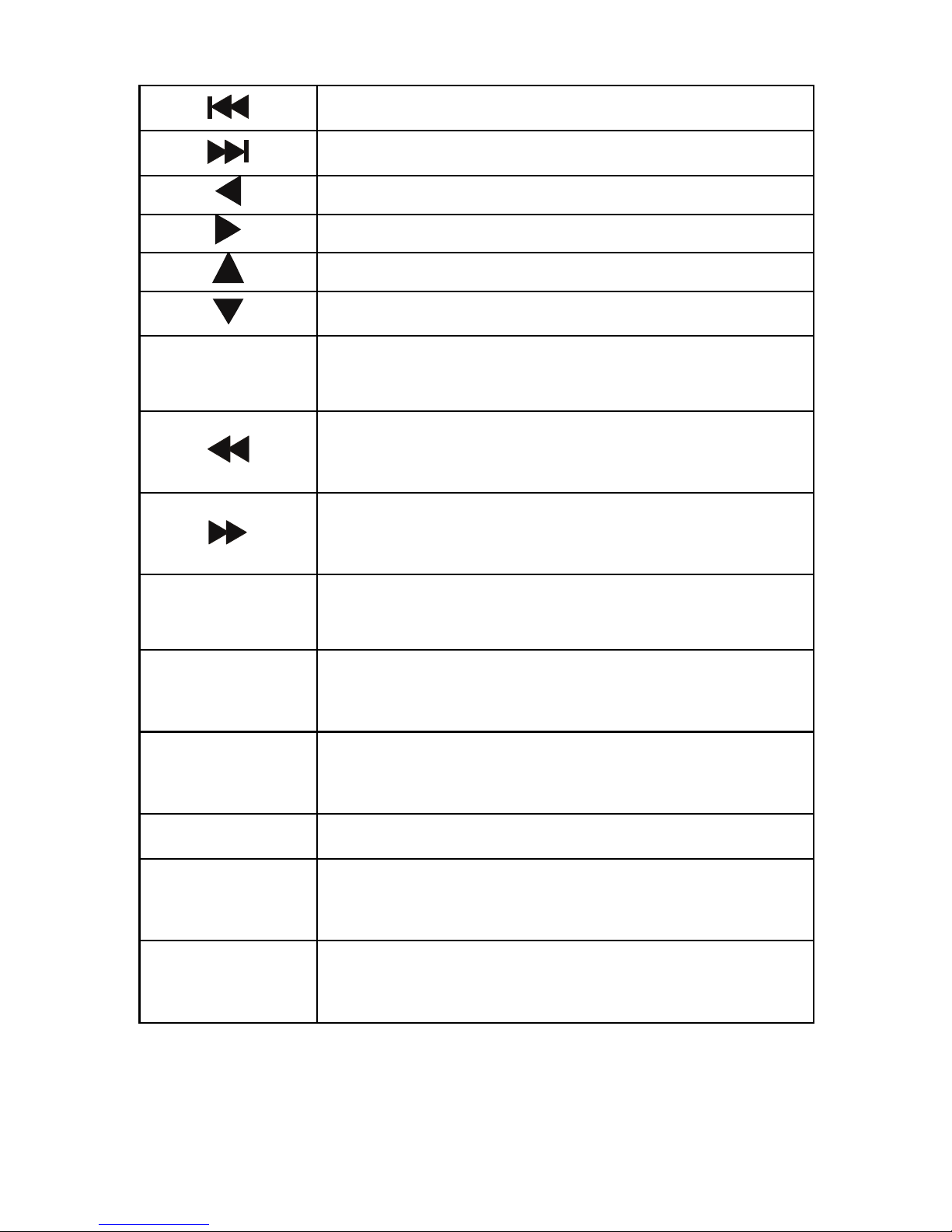
6
Press to return to previous file
Press to go to next file
Press shortly to move cursor left
Press shortly to move cursor right
Press shortly to move cursor up
Press shortly to move cursor down
OK Press this button confirms a selection
and starts the playback of a media file.
Press to fast rewind from current play
and again to select the speed
Press to fast forward from current play
and again to select the speed
SETUP In any mode, press to enter to
corresponding setting menu
GOTO Jump to the appointed time/page when
playing video
DISPLAY Press to display time, title, information of
chapter when play video and photo
0-9 Press to input digital
ALL Press this button, the list of all
documents in storage media will display.
MUSIC Press this button, the list of music
documents in storage media will display.

7
PHOTO Press this button, the list of photo
documents in storage media will display.
MOVIES Press this button, the list of film
documents in storage media will display.
Basic operation
Usage preparing
1. Power connection
Take out power adapter from the package and connect
2. Connection of TV audio and video output
The product is designed with multiple outputs, including
composite (AV), digital coax and HDMI. Individuals can
select different interfaces according to their needs. The
product can detect video output automatically, making the
operation friendly and convenient. Please refer to the
following instructions for connection to avoid any problem.
Composite output connection (AV)
Plug the yellow connector into the AV output of product
and AV input of TV, and plug the red and white

8
connector into the audio input of TV or HIFI. Turn on the
TV and select the correct AV mode. Turn on the product
and TV will display the initiation screen of the Micro2+.
Note: You must select to the “PAL/NTSC” output, if
not there is no video output by AV.
Coaxial output connection
Coaxial output: Connect the Coaxial connector of the
media player with the coaxial connector of other video or
audio device by Coaxial cable. Then enter the product's
audio output format interface, select the Digital Output
option “RAW”. It is available to enjoy 5.1 high quality
sounds through a multi channel decoder/amplifier with
coaxial input.
Note: when output format selected is “normal”, there is no
audio output by coaxial output, and when output format
selected is “SPDIF” / “RAW”, the HDMI and AV outputs
will have no audio output.
Autres manuels pour MICRO2+
2
Table des matières
Autres manuels Wintal Lecteur DVD


