WILSON PRO A500 Manuel utilisateur

NEED HELP? BoltonTechnicalAfrica.com+27796793305
User Manual
Cellular Signal Booster
WilsonPro A500

Package Contents 1
STEP 1: Preparation 2
STEP 2: Find The dBm Reading On Your Phone 3
STEP 3: Measure Signal Strength For Inside Antenna 4
STEP 4: Measure Signal Strength For Outside Antenna 5
STEP 5: Temporarily Mount The Outside Antenna 6
STEP 6: Connect The System 7
STEP 7: Compare Results 8
STEP 8: Permanently Mount The Outside Antenna 9
STEP 9: Permanently Mount The Inside Antenna 11
STEP 10: Route & Secure The Cable 12
Test System: Lights 13
Specifications 15
Safety Guidelines 16
Warranty 18
______
Index

WilsonPro A500 CELL PHONE SIGNAL BOOSTER 1
________
Package
Contents
WilsonPro
A500
2x Pole Mount
Bracket
Wall Mount
Bracket
Inside
Antenna
Outside
Antenna
3 Coax
Cables
(1m,10m,15m)
Power
Supply
This device may be operated ONLY in a fixed location for in-building
use. The signal booster unit is designed for use in an indoor,
temperature controlled environment (< 38 degrees Celsius)
Lightning
Surge
Protector

2CELL PHONE SIGNAL BOOSTER WilsonPro A500
______
Step 1: Preparation
NOTE: These instructions will walk you through a “soft” install process to find the
optimal locations for the Inside and Outside ntennas, then through the process of
the permanent installation.
You Will Need (tools not included)
Make sure the following materials are prepared and ready for your installation.
oLadder
oPhillips-head screwdriver
o10mm open-end wrench or adjustable wrench
oDrill (if routing cable through wall)
o Mounting Option
25cm pole (#BT512631) or an existing pole
oRecommended: Power Strip with surge protection
2 to 3 hours
2 people (a person to help with antenna calibration)

WilsonPro A500 CELL PHONE SIGNAL BOOSTER 3
Apps to Measure Signal Strength:
iPhones
• OpenSignal is a free app that allows you to run a test of your iPhone’s true speed
• Speedtest by Ookla is another free app
Android users: do a signal strength test and network speed test.
• Network Cell Info Lite, available for free on the Google Play store, provides nearly
real-time monitoring of cellular and WiFi signals
Put your iPhone into field test mode. To do this dial
*3001#12345#* then press call.
1Hold down power button until you see 'Slide to
Power O'.
2Then release the power button.
3 Hold the Home button until your main screen appears.
If you want to check 3G/1x but your iPhone is picking
up 4G/LTE signal, go to Settings>Cellular>Cellular Data
Options>Enable LTE>Select O.
After you system is set up, you can go back to the dots signal
by once again dialing *3001#12345#* then pressing call.
When the menu comes back up, tap “phone” in the top left
corner of your phone.
iOS 11 no longer displays the decibel (dBm) reading in ‘Field
Test Mode’. Tip: Using the bar indicator on your cell phone
can assist you in finding the strongest signal direction as well
as placing calls in dierent locations. For changes/updates
on this issue, periodically go to:
www.BoltonTechnicalAfrica.com
Settings > About Phone > Status or Network > Signal Strength
or Network Type and Strength (exact options/wording
depends on phone model).
iPhone®
iOS 9 - 10.3.3
iPhone®
iOS 11 - current
Android™
iPhone is a registered trademark of Apple Inc. Android is a trademark of Google Inc.
______
Step 2: Find The dBm
Reading On Your Phone
Visit: https://www.BoltonTechnicalAfrica.com

4CELL PHONE SIGNAL BOOSTER WilsonPro A500
______
Step 3: Measure Signal
Strength For Inside
Antenna Placement
Having an accurate measurement of signal strength in decibels (dBm) is crucial
when installing your system. Decibels accurately measure the signal strength you
are receiving. Test both 3G and 4G signal for best results by turning the LTE o in
the carrier settings of your device.
SIGNAL STRENGTH EXCELLENT GOOD FAIR POOR DEAD ZONE
3G/1x
(typically voice) -70dBm -71 to -85dBm -86 to -100dBm -101 to -109dBm -110dBm
4G/LTE
(typically data) -90dBm -91 to -105dBm -106 to -110dBm -111 to -119dBm -120dBm
Turn o your cell phone’s WiFi to ensure you
are checking the cellular connection. The dBm
reading will be refreshed every 30-60 seconds.
Want faster results? Once you have a reading,
turn on airplane mode. Wait 15 seconds.
Turn o airplane mode. The signal strength
reading is refreshed.
Walk around your home/oce taking signal
strength readings until you find the area that has
the weakest reception, or number farthest away
from zero. For example -100 is a weaker signal
than -80.
Users on iOS 11 and above will need to use an
alternative method using the bar indicator on
your cell phone and/or placing calls in dierent
locations.
Weakest Signal Number:___________
Weakest Signal Location: ___________
Place your Inside Antenna in this poor signal area.
For best results, keep the Inside Antenna more
than 45cm away from the booster.

WilsonPro A500 CELL PHONE SIGNAL BOOSTER 5
______
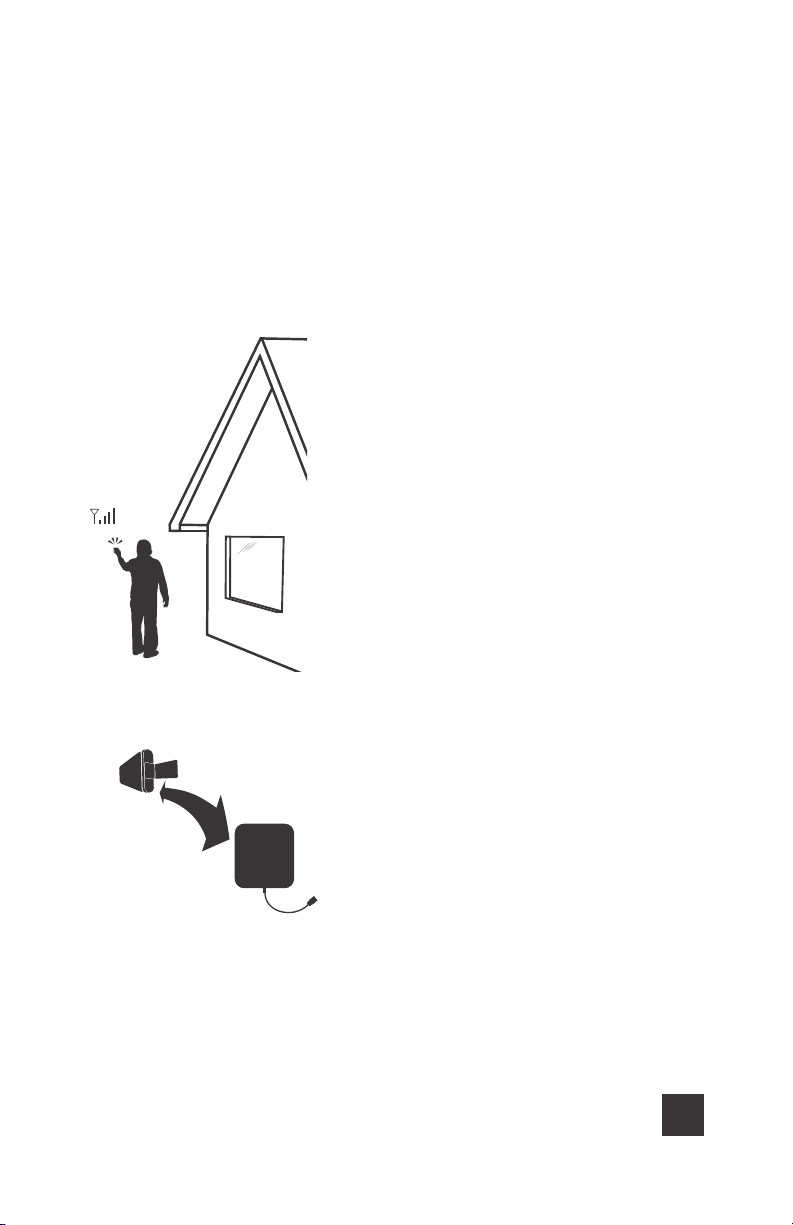
Step 4: Measure Signal
Strength For Outside
Antenna Placement
This is the most critical step of the installation
process because it will determine the overall
performance of the booster system. Using the
same method as Step 3, find the place with the
strongest signal (number closest to zero) on the
outside of your home.
Users on iOS 11 and above will need to use an
alternative method using the bar indicator on
your cell phone and/or placing calls in dierent
locations.
The further apart the Inside Antenna is located
from the Outside Antenna, the better. To
determine the best location for your Outside
Antenna, note the dBm reading in a variety of
locations.
Note: The Outside Antenna must be at least
6 meters vertical or 15 meters horizontal from
the Inside Antenna for best performance. Make
sure the Inside Antenna and Outside Antennas
are facing away from each other.

6CELL PHONE SIGNAL BOOSTER WilsonPro A500
______
Step 5: Temporarily Mount
The Outside Antenna
Use one of the two options to mount the
Outside Antenna on the side of the house with
the strongest signal.
Note: Using an app like 'Open Signal' will help
you point the Outside ntenna in the direction
of the nearest cell phone tower.
AOption (Best)
BOption (Good)
Note: The Outside Antenna must be at least
6 meters vertical or 15 meters horizontal from
the Inside Antenna for best performance. Make
sure the Inside Antenna and Outside Antennas
are facing away from each other.
A
B

WilsonPro A500 CELL PHONE SIGNAL BOOSTER 7
Band 5 Band 4
Band 12/13/17
Connect 4G-X ®
Band 2
Band 5 Band 4
Band 12/13/17
Connect 4G-X ®
Band 2
______
Step 6: Connect The System
2
Connect the supplied Coax Cable to end of
booster labeled Inside Antenna.
3
Power up the Booster by connecting it to a
power source.
To protect Booster from power surges, connect
to a power strip.
1
Connect the supplied Coax Cable to end of
booster labeled Outside Antenna.
Outside
Antenna
Inside
Antenna
Band 5 Band 4
Band 12/13/17
Connect 4G-X ®
Band 2
Band 5 Band 4
Band 12/13/17
Connect 4G-X ®
Band 2
Warning: Do Not connect power
supply to booster before connecting
both outside and indoor antennas

8CELL PHONE SIGNAL BOOSTER WilsonPro A500
______
Step 7: Compare Results
Using the field test mode described in step 3, measure the new signal
strength and write it down here ___________.
Compare this number with the original reading you took in the same part of the house.
If the number is higher (closer to zero) than the original reading without booster, your
booster is working. If it is not, look at the lights on the booster and the section at the
end of this manual “Test System: Lights”.
Users on iOS 11 and above will need to use an alternative method using the bar
indicator on your cell phone and/or placing calls in dierent locations.
Did you know a signal increase in just
3dB is 2 times the power and signal amplification!
Distance from Cell Tower
CELL
TOWER
Signal Strength
GOOD
Signal Strength
POOR
Signal Strength
DEAD ZONE
Signal Strength
EXCELLENT
Signal Strength
FAIR
3G/1x
4G/LTE
-70dBm
-90dBm
-75dBm
-100dBm
-90dBm
-108dBm
-105dBm
-115dBm
-110dBm
-120dBm
DECIBEL GAIN POWER INCREASE
3dB 2 times the power and signal amplification
6dB 4 times the power and signal amplification
10dB 10 times the power and signal amplification
12dB 16 times the power and signal amplification
20dB 100 times the power and signal amplification
Autres manuels pour A500
1
Table des matières
Autres manuels WILSON PRO Extenseur

WILSON PRO
WILSON PRO A1000 Manuel utilisateur

WILSON PRO
WILSON PRO 460236 Manuel utilisateur

WILSON PRO
WILSON PRO 4000R Manuel utilisateur

WILSON PRO
WILSON PRO A500 - 3G/4G Manuel utilisateur

WILSON PRO
WILSON PRO A1000 Manuel utilisateur

WILSON PRO
WILSON PRO 1000 Manuel utilisateur

WILSON PRO
WILSON PRO 1050 Manuel utilisateur

WILSON PRO
WILSON PRO 620037 Manuel utilisateur

WILSON PRO
WILSON PRO A500 Manuel utilisateur

WILSON PRO
WILSON PRO 1000R Manuel utilisateur