
Wegener UNITY4000 Manuel utilisateur

Instruction Manual
UNITY4000™
MPEG VIDEO INTEGRATED
RECEIVER DECODER
Data, drawings, and other material
contained herein are proprietary to
Wegener Communications, Inc., and
may not be reproduced or duplicated in
any form without the prior permission of
Wegener Communications, Inc.
When ordering parts from Wegener
Communications, Inc., be sure to include
the equipment model number, equipment
serial number, and a description of the part.
In all correspondence with Wegener
Communications, Inc., regarding this
publication, please refer to UTY4000-003E.
Note: Features of the product described
herein are covered by U.S. Patent #
4,985,895.
First Edition: June 1998
Revised: August 2002
TECHNOLOGY PARK / JOHNS CREEK
11350 TECHNOLOGY CIRCLE
DULUTH, GEORGIA 30097-1502
(770) 814-4000 FAX (770) 623-0698

UTY4000-003 ii
This Page Intentionally Left Blank

iii UTY4000-003
CAUTION
RISK OF ELECTRIC SHOCK
DO NOT OPEN
CAUTION: TO REDUCE THE RISK OF ELECTRIC SHOCK,
DO NOT REMOVE COVER (OR BACK).
NO USER-SERVICEABLE PARTS INSIDE.
REFER SERVICING TO QUALIFIED SERVICE PERSONNEL.
CAUTION
As this unit is intended to interface with other electrical/electronic systems, proper
engineering practices must be adhered to during installation and check-out.
All AC power and ground must be installed in accordance with National Electric
Code Standards as to conductor size and limitations (see NFPA 70, articles 200-
280, as amended, if required), and lightning protection must be provided.
All RF interconnections must be properly shielded to prevent ingression or
egression of potential interfering sources to existing services.
Any damage to this unit caused by improper wiring/interconnections will void any
warranty extended.
All Wegener Communications products are warranted against defective materials and workmanship for
a period of one year after shipment to customer. Wegener Communications' obligation under this
warranty is limited to repairing or, at Wegener Communications' option, replacing parts, subassemblies,
or entire assemblies. Wegener Communications shall not be liable for any special, indirect, or
consequential damages. This warranty does not cover parts or equipment which have been subject to
misuse, negligence, or accident by the customer during use. All shipping costs for warranty repairs will
be prepaid by the customer. There are no other warranties, express or implied, except as stated
herein.
WARRANTY

UTY4000-003 iv
This Page Intentionally Left Blank

v UTY4000-003
Table of Contents
SECTION 1 - GENERAL INFORMATION
Paragraph Title Page #
1.1 General........................................................................................... 1-1
1.2 Introduction..................................................................................... 1-1
1.3 Unpacking and Inspection .............................................................. 1-1
1.4 Physical Environment ..................................................................... 1-1
1.5 Security Labels ............................................................................... 1-2
1.6 Physical Specifications ................................................................... 1-2
1.7 Technical Support........................................................................... 1-2
1.8 Manuals .......................................................................................... 1-3
SECTION 2 - SYSTEM CONFIGURATION
2.1 Unit Overview ................................................................................. 2-1
2.2 Block Diagram Discussion .............................................................. 2-1
2.3 Specifications ................................................................................. 2-3
2.3.1 L-Band Tuner..................................................................... 2-3
2.3.2 QPSK Demodulator ........................................................... 2-3
2.3.3 Transport DEMUX ............................................................. 2-4
2.3.4 System Processor ............................................................. 2-4
2.3.5 Auxiliary Data Processing.................................................. 2-4
2.3.6 Composite Video Encoder ................................................. 2-4
2.3.7 Video Specifications .......................................................... 2-5
2.3.8 Audio Specifications .......................................................... 2-5
2.3.9 Serial ASYNC Data, Monitor and Control of IRD ............... 2-6
2.3.10 Encryption.......................................................................... 2-6
2.3.11 Transport Output ............................................................... 2-6
2.3.12 Option Modules for Expansion Ports ................................. 2-6
2.3.13 AC Power .......................................................................... 2-6
2.3.14 LNB DC Power .................................................................. 2-6
2.3.15 Four Input / One Output RF Switch (Optional)................... 2-7
2.3.15.1 Description.......................................................... 2-7
2.3.15.2 Electrical Characteristics .................................... 2-7
2.4 Local Controls and Indicators ......................................................... 2-7
2.4.1 Front Panel ....................................................................... 2-7
2.4.1.1 Front Panel Display .............................................. 2-7
2.4.1.2 Front Panel Keypad.............................................. 2-8
2.4.1.3 Indicator LED’s ..................................................... 2-8

UTY4000-003 vi
Table of Contents (continued)
Paragraph Title Page #
2.4.2 Rear Panel.......................................................................... 2-8
2.4.2.1 MODE Control DIP-switches ................................. 2-8
2.4.2.2 Standard DVB Synchronous Interface ................... 2-8
2.5 External Inputs and Outputs ........................................................... 2-9
2.5.1 Balanced Audio Outputs ..................................................... 2-10
2.5.2 FCC-Mandated Suppression of Radiated Emissions.......... 2-10
2.5.3 Alarm Relay and Addressable Contact Closures ............... 2-10
2.6 Expansion Card Configuration ....................................................... 2-13
2.6.1 Balanced Audio Expansion Card ....................................... 2-13
2.6.1.1 Audio Card Jumper Configuration ...................... 2-13
2.6.1.2 Audio Card Label Instructions ............................. 2-13
2.6.2 SYNC or ASI Card Jumper Configuration .......................... 2-14
SECTION 3 - OPERATION
3.1 Modes of Operation ........................................................................ 3-1
3.1.1 Power Up........................................................................... 3-1
3.1.2 Boot Fail ............................................................................ 3-1
3.1.3 Alarm, Warning, & Normal ................................................. 3-1
3.2 LED & Alarm / Warning Conditions................................................. 3-1
3.2.1 Carrier (Green) .................................................................. 3-2
3.2.2 AGC (Green) ..................................................................... 3-2
3.2.3 MPEG (Green)................................................................... 3-2
3.2.4 Cue (Green)....................................................................... 3-2
3.2.5 COMPEL (Green) .............................................................. 3-2
3.2.6 Authorized (Green) ............................................................ 3-2
3.2.7 Alarm (Red) ....................................................................... 3-3
3.2.8 Warning (Amber) ............................................................... 3-3
3.3 Relays............................................................................................. 3-4
3.4 Program Selection .......................................................................... 3-4
3.5 Audio Handling ............................................................................... 3-5
3.6 Sources of Control.......................................................................... 3-5
3.6.1 COMPEL™........................................................................ 3-5
3.6.2 Terminal............................................................................. 3-5
3.6.3 Modem............................................................................... 3-5
3.6.4 Dip Switches...................................................................... 3-6
3.6.5 Display / Push Buttons....................................................... 3-6
3.7 Serial Ports ..................................................................................... 3-6
3.7.1 Printer Device Handling ..................................................... 3-7

vii UTY4000-003
Table of Contents (continued)
Paragraph Title Page #
3.7.2 Aux Data Device................................................................ 3-7
3.8 Receiver Functions......................................................................... 3-7
3.8.1 Perms, Temps, Searching & Settings................................ 3-7
3.8.2 Settings Table (or Search Table) ...................................... 3-9
3.8.3 Signal Quality Monitoring................................................... 3-9
3.8.4 Frequency Tagging ........................................................... 3-9
3.9 Display / Push Buttons.................................................................... 3-10
3.9.1 Overview............................................................................ 3-10
3.9.2 Push Button Functions....................................................... 3-11
3.9.3 E-mail ................................................................................ 3-14
Appendix A - Terminal / Modem Commands
A1.0 Status Commands .......................................................................... A-1
A1.0.1 H (Help)............................................................................ A-1
A1.0.2 R (Report) ........................................................................ A-2
A1.1 Control Commands......................................................................... A-2
A1.1.1 ABORT............................................................................. A-2
A1.1.2 ADDS ............................................................................... A-2
A1.1.3 DELS ............................................................................... A-2
A1.1.4 MUTE............................................................................... A-2
A1.1.5 OH.................................................................................... A-3
A1.1.6 PC .................................................................................... A-3
A1.1.7 PERM............................................................................... A-3
A1.1.8 PERMCH.......................................................................... A-3
A1.1.9 PW ................................................................................... A-3
A1.1.0 RE .................................................................................... A-3
A1.1.11 SETAUDIO ...................................................................... A-4
A1.1.12 SETLNB .......................................................................... A-4
A1.1.13 SETTIMEOUT ................................................................. A-4
A1.1.14 SNR ................................................................................. A-5
A1.1.15 TEMP ............................................................................... A-5
A1.1.16 TEMPCH ......................................................................... A-5
A1.1.17 UNMUTE.......................................................................... A-5
Appendix B – Front Panel Display
B1.0 Home Screen............................................................................................ B-1
B1.1 Email ......................................................................................................... B-1
B1.2 Hardware Setup ...................................................................................... B-2

UTY4000-003 viii
Table of Contents (continued)
Paragraph Title Page #
B1.2.1 Current Settings ............................................................... B-2
B1.2.2 Channel Selection ............................................................ B-3
B1.2.3 Edit Channel ..................................................................... B-3
B1.2.4 Audio Settings .................................................................. B-3
B1.2.5 SNR Alarm Threshold ...................................................... B-4
B1.2.6 Serial Ports ....................................................................... B-4
B1.2.7 LNB LOs .......................................................................... B-5
B1.2.8 Unit Reset ........................................................................ B-6
B1.3 Status Reports........................................................................................... B-6
B1.3.1 Settings Status ................................................................. B-6
B1.3.2 Carrier Status ................................................................... B-7
B1.3.3 MPEG Status ................................................................... B-9
B1.3.4 Settings Table .................................................................. B-10
B1.3.5 NC Status ......................................................................... B-11
B1.3.6 Parameter Status ............................................................. B-12
B1.3.7 Port Status ....................................................................... B-14
B1.3.8 Relay Status ..................................................................... B-14
B1.4 Version ....................................................................................................... B-15
B1.5 Navigation Help .............................................................................. B-16
Appendix C - Glossary of Terms
Terms and Acronyms............................................................................................. C-1
Appendix D - RMA Request Form
LIST OF TABLES
Table # Title Page #
1-1 Physical Specifications .............................................................................. 1-2
2-1 Tuner Specifications ................................................................................... 2-3
2-2 QPSK Demodulator Requirements .......................................................... 2-4
2-3 Video Resolution Requirements ............................................................... 2-4
2-4 Video Specifications ................................................................................... 2-5
2-5 Audio Specifications ................................................................................... 2-5
2-6 Serial ASYNC Port Requirements ........................................................... 2-6
2-7 RF Switch Characteristics ......................................................................... 2-7
2-8 Front Panel LED's ....................................................................................... 2-8
2-9 Standard DVB Synchronous Parallel Interface Pin-out ........................ 2-8
2-10 Input and Output Connectors ................................................................... 2-9
2-11 Serial 1 and Serial 2 Port Pin-outs ........................................................... 2-9

ix UTY4000-003
Table of Contents (continued)
Paragraph Title Page #
3-1 LED and Alarm Conditions ........................................................................ 3-2
3-2 Relay Operation .......................................................................................... 3-4
3-3 Audio Handling ............................................................................................ 3-5
3-4 DIP Switch Function ................................................................................... 3-6
3-5 Serial Device Settings ................................................................................ 3-7
3-6 Settings Parameters ................................................................................... 3-8
3-7 Settings Types ............................................................................................ 3-8
3-8 IRD Signal Quality ...................................................................................... 3-9
3-9 Display Modes ............................................................................................. 3-10
3-10 Push Button Functions ............................................................................... 3-11
3-11 LC Display Menus ...................................................................................... 3-12
LIST OF ILLUSTRATIONS
Figure # Title Page #
2-1 UNITY4000 Block Diagram ....................................................................... 2-2
2-2 Ferrite Bead Installation ............................................................................. 2-11
2-3 UNITY4000 Front Panel ............................................................................ 2-12
2-4 UNITY4000 Rear Panel ............................................................................. 2-12

UTY4000-003 x
This Page Intentionally Left Blank
Autres manuels pour UNITY4000
1
Table des matières
Autres manuels Wegener Convertisseur de média

Wegener
Wegener Nielsen NAVE IIc Manuel utilisateur

Wegener
Wegener 4422 Manuel utilisateur

Wegener
Wegener SMD 515 Fiche technique

Wegener
Wegener 4600 Manuel utilisateur

Wegener
Wegener UNITY500 Manuel utilisateur

Wegener
Wegener UNITY4000 Manuel utilisateur
Wegener
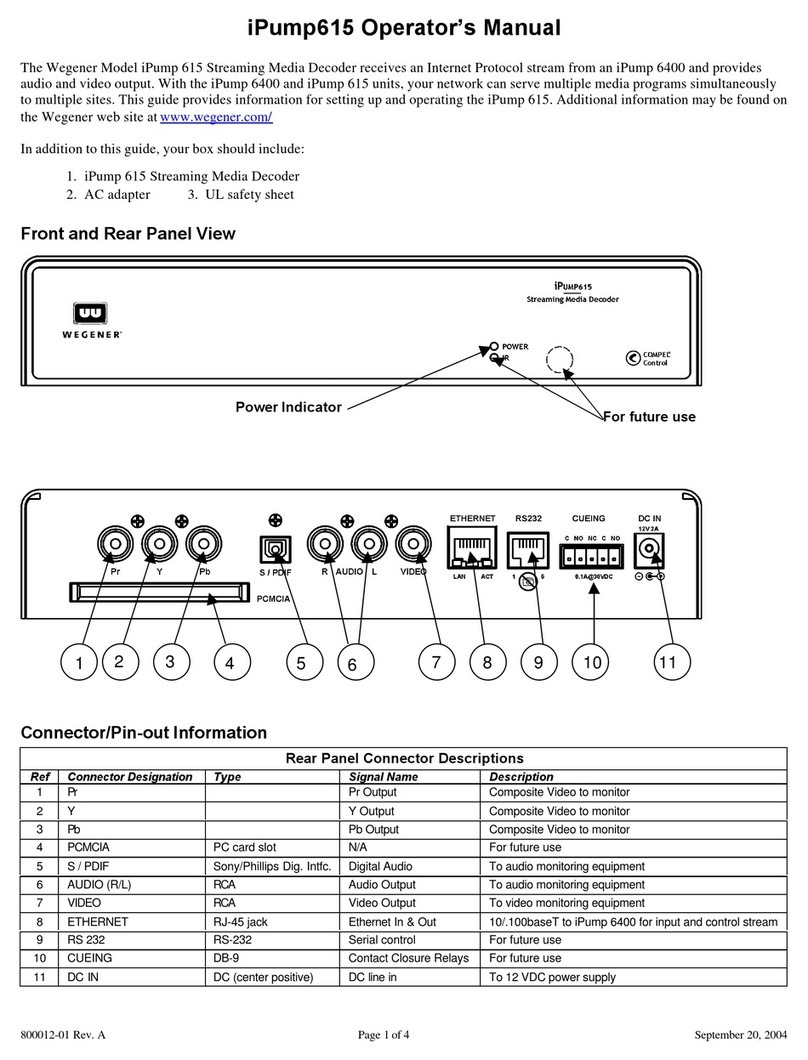
Wegener iPump615 Manuel utilisateur

Wegener
Wegener 4600 Instructions de montage


