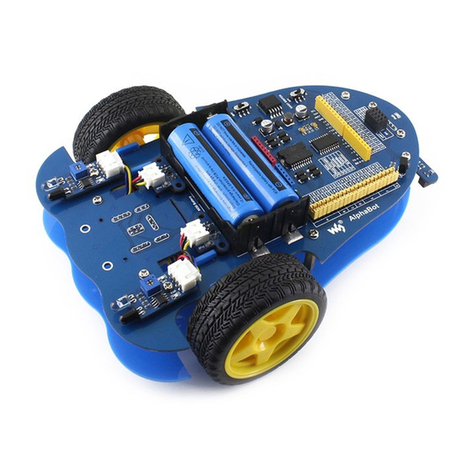
Waveshare Alphabot2 Manuel utilisateur

Alphabot2 for micro:bit User Manual
1/ 76
Alphabot2 for micro:bit
User Manual

Alphabot2 for micro:bit User Manual
2/ 76
CONTENT
Preface .......................................................................................................................................................... 5
micro:bit............................................................................................................................................... 5
Notes..................................................................................................................................................... 6
Chapter 1 LED lights................................................................................................................................. 8
JavaScript Blocks editor.................................................................................................................. 8
Blocks............................................................................................................................................ 9
Lighting LEDs ...........................................................................................................................10
Heart Beating ...................................................................................................................................13
Display Text.......................................................................................................................................14
Chapter 2 Buttons...................................................................................................................................15
Pressing..............................................................................................................................................15
Pressing 2 ..........................................................................................................................................16
Chapter 3 Sensors...................................................................................................................................18
Temperature Sensor ......................................................................................................................18
Accelerometer..................................................................................................................................19
Magnetometer.................................................................................................................................21
Light sensor ......................................................................................................................................23
Chapter 4 Music.......................................................................................................................................25
Play a melody...................................................................................................................................26

Alphabot2 for micro:bit User Manual
3/ 76
Play Piano ..........................................................................................................................................27
Play melody 2...................................................................................................................................28
Chapter 5 RGB LED.................................................................................................................................29
Add package.....................................................................................................................................30
Lighting ..............................................................................................................................................31
Display different Colors................................................................................................................32
Blinky LEDs........................................................................................................................................33
Rainbow .............................................................................................................................................34
Chapter 6 Moving, Robot.....................................................................................................................35
Add Pakcage.....................................................................................................................................36
Motors ................................................................................................................................................37
Moving ...............................................................................................................................................38
Moving 2............................................................................................................................................40
Moving 3............................................................................................................................................41
Chapter 7 Infrared Obstacle Avoiding.............................................................................................42
Infared Sensor Status ....................................................................................................................43
Obstacle Avoiding ..........................................................................................................................44
Chapter 8 Bluetooth...............................................................................................................................45
Add Package.....................................................................................................................................45
Bluetooth Connetion .....................................................................................................................46

Alphabot2 for micro:bit User Manual
4/ 76
Bluetooth Connecting 2 ...............................................................................................................51
D-Pad controller..............................................................................................................................53
D-PAD Controller 2 ........................................................................................................................55
Chapter 9 2.4g Radio .............................................................................................................................56
Add Package.....................................................................................................................................56
radio communicating ....................................................................................................................56
Joystick for micro:bit .....................................................................................................................58
Joystick for micro:bit 2..................................................................................................................62
Posture control................................................................................................................................64
Chapter 10 Ultrasonic Obstacle Avoidancing ...............................................................................66
Ultrasonic sensor ............................................................................................................................67
Obstacle Avoiding ..........................................................................................................................68
Chapter 11 Line Tracking......................................................................................................................69
Tracker sensor..................................................................................................................................70
Original data.....................................................................................................................................71
Calibrated Data................................................................................................................................74
Tracking..............................................................................................................................................76

Alphabot2 for micro:bit User Manual
5/ 76
PREFACE
This Alphabot2 robot kit uses the BBC micro: bit as the host controller, combined
with several functional modules, it is easy for the kids to experience robotic tricks such
as line tracking, obstacle avoiding, ultrasonic ranging, servo operation, Bluetooth
remote control, etc.
MICRO:BIT
The BBC micro: bit is a pocket-sized computer to learn programming for kids and
beginners
⚫Nordic nRF51822
◼16 MHz 32-bit ARM Cortex-M0 microcontroller
◼Bluetooth® 4.0 low energy/2.4GHz RF SoC
◼16kB RAM
◼256kB Flash
⚫Freescale KL26Z –48 MHz ARM Cortex-M0+ MCU
⚫Compass –Freescale MAG3110 3-axis magnetometer, I2C interface
⚫Accelerometer –Freescale MMA8652 3-axis accelerometer, I2C interface
⚫Power connector –3V power supply
⚫Reset button –reset the system
⚫Micro USB connector –for connecting PC, download code, serial communication,
etc.

Alphabot2 for micro:bit User Manual
6/ 76
⚫5x5 LED display –5x5 LED grid
⚫Button A/B –programmable buttons
⚫I/O connection pins –5 I/O rings and 20-pin edge connector, including SPI,
UART, I2C, Analog, PWM, etc.
⚫Dimensions –5cm x 4cm
NOTES
1. Components in different package will be different. In this guide, we describe all
components, and some of them may not be included in the package you buy.
2. The use manual, schematic, demo code and datasheet, all these resources can be
downloaded in Wiki.
➢https://www.waveshare.com/wiki/AlphaBot2_for_micro:bit
3. There may be mistakes in this guide due to the limit of time. If you find them,
please kindly contact Waveshare Team.
1
4. To avoid of destroying the Alphabot2, we recommend you read this manual and
following it if you are the first time receive your parcel.
5. Please check your parcel when you receive to check if all the components your
bought are included. We recommend you to first learn how to use the micro: bit
by following Chapter 1 to Chapter 3 if you are the beginner.
1

Alphabot2 for micro:bit User Manual
7/ 76
6. You must turn on the power switch and make sure the battery supplies power
normally before you connect USB cable to micro:bit for programming. You cannot
power Alphabot2 by micro:bit, otherwise the power LED's light is very slight and
Alphabot2 will work improperly.
7. You must turn off power before you plug/pull micro:bit, to avoid of destroying
micro:bit. And please keep the LED matrix of micro:bit towards to outside.
8. All the demo codes mentioned here are provided in Wiki. Demo codes are based
on make code programming environment of Microsoft. The makecode tool
supports Graphic programming and JavaScript. The demo codes are all hex files,
can be copied to micro:bit directly and run. (The micro:bit is recognized as a
potable drive when connected to PC. Flashing demo code to micro:bit by copied
hex file to this drive). You can also import demo code to miscode website for
modifying and flashing.
9. All specifications and demo codes supplied herein are subject to change without
notice at any time.

Alphabot2 for micro:bit User Manual
8/ 76
CHAPTER 1 LED LIGHTS
The micro:bit has 25 (5x5) individually-programmable LEDs, allowing you to
display text, numbers and images, here we will learn about coding these LEDs.
JAVASCRIPT BLOCKS EDITOR
The link of online JavaScript Block Editor of BBC: https://makecode.microbit.org/#
Accessing the editor. There is divided to four area, the upper area is menu bar, center
area is Blocks, left is simulating demonstration area and the right is Blocks and
JavaScript editing area.

Alphabot2 for micro:bit User Manual
9/ 76
BLOCKS
Blocks in Basic are mainly used for basic operation like LEDs controlling.
: Run the code at the beginning
: Repeat the code forever at the background

Alphabot2 for micro:bit User Manual
10 / 76
: Draw an image on the LED screen (LEDs)
: Scroll a number on the LEDs
: Display text on the LEDs, display one
character at a time.
: Draw selected icon on the LEDs
: Turn off all LEDs
: Draw an arrow on the LEDs
LIGHTING LEDS
Connecting the micro:bit to computer via a micro USB cable, the micro:bit will show
up on your computer as a drive called “MICROBIT”.
Now let’s start our first code that to light the LEDs with the blocks we describe
above. Just as below:
Table des matières
Autres manuels Waveshare Robotique
Manuels Robotique populaires d'autres marques

STEMCenter USA
STEMCenter USA Pi-Bot v2.00 Manuel utilisateur

SunFounder
SunFounder PiDog Manuel utilisateur

Universal Robots
Universal Robots UR5 Manuel utilisateur

Universal Robots
Universal Robots E Series Manuel utilisateur

YASKAWA
YASKAWA MOTOMAN-MPL80 II Manuel utilisateur

EFORT
EFORT ECR5 Manuel d'instructions