
Waves BSS DPR-402 Manuel utilisateur
WAVES
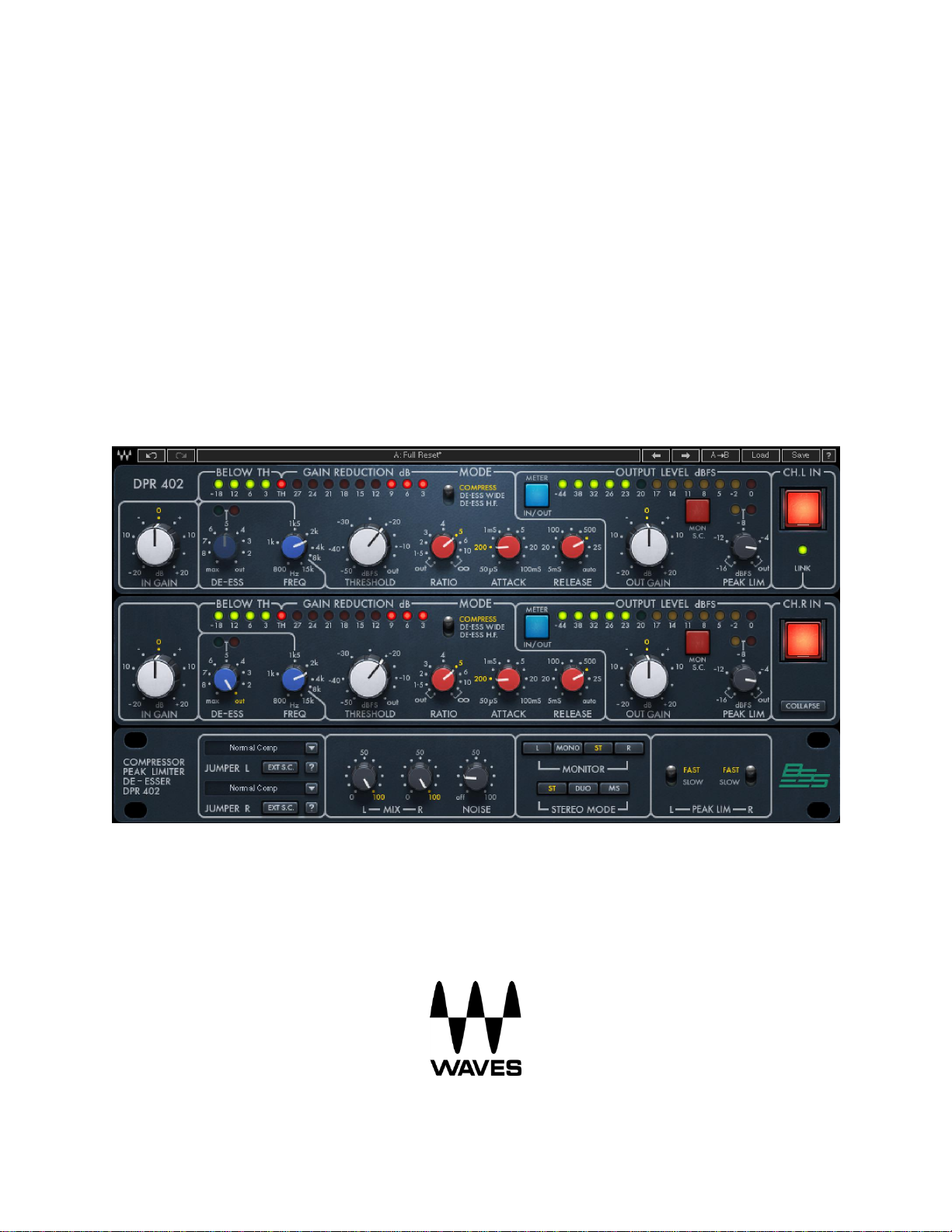
BSS®DPR-402
COMPRESSOR / PEAK LIMITER / DE-ESSER
USER GUIDE

Waves BSS DPR-402
User Guide
2
TABLE OF CONTENTS
Chapter 1 –Introduction ....................................................................................................... 3
1.1 Welcome.......................................................................................................................................... 3
1.2 About BSS DPR-402.......................................................................................................................... 3
1.3 The Original Hardware..................................................................................................................... 3
1.4 Features Added to the Plugin .......................................................................................................... 4
1.5 Components..................................................................................................................................... 5
Chapter 2 –Interface and Controls ........................................................................................ 6
2.1 Interface........................................................................................................................................... 6
2.2 Controls............................................................................................................................................ 7
Chapter 3 –Suggested Settings for Initial Setups ................................................................. 13
3.1 Compression ..................................................................................................................................13
3.2 De-Essing........................................................................................................................................14
3.2.1 De-Essing Wide with Full Dynamic Control..........................................................................15
3.2.2 De-Essing HF with Full Dynamic Control ..............................................................................16
3.2.3 De-Essing Wide with Simultaneous Compression................................................................ 17
3.3 Peak Limiting..................................................................................................................................17
3.4 Additional Jumper Settings............................................................................................................18
All references to HARMAN products and all uses of HARMAN’s trademarks are made with written
permission from HARMAN INTERNATIONAL INDUSTRIES INC.
3.5WaveSystem Toolbar......................................................................................................................19

3
Chapter 1 – Introduction
1.1 Welcome
Thank you for choosing Waves! In order to get the most out of your new Waves plugin, please
take a moment to read this user guide.
To install software and manage your licenses, you need to have a free Waves account. Sign up
at www.waves.com. With a Waves account you can keep track of your products, renew your
Waves Update Plan, participate in bonus programs, and keep up to date with important
information.
We suggest that you become familiar with the Waves Support pages: www.waves.com/support.
There are technical articles about installation, troubleshooting, specifications, and more. Plus,
you’ll find company contact information and Waves Support news.
1.2 About BSS®DPR-402
The Waves BSS DPR-402 plugin is a software model of the DPR-402 Compressor/Peak
Limiter/De-Esser hardware originally manufactured by BSS Audio. This dynamics processor
provided the punchy, explosive signature sound for drum machines in the 1980s, and was
featured heavily in dance pop, electronic and hip-hop music. But it had many other versatile
uses in the studio, and was also a massively popular favorite on stage.
Working in collaboration with BSS Audio and Harman International, Waves has now modeled
this landmark dynamics processor and created a digital tool with the unique sound, functionality
and flexibility of the original.
1.3 The Original Hardware
BSS DPR-402 was designed in response to the demand for a versatile, compact stereo unit
that provides the three most commonly used dynamic functions in a single 1-unit rack space. Its
internal architecture, including two independent insert-accessible side chains per channel,
allows great flexibility and scope.
Waves BSS DPR-402
User Guide

Waves BSS DPR-402
User Guide
4
A dedicated de-esser control with a variable filter provides wideband sibilance control along with
compression and peak limiting. There are three modes of de-essing: full-spectrum attenuation,
HF-only attenuation, and a mix of de-essing and compression.
The compressor section affords full control over all the normal parameters, and offers “auto”
time constants for general-purpose use. It can be switched to operate at high frequencies only,
resulting in a dynamically controlled tunable HF filter. The control and subtract sidechain
insertion points allow for versatile dynamic tonal modification. Gain reduction is achieved using
a voltage controlled attenuator that is capable of reducing the input signal by up to 30 dB.
A calibrated peak limiter provides absolute control without compromising the dynamics setting of
the compressor. This can yield less dynamic distortion for an equivalent amount of
compression.
1.4 Features Added to the Plugin
In addition to modeling the above features of the original hardware, Waves has added five
features to the plugin for extra flexibility, control, and ease of use:
1
INPUT GAIN CONTROL
Controls the input level going into the compressor
2
MIX CONTROL
Controls the balance between the processed and the
unprocessed signal. This enables very quick parallel
compression within the plugins.
3
NOISE CONTROL
Adds hardware-modeled noise.
4
MS MATRIX
(stereo component only)
Provides separate compression between the mid and sides of
the stereo signal: Mid is compressed on one channel and sides
on the second.
5
MONITOR
(stereo component only)
Select the source of the monitor output –Mono, Stereo, Left or
Right. (In MS mode, Left monitors the mid while Right monitors
the sides.)

Waves BSS DPR-402
User Guide
5
1.5 Components
WaveShell technology enables Waves processors to be split into smaller plugins, which we call
components. A choice of different components for a particular processor allows you to choose
the configuration best suited to your material. Waves BSS DPR-402 includes the following
components:
BSS DPR-402 Mono
BSS DPR-402 Stereo

Waves BSS DPR-402
User Guide
6
Chapter 2 – Interface and Controls
2.1 Interface

Waves BSS DPR-402
User Guide
7
2.2 Controls
IN GAIN
Increases or decreases the gain of the input signal.
Range: -20 dB to 20 dB in 0.1-dB increments
Default: 0 dB
Reset: 0 dB
DE-ESS
Determines the amount of de-essing applied to the signal when Mode is set to “Compress.”
Range: Out (0 dB) to 9 dB of gain reduction in 0.1-dB increments
Default: Out
Reset: Out
FREQ
Determines the frequency that will trigger the selected frequency-dependent dynamic
processes.
Range: 800 Hz to 15 kHz in 0.01-kHz increments
Default: 15 kHz
Reset: 15 kHz
De-Esser Meter
Indicates the operation of the de-esser.
1. Off –DeEsser not active
2. Green –Shows that gain reduction is active, even at low values such as below 1 dB.
3. Orange –approximately 15 dB of Gain Reduction
THRESHOLD
Determines the level above which dynamic processes occur.
Range: Out (0.0 dB) to -50 dB in 0.1-dB increments.
Default: Out
Reset: Out

Waves BSS DPR-402
User Guide
8
RATIO
Determines the ratio of compression, expansion or de-essing, depending on the selected Mode
and Jumper settings.
Range: Out (1:1) to inf:1 in 0.1:1 increments
Default: 4:1
Reset: Out (1:1)
MODE
Determines the function of the dynamic processing operation.
1. COMPRESS –Broadband compression
2. DE-ESS Wide –Assigns Thresh/Ratio/Attack/Release controls to broadband de-essing.
The DE-ESS control is inactive in this mode.
3. DE-ESS HF –Assigns Thresh/Ratio/Attack/Release controls to frequency-specific
de-essing. De-ess and Peak Limiter controls are inactive in this mode.
ATTACK
Determines the attack time of the compression, expansion, or de-essing, depending on the
selected Mode and Jumper settings.
Range: 50 µs to 100 ms in 11 predetermined states
Default: 1 ms
Reset: 50 µs
RELEASE
Determines the release time of the compression, expansion or de-essing, depending on the
selected Mode and Jumper settings.
Range: 5 ms to 4 sec., or Auto for program-dependent Attack and Release times.
The ATTACK control is inactive in this mode.
Default: 100 ms
Reset: 5 ms

Waves BSS DPR-402
User Guide
9
BELOW TH Meter
Indicates how far the signal is below the set threshold. When the “TH” LED is illuminated, the
threshold has been reached.
Range: -18 dB to threshold.
GAIN REDUCTION Meter
Indicates the amount of gain reduction applied to the signal.
Range -3 dB to -27 dB of gain reduction
METER IN/OUT
Toggles the meter display between input and output.
Range: Input /Output
Default: Output
Reset: Output
Out Gain
Increases or decreases the gain of the output signal.
Range: -20 dB to 20 dB in 0.1-dB increments
Default: 0 dB
Reset: 0 dB
Mon S.C.
Lets you monitor the sidechain signal that triggers the VCA dynamic process.
Range: On/Off
Default: Off
Reset: Off
Input/Output Level Meter
Indicates the signal level at the plugin’s input or output, according to the state of the Meter
In/Out button.
Range: -44 dB to 0 dB

Waves BSS DPR-402
User Guide
10
PEAK LIM
Determines the threshold of the Peak Limiter. Peak level limiting occurs after Output Gain, so
changing output gain will affect output level, not the peak level. The ratio of the Peak Limiter is
fixed at 20:1.
Range: Out (0 dB) to -16 dB in 0.1-dB increments
Default: Out
Reset: Out
Peak Limiter Meter
This meter indicates when limiting begins (Green) and when heavy limiting occurs (Red).
PEAK LIM FAST/SLOW
Sets the attack and release times of the Peak Limiter. It is generally preferable to use the Fast
response setting. However, if this results in audible artifacts, try the Slow response.
Range: Fast /Slow
Default: Fast
Reset: Fast
CH IN
This button is an internal bypass button that enables you to quickly bypass all functions of the
selected channel in the DPR-402. When the button illuminated, the channel is active. When the
button is off, the channel is bypassed.
Range: In (active) / Out (bypass)
Default: In
Reset: In
LINK LED
When illuminated green, this LED indicates that the two channels are linked together as a
stereo pair.
Table des matières
Autres manuels Waves Matériel de DJ

Manuels Matériel de DJ populaires d'autres marques


thomann
thomann Stairville DJ Lase 40-G MK-III Manuel utilisateur

Eagletone
Eagletone 6 Eyes Flower Manuel utilisateur

EuroLite
EuroLite FLD-1508 Manuel utilisateur

Technical Pro
Technical Pro LG8xSEA Manuel utilisateur

JB Systems
JB Systems Lounge Laser DMX Manuel utilisateur

Lightmaxx
Lightmaxx Vega Halo 90 Manuel utilisateur

Elation
Elation FUZE WASH Z350 Manuel utilisateur

Maverick
Maverick MK3 WASH Manuel utilisateur

Infinity
Infinity TF-260C7 Fresnel Manuel utilisateur

Chauvet
Chauvet EVE E-50Z Manuel utilisateur

Eliminator Lighting
Eliminator Lighting E 138 Manuel utilisateur

EuroLite
EuroLite Mini Multicolor LED Flashing Light SC Manuel utilisateur