
Wahl ZX999 Manuel utilisateur
ZX999
USB RECHARGEABLE
SCALES
INSTRUCTIONS

2
USB Rechargeable Scales
Please read all instructions carefully to familiarise
yourself with the Wahl USB Rechargeable Scales
before using.
Save these instructions for further reference.
For any further assistance or information call
customer services on
T: 01227 740066 or visit
W: www.wahl.co.uk
E: customer[email protected]
INDEX
DESCRIPTION OF PARTS Page 3
IMPORTANT SAFEGUARDS Page 5
OPERATING INSTRUCTIONS Page 6
CLEANING AND MAINTENANCE Page 12
LITHIUM BATTERY REPLACEMENT,
REMOVAL AND DISPOSAL Page 13
GUARANTEE Page 15
3
USB Rechargeable Scales
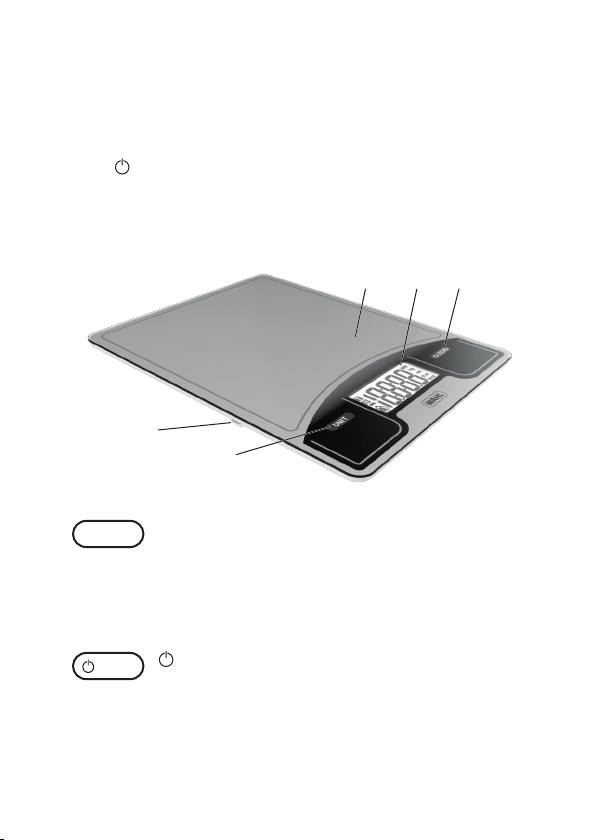
1. Unit Button
2. /Zero Button
3. LCD Display
4. Weighing Platform
5. USB Charging Port
DESCRIPTION OF PARTS
/ZERO
UNIT
1
5
234
UNIT BUTTON
Choose between the Weight, Liquid or
Milk functions in either metric or imperial
measurements.
(See page 8)
/ ZERO BUTTON
Turns the scales on and o, also used for
the ZERO/TARE function (Add & Weigh
function, see page 11).
4
USB Rechargeable Scales
GENERAL USER INFORMATION
Information about using the operation manual
► Before using the appliance for the rst time,
you must read and understand the operation
manual completely.
► Consider the operation manual as part of the
product and store it in a safe and accessible
place.
► Include this operation manual if passing the
appliance on to a third party.
► In the case of conicts with national safety
specications or instructions, the national
requirements must be followed.
EXPLANATION OF SYMBOLS AND NOTES
DANGER
Danger of explosion which may result in serious physical
injury or death.
WARNING
Warning of possible physical injury or a health risk.
CAUTION
Information about danger of material damage.
Note with useful information and tips.
Action to be taken by owner.
Carry out these actions in the sequence described.
List
·
1.
5
USB Rechargeable Scales
IMPORTANT SAFEGUARDS
When using this electrical appliance, especially
when children are present, basic safety
precautions should always be observed including
the following.
TO REDUCE THE RISK OF FIRE AND INJURY
WARNING
1. This appliance can be used by
children from aged 8 years and
above and persons with reduced
physical, sensory or mental
capabilities, or lack of experience
and knowledge, if they have been
given supervision or instruction
concerning use of the appliance
in a safe way and understand
the hazards involved. Children
shall not play with the appliance.
Cleaning and user maintenance
shall not be made by children
without supervision.
2. Use this appliance for its intended
use only.

6
USB Rechargeable Scales
3. When discarding this product,
do not throw into a re or where
heat could cause it to rupture or
explode.
OPERATING INSTRUCTIONS
BEFORE FIRST USE
These scales must be fully charged before rst
use.
TO CHARGE
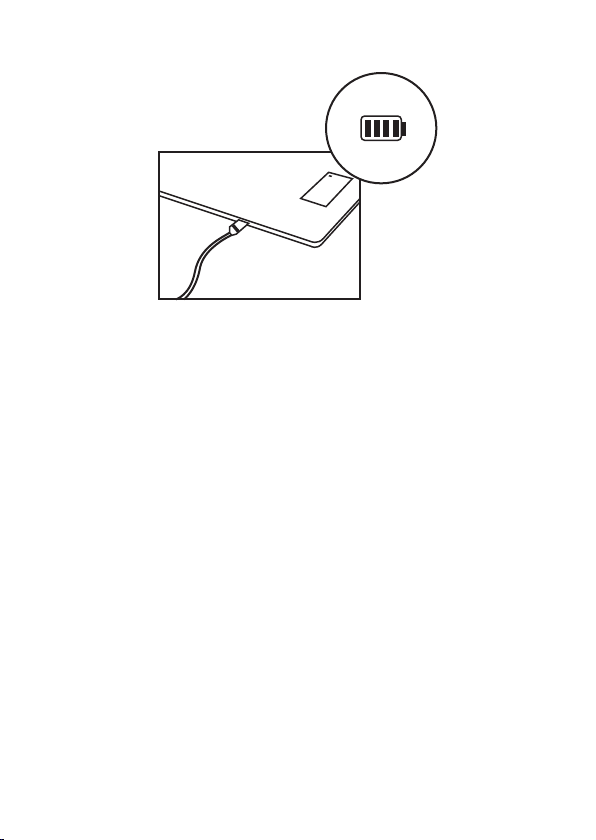
1. This product should be fully charged when
rst used or if it has been stored unused for a
long time. The battery symbol ashes during
charging and disappears when charging is
complete. It takes about 90 minutes to fully
charge.
NOTE: If required, a quick charge of 2 minutes
will give approx. 5 minutes operating time.
2. Please use the supplied USB cable with an
Android 5V charger with current less than or
equal to 2A. A voltage greater than 5V is not
suitable. Maximum capacity for lithium battery
is 250mAh.
3. It is suggested you charge every 3 months if
the product hasn’t been used.
7
USB Rechargeable Scales
FEATURES
1. Max weight capacity: 5kg/11lb
2. Gram/Ounce convertible
3. Water and Milk weighing function
4. ml and ’oz convertible
5. Graduations: 1 gram/0.05oz
6. Auto-Zero and Tare function
7. Auto-O
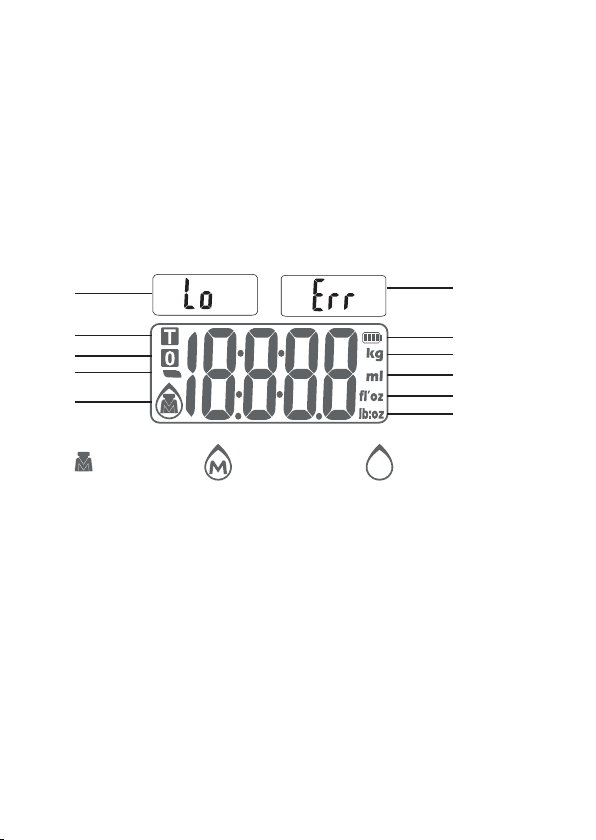
8. Overload indication: ‘Err’
9. Low battery indication: ‘Lo’
10. USB rechargeable
8
USB Rechargeable Scales
LCD DISPLAY
1. Low battery power
icon
2. Tare weight
3. Zero weight
4. Negative value
5. Mode
6. Overload
7. Battery indicator
8. Weight unit (kg)
9. Volume unit (ml)
10. Volume unit (’oz)
11. Weight unit (lb:oz)
Weight mode Milk volume mode Water volume mode
1.
2.
3.
4.
5.
6.
7.
8.
9.
10.
11.
WEIGHING MODES FOR FOOD AND LIQUID
This scale will measure foods and liquids. To
select weight (food), milk volume or water volume
mode press the UNIT button until the required
mode symbol shows on the LCD display. Refer
to the LCD display diagram and mode symbols
above.

9
USB Rechargeable Scales
IMPERIAL OR METRIC MEASUREMENTS
These scales can weigh in both Metric (g, ml) and
Imperial (lb:oz, ’oz).
To select between Imperial and Metric press and
hold the UNIT button for approximately three
seconds.
WEIGHING OPERATION
NOTE: When using a weighing bowl position
the bowl centrally before turning on the scales.
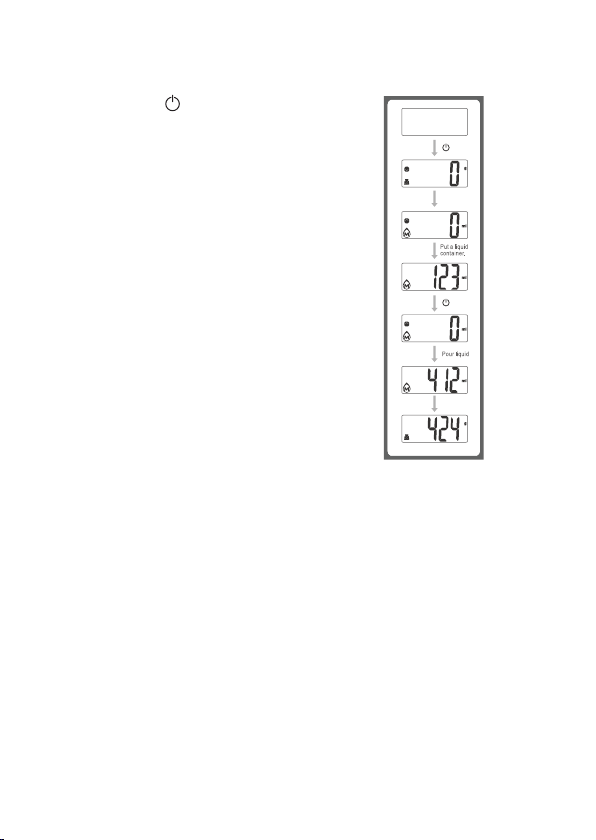
1. Press /ZERO button to turn the unit on.
2. LCD will come on showing all segments lit up,
then return to the weighing mode that was
previously used.
3. Press UNIT button to set to gram or oz (To
select between Imperial and Metric press and
hold the UNIT button for approximately three
seconds).
4. Ensure the unit is stable and showing zero
weight before weighing, and that the platform
is dry.
5. Always try to place the ingredient you are
weighing in the centre of the platform or bowl.
6. Wait until the LCD has stabilised, the LCD will
then indicate the proper weight value of the
ingredient you are weighing.
10
USB Rechargeable Scales
VOLUME OPERATION
1. Press /ZERO button to turn
the unit on.
2. LCD will come on showing all
segments lit up, then return to
the weighing mode that was
previously used.
3. Press Unit button to set to
ml, ’oz (To select between
Imperial and Metric press
and hold the UNIT button for
approximately three seconds).
4. Ensure the unit is stable and
showing zero weight before
weighing, and that the platform
is dry.
5. When using a weighing bowl,
position the bowl centrally before turning on.
6. Always try to place the ingredient you are
weighing in the centre of the platform or bowl.
7. Wait until the LCD has stabilised, the LCD will
then indicate the proper weight value of the
ingredient you are weighing.
UNIT
UNIT
/ZER
O
/ZER
O
Table des matières
Autres manuels Wahl Échelle


