
WABCO smatrboard Manuel utilisateur

1
1
2
3
4
5
6
7
8
SmartBoard
Display / Controller (EN)

2
SmartBoard Display / Controller (EN)
SmartBoard functions (optional)
6
General
As an option, Humbaur trailers can be
equipped with a SmartBoard device as a
display and control unit for various
functions.
The display/control functions of the
SmartBoard device depend on the
components installed on the trailer.
List of possible functions:
Air suspension
Loading
Odometer
Diagnostic memory
Steering axle lock
Brake lining wear
SafeStart
Bounce control
Relaxation function
Brake release
GIO Function 1 & 2
Tyre pressures
Finisher brake
Vehicle tilt
Electronic parking brake
Wheel clamp
Wheel clamp emergency
unlocking
Current length of the trailer
Language
Extras
Abb. 1 SmartBoard device
1Housing
2Protective cover
3Electrical power cable
The SmartBoard device should
not be used in regions with
temperatures below -20 °C!
Refer to the WABCO
manufacturer documents for
additional information about
operating the SmartBoard
device and its safety!
The Wabco manufacturer documents
are available on its homepage
(www.wabco-auto.com).
SB - 001
2
1
3

SmartBoard Display / Controller (EN)
3
SmartBoard functions (optional) 1
2
3
4
5
6
7
8
General information
– The menu elements are displayed in
accordance with the installed and
configured system.
– All the data is purely informational!
– The displayed information and
messages correspond to the situation
of the latest or current driving
operation.
– A detailed definition of the message
codes can be found in the
SmartBoard system description in the
INFORM product database at
www.wabco-auto.com.
Batteries may only be replaced
by an authorized speciality
workshop
(does not apply for the ADR
version)!
The SmartBoard device is not
calibrated!
Displayed values can deviate
from actual values!
Switching the SmartBoard on/off
Abb. 2 Display ON / Display
A requirement for using the SmartBoard
device is the power supply by the
ISO 7638 5-pin or 7-pin plug connection
or by a battery connected to the Trailer's
EBS E-Modulator.
The SmartBoard can be used without
the ISO 7638 plug connection.
The SmartBoard device is supplied with
power by the internal battery (not in the
ADR Version).
The standard device is not
suitable and not approved for
ADR-compatible vehicles.
Switching on the display
ISO 7638 power supply / battery
Trailer hitched:
Turn on the tractor-unit ignition.
Display is ON.
Display of the trailer's EBS functions.
Power supply by internal battery.
Trailer unhitched:
Press any button for longer than
2 seconds.
Display is ON.
Standard SmartBoard display.
Switching off the display
Turn off the tractor-unit ignition.
The background lighting goes out after
30 seconds.
The display shuts off automatically
after:
– for hitched trailer
with EBS after 45 s / with EBS E
after 75 s.
– for unhitched trailer
after 15 s
SB - 003

SmartBoard functions (optional)
4
SmartBoard Display / Controller (EN)
6
Operating the display
Abb. 3 SmartBoard opened
1Protective cover
2Display
3Selector button: Selection of the next
menu element or the next option
4OK button: Confirmation / execution of the
current selection
5Return button: back one menu level
6Message symbol
7Signal lamp
Open the protective cover
(Abb. 3/ 1).
Activate the SmartBoard device.
Use the selector button to choose the
corresponding function (Abb. 3/ 3).
Press the OK button to confirm the
corresponding function (Abb. 3/ 4).
Abb. 4 Main menu field 1
Abb. 5 Main menu field 2
The menu elements are displayed in
accordance with the installed and
configured system.
SB - 002
2
1
3
7
6
45
SmartBoard Display / Controller (EN)
5
SmartBoard functions (optional) 1
2
3
4
5
6
7
8
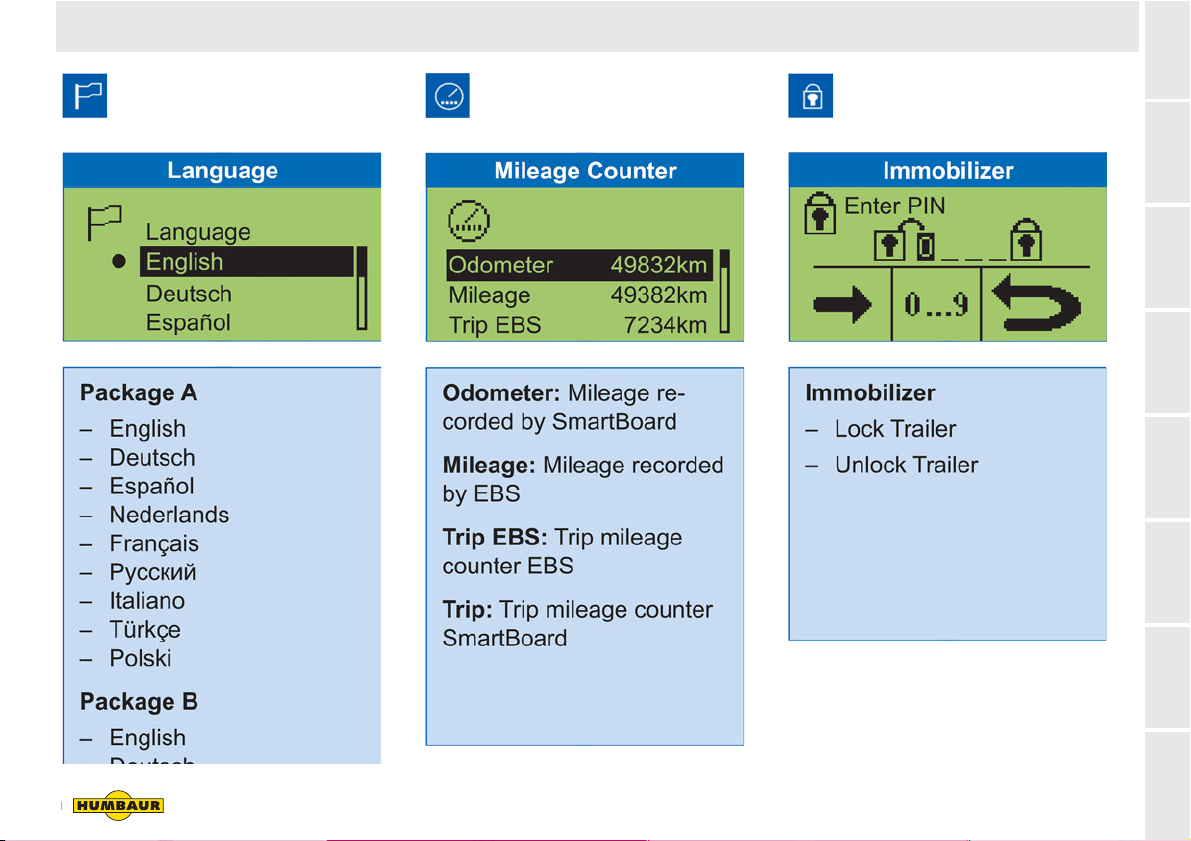
Select/change language. Display of odometer and
trip data.
Using a PIN to lock/unlock the
trailer brake.

SmartBoard functions (optional)
6
SmartBoard Display / Controller (EN)
6
Status display for the brake
linings.
Display of the current axle loads.
The SmartBoard device is not
calibrated!
The operator is responsible for compli-
ance with the max. permissible axle
loads!
Pressure-sensor calibration
The SmartBoard is delivered with set
values of 15 t each for the first and
second warning thresholds. The warning
threshold are not activated by this.
The SmartBoard offers the option of
calibrating the pressure sensors for the
axle load display of the trailer's EBS E.
The parking brake and the
service brake must be released
during calibration!
Calibration improves the accuracy of the
axle-load display. The more precisely
the vehicle weight is determined and the
pressure sensors calibrated, the more
accurate the axle-load display.
Faulty calibration causes incorrect axle-
load display values!
The calibration must be repeated when
the air suspension or the Trailer EBS E
Modulator are replaced.
See the documents of the
SmartBoard device for
information on the pressure-
sensor calibration process.

SmartBoard Display / Controller (EN)
7
SmartBoard functions (optional) 1
2
3
4
5
6
7
8
Display of the tyre information
such as current tyre pressure and
target pressure.
Display of diagnostics and system
messages.
Check if the warning lamp is flashing.
Release service brake during
standstill.

SmartBoard functions (optional)
8
SmartBoard Display / Controller (EN)
6
Braking of tipper trucks operating
behind road-laying machines.
Display of the trailer tilt. Freely configured GIO functions
can be set on the Trailer EBS.

SmartBoard Display / Controller (EN)
9
SmartBoard functions (optional) 1
2
3
4
5
6
7
8
This group of functions can be
used to operate the air
suspension system in various
different ways.
Assignment of the operating buttons on
the SmartBoard device.
OptiTurn™ manoeuvring aid
The manoeuvring aid improves the
capacity of the lorry semi-trailer
combination for driving around bends and
roundabouts and when manoeuvring up to
loading ramps.
OptiLoad™ drawbar-load reduction
The draw-bar load reduction system
automatically distributes the weight of the
load onto the supporting axles of the lorry
semi-trailer combination without the need
to shift the load in the semi-trailer.

SmartBoard functions (optional)
10
SmartBoard Display / Controller (EN)
6
The relaxation function prevents
the body from "jumping" when the
brake is released.
The device settings can be
changed and additional functions
can be called up.
Table des matières
Autres manuels WABCO Contrôleurs


