
VULKKANO A5 ARC Manuel utilisateur

User manual
VULKKANO A5 ARC
Please read all instructions before use for the best performance of this product.
Save these instructions for future reference.

Thank you for choosing products of VULKKANO
Learn more about VULKKANO products on our official website
or follow us on social networks, we are waiting for you!
Merci d'avoir choisi les produits de VULKKANO
Découvrez les produits VULKKANO sur notre site officiel ou suivez-nous
sur les médias sociaux, nous sommes impatients de vous voir!
Gracias por elegir los productos de VULKKANO
Conoce más productos VULKKANO en nuestra página oficial
o síguenos en redes sociales. ¡Te esperamos!
Danke, dass Sie sich für Produkte von VULKKANO entschieden haben
Erfahren Sie mehr über VULKKANO-Produkte auf unserer offiziellen Website
oder folgen Sie uns in den sozialen Medien, wir freuen uns auf Sie!
Grazie per aver scelto i prodotti di VULKKANO
Scopri di più sui prodotti VULKKANO sul nostro sito ufficiale
o seguici sui social media, ti aspettiamo!
Obrigado por escolher os produtos de VULKKANO
Descubra mais sobre os produtos VULKKANO no nosso site oficial
ou siga-nos nas redes sociais, estamos ansiosos por o ver!
www.vulkkano.com
@Vulkkano
@vulkkanosound
@vulkkanosound

Box Contents
LED Indicators and Button Introduction
Connection Diagram
Connecting with a TV
Setting “PCM” on your TV
Connecting a Bluetooth Device
Specifications
Troubleshooting
FCC Statement
Manuel d'utilisateur
Manual de usuario
Bedienungsanleitung
Manuale dell’utente
Manual do utilizador
English
2
Content
page 3 ... ... ... ...
page 3 ... ... ... ...
page 5 ... ... ... ...
page 6 ... ... ... ...
page 6 ... ... ... ...
page 7 ... ... ... ...
page 8 ... ... ... ...
page 8 ... ... ... ...
page 9 ... ... ... ...
page 10 ... ... ... ...
page 17 ... ... ... ...
page 24 ... ... ... ...
page 31 ... ... ... ...
page 38 ... ... ... ...

English
3
Box Content
LED Indicators and Button Introduction
Bookshelf Speaker Remote control User manual
Audio cable Stereo RCA to 3.5mm
audio cable
RCA to RCA
audio cable
Digital Optical cable Power adapter
Standby Bluetooth Optical
Line in ARC USB
Infrared receiver
LED indicators
Active Speaker
*For reasons beyond the control of the brand, the accessories may vary.

English
4
01. Power switch
02. Input selection
Press in to navigate between audio sources:
Bluetooth -> Optical -> Line in -> ARC -> USB
03. Sound effects
Press in to navigate between audio sources:
Music -> Dialogue -> Movie
04. Volume control
05. Treble control
06. Bass control
07. Optical input port
08. Connect a subwoofer
09. Line in input port
10. ARC input port
11. USB input port
12. Left speaker audio output
13. Power port
14. Left speaker audio in
Know your remote
Active Speaker
Passive Speaker
Power button Mute/Unmute
Volume up Volume down
Previous track Next track
Play/Pause Optical mode
ARC mode USB mode
Bluetooth mode
Virtual bass on Virtual bass off
Line in mode Movie mode
Music mode Dialogue mode
English
5
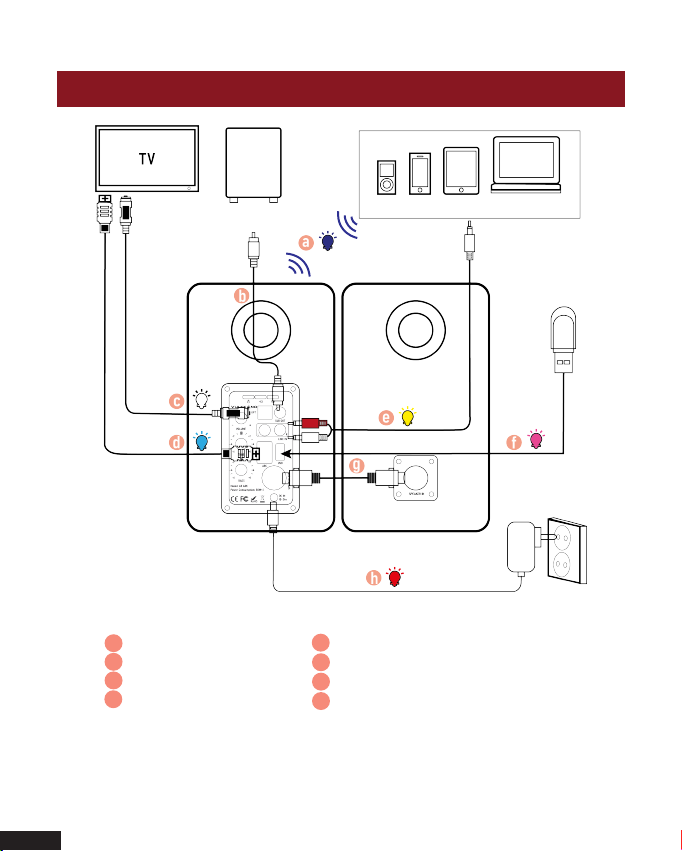
Connection Diagram
a Bluetooth
b Audio cable
c Digital Optical cable
d High speed ARC cable
Active Speaker Passive Speaker
USB
Bluetooth Device
Subwoofer Bluetooth signal
up to 30 feet
e Stereo RCA to 3.5mm audio cable
f USB
Audio cable
h Power Adapter
a
b
c
d
e
f
a
g
h

Connecting with a TV
English
6
Setting “PCM” on your TV
Method 1. Connecting using an Optical cable.
Select Optical mode and set the TV’s audio
output to “PCM”. (More information on PCM page)
Method 2. Connecting using a RCA to 3.5mm audio cable.
Select RCA mode.
Method 3. Connecting using an ARC cable. Select ARC mode
and set the TV’s audio output to “PCM”.
(More information on PCM page)
When all cables are connected properly, and LED indicator
lights properly, if there is no sound from tv or Soundbar, please
setting your tv as below:
A
B
C
Optical digital cable
RCA to 3.5mm
audio cable
High speed
ARC cable
Active Speaker

English
7
Connecting a Bluetooth Device
1. Press “Menu” on the TV’s remote control.
2. Press the arrow keys on the remote to scroll to “Audio Settings”.
3. Press “OK” on the remote control.
4. Scroll to “Advanced Audio” and press “OK”. Some televisions may
not have an ”Advanced Audio” menu and may list various audio
settings instead.
5. Scroll to “Audio Output Mode” or “Digital Audio Output Mode” and
press “OK”.
6. Scroll until “PCM” is displayed as the current audio output.
7. Press “OK” to save the settings.
a. Press the “BT” button on the remote or press the “ ” button on
back panel of the active speaker, the LED indicator blinks blue.
b. Turn on Bluetooth on the Bluetooth device.
c. Select “VULKKANO A5 ARC” and connect it. When your Bluetooth
device is connected, the LED indicator blinks blue slowly.
d. Play music files from the device, connected via Bluetooth, through
the bookshelf speaker.
Bluetooth signal
up to 30 feet

Specifications
English
8
Φ25 mm tweeter
Troubleshooting
No sound
- Check if the power indicator light is ON.
- Try to turn up the volume using either the master volume control or remote control.
- Ensure the audio cables are firmly connected and the input is set correctly on the
speakers.
- Check if there is signal output from the audio source.
Cannot connect via Bluetooth
- Make sure the speaker is switched to Bluetooth input, in other audio input mode
Bluetooth can not be paired or connected. Disconnect from any Bluetooth device by
press and hold the volume dial in Bluetooth mode, then try again.
- Effective Bluetooth transmission range is 10 meters, please make sure operation is
within the range.
- Try another Bluetooth device for connection.
The VULKKANO A5 ARC Bookshelf Speaker does not turn on
- Check if mains power is connected. or if the wall outlet is switched on.
Power output: L/R: 50W + 50W
Signal to noise ratio dB(A): L/R: ≥80dB (A)
Input sensitivity: LINE IN: R/L: 650±50mV
OPT: R/L: 500±50mFFS
Bluetooth: R/L: 700±50mFFS
Frequency response: 30HZ-30KHZ
Bass unit: 5.25 inch (140mm)
Tweeter unit:

English
9
FCC Statement
This device complies with Part 15 of the FCC Rules. Operation is subject to the
following two conditions:
(1) This device may not cause harmful interference.
(2) This device must accept any interference received, including interference that
may cause undesired operation.
Warning: Changes or modifications not expressly approved by the party
responsible for compliance could void the user's authority to operate the
equipment.
NOTE: This equipment has been tested and found to comply with the limits for a
Class B digital device, pursuant to Part 15 of the FCC Rules. These limits are
designed to provide reasonable protection against harmful interference in a
residential installation. This equipment generates uses and can radiate radio
frequency energy and, if not installed and used in accordance with the
instructions, may cause harmful interference to radio communications. However,
there is no guarantee that interference will not occur in a particular installation.
If this equipment does cause harmful interference to radio or television reception,
which can be determined by turning the equipment off and on, the user is
encouraged to try to correct the interference by one or more of the following
measures:
- Reorient or relocate the receiving antenna.
- Increase the separation between the equipment and receiver.
- Connect the equipment into an outlet on a circuit different from that to which
the receiver is connected.
- Consult the dealer or an experienced radio/TV technician for help.
FCC Radiation Exposure Statement:
This equipment complies with FCC radiation exposure limits set forth for an
uncontrolled environment. This equipment should be installed and operated with
minimum distance 20cm between the radiator & your body.
Table des matières
Langues :
Autres manuels VULKKANO Intervenants

Manuels Intervenants populaires d'autres marques


Bowers & Wilkins
Bowers & Wilkins 4 Manuel utilisateur

Sonance
Sonance SONOS OUTDOOR Series Manuel utilisateur

Electro-Voice
Electro-Voice EVID FM4.2 Manuel utilisateur

Pioneer
Pioneer XW-HTD630 Manuel utilisateur

Onn
Onn BWA16AA002 Manuel utilisateur

HP
HP GL313AA - USB Speakers PC Multimedia Manuel utilisateur