
VoiceSolo VSM-200P Manuel utilisateur
User’s Manual
VSM-200P
Passive Voice Monitor


a
IMPORTANT SAFETY INSTRUCTIONS
The lightning flash with an arrowhead symbol within an
equilateral triangle, is intended to alert the user to the
presence of uninsulated “dangerous voltage” within the
product’s enclosure that may be of sufficient magnitude to
constitute a risk of electric shock to persons.
The exclamation point within an equilateral triangle is
intended to alert the user to the presence of important
operating and maintenance (servicing) instructions in the
literature accompanying the product.
Read these instructions.
Keep these instructions.
Heed all warnings.
Follow all instructions.
Do not use this apparatus near water.
Clean only with dry cloth.
Do not block any ventilation openings.
Install in accordance with the manufacturer's instructions.
Do not install near any heat sources such as radiators, heat registers, stoves, or other apparatus (including amplifiers) that produce heat.
Only use attachments/accessories specified by the manufacturer.
Use only with the cart, stand, tripod, bracket, or table specified by the manufacturer, or sold with the apparatus. When a cart is used,
use caution when moving the cart/apparatus combination to avoid injury from tip-over.
Refer all servicing to qualified service personnel. Servicing is required when the apparatus has been damaged in any way, such as power-supply
cord or plug is damaged, liquid has been spilled or objects have fallen into the apparatus, the apparatus has been exposed to rain or moisture,
does not operate normally, or has been dropped.
Warning!
• To reduce the risk of fire or electrical shock, do not expose this equipment to dripping or splashing and ensure that no objects filled with liquids,
such as vases, are placed on the equipment.
Service
• There are no user-serviceable parts inside.
• All service must be performed by qualified personnel.

WELCOME
Welcome to VoiceSolo
The TC-Helicon VoiceSolo VSM range of near field live
monitoring speakers is a new concept in personal
monitoring. TC-Helicon strives for excellence in all things
related to vocals, and the VSM range builds upon the
success and worldwide reputation of TC-Helicon's vocal
expertise.
If you can't hear yourself correctly in a live situation, it's
hard to produce a good performance. VSM monitors are
designed to integrate into a boom-style microphone stand
bringing the speaker close to the performer. This yields a
wide range of benefits over existing wedge-type or in-ear
options such as:
• Lower monitor bleed into the main PA sound
• High volume level before feedback
• Better interaction with audience; stage space is
reclaimed from floor wedges and ear plug barriers are
not required as in in-ear monitors.
The VoiceSolo VSM monitors use a two-way point source
ICT ™ driver that eliminates the problem of hearing
separated high and low frequencies which happens when
listening to conventional speaker systems. This is
especially important when used on a microphone stand as
the speaker is located very close to the listener and the
separation would be more evident.
VSM-200P Features:
• Quick mic stand set up. Integrates with boom so the
same stand is used for the monitor and microphone.
• Versatile placement options provided by dual stand
mounting holes and dual bevelled edges for floor
mounting.
• Two-way point source 6.5" ICT™ driver for optimal near-
field live monitoring.
• High power capacity: 240W peak
• Cast aluminum enclosure for maximum rigidity and
minimum cabinet resonance
• Front panel mounted volume control for easy access.
2
About TC-Helicon
TC-Helicon’s core value is that the voice is the world's
most beautiful instrument. Therefore, everything TC-
Helicon does is dedicated to this instrument. TC-Helicon
envisions a world where those who work with voice are
able to bring out its very best and where the possibilities
of vocal craft are endless.
The company's mission was galvanized by a simple
question, "Isn't it time that someone finally provided
dedicated tools and solutions for voice?"
TC-Helicon is revolutionizing the vocal channel by
providing innovative tools and solutions for people who
create and work with the speaking and singing voice.
Our customers include the most demanding of live
performers, producers, broadcasters and recording
engineers.
Enjoy!
The TC-Helicon Team
a TC Group company

3
TABLE OF CONTENTS
VoiceSolo VSM-200P Rev 1.00
English version Prod. No: 606119021
Welcome . . . . . . . . . . . . . . . . . . . . .2
Table of Contents . . . . . . . . . . . . . . .3
Introduction . . . . . . . . . . . . . . . . . . .4
Front panel . . . . . . . . . . . . . . . . . . . .5
Back panel . . . . . . . . . . . . . . . . . . .6
Mic stand mounting procedure . . . .7
Using VoiceSolo . . . . . . . . . . . . . . .10
Specifications . . . . . . . . . . . . . . . .11
Specifications, interface, and features are subject to change without notice due to continued product improvement

4
INTRODUCTION
Preliminary Recommendations
The VoiceSolo VSM series of monitors are capable of very
high sound pressure levels (SPLs) especially at the close
range when integrated onto a microphone stand. They
were designed this way to be able to be loud enough to
compete with live acoustic drum kits. In situations where
high monitoring volumes are required we recommend that
ear protection be used.
For continuous exposure we recommend the occasional
use of a sound level meter capable of measuring the sound
level over a period of exposure according to noise control
standards. This should be used to check that noise levels
are always within safety limits.
Unpacking
Open the box from the top and remove cabling. Lift out
styrofoam insert, then using both hands lift out VoiceSolo.
Remove plastic bag from VoiceSolo. Nothing in your
speakers should rattle. Inspect each speaker for signs of
transit damage. In the unlikely event of this having
occurred inform the carrier and the supplier. Keep all the
packaging if damage has occurred, as this will show
evidence of excessive handling forces. It is also a good
idea to keep the packaging if possible for future
transportation.
Registering VoiceSolo
There are two methods for registering your VoiceSolo:
• Online: visit www.tc-helicon.com/VoiceSolo and click
Product Registration in the left hand column.
• Mail: complete and return the registration card included
with your product
Support
If you run into technical challenges, TC-Helicon will be
more than happy to help. There are a number of sources
for product support. We've prioritized them below according
to the speed at which you will access the help information.
1. Manual: The manual for VoiceSolo VSM-200P is a good
source of application information and answers for
common questions.
3.On-Line: visit www.tcsupport.tc to search and ask for
answers on up to date questions about VoiceSolo.
4.Phone: International: +45 8742 7000 | USA & Canada:
805 373 1828
5
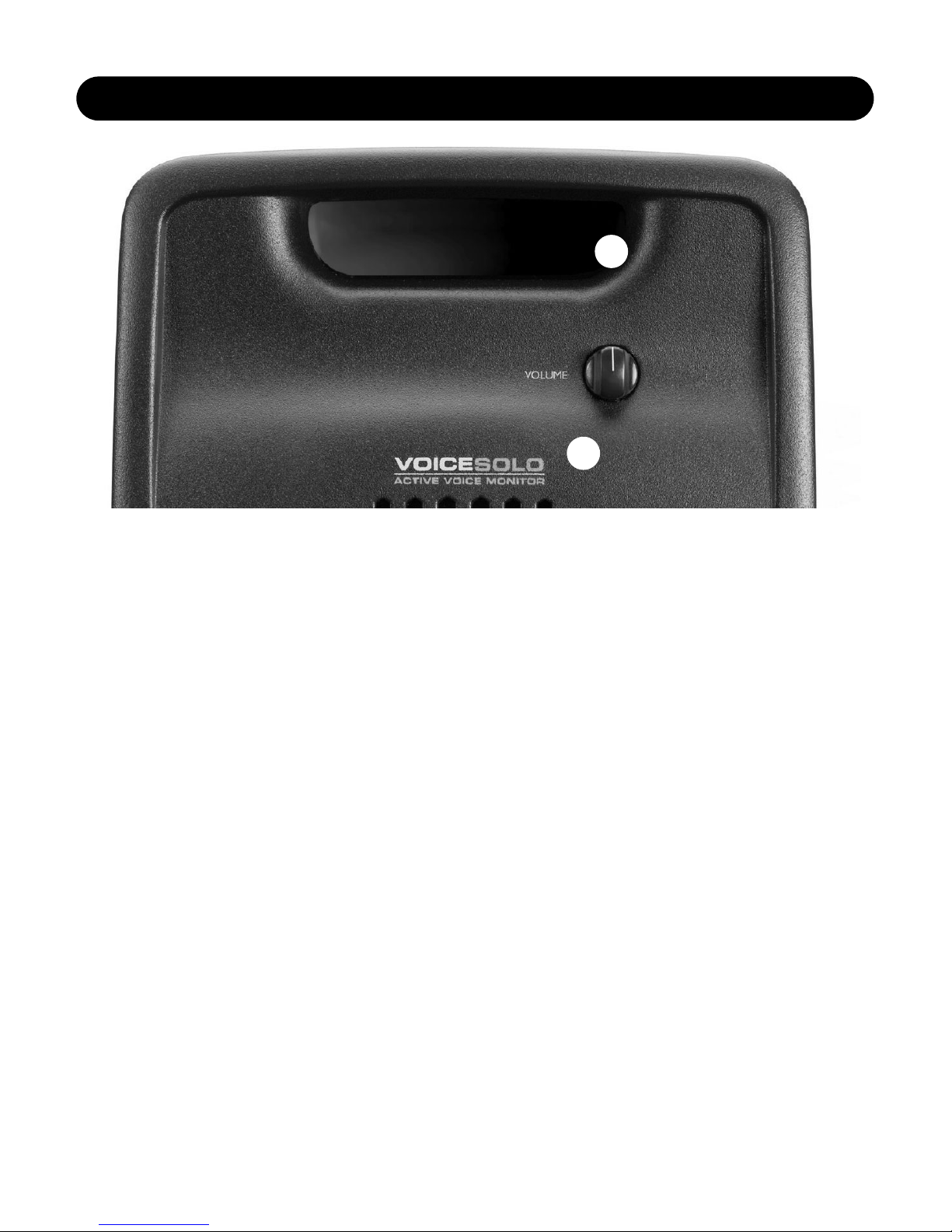
1. VOLUME level control
This detented attenuator allows you to adjust your monitor
level while staying close to your mic. This control functions
differently than the volume control on an amplifier. As you
turn up the volume on an amplifier, the amp works
successively harder to produce more volume. With the
VSM-200P volume control however, the amp continues to
work hard whether your VoiceSolo’s volume control is
turned up full or down. With a powerful amp and medium
volume level expectations, this control can be used
throughout its range. With less powerful amplifiers and high
volume expectation, the most efficient path is to leave the
VSM-200P volume control up full and for you to control
volume with your mixer and/or amplifier.
2. Tuned bass port
This allows VoiceSolo to produce low frequencies. It is also
useful as a handle when carrying the unit.
1
2
FRONT PANEL CONTROL
6
BACK PANEL
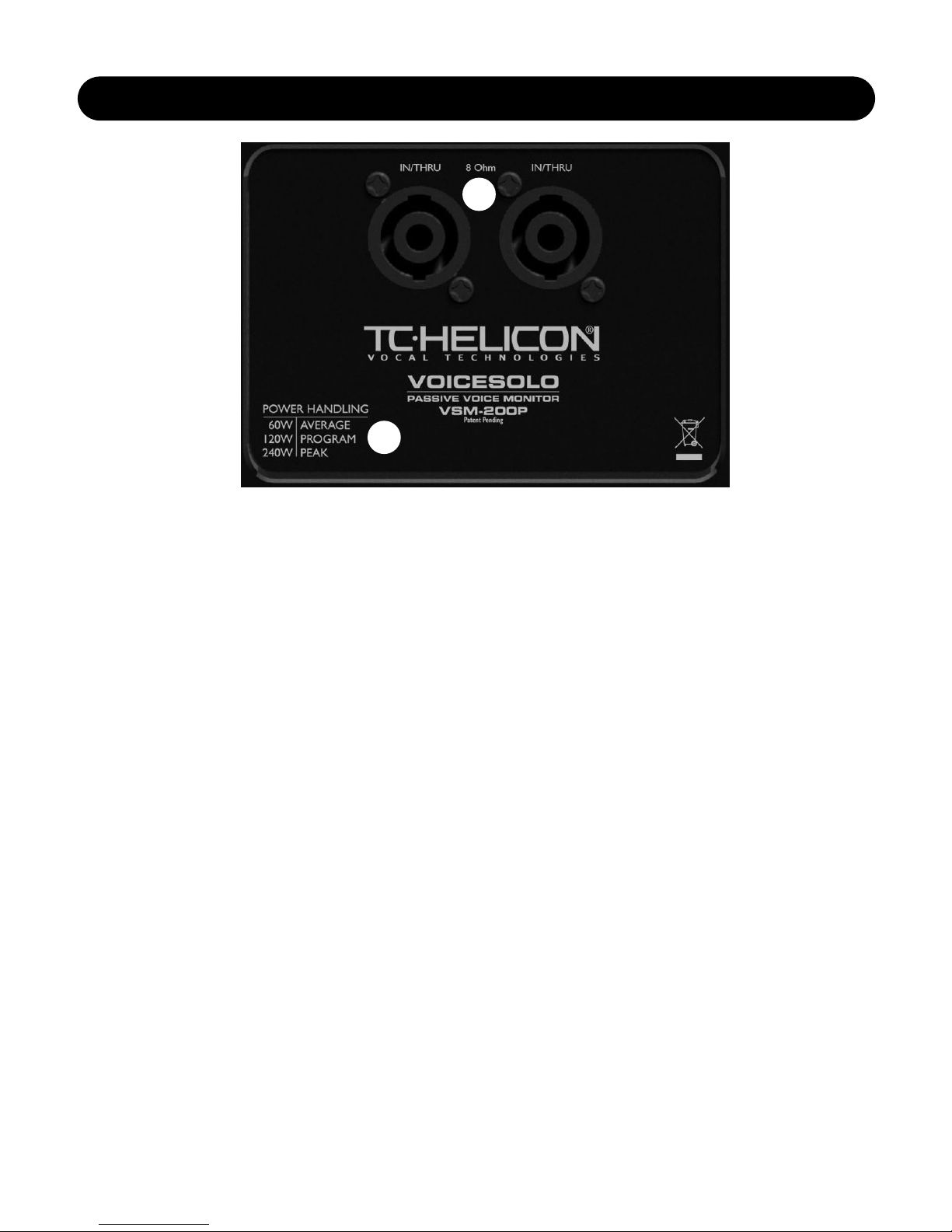
1. Speakon® combo input jacks
These jacks allow either a 1/4” speaker cable or Speakon
equipped speaker cable to connect to VoiceSolo. These
jacks are paralleled and can be used to chain several
VSM-200P units together. Thus, both jacks are designated
as IN/THRU.
A note about chaining multiple VoiceSolos
Your VSM-200P has an impedance, or ohms rating, of 8
Ohms. Chaining two VSM-200Ps together lowers the
impedance the amp will have to drive to 4 Ohms. Most
amps will work fine at 4 Ohms even when pushed to
produce loud volume levels.
Chaining three VSM-200Ps will lower the impedance to 2.6
Ohms and adding a fourth VSM-200P will bring the
impedance to 2 Ohms. Consult your amplifier’s manual to
confirm that it is capable of driving a 2 Ohm load.
Note that all Ohm ratings are specified with the volume
control set to maximum.
2. Power handling legend
This legend describes the amount of power your VSM-
200P will accept with various types of program material.
60W / AVERAGE: Also known as RMS, this means that
VoiceSolo will accept audio of constant level e.g. a sine
wave test signal of 60 watts for an extended period of time.
120W / PROGRAM: This rating describes how many watts
VoiceSolo can accept over an extended period of time with
dynamic program material such as what a band or singer
would produce.
240W / PEAK: This is the maximum VoiceSolo can
withstand for a very brief period of time.
1
2
7
VoiceSolo Placement Options
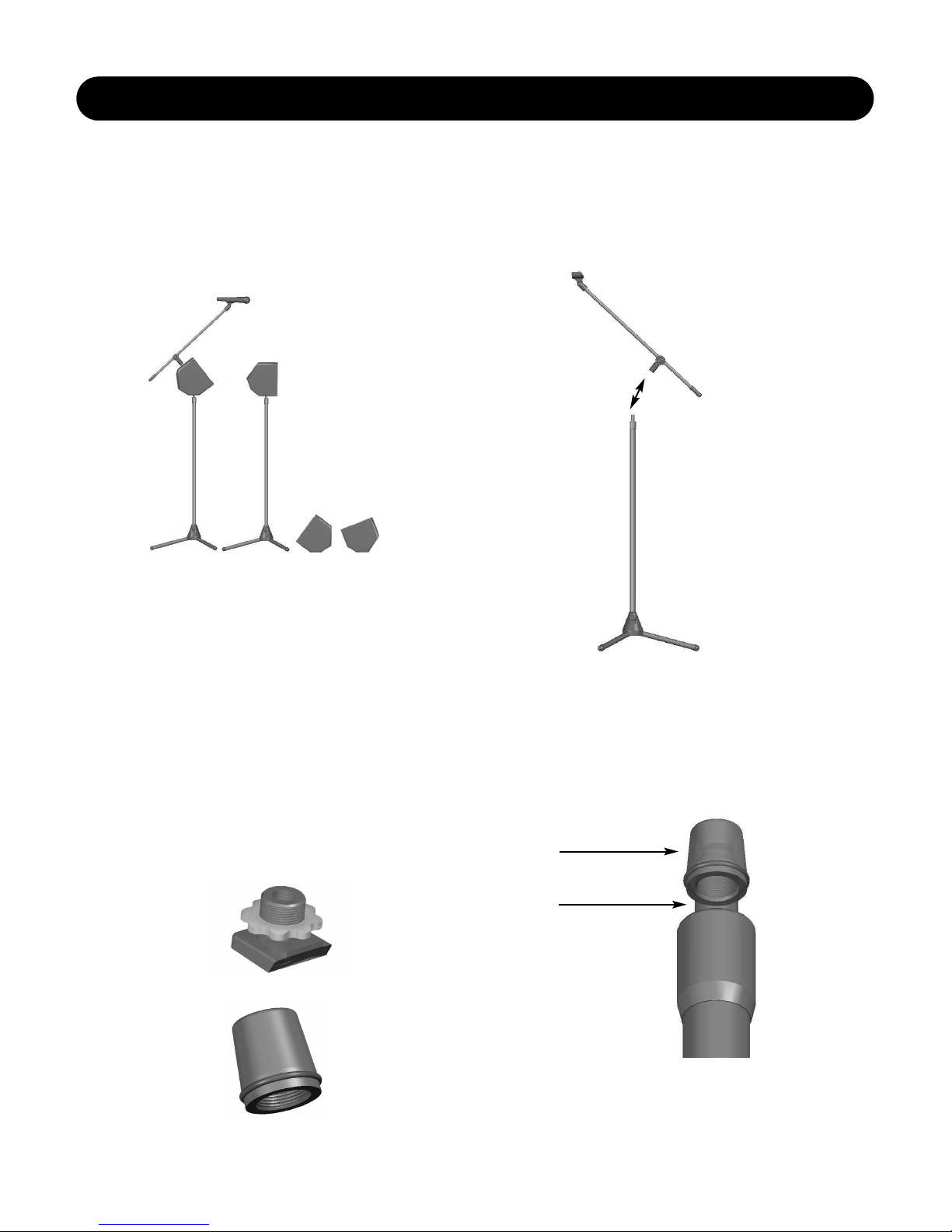
VoiceSolo can be placed in 4 different ways. This versatility
allows you to use it as a mic stand mounted monitor one
night, a PA system on another and then use it at home for
practice or jamming.
Mic Stand Mounting
Mic Stand Integration
What you need:
• VoiceSolo
• Tripod microphone stand with boom - must be the style
where the boom may be unscrewed from the vertical
shaft of the microphone stand.
• VoiceSolo adaptor hardware including:
Mic Boom Mount Attachment
Mic Stand Mounting insert
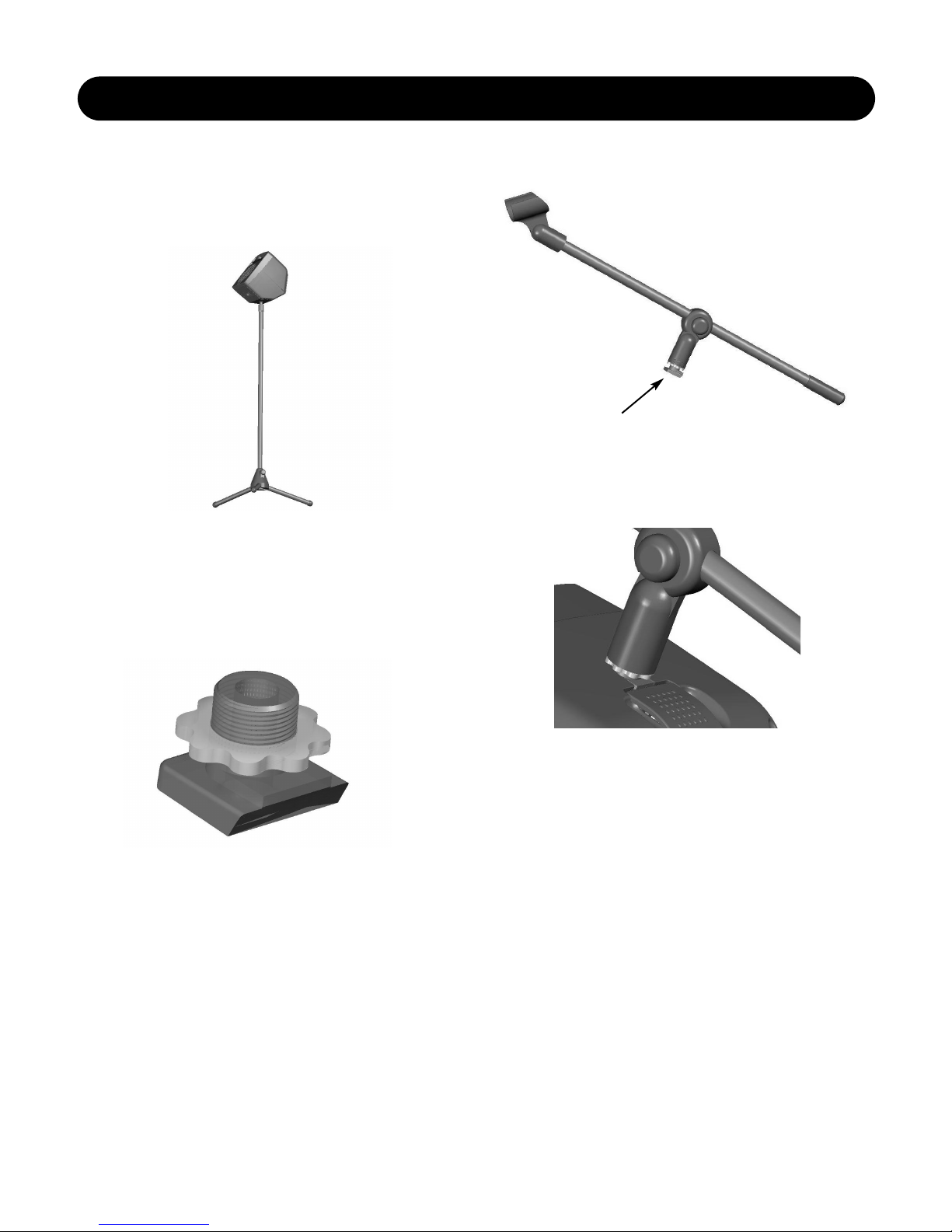
1. Separate the boom from the stand by unscrewing the
boom from the vertical shaft of the microphone stand. To
do this, tighten the clutch you use to raise and lower the
stand first. This makes it easier to unscrew the boom
section. Hold the base of the stand with one hand and
turn the boom counterclockwise (looking down from the
top) with the other hand.
2. Screw the Mic Stand Mounting Insert on to the
vertical shaft of the microphone stand. (If your stand
has 3/8", European thread it will be necessary to use a
5/8" to 3/8" thread adapter, commonly included with both
microphone stands and microphone clips)
MIC STAND MOUNTING
Mounting
Insert
Mic Stand
Shaft
8
MIC STAND MOUNTING
3. Place VoiceSolo on the mic stand so the stand goes
into the hole on the bottom of the VoiceSolo. If you don’t
need to mount VoiceSolo on a boom stand, you are
finished with your setup. If you require the boom,
continue to the next step.
4. Mic Boom Mount
The Mic Boom Mount is found in the bag of parts that came
with your VoiceSolo. There are two versions: a thin one for
European stands and a wider one for the rest. This adapter
connects the boom of your mic stand with VoiceSolo. It is
designed to fit into the top receptacle in VoiceSolo.
5. Screw the Mic Boom Mount Attachment into your boom.
6. Lift the lid on VoiceSolo, and while holding it open, slide
the Mic Boom Mount attachment, on the boom into slot
on top of the monitor and let the lid close.
Table des matières


