VINCI Tab MV Guide de démarrage rapide

Technical Guide and User Manual
VINCI Tab MVVINCI Tab MV

i
Introduction
About the User Manual
The User Manual can help you quickly and effectively understand VINCI Tab MV’s various functions
and its operating methods.
Notes:
To use this Tab safely and legally, read the “Safety Information” section carefully:
• Beforetherstuse,chargethebatterywiththeoriginalchargerfor8to10hours.Anewbattery
mayreachitspeakperformanceonlyaftertwoorthreecyclesoffullycharginganddischarging.
• Similartoacomputer,yourTabwillperformbestwhenenoughmemoryispresent.Rebootthe
Tab to clear the memory data to maintain its peak performance.
• RunningmultipleprogramsatthesametimemayprolongtheresponsetimeoftheTab.Ifit
startstoreactslowly,tryrebootingtheTabtorecoveritsregularresponsetime.
• IntheeventthatthecontentsoftheUserManualarenotconsistentwithmenuitemsonthe
Tab,followthepromptsontheTab.
• SomeservicesdescribedintheUserManualmaynotbesupportedbyallthenetworks.Contact
yournetworkoperatororserviceproviderfordetails.
• Allcompanyandproductnamesarethetrademarksoftheirrespectiveownersandregistered
trademarks.
• The User Manual and the layout of the Tab’s screen may differ.
• Theinformationinthisguideissubjecttochangewithoutnotice.
• In some cases, Tab’s screen may display black or bright spots. This phenomenon is
temporary and should not affect performance.
Intellectual Property
InaccordancewithCopyrightLaws,copyrightedmaterials(e.g.,music,pictures,apps,etc.)should
under no circumstances be copied, changed, and only be limited to personal or private use. If the
userdoesnotownthecopyrightwithoutexpressedconsentofthecopyrightowner,thentheunau-
thorizedcopying,alterationoruseofthismethodtomakeoramendacopy,willbedeemedasa
violationofCopyrightLaws,copyrightownershavetherighttosubmitclaimsfortheirlosses.

ii
VINCI Warranty
12monthspartsandlaboronly,exceptforthebatteryandscreen.Pleasereviewthecomplete
detailsoftheReturnandWarrantyPolicyatstore.vincigenius.com/control/vincipolicy
USB Data Cables
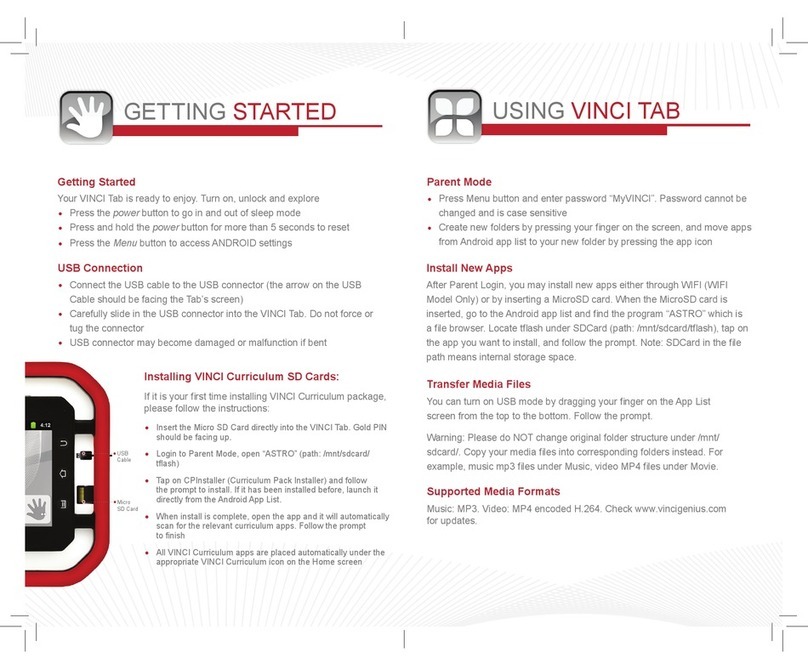
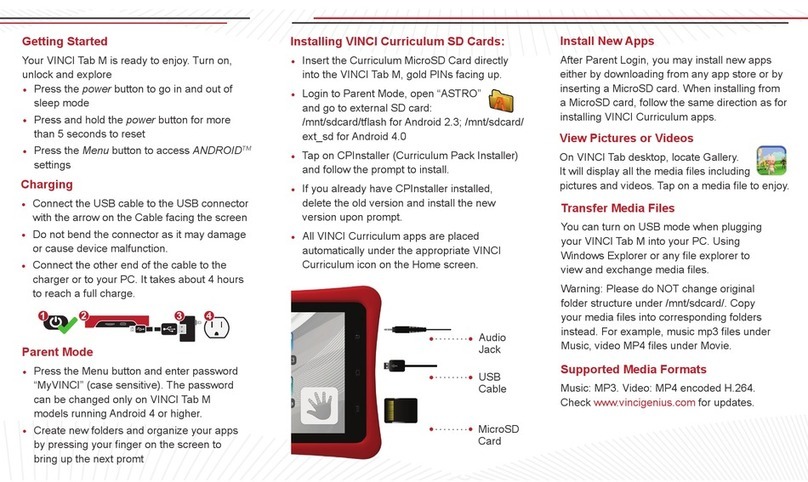
ThisversionsupportstheUSBinterface.YoucanconnectyourVINCITabMVwiththePCviathe
USB&datacable,copyormovethelesbetweentheVINCITabMVandPC,orbrowsetheimages
andrecordvideoles.
1.InserttheUSBdatacableconnectorintotheUSBinterfaceoftheVINCITabMV.
2.ConnecttheotherterminaloftheUSBdatacablewithUSBinterfaceofthePC.
CAUTION
THECONNECTIONTOUSBINTERFACESHASTOBELIMITEDTOUSB2.OVERSION
ORHIGHER
Appendix – Product Safety Warnings
SAFETY AND COMPLIANCE INFORMATION
Useresponsibly.Readalltheinstructionsandsafetyinformationbeforeusetoavoidinjury.
BATTERY SAFETY
Chargethebatteryonlyintemperaturesrangingfrom32°Fto95°F(0°Cto35°C).
CAUTION:Dangerofexplosionifbatteryisincorrectlyreplaced.Replaceonlywiththesameor
equivalentbatteryasrecommendedbythemanufacturer.Disposeofusedbatteriesaccordingtothe
manufacturer’s instructions.
WIFI SAFETY
TurnWIFIoffinareaswhereWIFIuseisprohibited,orwhenitmaycauseinterferencedanger,such
asinanairplanewhileying.
CARE AND MAINTENANCE
• YourVINCITabMVisanelectronicproductandshouldbetreatedwithcaretoreducetherisk
ofre,electronicshock,orproductdamage.
• Donotexposethisdevicetorain,moistureoranytypeofliquidthatcorrodeselectroniccircuits.If
yourdevicegetswet,immediatelyturnthepoweroff.Allowthedevicetodrycompletelybefore
using it again.
• Cleanthedisplaywithasoftclothandbecarefulnottowipethedisplaywithanythingabrasive.
WhencarryingyourVINCITabMVinabag,keepitintheincludedcovertoavoidscratches.
• Donotexposeyourdevicetoextremeheatorcold.Forexample,donotleaveitinyourcarin
sub-zero or high heat conditions.

iii
• Do not attempt to open the device other than as instructed in this User Manual.
• Do not drop the device. Rough handing can break the internal circuitry.
• Do not use harsh chemicals, cleaning solvents, or strong detergents to clean the device.
• Use recommended accessories only.
• Maintain a comfortable level of sound volume. Excessive sound pressure from earphones and
headphones may result in hearing loss.
Contact VINCI Customer Service with further questions or if you require technical support:
Live Chat: www.vincigenius.com/support
Phone: 1-855-MY-VINCI
Email: [email protected]
Check our website: www.vincigenius.com/support to download the VINCI Tab MV Quick Guide.

iv
SAFETY INFORMATION ........................................................................ 1
1.1WhenCarryingtheTab ............................................................... 2
1.2EnergyLeakofRadioFrequency ............................................... 2
1.3ElectromagneticRadiation .......................................................... 2
1.4InPublic ...................................................................................... 2
1.5CompatibilityofRFInterference ................................................. 2
1.6InAircraft..................................................................................... 2
1.7Pacemakers ................................................................................ 2
1.8HearingAids................................................................................ 3
1.9OtherMedicalEquipment ........................................................... 3
1.10RoadSafety .............................................................................. 3
1.11PotentiallyExplosiveAtmosphere ............................................. 3
1.12Battery....................................................................................... 3
1.13Others ....................................................................................... 3
OVERVIEW ............................................................................................. 5
2.1SIMCards ................................................................................... 6
2.1.1SIMCardInstallationProcedure .............................................. 6
2.1.2Caution..................................................................................... 6
2.1.3PINandPUK............................................................................ 6
2.2StorageCard............................................................................... 6
2.3Accessories................................................................................. 7
2.4TheBattery.................................................................................. 8
2.4.1BatteryUse .............................................................................. 8
2.4.2BatteryChargeLevel ............................................................... 8
2.4.3ChargingBatteries ................................................................... 8
BASIC FUNCTIONS ............................................................................... 9
3.1SwitchingON/OFF ...................................................................... 10
3.2OpenandClosetheScreen........................................................ 10
3.3SetLockandUnlock ................................................................... 10
3.5TheStatusBar ............................................................................ 10
3.6Add/DeleteShortcuts .................................................................. 11
3.7InputMethod ............................................................................... 11
3.8AdjusttheVolume ....................................................................... 11
3.9SetDateandTime ...................................................................... 11

v
CALL FEATURES................................................................................... 12
4.1MakeaCall ................................................................................. 13
4.2AnsweraCall .............................................................................. 13
4.3DuringaCall ............................................................................... 13
4.3.1Hold.......................................................................................... 13
4.3.2Mute ......................................................................................... 13
4.3.3SpeakerON ............................................................................. 13
4.3.4Hands-freeOn ......................................................................... 13
4.3.5ConferenceCall ....................................................................... 13
CONTACTS............................................................................................. 14
5.1ViewContactDetails................................................................... 15
5.2EditaContact ............................................................................. 15
5.3AddaNewContact ..................................................................... 15
5.4DeleteContacts .......................................................................... 15
5.5Import/ExportContacts ............................................................... 15
MESSAGING........................................................................................... 16
6.1TextMessage.............................................................................. 17
6.1.1ReadaTextMessage .............................................................. 17
6.1.2EditaTextMessage................................................................. 17
6.2Email ........................................................................................... 17
6.2.1AddaNewEmailAccount........................................................ 17
6.2.2SendanEmail.......................................................................... 18
6.2.3ReceiveEmail .......................................................................... 18
6.2.4ViewEmail ............................................................................... 18
6.3MMS............................................................................................ 18
6.3.1Create/SendaMultimediaMessage........................................ 18
6.3.2ReceiveMMS........................................................................... 19
6.3.3MessageSettings .................................................................... 19
MULTIMEDIA .......................................................................................... 21
7.1Camera ....................................................................................... 22
7.1.1OpenYourCamera .................................................................. 22
7.1.2ShootingPhotos....................................................................... 22
7.1.3TakePictureswithDigitalZoom............................................... 22
7.1.4ShootaVideo........................................................................... 22
7.2Music........................................................................................... 23
7.2.1PlayMusic................................................................................ 23
7.3Gallery......................................................................................... 23
7.3.1OpeningGallery/ViewingAlbums............................................. 23
7.3.2WorkingwithAlbums................................................................ 24
7.3.3View/BrowsePictures ............................................................. 24
7.4Recorder ..................................................................................... 24
7.5FMRadio .................................................................................... 25
7.5.1AutoSearch ............................................................................. 25
7.5.2Higher-frequency ..................................................................... 25
7.5.3Listen ....................................................................................... 25
7.5.4BrowseChannels..................................................................... 25
7.5.5Exit ........................................................................................... 25

vi
APPS & PROGRAMS............................................................................. 26
8.1Calendar ..................................................................................... 27
8.2Clock ........................................................................................... 27
8.3Calculator.................................................................................... 28
8.4SIMApplicationToolkit ................................................................ 28
8.5Browser....................................................................................... 28
8.5.1WebAccess ............................................................................. 28
8.5.2NewWindow ............................................................................ 29
8.5.3Windows .................................................................................. 29
8.5.4AddBookmarks........................................................................ 29
8.5.5VisitaWebsite ......................................................................... 29
8.5.6FindContent ............................................................................ 29
8.5.7SelectText................................................................................ 29
8.5.8ShareaPage ........................................................................... 29
8.5.9Download ................................................................................. 29
8.5.10Browsersettings .................................................................... 29
SETTINGS............................................................................................... 31
9.1Wireless&Networks................................................................... 32
9.1.1AirplaneMode .......................................................................... 32
9.1.2WLANandWLANSettings ...................................................... 32
9.1.3BluetoothandBluetoothSettings............................................. 33
9.1.4TetheringandPortableHotspotSettings ................................. 33
9.1.5VPNSettings............................................................................ 33
9.1.6MobileNetworkSettings .......................................................... 33
9.2CallSettings................................................................................ 34
9.3SoundSettings............................................................................ 35
9.4DisplaySettings .......................................................................... 35
9.5Location&SecuritySettings ....................................................... 36
9.6Privacy ........................................................................................ 37
9.7Storage ....................................................................................... 37
9.8Language&KeyboardSettings .................................................. 37
9.9VoiceInput&Output ................................................................... 37
9.10Accessibility............................................................................... 37
9.11Date&Time............................................................................... 37
9.12TimerPowerON&OFF............................................................ 37
9.13AboutVINCITabMV ................................................................ 37
HELP....................................................................................................... 39
10.1Troubleshooting ........................................................................ 40
MAINTENANCE GUIDE.......................................................................... 41
INTELLECTUAL PROPERTY................................................................. 43

1
CHAPTER 1CHAPTER 1
SAFETY INFORMATIONSAFETY INFORMATION

2
To use your Tab safely and effectively, please read these safety guidelines carefully.
1.1 When Carrying the Tab
WhenyouareusingtheTab,keepitsomedistance(atleast2.5cm)awayfromyourbody.Incase
there is a need for a Tab slipcover, belt clip, or other accessories to carry your Tab, it is important to
ensuretheyareapprovedbythemanufacturer.Otherwise,theTabmayexceedthemaximumlimit
of radio frequency leakage.
1.2 Energy Leak of Radio Frequency
YourTabisalow-power,wirelesstransmitterandreceiver.Afterbeingpoweredon,itwill
periodicallysendandreceiveradiosignalswhileitstransmissionpoweriscontrolledbythe
network.Thisdevicecomplieswithlocalstandardsrestrictingenergyleakofradiofrequency.
1.3 Electromagnetic Radiation
YourTabfullycomplieswithstandardsrelatedtowirelessirradiationenactedbytheauthorityofthe
StateandInternationalHealthAssociation.Theselimitationsarepartofthecomprehensiveregula-
tionsandconstitutepublicwirelessirradiationpermissionstandards.Thesestandardsaredevel-
opedandformedafterlong-termintensivescienticresearchbyindependentscienticorganizations
suchasInternationalCommissiononNon-IonizingRadiationProtection(ICNIRP).Thesestandards
contain a large surplus to ensure the safety of all and take the variable factors of various measure-
ment conditions into consideration.
1.4 In Public
Some public places, such as hospitals, health resorts, or other medical facilities, post signage pro-
hibitingcellularequipmentusage.PleasefollowthesewarningsandpoweroffyourTabindesig-
nated public places.
1.5 Compatibility of RF Interference
YourTabmayinterferewithotherdevicesthatarenotproperlydesignedforRFshieldingorcong-
uredforRFcompatibility.
1.6 In Aircraft
Switchthedeviceoffandremovethebatterywhenyouareinornearanaircraft.Itisillegaltouse
cellular equipment on board of an aircraft since it may cause interference to aircraft navigation
systemsand/ornetworks.Violatorsmayfaceseverepenalties.
1.7 Pacemakers
Ifyouareusingapacemaker,donotcarryyourTab(whileitisswitchedon)inthebreastpocket.
Aminimumseparationof15cmshouldbemaintainedbetweenthewirelessTabandapacemaker.
Usetheoppositeearwhenmakingacalltominimizethepotentialforinterferencewithregularfunc-
tionsofthepacemaker.Ifyouhaveanyreasontosuspectthatinterferenceistakingplace,switchoff
your Tab immediately.

3
1.8 Hearing Aids
WirelessTabsmayinterferewithsomehearingaids.Intheeventofsuchinterference,youmaywant
to consult your service provider.
1.9 Other Medical Equipment
Forotherpersonalhealthcareequipment,consultyourserviceprovider.Consultaphysicianorthe
manufacturerofthemedicaldevicetodetermineiftheyareadequatelyshieldedfromRFenergyor
if you have any further questions.
1.10 Road Safety
Pleasecomplywithlocaltrafclawsandregulations.Ifyourvehiclehasairbags,keepyourTab
awayfromwheretheinatedairbagscanreach.Otherwise,youmaybeseriouslyinjuredbytheTab
oncetheairbagexpands.
1.11 Potentially Explosive Atmosphere
SwitchoffyourTabwhenbeinginanareawithapotentiallyexplosiveatmosphereandobeyall
signsandinstructions.Theseareasincludefueldepots(belowdeckonboats,fuelorchemical
transfersorstoragefacilities),areaswheretheaircontainschemicalsorparticles,suchasgrain,
dustormetalpowders.Theyareusuallymarkedwithsigns,butthisisnotalwaysthecase.
1.12 Battery
Anycontactofthebattery’sexposedelectrodeswithaconductor,suchasjewelryorkeys,may
cause damage to your possessions or bodily injury.
1.13 Others
The Tab is comprised of precise electronic circuits, magnets and a sophisticated battery system.
Cautionisadvisedwhenhandlingthecomponents,particularlywithregardtothefollowing:
• KeeptheTabanditsaccessoriesdry.YourTabisnotwaterproof.
• KeeptheTabawayfromextremetemperatures.
• Donotplaceitnearaameoralitcigarette.
• Donotscratchit.
• AvoidtappingtheTabtopreventdamage.
• KeepthedeviceawayfromCDs,creditcards,travelingcards,orothermagneticobjectstoavoid
damage to the Tab.
• DonotplacetheTabonthedashboardofacar,windowsoranywhereelsewheresunshine
can penetrate.
• Donotremovethebatterywhenitispoweringon.
• Donotplacethebatterynear/inare.Itmayexplode.
• Donotplacethebatteryinthemouth.Itmaybepoisonous.
• DonottrytodisassembletheTaboritsaccessories.
• Useonlyapprovedmodel-applicablebatteries.Incorrectbatteriesmayexplode.Followthe
manufacturer’s instructions to dispose of used batteries.
• Heat is generated by prolonged usage of the headphones and by prolonged charging of the
cellular equipment.
Table des matières
Autres manuels VINCI Comprimé