Vezco RS-485 Manuel utilisateur

DIGITAL VIDEO RECORDER
Quick Start Guide

Digital Video Recorder Quick Start Guide
1
TABLE OF CONTENTS
Chapter1 Panels Description.............................................................................6
1.1 Front Panel................................................................................................6
1.2 Rear Panel ................................................................................................7
Chapter 2 Installation and Connections ...........................................................8
2.1 DVR Installation.........................................................................................8
2.2 Hard Disk Installation.................................................................................8
2.3 RS-485 and Controller Connection..........................................................10
2.4 HDD Storage Calculation Chart............................................................... 11
Chapter 3 Menu Operation...............................................................................12
3.1 Menu Structure........................................................................................12
3.2 Startup and Shutdown .............................................................................12
3.3 Activating Your Device.............................................................................13
3.4 Using the Unlock Pattern for Login..........................................................15
3.5 User Login...............................................................................................16
3.6 Using the Setup Wizard...........................................................................18
3.7 Network Settings .....................................................................................19
3.7.1 Configuring General Settings..........................................................19
3.8 Adding IP Cameras..................................................................................20
3.9 Live View.................................................................................................21
3.10 Recording Settings................................................................................21
3.11 Playback................................................................................................22
Chapter 4 Accessing by Web Browser............................................................24

Digital Video Recorder Quick Start Guide
2
Quick Start Guide
About this Manual
This Manual is applicable to Vezco’s HD Digital Video Recorder (DVR).
The Manual includes instructions for using and managing the product. Pictures, charts,
images and all other information hereinafter are for description and explanation only. The
information contained in the Manual is subject to change, without notice, due to firmware
updates or other reasons. Please find the latest version in the company website.
Please use this user manual under the guidance of professionals.
Legal Disclaimer
REGARDING TO THE PRODUCT WITH INTERNET ACCESS, THE USE OF PRODUCT
SHALL BE WHOLLY AT YOUR OWN RISKS. OUR COMPANY SHALL NOT TAKE ANY
RESPONSIBILITES FOR ABNORMAL OPERATION, PRIVACY LEAKAGE OR OTHER
DAMAGES RESULTING FROM CYBER ATTACK, HACKER ATTACK, VIRUS
INSPECTION, OR OTHER INTERNET SECURITY RISKS; HOWEVER, OUR COMPANY
WILL PROVIDE TIMELY TECHNICAL SUPPORT IF REQUIRED.
SURVEILLANCE LAWS VARY BY JURISDICTION. PLEASE CHECK ALL RELEVANT
LAWS IN YOUR JURISDICTION BEFORE USING THIS PRODUCT IN ORDER TO
ENSURE THAT YOUR USE CONFORMS THE APPLICABLE LAW. OUR COMPANY
SHALL NOT BE LIABLE IN THE EVENT THAT THIS PRODUCT IS USED WITH
ILLEGITIMATE PURPOSES.
IN THE EVENT OF ANY CONFLICTS BETWEEN THIS MANUAL AND THE APPLICABLE
LAW, THE LATER PREVAILS.

Digital Video Recorder Quick Start Guide
3
Regulatory Information
FCC Information
Please take attention that changes or modification not expressly approved by the party
responsible for compliance could void the user’s authority to operate the equipment.
FCC compliance: This equipment has been tested and found to comply with the limits for a
Class A digital device, pursuant to part 15 of the FCC Rules. These limits are designed to
provide reasonable protection against harmful interference when the equipment is operated
in a commercial environment. This equipment generates, uses, and can radiate radio
frequency energy and, if not installed and used in accordance with the instruction manual,
may cause harmful interference to radio communications. Operation of this equipment in a
residential area is likely to cause harmful interference in which case the user will be
required to correct the interference at his own expense.
FCC Conditions
This device complies with part 15 of the FCC Rules. Operation is subject to the following
two conditions:
1. This device may not cause harmful interference.
2. This device must accept any interference received, including interference that may cause
undesired operation.
EU Conformity Statement
This product and - if applicable - the supplied accessories too are marked with
"CE" and comply therefore with the applicable harmonized European standards
listed under the EMC Directive 2014/30/EU, the LVD Directive 2014/35/EU, the RoHS
Directive 2011/65/EU.
2012/19/EU (WEEE directive): Products marked with this symbol cannot be
disposed of as unsorted municipal waste in the European Union. For proper
recycling, return this product to your local supplier upon the purchase of equivalent
new equipment, or dispose of it at designated collection points. For more information see:
www.recyclethis.info
2006/66/EC (battery directive): This product contains a battery that cannot be
disposed of as unsorted municipal waste in the European Union. See the product
documentation for specific battery information. The battery is marked with this
symbol, which may include lettering to indicate cadmium (Cd), lead (Pb), or mercury (Hg).
For proper recycling, return the battery to your supplier or to a designated collection point.
For more information see: www.recyclethis.info
Industry Canada ICES-003 Compliance
This device meets the CAN ICES-3 (A)/NMB-3(A) standards requirements.


Digital Video Recorder Quick Start Guide
4
Symbol Conventions
The symbols that may be found in this document are defined as follows.
Symbol
Description
Provides additional information to emphasize or supplement
important points of the main text.
Indicates a potentially hazardous situation, which if not
avoided, could result in equipment damage, data loss,
performance degradation, or unexpected results.
Indicates a hazard with a high level of risk, which if not avoided,
will result in death or serious injury.

Digital Video Recorder Quick Start Guide
5
Safety Instructions
Proper configuration of all passwords and other security settings is the responsibility of
the installer and/or end-user.
In the use of the product, you must be in strict compliance with the electrical safety
regulations of the nation and region. Please refer to technical specifications for detailed
information.
Input voltage should meet both the SELV (Safety Extra Low Voltage) and the Limited
Power Source with 100~240 VAC or 12 VDC according to the IEC60950-1 standard.
Please refer to technical specifications for detailed information.
Do not connect several devices to one power adapter as adapter overload may cause
over-heating or a fire hazard.
Please make sure that the plug is firmly connected to the power socket.
If smoke, odor or noise rise from the device, turn off the power at once and unplug the
power cable, and then please contact the service center.
Preventive and Cautionary Tips
Before connecting and operating your device, please be advised of the following tips:
Ensure unit is installed in a well-ventilated, dust-free environment.
Unit is designed for indoor use only.
Keep all liquids away from the device.
Ensure environmental conditions meet factory specifications.
Ensure unit is properly secured to a rack or shelf. Major shocks or jolts to the unit as a
result of dropping it may cause damage to the sensitive electronics within the unit.
Use the device in conjunction with an UPS if possible.
Power down the unit before connecting and disconnecting accessories and peripherals.
A factory recommended HDD should be used for this device.
Improper use or replacement of the battery may result in hazard of explosion. Replace
with the same or equivalent type only. Dispose of used batteries according to the
instructions provided by the battery manufacturer.

Digital Video Recorder Quick Start Guide
6
Chapter 1 Panels Description
1.1 Front Panel
The front panel vaires according to different models. Please refer to the actual product.
Figure 1-1 Front Panel
Table 1-1 Description of Front Panel
No.
Icon
Description
1
Turns white when DVR is powered up.
2
Turns red when data is being read from or written
to HDD.
3
Flickers white when network connection is
functioning properly.
4
Receiver for IR remote control.
5
USB Interface
Universal Serial Bus (USB) ports for additional
devices such as USB mouse and USB Hard Disk
Drive (HDD).

Digital Video Recorder Quick Start Guide
7
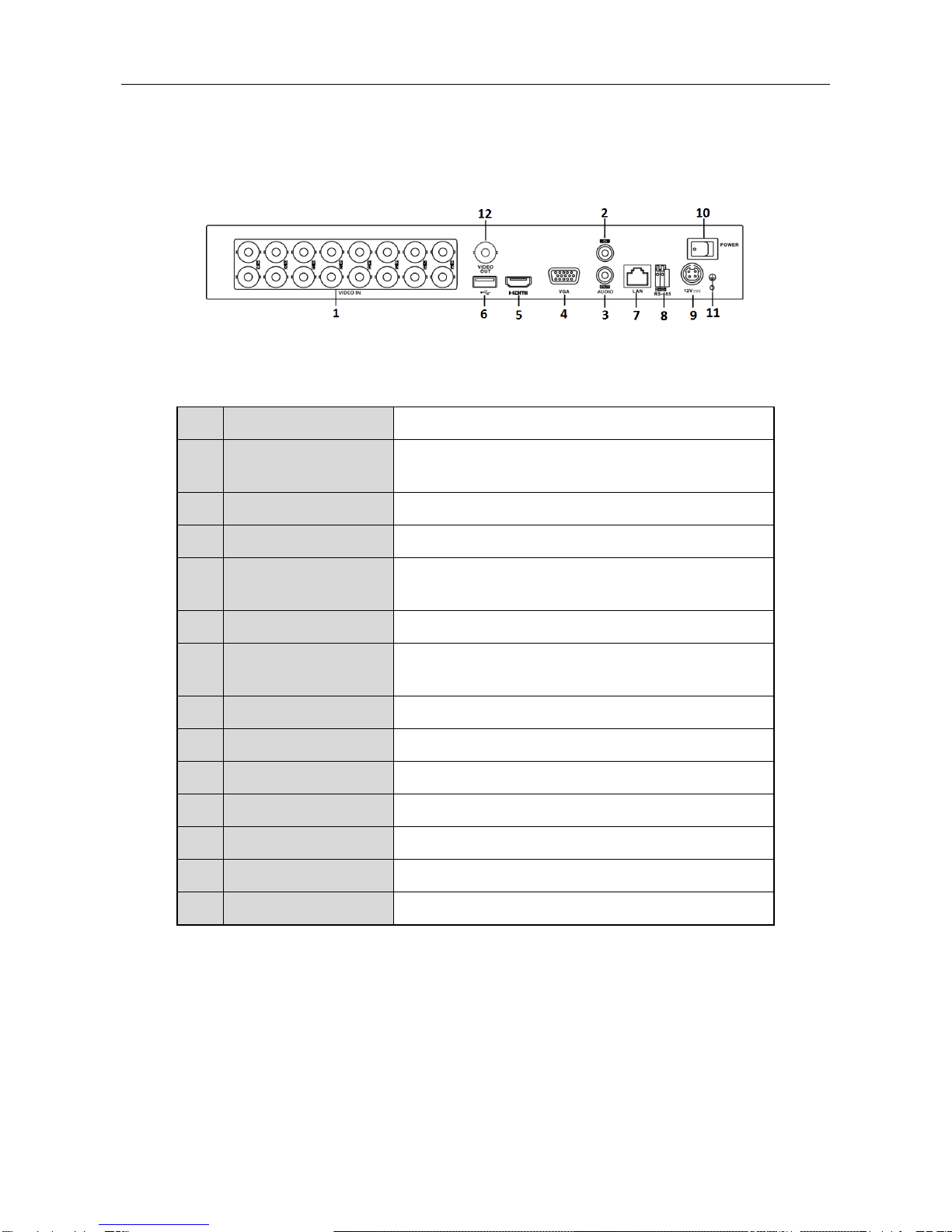
1.2 Rear Panel
Figure 1-2 Rear Panel
Table 1-2 Description of Rear Panel
No.
Item
Description
1
VIDEO IN
BNC interface for Turbo HD and analog video
input.
2
AUDIO IN
RCA connector
3
AUDIO OUT
RCA connector.
4
VGA
DB15 connector for VGA output. Display local
video output and menu.
5
HDMI
HDMI video output connector.
6
USB Interface
Universal Serial Bus (USB) port for additional
devices.
7
Network Interface
Connector for network
8
RS-485 Interface
Connector for RS-485 devices.
9
Power Supply
12 VDC power supply.
10
Power Switch
Switch for turning on/off the device.
11
GND
Ground
12
VIDEO OUT
BNC connector for video output.
13
Alarm In/Out
Connector for alarm input and output.

Digital Video Recorder Quick Start Guide
8
Chapter 2 Installation and Connections
2.1 DVR Installation
During installation of the DVR:
Use brackets for rack mounting.
Ensure ample room for audio and video cables.
When routing cables, ensure that the bend radius of the cables are no less than five
times than its diameter.
Connect the alarm cable.
Allow at least 2 cm (≈0.75-inch) of space between racks mounted devices.
Ensure the DVR is grounded.
Environmental temperature should be within the range of -10 to +55º C, +14 to +131º F.
Environmental humidity should be within the range of 10% to 90%.
2.2 Hard Disk Installation
Before you start
Before installing a hard disk drive (HDD), please make sure the power is disconnected from
the DVR. A factory recommended HDD should be used for this installation.
One or two SATA hard disks can be installed depending on different models.
Tools Required: Screwdriver.
As the installation steps of HDD are similar among different models, here we just take an
example.
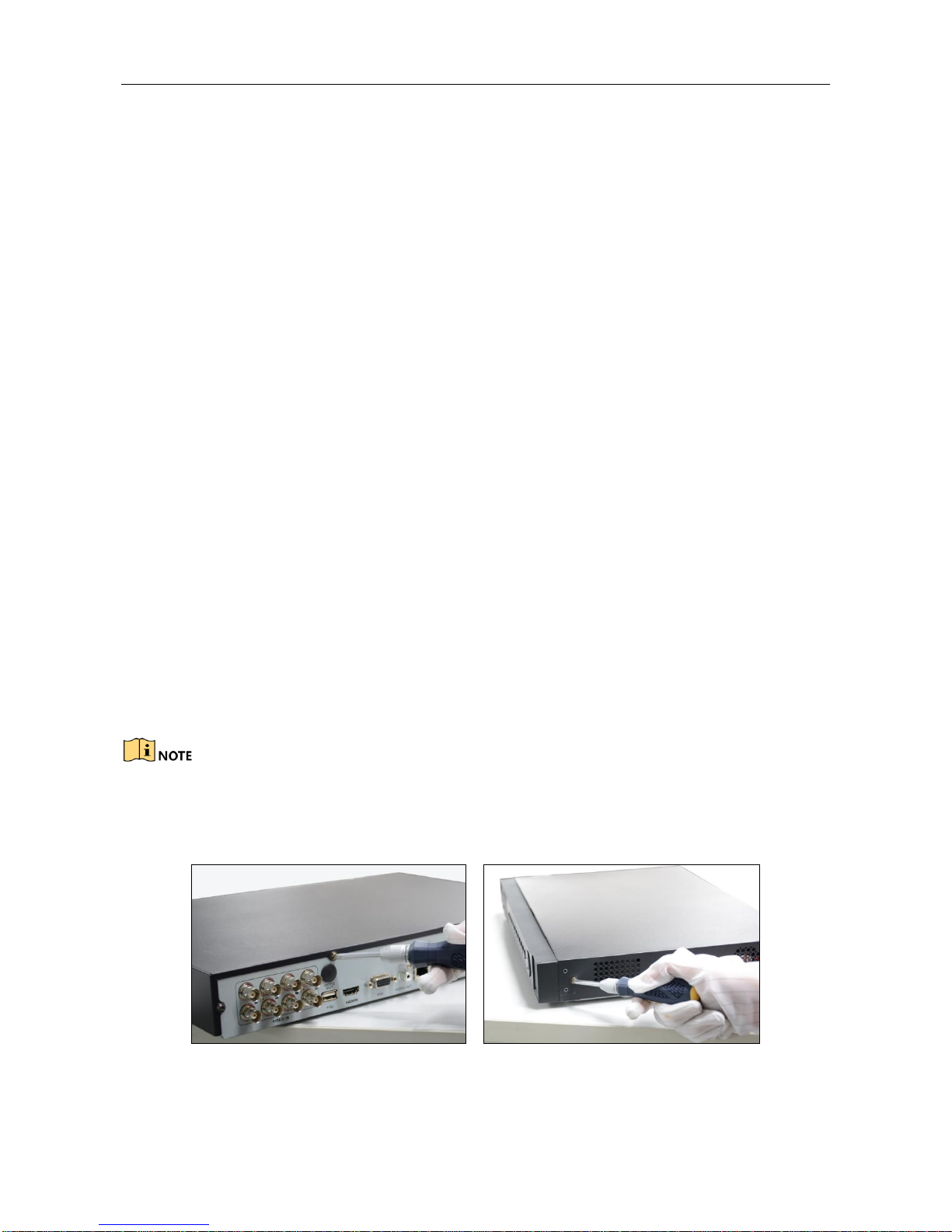
Step 1 Remove the cover from the DVR by unfastening the screws on the back and side.
Figure 2-1 Remove Cover

Digital Video Recorder Quick Start Guide
9
Step 2 Connect one end of the data cable to the motherboard of DVR and the other end to
the HDD.
Figure 2-2 Connect Data Cable
Step 3 Connect the power cable to the HDD.
Figure 2-3 Connect Power Cable
Step 4 Place the HDD on the bottom of the device and then fasten the screws on the bottom
to fix the HDD.
Figure 2-4 Fix Hard Disk
Step 5 Re-install the cover of the DVR and fasten screws.
Table des matières
Autres manuels Vezco DVR