VANPOWERS SW-LCD Manuel utilisateur

Vanpowers Bike
Display
User Manual
For Manidae

USER GUIDE
SW-LCD

Content
1. Appearance and Specifications ..................................................................................4
1.1 Materials ........................................................................................................... 4
1.2 Display Measurements ..................................................................................... 4
2. Overview of Functions and Buttons ...........................................................................5
2.1 Preset and Default Items .................................................................................. 5
2.2 Display Example Image ..................................................................................... 5
2.3 Buttons ..............................................................................................................6
3. Installation Instructions ............................................................................................. 7
4. Setup .......................................................................................................................... 7
4.1 Pre-Startup ........................................................................................................7
4.2 Startup and Settings ..........................................................................................7
4.3 Wheel Diameter ................................................................................................7
4.4 Maximum Speed ............................................................................................... 8
4.5 Backlight Brightness ..........................................................................................9
4.6 Unit Settings ......................................................................................................9
4.7 Exit Settings .....................................................................................................10
5. Standard Operation ..................................................................................................10
5.1 Power On/Off ..................................................................................................10
5.2 Battery Capacity ..............................................................................................11
5.3 Speed .............................................................................................................. 11
5.4 Assist/Throttle Level ....................................................................................... 12
5.5 Odometer ........................................................................................................12
5.6 Cruise Control ................................................................................................. 13
5.7 Backlight On/Off ............................................................................................. 13
5.8 Power Usage ................................................................................................... 14
6. Warnings .......................................................................................错误!未定义书签。
7. Q&A ..........................................................................................................................15
8. Warranty Terms ........................................................................................................15
9. Circuit Diagram .........................................................................................................15
10. Software Version ....................................................................................................16

User Instructions
Dear User,
To ensure the best possible performance for your e-bike, please read
through the SW-LCD display manual carefully before use.
From hardware installation to settings to basic functions, this manual will
go over every aspect of the display in brief and concise language. It will
also help you troubleshoot potential problems to prevent you from
having to research confusing technological terms.
1. Appearance and Specifications
1.1 Materials
The SW-LCD display shell has a sleek black-and-white design and can be
used normally at temperatures ranging from –20 ℃to 60 ℃.
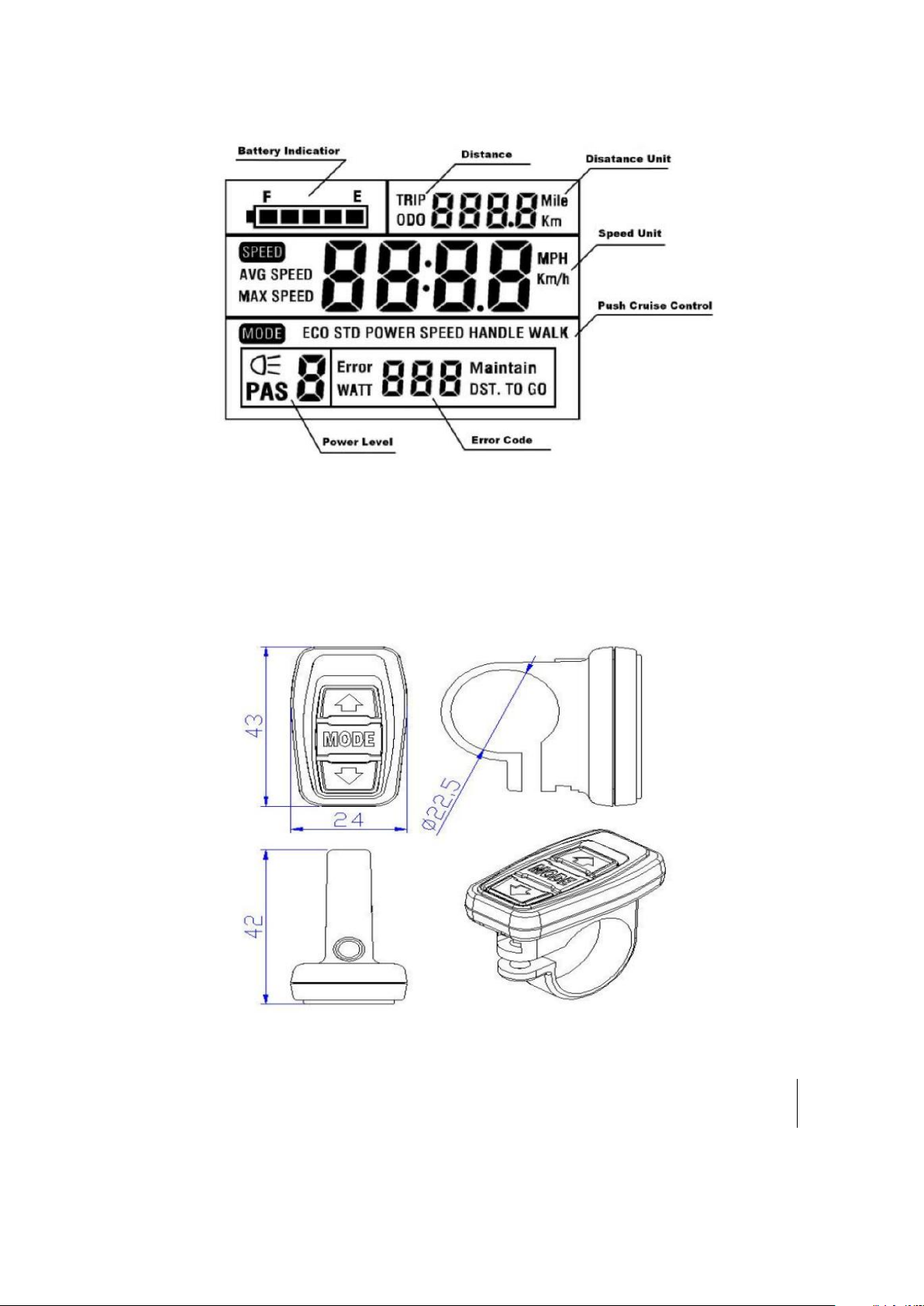
1.2 Display Measurements
Units are in millimeters (mm).

2. Overview of Functions and Buttons
2.1 Preset and Default Items
The available SW-LCD user settings include wheel diameter (18–28
inches), max speed, backlight level, display units, and more.
2.2 Display Example Image
The screen displays battery capacity, assist level, speed, distance
traveled, power usage, cruise control mode, and an error code if there is
an issue with the electronic control system.

2.3 Buttons
The SW-LCD is equipped with a button set that can be installed on either
side of the handlebar. Its specifications in millimeters are as follows:
The button set is connected to the bottom of the SW-LCD display via the
lead cable.

In the following instructions, is represented by
[MODE], is represented by [UP], and is represented
by [DOWN].
3. Installation Instructions
Affix the display and the button set to the handlebar and adjust the
angle for easy viewing while riding. With the e-bike turned off, connect
the display cable to the controller cable to finish installation.
4. Setup
4.1 Pre-Startup
Make sure the display cable and controller cable are properly connected.
4.2 Startup and Settings
Press the [MODE] button for 1.5 seconds to turn on the display. Hold
both the [UP] and [DOWN] keys for 2.5 seconds to enter the menu to
change your settings. The current setting being adjusted will blink.
4.3 Wheel Diameter
The first setting is wheel diameter. The interface looks like this:

Wheel diameter interface
Press [UP] or [DOWN] to choose the correct diameter (18–28 inches) for
your wheels. The default setting is 26 inches. Press [MODE] to save your
changes and progress to the maximum speed setting.
4.4 Maximum Speed
The second setting is maximum speed. The interface looks like this:
Maximum speed interface
This is where the maximum riding speed can be set. The bike will not
exceed the set maximum speed for the rider’s safety. The options for
maximum speed range from 7.5 to 25 mph (12 to 40 km/h). Press [UP] to

increase the maximum speed and [DOWN] to decrease it. The default
setting is 15.5 mph (25 km/h). Press [MODE] to save your changes and
progress to the backlight brightness setting.
Warning: Raising the speed limit of your e-bike may violate your local
laws. Vanpowers Bike is not responsible for any issues caused by your
decision to change the speed limit.
4.5 Backlight Brightness
The third setting is backlight brightness. The interface looks like this:
Backlight brightness interface
Press [UP] or [DOWN] to modify the backlight brightness. You can
choose from three brightness levels, with 1 being the lowest and 3 being
the highest. The default setting is level 1. Press the [MODE] key to
confirm the backlight brightness and progress to the unit settings.
4.6 Unit Settings

The fourth setting is speed and distance units. The interface looks like
this:
Unit settings interface
Press the [UP] or [DOWN] key to choose between imperial and metric
speed units. The distance units will change accordingly.
4.7 Exit Settings
While in the settings, long press the [MODE] key for 3 seconds to save
your changes and exit.
5. Standard Operation
5.1 Power On/Off
Long press the [MODE] key to start up the display and supply power to
controller. Long press the [MODE] key again to turn off the display and
the controller. In the power-off state, the display and controller will no
longer consume battery power.
Table des matières
Autres manuels VANPOWERS Accessoires pour vélos