Vanco PulseAudio PA230SWA Manuel utilisateur

vanco1.com | 800.626.6445
30W, 2 Channel In-Wall
Wi-Fi Streaming
AMPLIFIER
PART NUMBER PA230SWA
BUILT-IN 2X30W AMPLIFIER

2
1. Do not install or place this unit
in a built-in cabinet, or other
confined space without adequate
ventilation.
2. To prevent risk of electrical shock
or fire hazard, due to overheating
do not obstruct unit’s ventilation
openings.
3. Do not install near any source of
heat, including other units that
may produce heat.
4. Do not place unit near flames.
5. Only clean unit with a dry cloth.
6. Unplug unit during lightning
storms or when not used for an
extended period of time.
7. Protect the power cord from being
walked on or pinched, particularly
at the plugs.
8. Use unit only with accessories
specified by the manufacturer.
9. Refer all servicing to qualified
personnel.
WARNING
THIS PRODUCT IS 100% INSPECTED AND TESTED IN THE
UNITED STATES TO VERIFY PERFORMANCE PARAMETERS.
Thank you for purchasing this product. For optimum
performance and safety, please read these instructions
carefully before connecting, operating or adjusting this
product. Please keep this manual for future reference.
DEAR CUSTOMER
The Bluetooth® word mark and logos are registered trademarks owned by the
Bluetooth SIG, Inc. and any use of such marks by Vanco International, LLC is
under license. Other trademarks and trade names are those of their respective
owners.

3
The PulseAudio PA230SWA is an in-wall streaming audio receiver with a
built in 2x30W amplifier in a single gang wall plate form factor, that creates
a simple distributed audio system to stream music over a wireless internet
connection. Install in one zone or multiple zones, a great solution to stream
music and create a wireless distributed audio system, all while using the easy
to use and intuitive PASTREAM app! Play and control music, downloaded
or streamed from your phone, tablet, or computer. The PA230SWA is
compatible with Airplay, and Wi-Fi Direct that are found within the same
network, allowing for songs to be shared easily in a distributed audio system.
In addition, a mobile app is available on iOS and Google Play marketplaces,
and allows the end user to sync their Spotify, Amazon Music, Qplay, TuneIn,
iHeartRadio, and Tidal accounts for an eortless and enhanced listening
experience. Multiple PA230SWA amplifiers can be used within the same
systems allowing everyone to listen to their own music and playlists or join
multiple units together for a party mode!
30W, 2 Channel In-Wall Wi-Fi
Streaming Amplifier
Part # PA230SWA
• In-wall streaming audio receiver with a built-in 2x30W amplifier
• Fits easily into a single gang low-voltage box with streaming capability
• Creates a simple distributed audio system to stream music over a wireless internet
connection from many dierent audio streaming services
• Stream music directly or through a connected network
• Mobile control app available on iOS and Android marketplaces
• Compatible with Airplay, and WiFi Direct devices that are found within the same
network, allowing for songs to be shared easily in a distributed audio system
• Allows user to sync their Spotify, Amazon Music, Qplay, TuneIn, iHeartRadio, and
Tidal accounts for an eortless and enhanced listening experience
• Install for one zone, or multiple zones with additional units that can be joined
together to create a wireless distribution system
• Multiple PA230SWA amplifiers can be used within the same systems allowing
everyone to listen to their own music and playlists or join multiple units together for
party mode
• Dimensions: 2.8” x 4.5” x 2” (70mm x 114mm x 50mm)
FEATURES

4
PACKAGE CONTENTS
• PA230SWA Amplifier
• (1) IR Remote
• (1) Power Adapter
• (1) 4-Terminal Phoenix Connector
• (1) White Single Gang Decora Wall Plate
• (1) Mounting and installation screws
• (1) Manual
SPECIFICATIONS
Wireless Network..............................................IEEE802.11 b/g/n 2.4G
Power Input.........................................................DC 24V
Output Power.....................................................2x30W; 8ohm
Audio Source Input ..........................................3.5mm Phone Jack
Frequency Response.......................................20Hz to 20kHz
EQ (Bass/Treble)...............................................±10db
Music Format......................................................MP3/WMA/AAC/AAC+/ALAC/FLAC/
APE/WAV
OS ...........................................................................iOS, Android
Application ..........................................................PASTREAM
Music Platforms .................................................Spotify, Qplay, TuneIn, iHeartRadio,
Tidal, and Napster; supports Airplay, and WiFi Direct for additional listening
options
Weight ..................................................................0.22 lbs (100g)
Dimensions ..........................................................2.8” x 4.5” x 2” (70mm x 114mm x
50mm)

5
PANEL DESCRIPTIONS
1. Wi-Fi STATUS LED
a. Blue light flashes slowly: System initialization
b. Blue light flashes quickly: WiFi connecting / Allow WiFi connection setting
c. Green light: WiFi connected
2. Built in IR Receiver – use the included IR remote to control power, volume, bass,
treble, etc.
3. RESET: Press to reset unit if trouble connecting to Wi-Fi
4.AUX IN: 3.5mm auxiliary input; connect an analog audio source
2
1
3
4

6
REMOTE
Power ON/OFF
Unsupported
Volume down
Selection WiFi
interface
Track settings
BASS+: Bass increase
BASS -: Bass reduction
TREBLE +: Treble increase
TREBLE-: Treble reduction
Flat: Restore original
d.bass: BASS increase by 6dB
Mute
Selection AUX
interface
Volume up
Next song
Previous song
Unsupported
Unsupported
Unsupported

7
CONNECT AND OPERATE
Speakers
PA230SWA
Aux Wire
1. Connect speakers to the output of the PA230SWA using the provided 4-pin
phoenix terminal connector
2. OPTIONAL: Connect a source (input) for wired audio connection. If utilizing
wireless streaming, connection to the input is not necessary
3. Connect the included power supply to power up the unit
4. Connect a mobile device that will be the audio source to the local network
5. Connect the PA230SWA to the same Wi-Fi network
6. Download the PASTREAM APP from the Google Play or Apple Marketplace, follow
the steps for connection the app will provide
The PA230SWA is a device that receives internet streaming music or other wireless
music from a Wi-Fi enabled device. Multiple units can be used to create a distributed
audio system.
BASS+: Bass increase
BASS -: Bass reduction
TREBLE +: Treble increase
TREBLE-: Treble reduction
Flat: Restore original
d.bass: BASS increase by 6dB

8
CONNECT TO WIFI AND CONFIGURE
THE DEVICE
Follow the steps below to play content from a mobile device or streaming app to the
PA230SWA over a 2.4G wireless network.
NOTE: Streaming apps may require internet connectivity.
1. Open the PASTREAM app, click on Add Device
2. Ensure you are connecting to a 2.4G WiFi network
3. The PA230SWA does not have a WPA button so click on NEXT
4. Click on CANCEL to manually configure PA230SWA

9
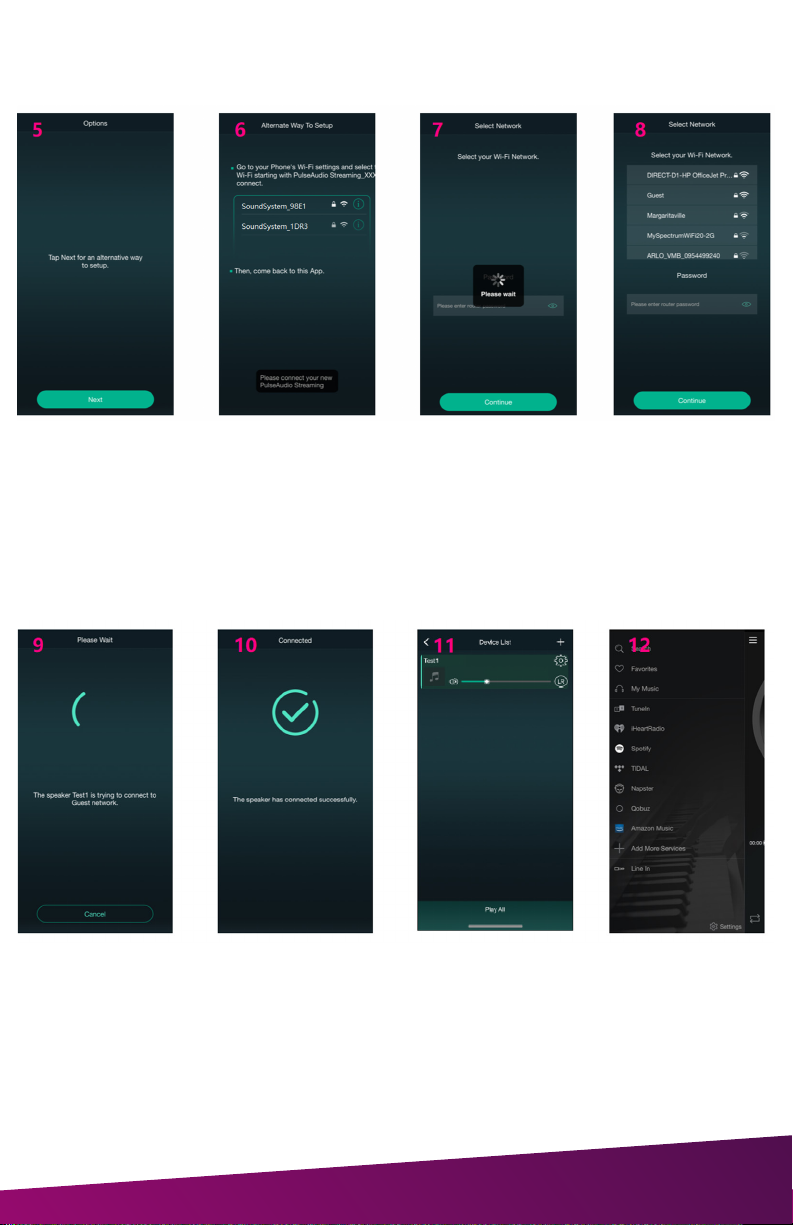
5. Click Next
6. Go to the WiFi settings of your device and connect to the PA230SWA directly and
return to the app
7. App will search for other networks
8. Select the network you wish to connect and use the PA230SWA with, type in the
password if needed and click Continue
9. The app will connect the PA230SWA to your selected Wi-Fi network
10. Receive confirmation app is ready to be used
11. Home screen when the PA230SWA is connected
12. Main menu of streaming services
NOTE: You will need to login separately to your music streaming service to pair

10
CUSTOMIZING DEVICE SETTINGS
Through device settings you can get technical information on or change the name of
the device.
1. Click “Gear” icon
2. Click “Rename”
3. Click “Custom…”
4. Enter new name of the device and Click “Confirm”
5. Click “Finish”, Complete the Rename
(Note - If there is an updated name and then initialize the device, the SSID will be
changed to the last custom name plus the serial number of the product)
To Rename a Device:
Table des matières
Autres manuels Vanco Amplificateur

Vanco
Vanco PulseAudio PA230BWA Manuel utilisateur

Vanco
Vanco Spot for Dot Manuel utilisateur

Vanco
Vanco Pulse Audio PA230WP Manuel utilisateur

Vanco
Vanco AMP200 Manuel utilisateur

Vanco
Vanco Beale Street Audio BAV4250 Manuel utilisateur

Vanco
Vanco PULSEAUDIO RPA66MK2 Manuel utilisateur

Vanco
Vanco HD4KCLK Manuel utilisateur

Vanco
Vanco D2.1 Manuel utilisateur