Vaderstad Seed Hawk Manuel utilisateur

Seed Hawk Startup.
Preparing you for the season to come.

Customer Clinic
Presentation
We share a wide variety of
information, tips, tricks and
troubleshooting at our customer
clinics.
In case you missed anything you
can view the presentation at any
time by following the QR code to
the right.
View Presentation
Seed Hawk Cheat Sheets
To ensure you have the right
information at your fingertips
when you need it, we have created
a folder of cheat sheets, tips,
tricks, trouble shooting, and a
copy of this Start Guide.
Follow the QR code to the right
to view the folder and download
the files to your iPad or phone for
quick, easy access in the field.
View Folder Contents
QuickStart Videos
We have laid out the steps for
many of the main functions of your
Seed Hawk seeding system in this
guide, to get you started with your
new machine.
Follow the QR code to the right
to view all Seed Hawk QuickStart
videos.
View Folder Contents
Seed Hawk iCon Control
The modern iPad-based control
system Seed Hawk iCon Control
provides simple, complete control
of your Seed Hawk air cart and
toolbar.
Wireless control provides
substantial benefits for seed
drill systems. Carry your iCon
controlled tablet with you to gain
full seeder control and eliminate
the need to go back and forth
between the tractor cab and the
machine.
View App in Store
Vaderstad E-Control
The modern iPad-based control
system Väderstad E-Control can
be used to download manuals,
instructions and QuickStarts to be
stored for offline use on your iPad.
View App in Store

Seed Hawk iCon Cloud
The Seed Hawk iCon Control uses a cloud based system to store job files
and transfer prescription map files to and from the machine.
Visit the cloud at https://cloud.seedhawk.com/
iCon Cloud
Your login details:
Syncing to the cloud
Learn how to sync your iCon operating system with
the cloud.
View QuickStart Video
Loading prescription maps to a job
Learn how to upload prescription map data to the
cloud, and then utilize it in a job in the iCon operating
system.
View QuickStart Video
Username:
Password:

Loading product documents to your iPad
You can use the Väderstad e-Control app to load manuals, instructions
and QuickStarts on your iPad for use while away from a wifi connection.
E-Control App View QuickStart video
Search VVAB e-Control in the App Store
Install on your iPad
Launch E-Control
Tap the How To Button
Tap the Machine Family
Select Product family and tap Done
Tap the Language
Select English [en-CA] and tap Done
You may also enter in Serial Number and Software version
to further refine results

After specifying search filters tap Show Items for results Now you can scroll all results and tap the download
button to add to your iPad for use offline
When you have finished all of your chosen documents/
QuickStart videos can be found in the How To Section of
the app. These items are now housed on your iPad and can
be viewed without wifi connection.

Let’s get started!
Before you begin operating make sure you have the most updated version of the
iCon Control operating System.
Updating software
1. Visit iCon Control in the App Store
2. If the Update button appears in blue, click it, and let your operating system update.
iCon Control App
Before you begin operating make sure you have turned your fans on, opened the
bulk shut off, and ensured your ladder is secured in the up position.
Connect to the Gateway
1. Ensure your Control Panel switch is on and the green led is lit.
2. Wait for the PM4X LED’s to remain solid red before connecting IPAD to the gateway
3. Go to Settings, Select WiFi
4. Select ICONXXXXXX
5. Password for network is “seedhawk”
6. Once initially paired to machine, the WiFi network will be saved to iPad.
View QuickStart video

Setting seed depth
Placing the seed at the proper depth and keeping the depth setting
consistent are critical to achieving optimum germination. The packer
wheels are factory set to place seed at a depth of 3/4 in. below the packed
surface of the soil.
• Factory seed depth setting is “D”, which equates to approximately ¾”.
• The fertilizer to seed offset will place the fertilizer ¾” below and 1 ½”
to the side of the seed.
• The depth of this offset can be manually adjusted by the slide on the
fertilizer knife.
• It is important to ensure you always manually check your seed and
fertilizer depth to guarantee proper placement.
• The seed depth is adjusted by removing the retaining pin on the
opener and utilizing a ¾” wrench to turn the packer wheel gear to the
desired setting.
• Additionally, growers will often utilize the fertilizer knife to seed crops
such as peas. This is providing that the nutrients being put down are
okay to be in the seed row. At factory setting of “D” this would give a
depth of 1 ½” on the seed when putting it through the fertilizer knife.
Note: Please check with your local agronomist to confirm this practice
with your nutrients, and soil composition
1. Remove retaining pin from the
quick pin.
2. Remove quick pin from opener
shank.
3. Rotate the packer arm gear using
a 3/4 in. wrench, and align the
corresponding pin hole with the
desired depth setting (marked on
the decal).
4. Replace the quick pin and the
retaining pin.
Seed depth pin legend
A. 3/8” (9.5mm)
B. 1/2” (12.7mm)
C. 5/8” (15.9 mm)
D. 3/4” (19.0 mm)
E. 1” (25.4 mm)
F. 1-1/4” (31.7 mm)
G. 1-1/2” (38.1 mm)
-A. Less than 3/8” (<9.5mm)
View QuickStart video

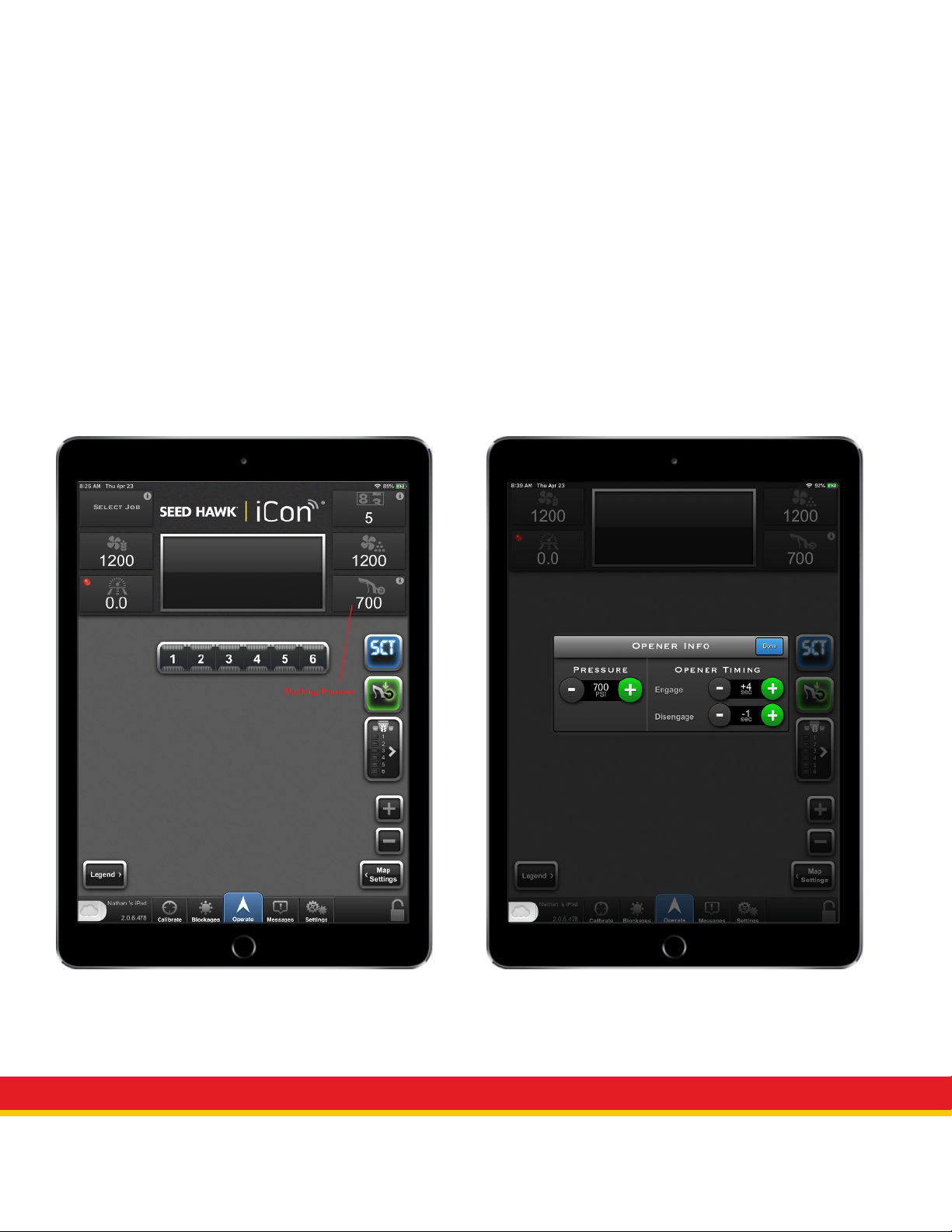
Packing pressure
Packing pressure could vary greatly depending on the soil type, moisture and crop being seeded. The
following considerations should be considered when setting opener pressure.
• The opener chain is the key visual guide to ensure you are at least set at the lowest minimum packing
pressure. When in the field, pay attention to the opener chains behind your tractor wheels/mainframe
wheels. During field operation, the chain should be remaining tight. It is considered normal for it to
“twitch” momentarily while seeding but should stay tight for the most part.
• The packing pressure operational range is 800-1500 psi
• In wet conditions, you will likely be in the 800-1100 psi range.
• In dry conditions, you will likely be in the 1100-1500 psi range.
• Always check your furrow to ensure you are achieving a consistently packed finish.
• You can set a packing pressure lower than 800 psi, depending on conditions. This would mostly be
recommended for your when you utilize your “quick dump override”.
Packing Pressure Display/Button Packing Pressure Adjustment Page

Quick dump override
• The quick dump override feature is utilized for when you encounter wet areas in the field that require less
packing pressure.
• Pushing the button will dump your packing pressure down to a user selected psi and time.
• The time and psi are set in the settings menu, in the “General” tab.
• It is important to note that lessening the packing pressure in wet areas will also help prevent the machine
from getting stuck.
Quick Dump Override Quick Dump Override Settings

Fan settings
• Fan settings are based on product lift versus a pre-defined chart.
• Product lift should be 18-24”
• To test product lift:
• Remove secondary hose from furthest opener to outside on either end of drill. This would involve
either removing the hose from metal drop tube, or sliding complete rubber drop tube from support.
• Attach secondary hose to frame pointing upward.
• Operate drill at normal seeding speed and observe product lift.
• Adjust fan RPM until 18-24” of product lift is achieved.
• Re-install secondary hose on machine.
• Verify field operation by operating and check for product on ground and proper depth being achieved.
• High and Low limit fan alarms are setting in the settings menu, Configure Fans tab.
Fan Displays Fan Alarm Limit Settings
Table des matières
Autres manuels Vaderstad Semoir