Vacron VIT-6 Series Manuel utilisateur

VIT-6Series
User Manual
2014 AUG. V1.0

LEGAL NOTICE
The provided software and hardware authorization agreement is legally binded
between The User (for personal or multiple usage) and The Company in bilateral basis,
this includes any related hardware components, multimedia, printed and / or online
documents and electronic files. Installation, copying or any other method of using
products covered in this agreement is established on the notion The User accept
terms listed in this agreement. However, if you do not agree these terms, please do not
install or use this product. This product is protected under copyright law and Universal
Copyright Convention, including other intellectual property laws and agreements. The
hardware and software authorization code on agreement certificates automatically
grant The User a full operational rights. However, please note the product is only
authorized for usage by The User only, not for acts of reselling.
COPYRIGHT
The Company owns all titled properties, include but not limited to copyrighted
materials, hardware and software products and / or any materials in carbon or
electronic copy. The Company reserves the right of ambiguity in authorization rights.
LIABILITY WAIVER STATEMENT
The Company is not responsible for any damages, repairs and liabilities caused by
situations of force majeure, improper, unlawful and integration related usage. The
Company does not direct and indirectly guarantee or prohibit, include but not
limited, to any promotability and maintainability of its product and any related
material towards any specific purpose under none infringing methods.

TERMS AND CONDITIONS
The overall risk may arise from hardware and software performance and usage. This
product will notify, if integrated with other branded hardware, can assist The User to
execute surveillance monitoring and data analysis. These purposes may be regulated
or is in conflict of applicable law include but not limited to data secrecy and privacy
reasons. The User has the responsibility and due diligence to conform and / or comply
with applicable law and practice.
LIMITED LIABILITY
This clause indicates the maximum influence allowed under applicable law. Under
any circumstances; if FUHO (DBA as VACRON) and its supplier sustained any
specific, temporal, indirect or any other forms of losses (including but not limited to
profit loss, disrupted business operation, loss of corporate information or any other
form of damages) due to the use or discontinued use of products with sufficient or
insufficient support, even a prior notice has been issued by either party; FUHO is
only responsible for the customer actual purchase price.
OTHER AGREEMENT
(A) Under applicable legal scope, any reverse engineering, reverse coding or
disassembly of any hardware and software components covered within this
Agreement is prohibited
(B) The User can permanently transfer the right of usage as long as the recipient
agrees to terms listed within this Agreement.
DISCLOSURE
The Company has the right to terminate the service and this agreement under
circumstances of failure to comply with the terms and conditions. The User must
destroy any copied material and software under such situation.

MENU
【IMPORTANT NOTICES】 ..................................................................................................................... 1
1.【SPECIFICATIONS】 ............................................................................................................................. 2
2.【E BROSWER LOG IN】 ....................................................................................................................... 3
2.1 Log in verifications ................................................................................................. 3
2.2 IE WEBPAGE INTERFACE ....................................................................................... 3
3.【STATUS INFORMATION】 ............................................................................................................... 4
3.1 STATUS INFORMATION IN WEBPAGE ............................................................. 4
3.2 LIVE VIEW AND FUNCTION ................................................................................ 5
4.【SETTINGS】 ........................................................................................................................................... 7
4.1 Video Setting ............................................................................................................ 7
4.2 Camera Setting ........................................................................................................ 9
4.3 Audio Setting ......................................................................................................... 12
4.8 Alarm Setting ......................................................................................................... 17
4.9 Record ...................................................................................................................... 19
5.【MAINTENANCE】 ............................................................................................................................ 20
5.1 User Account ......................................................................................................... 20
5.2 SD Card .................................................................................................................... 20
5.3 Profile Setting ........................................................................................................ 21
5.4 Firmware update .................................................................................................. 21
5.5 Restart ...................................................................................................................... 22
5.6 Language ................................................................................................................ 22

1
【IMPORTANT NOTICES】
WARNING
PLEASE DO NOT LEAVE OR INSTALL THE DEVICE IN DAMP PLACE, DIRECT
SUNLIGHT, HOT OR TIGHTLY SEALED ENVIRONMENT
As this may contribute to loss of system performance, power leakage, even damages in
extreme cases.
PLEASE DO NOT TOUCH POWERLINE, ADAPTER AND WALL PLUG WHEN HANDS
ARE WET
As this may cause electric shock.
PLEASE DO NOT OVERLY TWIST THE CABLES OR PLACE HEAVY ITEMS ON TOP
As this may damage the equipment.
PLEASE DO NOT USE DAMAGED OR OPEN ENDED POWER LINE
As this may cause electric shock or other injuries.
PLEASE USE SEPARATE POWER SOURCE, DO NOT SHARE OR EXTEND WALL
PLUG WITH OTHER APPLIANCES.
As this may cause electric shock, damages or other injuries.
PLEASE DO NOT DISASSEMBLE, RE-DESIGN OR MAINTAIN THE DEVICE BY YOUR
SELF
As this may cause electric shock, damages or other injuries. Please contact local supplier
for repair and maintenance requirement.
PLEASE DO NOT REMOVE DEVICE ENCLOSURE OR INSERT FOREIGN OBJECT
As this may cause electric shock, damages or other injuries.
PLEASE DO NOT USE UNKNOWN PARTS AND ACESSORYS OTHER THAN
SUPPLIED MATERIALS
Please contact local supplier for repair and maintenance requirement.
CAUTION
PLEASE DO NOT PLACE THE DEVICE UNDER RAIN OR OVERLY DAMP PLACES
(EXLUCDING OUTDOOR MODELS)
As this will decrease the overall performances and cause fatal functional error.
PLEASE DO NOT SUBJECT DEVICE UNDER EXCESSIVE VIBRATION AND SHAKEING.
As this may damage internal mechanics and ICs
Important Notice
Please make sure the voltage is correct!

2
1.【SPECIFICATIONS】
Subject Specifications
System Platform : TI TMS320DM368 Flash : 32MB RAM : 128MB
Lens Manual Focus CS mount Lens (Support Auto Focus C/CS mount Lens)
Video
H.264: 30 fps at 1280x720 , maximum 8 fps at 2592x1920
MPEG4: 30 fps at 1280x720 , Maximum 8 fps at 2592x1920
MJPEG: 30 fps at 1280x720 , Maximum 8 fps at 2592x1920
H.264、MPEG-4 & MJPEG Multiple Compression Engine Technology (Triple Codec)
Support Simultaneous Multiple Streams
Support BNC Video Out、Selectable NTSC/PAL Format
Image
Settings
Adjustable image size, quality, and bit rate
Time/Date stamp and text caption overlay.
Configurable brightness, contrast, saturation, sharpness, white balance and
exposure AGC / AWB / AES / BLC/WDR
Audio
Format MPEG-4 AAC audio encoding
G.711audio encoding
Build-in microphone recording distance up to 5meters, mute and volume function
available Support Audio line-in for external microphone
Support audio line-out for external alarm output
Networking
Interface 10/100 Mbps Ethernet, RJ-45
Supported
Protocol
IPv4,TCP/IP, DHCP, HTTP, FTP, SMTP, RTSP,SNTP,DNS
Supported
Browser
Microsoft Internet Explorer 6.0 or above
Alarm and
Event
Management
Motion Detection
Digital trigger input / output
Audio alarm output (need line-out)
E-mail event notification using SMTP or FTP
User Account Maximum 4 clients online monitoring simultaneously
Multi-level user access control with password protection
Local Record Micro SD/SDHC card slot : Stores snapshots and video clips
Maintenance Supports online firmware upgrade
I /O Interface RJ-45 Ethernet x1,DC Jack x 1, SD Card slot x1, Auto IRIS, RS-485, line/out, Digital
I/O (2 in, 2 out), external reset
Power DC12V or PoE IEEE802.3af Class 0 (optional)
Operating
Environment
0~45°C

3
2.【E BROSWER LOG IN】
2.1 Log in verifications
After successfully connected with IPC (IP camera) via IP address, you will be
prompted with log in verifications. Please type in your username and password to
access the system and setting.
2.2 IE WEBPAGE INTERFACE
The logged in web interface displays basic hardware and software information and
/ or option separated into 2 parts; a dropdown table of function list on the left and
basic option and information on the right. (demonstrated with administrator log in)

4
3.【STATUS INFORMATION】
3.1 STATUS INFORMATION IN WEBPAGE
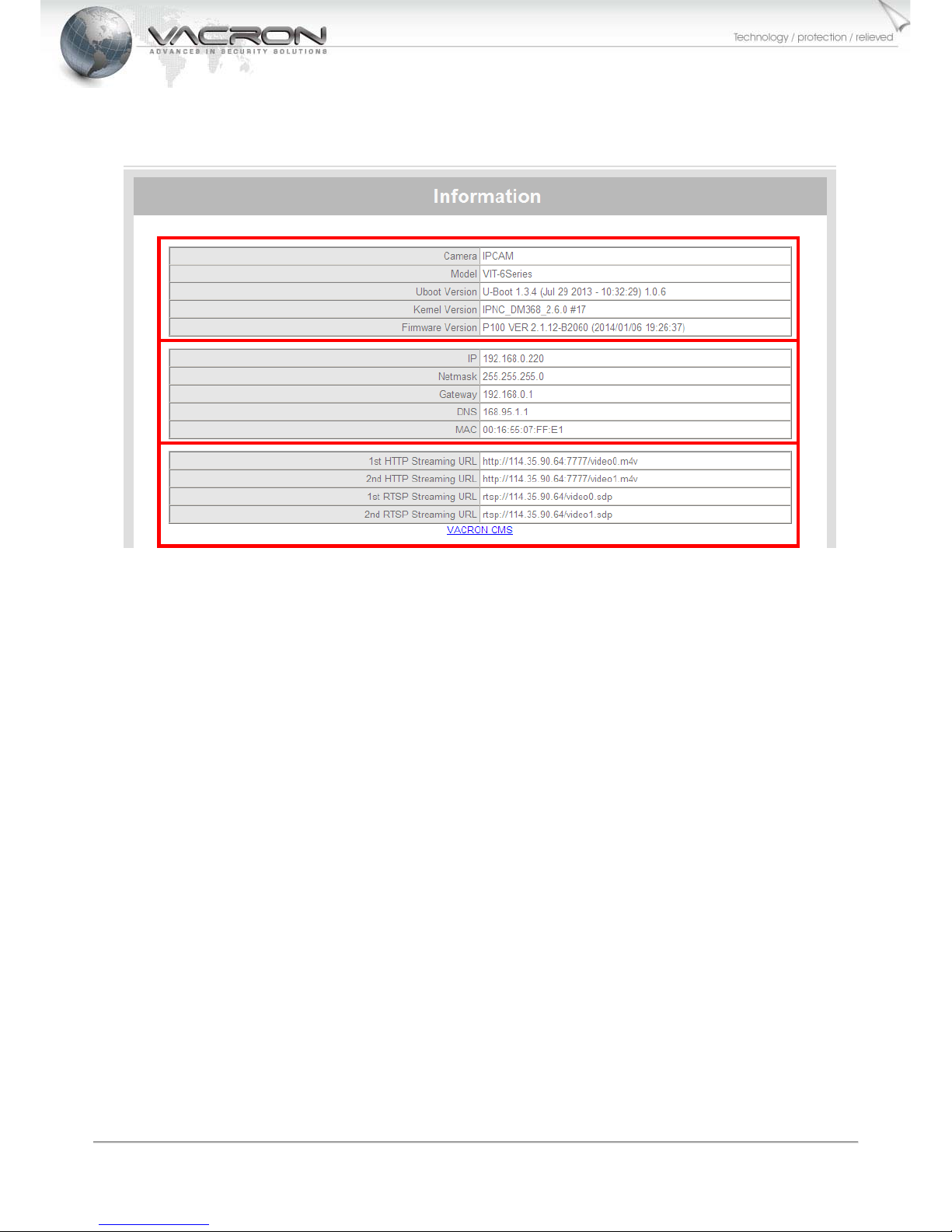
1. The information area separate into three categories; firmware information on the top, IP
address setting in middle, and TCP/IP protocol at the third.
2. Firmware include three main information; Uboot Version (boot-up firmware), Kernel Version
(physical layer firmware) and Firmware Version.
3. IP address setting includes current IP address, subnet mask, gateway and device MAC
number.
4. TCP/IP information; is where one can find IPC video/audio streaming protocols, video stream
can be viewed on internet enabled media players (such as VLC) via streaming protocol. The
hyperlink at the bottom connects to VACRON homepage, all product and update information
can be viewed there. The IPC must be connected to WAN in order to visit VACRON.

5
3.2 LIVE VIEW AND FUNCTION
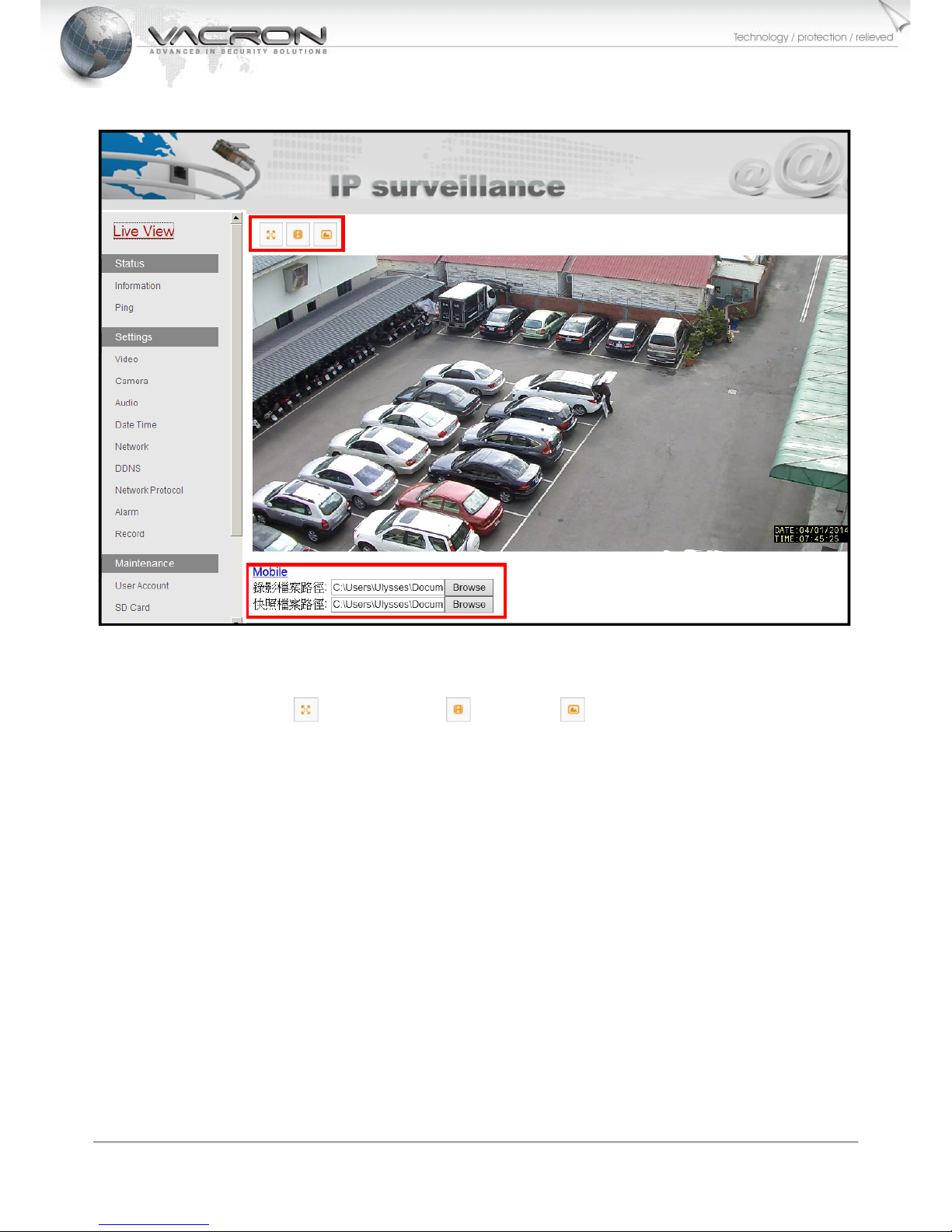
1. New installers may be prompted to download OCX if the computer used has yet to install
OCX. Please proceed to download OCX in order to view live streaming.
2. On the top corner is (Full screen) (Record) (Snapshot) for quick function.
The default record is at C drive, this can be changed to suit your requirement.
3. The options at the bottom is for direct record or snapshot on to computer, record path is
definable.

6
4. When above warning appears, please bypass IE security setting by manually download
(allow) Active X, or it might be blocked by Windows IE.
Table des matières
Autres manuels Vacron Caméra IP