
V-tech Power Zone Edge Manuel utilisateur


39
Dear Parent:
At VTech®we know that a child has the ability
to do great things. That’s why all of our electronic
learning products are uniquely designed to develop
a child’s mind and allow them to learn to the best
of their ability. Whether it’s learning about letters,
numbers, geography or algebra, all VTech®
learning products incorporate advanced
technologies and extensive curriculum to
encourage children of all ages to reach their
potential.
When it comes to providing interactive products
that enlighten, entertain and develop minds, at
VTech®we see the potential in every child.
34600 I/M 2/28/00, 11:27 AM39

40
CONTENTS
INTRODUCTION.........................................................1
PREPARATION........................................................1-4
MOUSE CONNECTION .......................................................1
PRINTER CONNECTION ....................................................2
BATTERY INSTALLATION ..................................................2
KEYBOARD BATTERY INSTALLATION ............................. 2
BATTERY NOTICE...............................................................2
BACKUP BATTERY INSTALLATION ...............................2-3
MEMORY INITIALIZATION..................................................4
AC ADAPTOR CONNECTION............................................. 4
ON/OFF BUTTON ............................................................... 4
AUTOMATIC SHUT-OFF......................................................4
VOLUME SWITCH ...............................................................4
CONTRAST SWITCH .......................................................... 4
MOUSE, KEYBOARD AND
CURSOR CONTROL .................................................. 5
MOUSE ................................................................................5
CLEANINGTHE MOUSE..................................................... 5
KEYBOARD...........................................................6-10
SPECIAL KEYS ................................................................6-9
CATEGORY BUTTONS ..................................................9-10
34600 I/M 2/28/00, 11:27 AM40

41
DESCRIPTION OF ACTIVITIES ..........................10-36
GENERAL DISPLAY..........................................................10
LANGUAGE ARTS .......................................................11-13
WORD CHALLENGE ........................................................11
COMPREHENSION...........................................................11
SECRETWORD ................................................................11
GRAMMAR QUIZ ..............................................................11
PARTS OF SPEECH .........................................................11
WORD SEARCH ..........................................................11-12
CROSSWORD ...................................................................12
SYNONYMS ......................................................................12
ANTONYMS.......................................................................12
WORD PUZZLE.................................................................12
SOUND ALIKES................................................................12
SENTENCE SHUFFLE......................................................12
CREATIVE WRITING .........................................................13
MATHEMATICS.............................................................13-16
MATH FUN.........................................................................13
TIME OUT!.........................................................................13
COMMON GROUND .........................................................13
FACTOR REACTOR ..........................................................13
COORDINATES.................................................................13
SUM IT UP.........................................................................13
MINUS MADNESS ............................................................14
MULTIPLICATION .............................................................14
DIVISION ...........................................................................14
34600 I/M 2/28/00, 11:27 AM41

42
ALGEBRA ATTACK! .........................................................14
GEOMETRY.......................................................................14
GRAPH IT!.........................................................................14
TICTAC 18.........................................................................15
MAGIC 24 ..........................................................................15
THISTOTHAT ...................................................................15
FRACTION ACTION .......................................................... 15
NUMBER PATTERNS .......................................................15
MATH CHALLENGE..........................................................15
TRIVIA CHALLENGE ...................................................16-17
UNDERSEA LIFE ..............................................................16
ANIMAL LIFE ....................................................................16
ENTERTAINMENT.............................................................16
MYSTERY EVENTS ..........................................................16
TECHNOLOGY..................................................................16
SPACE DISCOVERY .........................................................17
GEOGRAPHY....................................................................17
BIOLOGY ..........................................................................17
KNOWLEDGE CHALLENGE ............................................17
LOGIC & GAMES .........................................................17-19
ROBOT HUNT ..............................................................17-18
3D RACE RALLY...............................................................18
3DTICTACTOE ................................................................18
TREASURE HUNT ............................................................18
DISC CHALLENGE ......................................................18-19
3D MAZE ...........................................................................19
34600 I/M 2/28/00, 11:27 AM42

43
ART STUDIO......................................................................19
CARD MAKER ..................................................................19
PICTURE MAKER .............................................................19
PERSONAL OFFICE ....................................................20-31
WORD PROCESSOR...................................................20-23
TELEPHONE BOOK .........................................................23
SCHEDULER.....................................................................24
SPELL CHECKER.............................................................24
CALENDAR .......................................................................24
CONVERSION PAD...........................................................24
CALCULATOR ..................................................................24
LOGO ................................................................................25
COMMANDS .....................................................................25
ROUTINES ...................................................................25-31
LOGO BEGINNER ............................................................31
LOGO INTERMEDIATE.....................................................31
LOGO ADVANCED ...........................................................31
MONEY MANAGER ..........................................................31
HOMEWORK LAB™ .........................................................32
DATA PAIRS 1 ...................................................................32
DATA PAIRS 2 ...................................................................32
TESTTRAINER 1 ..............................................................32
TESTTRAINER 2 ..............................................................32
SYSTEM SETUP...........................................................32-33
FILE CABINET ..................................................................32
QUICKTAG........................................................................32
34600 I/M 2/28/00, 11:27 AM43

44
SOUND EFFECT ........................................................................32
BACKGROUND MUSIC..............................................................32
DATE &TIME ..............................................................................32
SCORING STATISTIC.................................................................33
PRINTER SETUP .......................................................................33
TROUBLESHOOTING FOR PRINTER ERROR.........................33
TOOLS ...................................................................................33-34
HOWTO USE AN EXPANSION CARTRIDGE ......... 34
ACTIVITY CARTRIDGES ......................................... 35
SCORING ............................................................36-37
SCORING CODE ........................................................................36
VTECH®Power Zone™Edge ACTIVITIES ...............................37
CARE AND MAINTENANCE.................................... 38
34600 I/M 2/28/00, 11:27 AM44

45
CAUTION-ELECTRIC TOY
CAUTION-ELECTRIC TOY
FOR
FOR
TOY TRANSFORMER
TOY TRANSFORMER
Not recommended for children under 3 years of age.
As with all electrical products, precautions should
be observed during handling and use to reduce the
risk of electric shock.
Input: AC120V 60 HZ9W
Output: DC 14.5V No-Load 4.5VA
Ideal to be used with DC 9V 500mA
The adaptor should be periodically examined for
conditions that may result in the risk of fire, electric
shock, or injury to persons (such as damage to the
output cord, blades, housing, or other parts). In the
event of such conditions, the transformer should not
be used until properly repaired.
34600 I/M 2/28/00, 11:27 AM45

1
INTRODUCTION
Thank you for purchasing the VTECH®Power Zone™ Edge learning product!
We at VTECH®are committed to providing the highest quality products to entertain
and educate your children. Should you have any questions or concerns, please
call our Consumer Services Department at 1-800-521-2010 in the U.S. or 1-800-
267-7377 in Canada.
The VTECH®Power Zone™ Edge is an electronic learning aid. This unit offers
a wide range of exciting and educational activities for interactive learning! The
unit’s 72 built-in activities and computer skills tools encourage learning in an
entertaining and effective manner.
PREPARATION
MOUSE CONNECTION
1. Make sure the unit is turned OFF.
2. Locate the mouse jack on the back of the keyboard.
3. Plug the mouse into the unit’s mouse jack.
MOUSE
VOLUME
SWITCH
ON BUTTON
CONTRAST
SWITCH
CATEGORY
BUTTONS
CARTRIDGE
DOOR
CARTRIDGES
MOUSE PAD
OFF BUTTON
AC ADAPTOR
BACKLIGHT
BUTTON
TYPING
KEYBOARD
LCD
34600 I/M 2/28/00, 11:27 AM1
2
PRINTER CONNECTION (Printer sold separately)
1. Make sure the VTECH®Power Zone™ Edge learning aid and printer are
turned OFF.
2. Locate the printer port on the right side of the VTECH®Power Zone™ Edge
learning aid.
3. Connect the printer plug to the printer port.
4. Turn ON the VTECH®Power Zone™ Edge learning aid and the printer.
Please refer to Printer Setup for the list of printers that the VTECH®Power
Zone™ Edge learning aid supports.
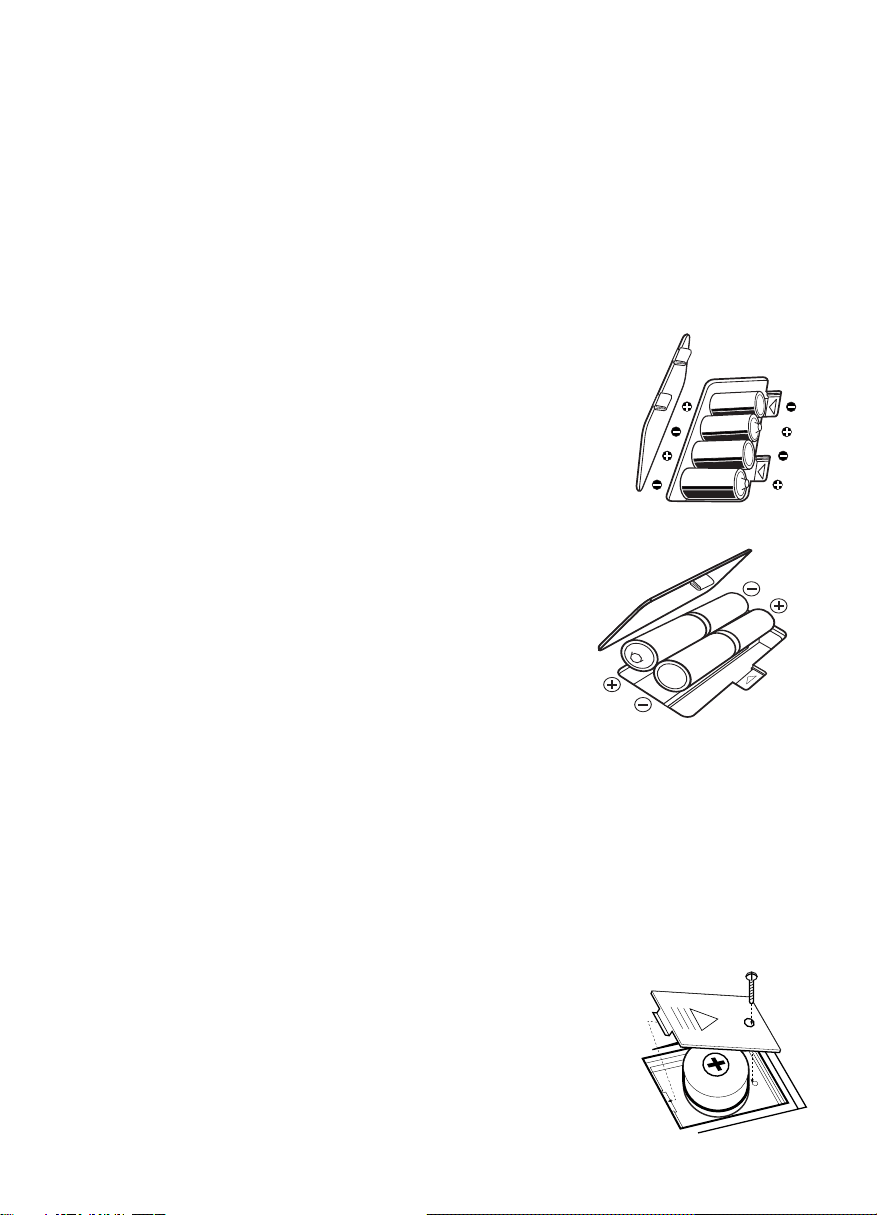
BATTERY INSTALLATION
1. Make sure the unit is turned OFF.
2. Locate the battery cover on the bottom of the unit
and open it.
3. Insert 4 “C” batteries as illustrated.
DO NOT USE RECHARGEABLE BATTERIES in this unit.
4. Close the battery cover.
KEYBOARD BATTERY INSTALLATION
1. Locate the battery cover on the bottom of the
keyboardand open it.
2. Insert 4 “AA” batteries as illustrated.
DO NOT USE RECHARGEABLE BATTERIES
in the keyboard.
3. Close the battery cover.
BATTERY NOTICE
• Install batteries correctly observing the polarity (+ , _) signs to avoid leakage.
• Do not mix old and new batteries.
• Do not use batteries of different types.
• Remove exhausted or new batteries from the unit when you are not going
to use the unit for a long time.
• Do not dispose of batteries in fire.
• Do not attempt to recharge ordinary batteries.
• Do not short-circuit supply terminals.
BACKUP BATTERY INSTALLATION
1. Make sure the unit is OFF.
2. Locate the backup battery cover on the bottom of the
unit and open it.
3. Insert 1 CR2025 battery as illustrated.
4. Replace the battery cover.
5. Turn the unit ON.
34600 I/M 2/28/00, 11:27 AM2
Table des matières
Autres manuels V-tech Ordinateur de bureau

V-tech
V-tech PreComputer 2000 Manuel utilisateur

V-tech
V-tech Creativision Manuel utilisateur
V-tech
V-tech Nitro Tunes Manuel utilisateur
V-tech
V-tech Laser XT Series Manuel

V-tech
V-tech Power Zone Plus Desktop Manuel utilisateur

V-tech
V-tech Laser 128 Manuel utilisateur

V-tech
V-tech DESKPRO 91-XXXXX-00X Manuel utilisateur


