
V.Bot P4960 Manuel utilisateur

Vacuum with Brush
.........................................................................
Operation Manual
P4960

TABLE OF CONTENTS
1
Safety Instructions ................................................................2
• Safety Instructions
• Battery and Recharging Instructions
Special Features....................................................................4
Components and Attachments ............................................4
Product Features/Locations.................................................5
Battery Installation and Removal.........................................6
Recharging Battery ...............................................................7
General Operation .................................................................7
• Preparation for Operation
• Starting Operation
Installing Sidebrush...............................................................8
Using Dust Cloths .................................................................8
Cleaning and Maintenance ...................................................9
• Maintenance Procedures
• Removing Dust Bin
• Emptying Dust Bin
• Cleaning Dust Bin
• Cleaning Intake
• Cleaning Side Brushes

SAFETY INSTRUCTIONS
2
CAUTION
RISK OF ELECTRIC
SHOCK
DO NOT OPEN
The lightning flash with
arrowhead, within an
equilateral triangle, is
intended to alert the user
to the presence of
uninsulated “dangerous
voltage” within the
product’s enclosure that
may be of sufficient
magnitude to constitute a
risk of electric shock to
persons.
CAUTION:
TO REDUCE THE RISK OF
ELECTRIC SHOCK, DO NOT
REMOVE COVER. NO USER-
SERVICEABLE PARTS
INSIDE. REFER SERVICING
TO QUALIFIED SERVICE
PERSONNEL.
WARNING:
TO REDUCE THE RISK OF FIRE OR ELECTRIC SHOCK, DO
NOT EXPOSE THIS APPLIANCE TO RAIN OR MOISTURE.
The exclamation point
within an equilateral
triangle is intended to
alert the user to the
presence of important
operating and mainte-
nance instructions in the
literature accompanying
the appliance.

SAFETY INSTRUCTIONS
Please read through the safety instructions in this Operation Manual before
operating this product and keep this manual handy for your future reference.
Observe the basic safety rules to prevent any occurrence of re, electric shock
and personal injury.
Safety Instructions
1. Please read through this Operation Manual before operation.
2. Do not operate this unit outdoors.
3. Keep the vacuum away from water, and never use it in any conditions
where water could enter the unit or it could damage the unit.
4. Before operating the vacuum remove any loose articles on the oor such
as clothes, paper, loose cables and extension cords as well as making
sure to lift curtains and drapes off the oor to avoid any possible ac-
cidents. In case the cable is entangled into this unit, the cable will move
around as the cleaner is working and nally topple down the table, chairs,
even cabinet and cupboard.
5. Never stand on the vacuum. Be aware of children or pets while the
vacuum is in operation.
6. Never use the vacuum to pick up lighted smoking or replace materials.
7. Never use the vacuum to clean combustible or highly volatile liquids such
as gasoline.
8. Make sure exit doors leading outdoors are closed.
9. During operation, care should be taken to avoid the heat vent from becom-
ing clogged during operation. This could damage the vacuum.
10. If the cleaner is out of work or damaged, never use it regardless whatever
the trouble will be.
11. Be sure the power is off and remove the battery if the unit will not be in
use for a long period of time.
Battery and Recharging Instructions
1. The battery is rechargeable. Please use the voltage and current specied
on the packaging. If you are not sure of the voltage and current of your
house, contact your local power company or a licensed electrician.
2. Use only the battery supplied with your vacuum.
3. Use the charger indoors only.
4. Use only the battery charger adaptor supplied with your vacuum.
5. Never use the battery again if the cable or plug of the battery becomes
damaged.
6. Never touch the charger, plug or cable with wet hands.
7. If the vacuum requires cleaning, unplug the unit and take out the battery.
8. Before disposing off the unit, the battery pack has to be taken out.
9. Please switch off the unit before taking out the battery.
10. Please recycle and dispose the waste battery properly.
3

SPECIAL FEATURES
4
Congratulations on your purchase of the V.Bot® Robotic Vacuum. This revo-
lutionary automatic vacuum is equipped with functions suitable for cleaning
home and ofce oor surfaces such as wood, tile, linoleum, and most low-pile
carpets.
You can also operate this unit with the provided micro ber dust cloths to help
you clean more effectively. The V.Bot® Robotic Vacuum Cleaner is denitely a
household helper.
Random Spiral Along the wall Spiral
MAJOR COMPONENTS AND ATTACHMENTS
V.Bot® Vacuum x1
Dusting Paper x3
Rechargeable Battery x1
Dust Bin Filter x1 Dusting Paper Holder x1
Adaptor x1
Operation Manual x1
Manual
Side Brushx1

PRODUCT FEATURES / LOCATIONS
5

BATTERY INSTALLATION AND REMOVAL
6
Battery Socket
1. Make sure the vacuum is turned off.
2. Press and slide the battery cover (see diagram below).
3. Insert the battery plug into the socket (please note the direction).
4. Place the battery in the battery reservoir and close the battery cover.
5. To remove the batteries, follow step #3 above in reverse.
RECHARGING BATTERY
7
1. To protect the rechargeable battery and lengthen its life, after the battery
is charged for 16 hours, the charging function will be cut off automatically.
After 12 hours of charging you may start using the vacuum even if the
power indication lamp is still ashing.
2. If the vacuum emits a warning buzz and stops moving, this indicates that
the battery needs immediate charging.
3. Make sure the vacuum is in the OFF position and the battery is installed.
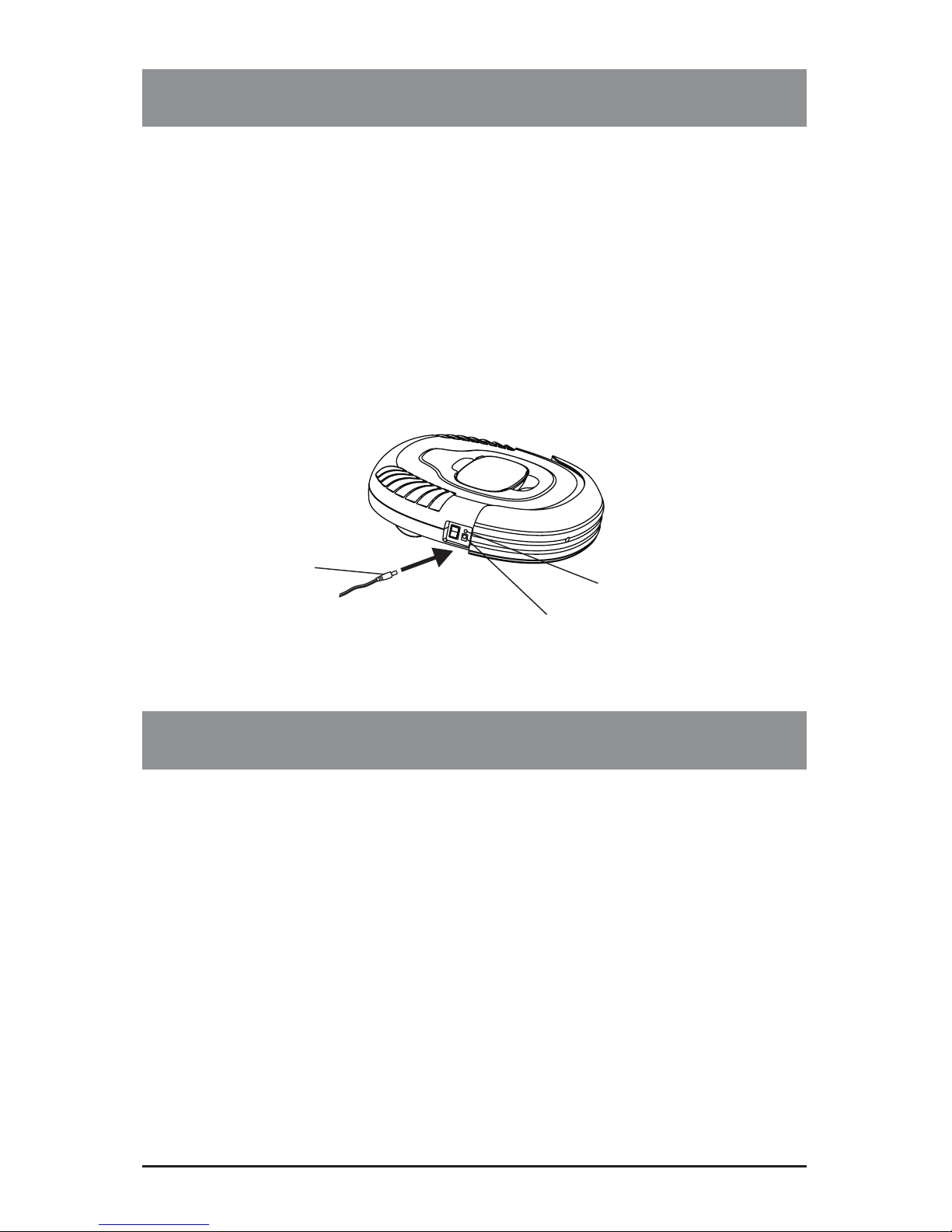
4. Plug one end of the AC adaptor into the jack on the vacuum and the other
end into the wall outlet to charge.
5. When the batteries are fully charged the power indication lamp will stay green.
Power Indication Lamp
Plug of Charger
(d.c 17V 200mA)
Socket for Charger
GENERAL OPERATION
Preparation for Operation
To ensure the best working efciency of the vacuum, make sure to remove
clothes, paper, and electric cords from the oor, and roll up the any curtains or
drapes that might cause the vacuum to become stuck. Should an electric cord
become entangled in the vacuum, the lamp or appliance risks being pulled to
the oor and damaged.
Do not use on the shag carpet.
Starting Operation
1. Clean the dust bin.
2. Place the vacuum on the oor and switch the unit to the ON position.
3. When the vacuum runs out of power, it will emit a buzz and stop automatically.
4. When the vacuum is not in use, or prior to recharging, make sure the
power switch is in the OFF position.
INSTALLING SIDE BRUSH
8
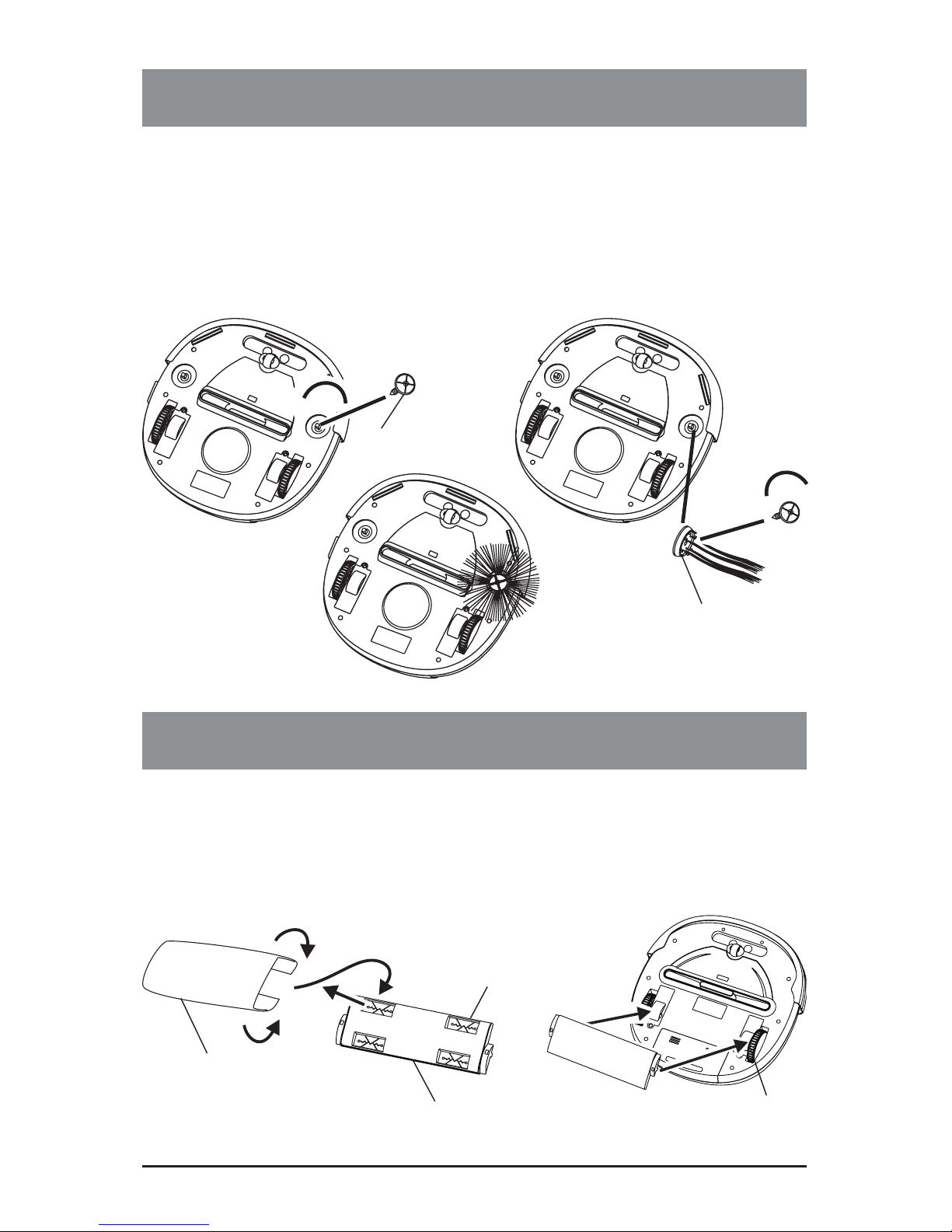
1. Unscrew and remove the brush holder on the bottom of the unit by
turning counter clockwise as shown in the following diagram
2. Place the brush on the brush mount and then put the brush holder back
by turning clockwise
3. Bristles should extend from the center of the brush like the rise of
the Sun.
.
USING DUST CLOTHS
1. Insert the edge of the micro ber dust cloth into the grip slots on the dust
cloth holder.
2. Press the dust cloth holder onto the base of the vacuum as shown below
until it clicks into place.
Grip Slot
Micro fiber dust cloth
Dust cloth holder Dust cloth holder
clicks into place
Side brush
Brush Holder

CLEANING AND MAINTENANCE
9
Maintenance Procedures
The operation and maintenance of the V.Bot® Robotic Vacuum is very simple.
After each use, empty any dirt from the dust bin and clean the lter. It is not
necessary to clean the intake after every use.
Removing Dust Bin
1. Press the dust bin ejector button as shown below.
2. Remove the dust bin by grasping it as shown and gently pulling it up and
out of the vacuum.
Grip slot for the dust bin
Table des matières
Langues :
Autres manuels V.Bot Aspirateur


