Uson sprint iq Manuel utilisateur

Owner’s
Guide

Product or trade names mentioned in
this manual may be trademarks or
registered trademarks of their
respective companies. Microsoft
Windows is either registered
trademark or trademark of Microsoft
Corporation in the United States and/
or other countries.
Due to a program of continual
improvement, Uson reserves the right
to modify or otherwise change
specifications and/or tester
performance without notice. Uson has
made every attempt to completely
describe the operation of the tester.
Uson shall not be liable for technical
or editorial errors or omissions.
Copyright©2007 Uson L.P.
All rights reserved. Printed in the
U.S.A.
Published by Uson L.P.
8640 North Eldridge Parkway
Houston, Texas 77041
U.S.A.
(281) 671-2000
(281) 671-2001 Fax
Mail: [email protected]
www.uson.com
First Edition, Jun 2007, Revision 003

1
Table of Contents
Chapter 1: Safety ............................................. 3
1.1: Safety Considerations ........................................................3
1.1.1: Pneumatic Hazards ...................................................3
Fixture Considerations ..................................................3
1.1.2: Electrical Hazards .....................................................4
1.1.3: General Safety Issues ................................................4
Chapter 2: Quick Start .................................... 5
2.1: Fast-Track Setup ................................................................5
2.1.1: Sprint iQ Requires Clean Dry Air ............................6
2.2: Front Panel Features ..........................................................7
2.2.1: Pass/Fail Lights .........................................................9
2.2.2: Back Panel Components .........................................10
2.2.3: Connecting Power ...................................................11
2.2.4: Switch-On the Tester ..............................................12
2.2.5: Run Mode Display Overview .................................12
2.2.6: Mode Box Messages ...............................................14
2.2.7: Status Box Messages ..............................................15
2.2.8: Test Parameters .......................................................16
Fine Tuning .................................................................18
2.2.9: Put Sprint iQ to Work .............................................18
2.2.10: In Case of Trouble ................................................19
2.2.11: Start Options .........................................................20
Local Start Option .......................................................20
Remote Start Option ...................................................20
Chapter 3: Menus ............................................ 23
3.0.1: Test Starting While in Menu System ......................23
3.0.2: Navigation ...............................................................23

2
Run Mode Options Menu ...........................................24
Program Mode Menu ..................................................32
Chapter 4: Programming................................. 49
4.1: Introduction ......................................................................49
4.1.1: Decay Testing .........................................................50
Decay Test Parameters ................................................53
Test Pressure ...............................................................53
Pressure Error .............................................................54
Timers in Decay Tests ................................................55
Delta Pressure .............................................................57
Pressure Change Calc. (Leak Rate) ............................59
Pneumatic Signal/Noise Ratio ....................................60
4.1.2: Back-Pressure Flow Test ........................................61
4.1.3: Occlusion (Blockage) Test .....................................64
4.1.4: Flow Test ................................................................69
Flow Test Parameters ..................................................69
Leak Test Using Flow .................................................71
Flow Sensor Over Pressure Limits .............................73
4.1.5: Burst Test ................................................................73
4.1.6: Creep Test ...............................................................76
4.1.7: Crack Test ...............................................................76
4.1.8: Pass/Reject Jumps ...................................................79
4.1.9: Timers .....................................................................80
Chapter 5: Reference ..................................... 81
5.0.1: General Specifications ............................................81
5.0.2: Standard Features ....................................................83
5.0.3: Optional Features ....................................................84
5.0.4: Digital I/O Pin Assignments ...................................85
5.0.5: Converting Pressure to Flow Rate ..........................86
5.0.6: Concepts Applicable to Testing ..............................87
5.0.7: Terminology Reference ..........................................95
5.0.8: Electronic Programmable Regulator .....................111

Safety
3
Chapter 1
Safety
1.1 Safety Considerations
Electrical and pneumatic (or air pressure) hazards are the two
primary areas of concern when operating leak-testing equipment.
1.1.1 Pneumatic Hazards
1.1.1.1 Fixture Considerations
Fixture safety considerations vary depending on the fixture being
leak tested.1However, the following hazards of working with
pressurized systems should be given serious consideration before
operating the Sprint iQ:
• High-pressure pneumatic air systems are exponentially
more hazardous as the pressure increases, or as the
volume of a system increases. Testing equipment
subjected to consistently high-pressure ranges has an
If the equipment is used in a manner not specified in this manual,
the protection provided by the equipment may be impaired.
Always wear eye protection when working with pressurized air.
Disconnect all pressure sources when working with internal
components of Uson equipment.
1.Jackson, Charles N., Jr., Sherlock, Charles N., technical editors, and Moore,
Patrick O., editor. “Safety Aspects of Leak Testing.” Nondestructive Testing Hand-
book, third edition: Vol. 1, Leak Testing. Columbus, OH: American Society for
Nondestructive Testing (1998): p 136.

4
Safety
increased probability of becoming unable to permanently
resist the effects of such pressure.
• Observe caution when working with nonreactive gases or
liquids above their boiling points (even at lower
pressures), especially when larger volumes of gases are
involved. It is essential that relief valves, rupture disks,
and pressure regulators are employed to ensure safety.
• Even at moderate pressures, pressurized systems can
present a hazard in the form of pressurized air escaping
from a leak or a failure. The hazard of flying particles is
added when a sight glass or glass flow meter is introduced
to the system. The sudden burst of a part could generate
sufficient sound concussion to cause hearing damage.
1.1.2 Electrical Hazards
Always use a replacement fuse of the same type and rating as the
original. Failure to do so may be hazardous and can cause damage
to the equipment.
1.1.3 General Safety Issues
Perform operations, maintenance, or troubleshooting procedures
only after reading and comprehending all manuals and materials
supplied with the Sprint iQ.
Always exercise caution when working with electricity.

Quick Start
5
Chapter 2
Quick Start
2.1 Fast-Track Setup
Connect clean, dry supply air.
Connect peripheral devices, if any.
Connect the power supply and turn on Sprint iQ. Turn the
connector’s collar until it is finger-tight to ensure a good
connection.
Use the back panel switch to turn on the Sprint iQ.
Turn the Lockout Keyswitch to the program position (horizontal).
Set the units of measure to use for pressure, flow volume, and
flow time.
Enter test parameters for the first program to run.
Enter test parameters for additional programs if you are using
more than one program.
Set communication values for the connected peripherals, if used.
Turn the Lockout Keyswitch to run position (vertical). Sprint iQ
is now ready to use.
Do not allow the power supply’s ventilation slots to be blocked.
The power supply has an automatic fan that runs as necessary to
prevent overheating.

6
Quick Start
2.1.1 Sprint iQ Requires Clean Dry Air
Before connecting air (or other gas) to Sprint iQ, make certain the
supply air is clean and dry and pressure doesn’t exceed the
maximum input listed on the rear panel.
Supply air is connected to the 1/8-inch female NPT bulkhead on
the back of Sprint iQ.
Compressor
Step-down regulator
Mist and Particulate Filter
Sprint iQ
Water vapor, particulates, and excessive pressure can damage
Sprint iQ’s internal components and affect product testing
2
3
4

Quick Start
7
2.2 Front Panel Features
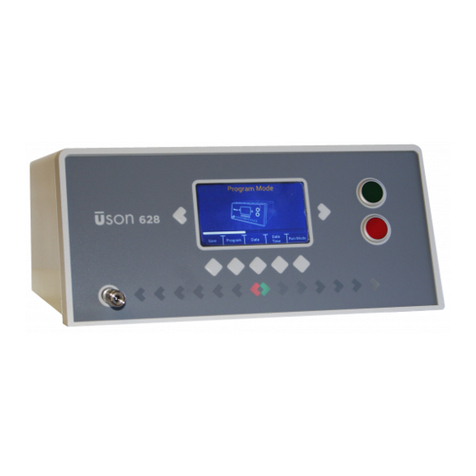
The front panel has an LCD display, keypad, Lockout keyswitch,
USB port, and Stop and Start buttons.
Display. The Sprint iQ has a 5.7" diagonal 320 x 240 color
graphic liquid crystal display (LCD) with backlight.
Keypad. The keypad has 6 keys:
• Exit. Use the Exit key to exit the Run
Mode Options Menu mode and return
to the Run display. It is also an
“escape” key, allowing parameter entry
to be aborted without saving changes.
2

8
Quick Start
• Enter. Use the Enter key to select the
chosen item. This key is also used to
save a value that has been entered.
This may be a highlighted item or an
entry. If it is not desired to save an entry, use the Exit
key instead.
• Increment and Decrement (Up
and Down). These keys are used
to move up and down. They are
most often used when moving
through the Test Parameters
screen. These keys will also
change digits and characters in the Parameter Editor of
certain menus.
• Next and Previous (Left and
Right). These keys are used to
set parameters. They are most
often used to move along in
menu selections to the desired
entry.
Lockout Keyswitch. Sprint iQ is in Run mode when the
keyswitch is vertical. Turn the keyswitch counter-clockwise to
the horizontal position to enter Program mode. The keyswitch
in illustration below is in the vertical position.
3
RunMode
Program Mode
Table des matières
Autres manuels Uson Équipement de test
Manuels Équipement de test populaires d'autres marques

SMART
SMART KANAAD SBT XTREME 3G Series Manuel utilisateur

Agilent Technologies
Agilent Technologies BERT Serial Manuel utilisateur

Agilent Technologies
Agilent Technologies N3280A Manuel utilisateur

Vernier
Vernier Go Direct Voltage Manuel utilisateur

Lifeloc
Lifeloc R.A.D.A.R. Manuel utilisateur

Fluke
Fluke T5-600 Instructions d'utilisation et d'installation


