Uniden R4 Manuel utilisateur

LONG RANGE Radar/Laser Detector
User’s Manual
R4
© 2021 Uniden America Corporation
Irving, Texas
Issue 1, September 2021
Printed in Korea

CUSTOMER CARE
At Uniden®, we care about you!
If you need assistance, please do NOT return this product to your place of purchase
Save your receipt/proof of purchase for warranty.
Quickly find answers to your questions by:
• Reading this User’s Manual.
• Visiting our customer support website at www.uniden.com.
Images in this manual may differ slightly from your actual product.
DISCLAIMER: Radar detectors are illegal in some states. Some states prohibit
mounting any object on your windshield. Check applicable law in your state and
any state in which you use the product to verify that using and mounting a radar
detector is legal. Uniden radar detectors are not manufactured and/or sold with the
intent to be used for illegal purposes. Drive safely and exercise caution while using
this product. Do not change settings of the product while driving. Uniden expects
consumer’s use of these products to be in compliance with all local, state, and
federal law. Uniden expressly disclaims any liability arising out of or related to your
use of this product.

CONTENTS
CUSTOMER CARE.......................................................................................................... 2
R4 OVERVIEW .............................................................................................5
FEATURES ........................................................................................................................ 5
WHAT’S IN THE BOX ...................................................................................6
PARTS OF THE R4........................................................................................7
NON-KEY ELEMENTS .................................................................................................. 9
POWER CORD................................................................................................................. 9
OLED DISPLAY .............................................................................................................11
INSTALL AND TURN ON R4..................................................................... 12
INSTALL/POWER ON..................................................................................................12
Windshield ............................................................................................................12
Dashboard.............................................................................................................13
MENU SYSTEM......................................................................................... 13
BASIC OPERATIONS ................................................................................ 25
FEATURE DETAILS ................................................................................... 26
ALARM PRIORITIES.....................................................................................................26
ATTENUATION..............................................................................................................27
AUTO DIM......................................................................................................................28
Set DIM to Auto from the R4/Power Cord..................................................28
Congure Auto from MENU............................................................................28
AUTO MUTE/AUTO MUTE VOLUME.....................................................................29
BLOCK BLIND SPOT MONITOR SYSTEMS..........................................................29
DISPLAY FORMATS.....................................................................................................30
Mode Display .......................................................................................................30
Scan Display..........................................................................................................30
Time Display .........................................................................................................30
FREQUENCY DISPLAYS.............................................................................................30
GATSO RT3/RT4 FREQUENCY RANGES..............................................................31
MODES (HIGHWAY, CITY, AUTO, AND ADVANCED).......................................31
MEMORY QUOTA........................................................................................................32
MUTE MEMORY ..........................................................................................................33
POP MODE ....................................................................................................................34
RED LIGHT CAMERA POINT DELETE ...................................................................34
RED LIGHT CAMERA QUIET RIDE .........................................................................34

THREATS.........................................................................................................................35
USER MARKS (MEMORY POINTS).........................................................................35
USER-SET AUTO CITY SPEED..................................................................................35
MAINTENANCE........................................................................................ 35
MAINTAINING THE EQUIPMENT ...........................................................................35
UPDATING THE FIRMWARE/DATABASE .............................................................36
TROUBLESHOOTING............................................................................... 36
SPECIFICATIONS ..................................................................................... 36
FCC/IC COMPLIANCE .............................................................................. 37
FCC COMPLIANCE ......................................................................................................37
FCC INTERFERENCE STATEMENT..........................................................................38
FCC CAUTION...............................................................................................................38
FCC RADIATION EXPOSURE STATEMENT..........................................................38
IC COMPLIANCE..........................................................................................................39
ONE-YEAR LIMITED WARRANTY ........................................................... 39

- 5 -
UNIDEN
LONG RANGE RADAR/LASER DETECTOR
USER’S MANUAL
R4
R4 OVERVIEW
Uniden’s R4 is a top of the line Radar Detector with a built-in GPS feature. With
the R4, you can mark geographical points where you commonly encounter radar
transmissions. These can be school zones, red-light cameras, and places where police
frequently monitor traffic. You can mark these points so the detector will announce
“User mark ahead” when you approach them. Among other announcements, the
Voice Notification feature lets you know when you are approaching a radar and what
type of radar it is (red light, speed, etc).
FEATURES
• Super Long Range Laser Radar Detection for X, K, Ka, POP, MRCD/T, and Gatso
RT3/4.
• Remote keypad (Optional)
• MRCD/T (Alert priority: Laser, MRCD, Ka, K, X) with customizable tones
• Quiet Ride MRCD/T on and off
• Voice Notifications
• Radar band frequency displays
• GPS for Red Light and Speed camera locations
• Up to 1750 GPS lockouts (Mute Memory points)
• Easy to read OLED display
• User Mark alarm with set and voice notification
• Advanced K and Ka band filters
• Undetectable Spectre I and IV
• Displays Signal Strength and Vehicle Battery Voltage
• Max. Speed Warning System
• Red light camera on/off and point delete
• X, K, MRCD/T, Ka, and Laser band selectable alert tones
• K, Ka Bogey tones (Alert tones 1 - 5)
• X, K, and Ka band user-defined sensitivity levels in Advanced mode
• Auto mute volume levels (Off, On: 0 - 7)
• Ka Frequency Voice Alert

- 6 -
• Auto Dim
• POI Database Save/Update (Maximum: 20,000 points)
• POI Passchime On/Off
• 8 Compass Directions
• Laser Gun ID
• Overspeed Alert Mute
• Keep K Block Filter ON to block K band monitor systems
• Mute Memory save, alarm
• Volume Adjust (0 - 8)
• Auto Mute Memory
• Two Low Noise Amplifiers (LNA)
WHAT’S IN THE BOX
R4 Radar
Detector
12V DC Cigarette
Adapter with
Mute Key and
RJ11 Jack
Single-Suction
Bracket
Dual-Suction
Bracket
Not Shown:
Hook and Loop Fastener Tape
Carry Case
Data Cable
Owner’s Manual

- 7 -
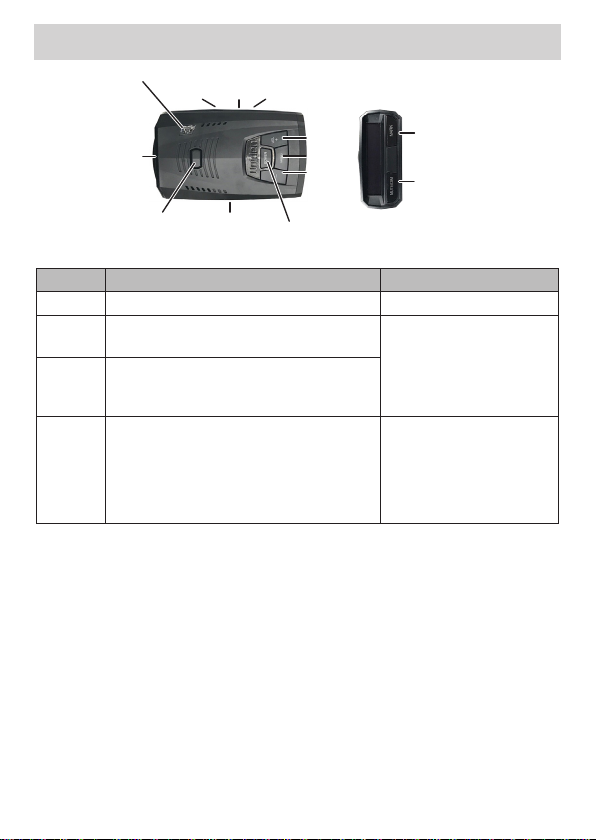
PARTS OF THE R4
Audio
Jack
Power
Jack
POWER
VOL +
MENU
VOL −
USB
Eagle
Eye
Latch
Slot
MUTE/DIM
MARK
Latch
Release
Aux
Jack
KEY PRESS TO... PRESS AND HOLD TO ...
POWER
Turn R4 on and off. NA
VOL +
Turn volume up (9 levels: 0 - 8; Default = 4).
In Menus, go to next item.
Quickly turn volume up or
down.
VOL –
Turn volume down (9 levels: 0 - 8; Default
= 4).
In Menus, go to previous item.
MENU
Access the Menu system.
In Menus, press to cycle through options
for the current menu item.
When in Menu mode, exit
the Menu system.
When NOT in Menu mode,
changes modes between
Highway, City, Auto, and
Advanced.

- 8 -
KEY PRESS TO... PRESS AND HOLD TO ...
MUTE/
DIM
MUTE
MUTE on - Press
MUTE/DIM
to mute
an alarm. Returns to normal operation
10 seconds after the alert ends or if a
different band is detected during Mute
mode. Mute On displays for a few
seconds.
MUTE off - Press
MUTE/DIM
to restore
audible alarms before the 10 second
automatic mute time-out.
MUTE MEMORY
Save a Mute Location (Mute Memory) -
press
MUTE/DIM
again while Mute On
displays to save that GPS location and
frequency to memory. Mute Memory
displays on the screen.
R4 stores up to 1750 Mute Memory
points. The R4 shares 2,000 points
between Mute Memory and User Marks
as set in the Memory Quota menu.
Delete Mute Memory - Press
MUTE/
DIM
while Mute Memory displays; the R4
displays a delete confirmation message.
Press
MUTE/DIM
again to confirm.
MUTE RED LIGHT CAMERA VOICE ALERT
Mute the voice alert for a red light camera
alarm. Press
MUTE/DIM
while the voice
alarm for a red light camera sounds. The
voice alarm mutes.
MUTE ALERTS FOR POI OVERSPEED ALERT
AND USER LIMIT SPEED
When R4 alerts you to an overspeed or
speed limit situation (an alarm sounds and
the alert displays), you can press
MUTE/
DIM
to silence that alarm.
DIM - Changes the
display and key backlight
brightness:
Auto (Default). Set 2
automatic time periods
and brightness levels for
the OLED display (see page
22).
Bright
Dim
Dimmer
Dark (Dark is off unless
there is alert.)
Off (Off regardless of
whether or not there is
an alert.)
DURING RED LIGHT
CAMERA ALERT
Press and hold
MUTE/
DIM
to delete the red light
camera point.
RED LIGHT CAMERA POINT
DELETE
When R4 alerts you to a
red light camera (the alert
displays), you can press
and hold
MUTE/DIM
to
delete that camera point.
After confirming this
deletion, R4 will not give
an alert for that camera.

- 9 -
KEY PRESS TO... PRESS AND HOLD TO ...
MARK
User Mark. A User Mark is a manually
tagged geographic location where an
alarm is usually found. The R4 alerts when
close to these User Marks.
Add - Press MARK when you are at the
alarm location.
Delete - Press MARK when you are at an
alarm location that has been marked.
An error message displays/sounds if
memory is full or there is a GPS error.
Delete all User Marks.
NON-KEY ELEMENTS
ELEMENT WHAT IS DOES
Eagle Eye Provides a 360° monitoring radius.
Latch Slot Insert the bracket latch into this slot.
Mini USB Provides PC connection for data updates.
Audio Jack Plug in headset.
Eject Press to release the bracket latch.
Power Jack Plug the 12V Power Cord here.
Signal Strength Displays received signal strength (5 levels).
POWER CORD
USB port
MUTE
button
LED
RJ11 port

- 10 -
ELEMENT WHAT IT DOES...
MUTE
button
(Although
not labeled,
press
and hold
MUTE
to
access DIM
functions)
• Press the MUTE button to mute an alarm. Returns to normal
operation 10 seconds after the alert ends or if a different band is
detected during Mute mode. Mute On displays on the R4 for a few
seconds.
• Save a Mute location (Mute Memory) - press the MUTE button
again while Mute On displays on the R4 to save that GPS location
and frequency to memory. Mute Memory displays on the screen.
R4 stores up to 1750 Mute Memory points. The R4 shares 2,000
points between Mute Memory and User Marks as set in the
Memory Quota menu.
• Delete Mute Memory - Press the MUTE button while Mute
Memory displays on the R4; the R4 displays a delete confirmation
message. Press the MUTE button again to confirm.
• Red Light Camera Point Alert Mute/Delete - When R4 alerts you
to a red light camera (the alert displays), you can press MUTE
to mute or delete (press and hold) that camera point. After
confirming this deletion, R4 will not give an alert for that camera.
• Mute Overspeed Alarms - When R4 alerts you to an overspeed or
speed limit situation (an alarm sounds and the alert displays), you can
press MUTE to silence that alarm
• Press and hold the MUTE button to change the display and key
backlight brightness.
DIM function. Press and hold for DIM options to display on the
OLED. Press the button again to scroll through and select one of the
following options:
• Auto (Default; see page 22 to set OLED brightness levels and
start times and page 28 for Auto Dim feature description.)
• Bright
• Dim
• Dimmer
• Dark (Dark is off unless there is alert.)
• Off (Off regardless of whether or not there is an alert.)
Dim level cannot be changed during a Red Light Camera alert.
LED (Red) • Off: Power is off.
• Steady on: Power is on.
• Flashing: Receiving an alert. The faster it flashes, the stronger the
signal.
Table des matières
Autres manuels Uniden Capteur de sécurité