Uniden XSA965 Manuel utilisateur

XSA955
AND
XSA965
Digital Answering
Machine
900 MHz
Caller ID
10 Number
Memory
Rocket Dial
Plus
Guide
Quick Start

INSTALLATION
INSTALLATION & SAFETY
3
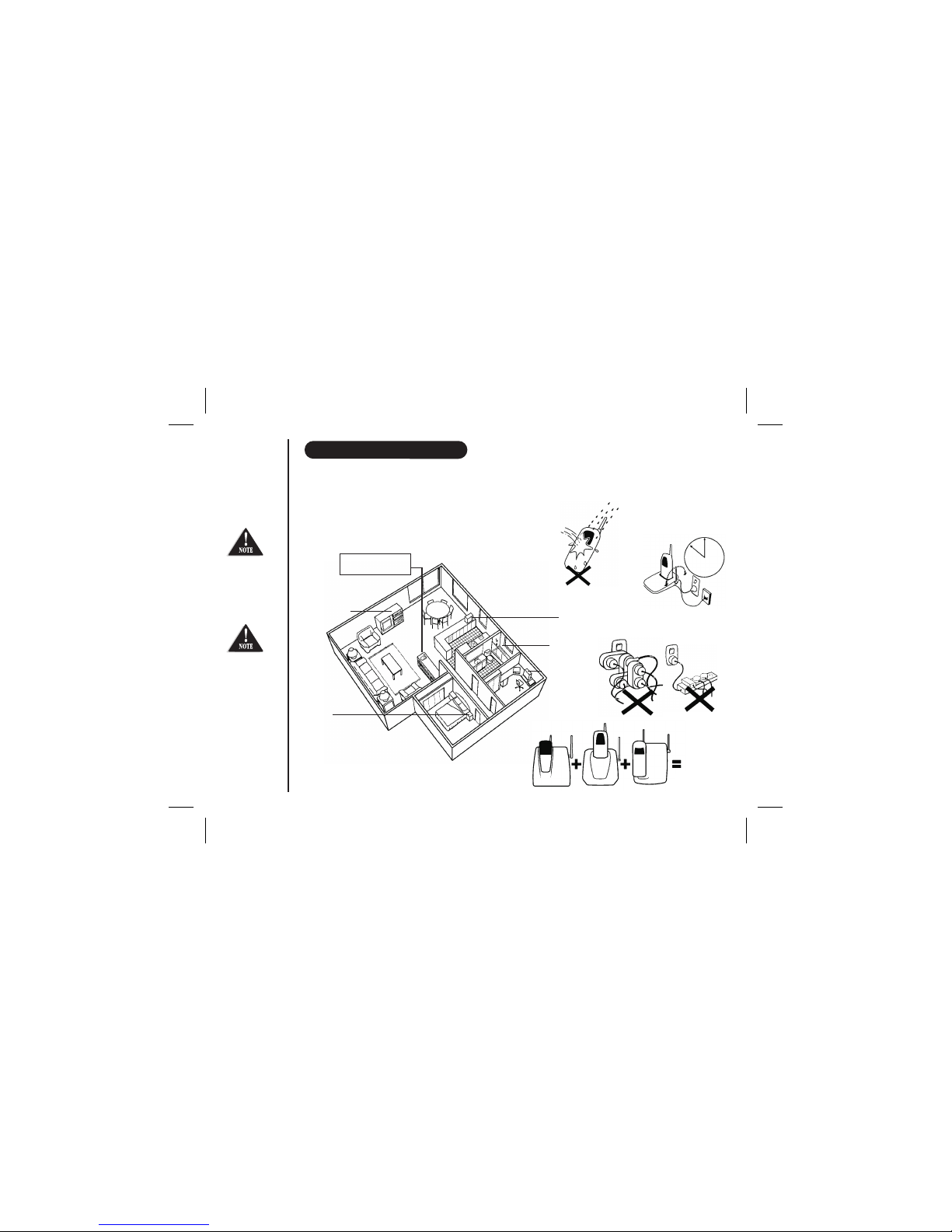
AVOID -
multi power
boards.
CHARGE -
the new phone
for 20 - 25 hrs.
AVOID -
connecting
more than
DON’T -
overload the
power outlet.
AVOID -
Moisture
CHOOSE -
a central location
AVOID -
Television sets and
other electronic
appliances
AVOID -
Microwave
ovens
AVOID -
Moisture
AVOID -
Computers
AVOID -
other cordless phones
Choosing the best location for your phone.
When choosing a location for your phone there are a number of appliances the phone
should not be near, and areas you should avoid.
This symbol
indicates
important
operating
and servicing
instructions.
Note: Ringing will not be impaired by adding extra cordless handsets.
Page i
The earcapof
this telephone
may attract and
retainsmall
metallicobjects.
phones as ringing
may be impaired

Here!
Start
Start
Here!
Installing the Base Unit
Page ii
INSTALLATION
INSTALLATION
This page is a very condensed version of the Owners Manual. It is designed to allow you to get your phone installed and operating
as quickly as possible - however it does not attempt to explain any of the advanced features of the XSA955 and XSA965.
l
l
l
l
Plug the telephone cord into the Base
Unit, then into the telephone socket on
the wall.
Plug the AC Adaptor cord into the Base
Unit, then the AC Adaptor into the wall
power point.
Press the AC Adaptor cord into the
curved recess under the Base Unit.
Raise the antenna.
Make sure the AC
Adaptor/s remains
switched ON at all
times. Use only
the Uniden AC
Adaptor/s supplied
with this unit.
AC adaptor
Power point
Telephone cord
Installing the Charge Cradle
(XSA965 Only)
lPlug the AC Adaptor cord into the Charge Cradle,
then the AC Adaptor into the wall power point.
AC adaptor
Power point
New Zealand
Australia
Tel Line Adaptor
(Not supplied)

Installing the Handset Battery
Page iii
INSTALLATION
lPress the battery cover and slide it off.
l
l
l
l
Connect the battery plug to the socket at the rear of
the battery compartment.
Make sure the plug is the right way round.
The RED and BLACK battery wires must match the
RED and BLACK printed on the phone case for the
plug to fit properly.
Press firmly until it clicks into place.
lPosition the battery in the compartment and slide the
cover into place.
You must charge
the batteries
continuously for
20 hours before
using the phone. XSA965 only - Repeat process for second handset.
Place one handset on the main base and place the
other handset in the extra charging cradle. It does
not matter which handset is placed on the main
base and extra charging cradle.
l
BLACK
RED

Making a Call
Page iv
GETTING STARTED
XSA965 Only: Registration of Dual Handset
status
main
l
l
After fully charging the handsets, remove the handset from the extra charging cradle and
place it on the main base. (The LED will begin to flash indicating registration is
occurring).
Wait for at least 5 seconds before removing the extra handset from the base.
The registration has been completed, and your dual handset cordless phone is ready for use.
Answering a Call
lHandset on the Base Unit:
Remove the handset from the base and speak ( ).Auto Talk On
l
l
Handset off the Base Unit:
Pick up the handset, press and speak.
To hang up - press
OR
Place the handset on the Base Unit.
l
l
Pick up the handset and press . Dial the phone number
OR
Dial the phone number - then press
To hang up - press
OR
Place the handset on the Base Unit.
IMPORTANT

Page v
GETTING STARTED
Setting Up the Answering System
To turn the answering system on:
To record your outgoing message:
l
l
l
l
l
Press - the pre-recorded greeting will play and your system is ready to accept calls.
Press and hold . After you hear a short tone, release the key.
"Record Greeting" is announced followed by a long tone.
Record your greeting while speaking within 15cm of the base.
When finished, press again.
Your outgoing
message can be
recorded up to 30
seconds long.
To play your message:
To repeat a message:
l
l
l
l
l
Press - new messages play first.
Press during playback of messages.
To skip a message:
To delete messages:
Press anytime during playback to skip to the next message. The system beeps and begins to play the next
message.
Delete one message:
Press during a message. The system beeps and begins to play the next message.
Delete all messages:
After reviewing all messages. Press , "To delete all messages, press delete again" is announced.
Press again.
Using the Answering System
Answer
on

To have the ability to transfer calls from one handset to the other handset:
Initial Setup:
(Important: XSA965 Only -
TO TRANSFER CALLS
Please make sure you have registered your dual handset - refer to instructions on
page iv).
To transfer your call from handset 1 to handset 2:
Press .
The call is placed on hold on the first handset, while handset 2 begins to ring. The call is transferred when
the 2nd handset is answered.
Repeat the process to transfer the call back to handset 1. Calls can be transferred from either handset.
If the transferred call is not answered, you can retrieve the call by pressing or .
l
l
l
l
Page vi
GETTING STARTED
transfer
If the transferred
call is not picked
up after 5 minutes,
the call will be
disconnected.
transfer
CALL TRANSFER
- XSA965 Only

Installation & Safety
Quick Start Guide
Contents
Getting Started
Using your Phone
.....................................................................................i
Installation ......................................................................................ii
.......................................................................................................vii
Controls and Functions ...................................................................1
Welcome ..........................................................................................3
Included in your Package................................................................4
Mounting the Base Unit on a wall....................................................5
Battery Maintenance .......................................................................6
Setting Menu Options ......................................................................7
Autotalk ...........................................................................................7
Pop Up Name...................................................................................7
Making and Receiving Calls .............................................................8
Adjusting the Handset Ringer Volume and Earpiece Volume...........9
Redial ..............................................................................................9
Travelling Out-of-Range...................................................................9
Selecting a Different Channel ........................................................10
Find Handset .................................................................................10
Call Waiting/Flash ..........................................................................10
Installing the Beltclip ......................................................................5
Headset Installation.........................................................................5
Storing Phone Numbers ................................................................11
Making Calls with Memory Dialing ................................................12
Memory Dialing from Talk Mode...................................................12
Chain Dialing.................................................................................12
Editing a Stored Name and/or Phone Number..............................13
Erasing a Stored Name and/or Phone Number .............................13
Call Transfer ..................................................................................14
Rocketdial......................................................................................15
Storing and Editing the Rocketdial ................................................15
Making Calls with Rocketdial.........................................................15
Deleting the Rocketdial..................................................................15
Memory Dialing
Rocketdial
CONTENTS
Page vii
Caller ID
Answering System
Troubleshooting
Warranty
Notes
When the Telephone Rings ...........................................................16
Viewing the Caller ID Message List................................................17
Deleting Information from the Caller ID List................................17
Deleting a Caller ID Message ........................................................17
Deleting all Caller ID Names and Numbers ..................................17
Calling a Party from the Caller ID List ..........................................18
Dial Edit........................................................................................18
Stored Caller ID Messages in Memory Dialing ..............................18
Setting the Time............................................................................20
Setting a Personal Security Code (PIN).........................................20
Setting the Ring Time....................................................................21
Setting the Message Record Time .................................................21
Announce Only Feature ................................................................22
Setting the Message Alert Tone......................................................22
Setting Your Outgoing Message (Greeting)....................................23
Setting the Base Ringer Volume ....................................................24
Adjusting the Speaker Volume Level .............................................24
Using Your Answering System .......................................................25
Playing Your Messages ..................................................................25
Repeating a Message.....................................................................25
Skippin
Deletin
Voice Memo ..................................................................................27
Remote Access Away From Home.................................................28
Turn on the Answering System Remotely......................................29
Remote Operation Card ................................................................31
........................................................................................33
.....................................................................................................34
..... .....................................................................................................35
Caller ID .......................................................................................16
Answering System.........................................................................19
Turning the Answering System On/Off ..........................................19
g a Message.......................................................................26
g a Message .......................................................................26
Notes.............................................................................................30

cid/
menu
CONTROLS AND FUNCTIONS
GETTING STARTED
Page 1
3
2
4
5
6
7
9
10
11
12
13
14
15
18
17
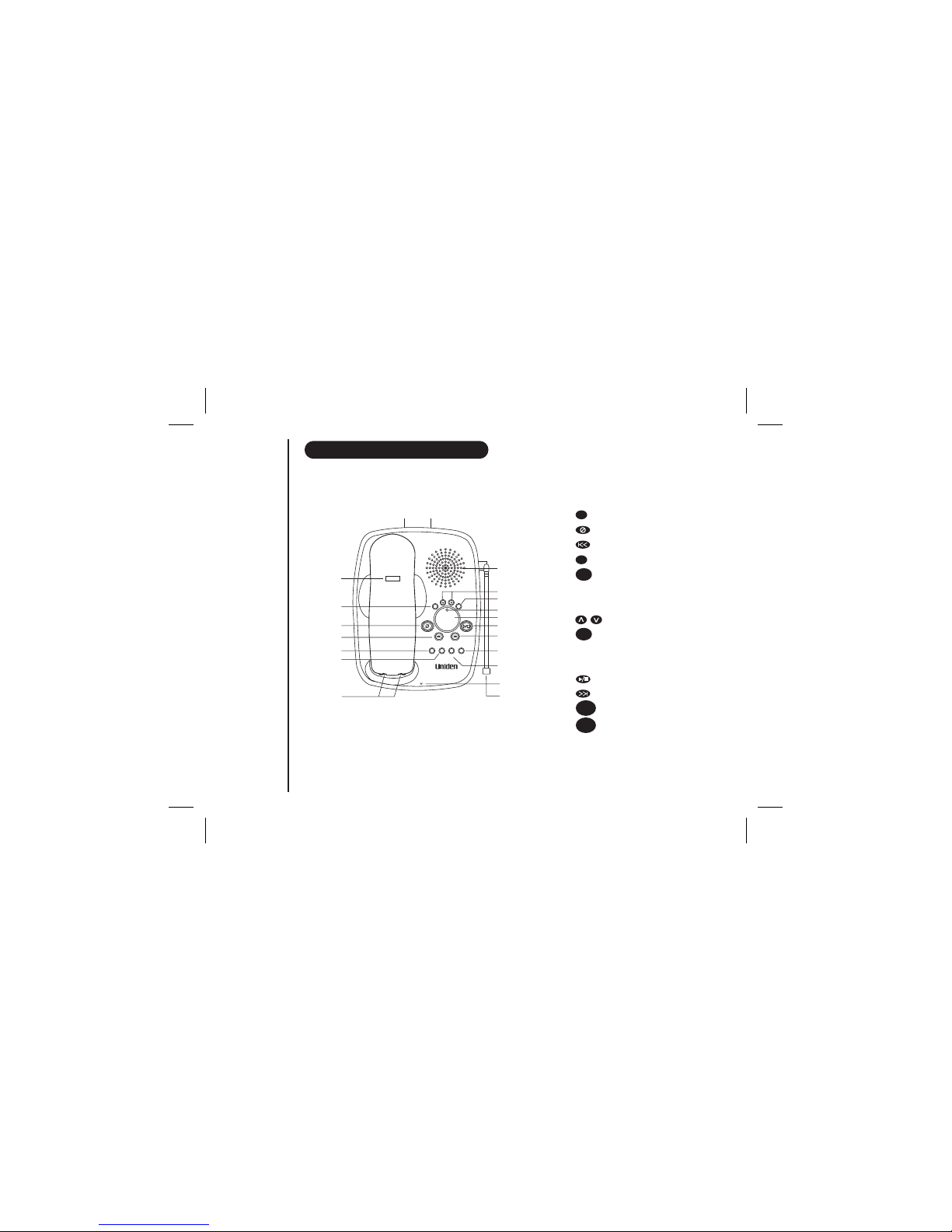
1. Handset antenna
2. Handset earpiece
3. LCD display
4. key
5. /flash key
6. /< key
7. /pause key
8. key
9. Handset microphone
and ringer speaker
10. Volume up key
11. key
12. key
13. Volume down key
14. /> key
15. key
16. /channel key
17. Handset charging contacts
18. /channel key (XSA965 only)
19. /delete key (XSA965 only)
redial
3
2
4
5
6
7
8
9
10
11
12
13
14
15
16
17
XSA955 XSA965
Dual Handset
pause select delete
redial channel transfer
pause
redial select
delete
channel mem
mem
19
select
transfer
11

CONTROLS AND FUNCTIONS
GETTING STARTED
30
31
32
33
34
35
36
37
38
39
21 22
24
25
26
27
28
29
21.
22. AC Adaptor input
23. Handset retainer clip
24. /ringer key
25. key
26. epeat/rew key
27. key
28. key
29. Base charging contacts
30. Base speaker
31. Speaker volume keys
32. key
33. Status LED
34. Message counter display
35. Play/Stop key
36. skip/ff key
37. /off key
38. key
39. Microphone
40. Base Antenna
Telephone line jack
r
/
set
find
memo
menu
Answer
on
greeting
find hs memo greeting answer
on/off
repeat/rew skip/ff
delete play/stop
status
set/
ringer menu
volume
88
900MHz
mic
Page 2
40
23
Dual Handset
Ce manuel convient aux modèles suivants
1
Table des matières
Autres manuels Uniden Répondeur

Uniden
Uniden XCA4500 Manuel utilisateur

Uniden
Uniden DA 069 Manuel utilisateur

Uniden
Uniden XSA 975 Manuel utilisateur

Uniden
Uniden DA 069 Manuel utilisateur

Uniden
Uniden 7000A Manuel utilisateur

Uniden
Uniden XCA4510 Manuel utilisateur

Uniden
Uniden 7100A Manuel utilisateur

Uniden
Uniden Answering Machine Manuel utilisateur

Uniden
Uniden 7500AI Manuel utilisateur

Uniden
Uniden DA071 Manuel utilisateur